

QR Code Integration for Micros POS

QR Code Ordering & Payments for Micros 3700 & Simphony

Let guests order and pay directly from their phones by scanning a QR code at the table. Fully integrated with your existing Micros POS — orders go straight to workstations and kitchen printers.

  • Compatible with Micros 3700, Simphony, and Opera PMS
  • Guests scan, order, and pay from their smartphones
  • Orders sync directly to Micros workstations and kitchen printers
  • Free installation and 24/7 support included
  • Next-day funding available
QR Code Payments

Overview

What Is QR Code Ordering & Payments for Micros POS?

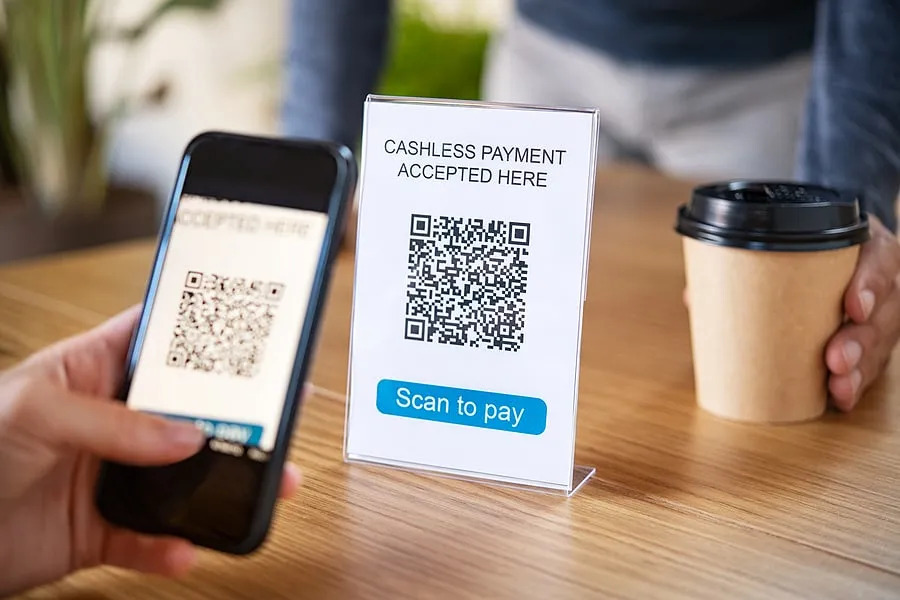
QR code ordering and payments allow your guests to scan a QR code at their table with their smartphone, browse your restaurant's digital menu, place orders, and pay — all without waiting for a server. Orders are sent directly to your Micros POS system and kitchen printers in real time.

The QR code system integrates with your existing Micros 3700 or Micros Simphony POS infrastructure. Once integrated, the system generates unique QR codes for tables and orders. Guests can also post charges to their hotel room when integrated with Opera PMS.

QR code ordering is optional — restaurants that prefer full server interaction can offer QR payments only for checkout. The system is flexible and adapts to your preferred service style.

Compatible Systems

Micros 3700, Simphony, 9700, e7, and Opera PMS.

Supported Payments

Apple Pay, Google Pay, tap-to-pay cards, and digital wallets.

Hardware Included

A compatible current-generation payment terminal with setup.

Works For

Restaurants, bars, hotels, hospitality venues, and chains.

Support

Installation, merchant setup, testing, and ongoing support.

What's Included

QR Code Ordering & Payments — Full Offer Details

Everything you need to offer QR code ordering and payments on your Micros POS.

Simple Pricing

$1 service fee per check, shown on the guest receipt. No additional expenses for the restaurant.

Free Installation

Our technicians handle the full setup and integration with your Micros POS, typically in 1–2 hours.

Custom QR Codes

Unique QR codes generated for each table, linked to your restaurant's digital menu and ordering system.

Full POS Integration

Orders from QR codes go directly to your Micros workstations and kitchen printers in real time.

24/7 Remote Support

Phone and remote troubleshooting around the clock, plus on-site support 9 AM – 5 PM.

Next-Day Funding

Deposits hit your bank account the next business day. Weekend batches deposited separately on Mondays.

Secure Payments

All payments processed in-house using EMV and P2PE technology. PCI-DSS compliant.

Simple Agreement

Standard 1-year processing agreement with auto-renewal. 30-day cancellation notice. Terms provided before signup.

Opera PMS Room Charge

Guests can post charges to their hotel room when integrated with Oracle Opera PMS.

Benefits

Why Restaurants Add QR Code Ordering to Micros POS

Faster Table Turnover

Guests order and pay from their phones, reducing wait times for servers. Tables turn faster, and you serve more guests per shift.

Fewer Order Errors

When guests place orders directly into the POS system from their phones, you eliminate miscommunication and reduce costly mistakes in the kitchen.

Fully Contactless Experience

No physical menus, no cash handling, no card swiping. QR code ordering and payments provide a completely contactless dining experience.

Personalized Branding

QR code menus can be customized to match your restaurant's branding and atmosphere, creating a more elevated and memorable guest experience.

Works for Every Venue Type

From cozy cafés and fine dining to hotel rooftops, poolside bars, and takeout — QR code ordering adapts to any restaurant format.

Delivery & Takeout Ready

Display QR codes on your website, takeout menus, or packaging so customers can browse, order, and pay without phone calls.

How It Works

How QR Code Ordering & Payments Work with Micros POS

1

Guest Scans the QR Code

A QR code is placed at each table. Guests scan it with their smartphone camera — no app download needed. They're redirected to your restaurant's digital menu where they can browse items and place their order.

2

Order Goes to Kitchen & POS

Once the guest places their order, it's sent directly to your Micros POS system and kitchen printers in real time. The order appears just like any server-entered ticket — no delays, no miscommunication.

3

Guest Pays from Their Phone

When the meal is finished, the guest scans the QR code again (or uses the one on the check), enters their payment information, and completes a secure transaction — all from their phone. Hotel guests can also post charges to their room via Opera PMS.

Ready to add QR code ordering to your Micros POS?

$1 per check. Free installation. No additional expenses for the restaurant.

Connected Workflows

Workflows Powered by QR Code Payments

Front-of-House Payments

Keep guest checkout fast, secure, and connected to your Micros POS workflow.

Restaurant, Bar & Retail POS

Support terminals, counters, tableside service, and hospitality payment needs from one setup.

Back Office & Reporting

Reduce manual reconciliation with cleaner payment and POS alignment.

Support & Maintenance

Get help with configuration, troubleshooting, hardware replacement, and ongoing support.

Equipment

Compatible Hardware for QR Code Payments & Micros POS

View All Products
Ingenico Lane 3600 EMV/NFC Pin Pad

Ingenico Lane 3600 EMV/NFC Pin Pad

Ingenico Pin Pads are programmed and connected directly to Micros POS stations. Includes free warranty and free installation.

Price: $0 View Details
Micros Workstation 8 Series

Micros Workstation 8 Series

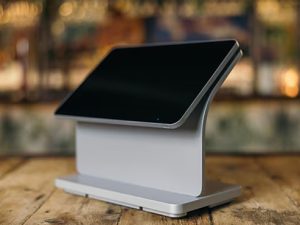
The latest Oracle Micros workstation, ideal for full-service and quick-service restaurants running Simphony Cloud.

Price: $49.99/month View Details
Epson TM-T88 Receipt Printer

Epson TM-T88 Receipt Printer

Reliable receipt printing hardware for restaurant and hospitality Micros POS environments.

Price: from quote View Details

Understanding QR Code Technology for Restaurants

QR codes — short for Quick Response codes — are two-dimensional barcodes that contain encoded information such as URLs, text, and other data. In a restaurant context, scanning a QR code with a smartphone camera instantly connects the guest to a digital menu, ordering system, or payment page. Since most modern smartphones are already equipped with QR code readers, no app download is required.

Why it matters for Micros POS users

QR code ordering and payments integrate directly with your existing Micros 3700 or Simphony POS. Orders placed through QR codes are processed exactly like server-entered orders — they appear at workstations and print in the kitchen. This means no workflow disruption and no separate system to manage.

How QR Code POS Integration Works

Once integrated with your Micros POS, the system generates unique QR codes for each table. The QR code holds information about your menu and allows customers to place orders and make payments. Once the order is transmitted to your Micros POS station, it’s processed and sent to kitchen printers — just like any other order in your system.

Security of QR Code Payments

QR code payment technology uses advanced encryption to ensure that customer payment information is transmitted securely. All payments are processed in-house using EMV and P2PE technology, complying with industry-standard best practices for data security. Customer payment details are never stored on the restaurant’s system.

Best Use Cases for QR Code Ordering

QR code ordering is especially valuable for restaurants with large dining areas, outdoor seating, rooftop or poolside service, hotel food & beverage outlets, and any venue where reducing server wait time improves the guest experience. It’s also effective for takeout and delivery — display a QR code on your website, packaging, or printed menus to let customers order and pay without phone calls or miscommunication.

Trusted by 200,000+ Businesses Nationwide

Oracle Platinum Partner - 350+ Processing Partners - 24/7 Support

Oracle Platinum Partner
Oracle Platinum Partner 34+ Years Experience 24/7 Live Support Free Staff Training 4.8+ Google Reviews

FAQ

Frequently Asked Questions

Which Micros POS systems support QR code ordering and payments?

QR code ordering and payments are compatible with all versions of Micros 3700 and Micros Simphony POS models. Room charge integration is also available for Oracle Opera PMS.

How much does QR code ordering cost?

The cost is $1 per check, shown as a 'service fee' on the guest receipt. Many restaurants pass this cost to the customer. There are no additional expenses for the restaurant — installation, support, and integration are included.

How do QR code payments work with Micros POS?

Guests scan a QR code at their table with their smartphone, browse the digital menu, place orders, and pay. Orders are sent directly to your Micros POS workstations and kitchen printers in real time, just like server-entered orders.

Can customers order and pay from their phones?

Yes. Guests use their smartphone camera to scan the QR code — no app download required. They can browse the menu, place orders, and complete secure payments all from their phone.

Do I need to replace my current Micros POS?

No. QR code ordering integrates with your existing Micros 3700 or Simphony POS infrastructure. There is no need to replace your system — we configure the integration to work with your current setup.

Are QR code payments secure?

Yes. QR code payments use advanced encryption and are processed in-house using EMV and P2PE technology. We comply with PCI-DSS standards to ensure customer payment information is transmitted and handled securely.

Can hotel guests charge to their room?

Yes. When integrated with Oracle Opera PMS, guests can scan the QR code and post charges directly to their hotel room — ideal for hotel restaurants, poolside bars, and room service.

Is QR code ordering mandatory for every table?

No. QR code ordering is optional and flexible. Restaurants that prefer full server interaction can offer QR codes only for payment at checkout, or use them selectively for certain service areas like patios or poolside.

Reviews

What Our Clients Say About Us

Verified Google Reviews

Google Excellent ★★★★★ 4.9 | 28 reviews
Write a review

Get Started

Add QR Code Ordering & Payments to Your Micros POS

Fill out the form below and we'll contact you within 24 hours to set up QR code ordering and payments for your restaurant.

Request QR Code Setup

Tell us your Micros POS model and location — we'll handle everything else.


    We typically respond within 24 hours. Your information is kept confidential.