
Handheld POS Solution
Micros Oracle Tablet
Take orders, process payments, and manage tables from anywhere in your restaurant or hotel with the Micros handheld POS tablet. Built on Oracle's Simphony Cloud platform for maximum mobility and efficiency.
A compact, durable handheld POS device designed for hospitality — split checks, modify orders, scan barcodes, and access real-time inventory without walking back to a central terminal.

Overview
What Is the Micros Oracle Tablet?
The Micros Oracle Tablet is a handheld POS device that allows restaurant and hotel staff to take their work on the go while maintaining the highest level of efficiency. Say goodbye to lost time walking back and forth to a central POS terminal — employees can take orders, cash out customers, and manage the floor from wherever they are.
This compact, powerful mobile POS device runs on the Simphony Cloud POS system, offering hospitality businesses of all sizes a versatile tool for order taking, payment processing, table management, and inventory access. The tablet’s built-in camera can scan barcodes, making it easier to manage inventory and reduce unnecessary errors. Between the advanced technology, comprehensive system integration, and durable design, the Micros handheld tablet is built for high-efficiency operations.
Whether you’re a mom-and-pop restaurant or a tech-savvy multi-location operator, the Micros Oracle Tablet brings the full power of Oracle’s hospitality platform directly into the hands of your staff — increasing visibility, speed, and guest satisfaction across every service area.
Table Service
Built for restaurants, hotels, banquet rooms, bars, and multi-station venues.
Quick Service
Fast ordering, modifiers, tenders, and payments for counter-service teams.
Reporting & Analytics
Track sales, labor, inventory, and performance from one POS ecosystem.
Works For
Restaurants, hotels, bars, cafes, retail locations, and high-volume hospitality operators.
Integrations
Connect Opera PMS, HMS systems, ordering, loyalty, and payment tools.
Support
Upgrade, setup, and 24/7 support from Micros payment specialists.
Key Features
What Does the Micros Oracle Tablet Offer?
The Micros handheld POS tablet is packed with features that help hospitality teams work faster, serve better, and manage operations from anywhere on the floor.
Mobile Order Taking
Take guest orders tableside or anywhere in your venue — eliminate trips to a central terminal and reduce wait times for customers.
Payment Processing
Process all payment types directly from the handheld tablet — EMV chip, contactless, Apple Pay, Google Pay, and split checks with ease.
Table Management
View and manage floor plans, assign tables, transfer checks between servers, and monitor table status in real time from the palm of your hand.
Barcode Scanning
Built-in camera enables barcode scanning for inventory management, reducing manual entry errors and speeding up stock tracking.
Split Checks & Modify Orders
Split checks by item or guest, modify orders on the fly, apply discounts, and handle special requests without leaving the table.
Inventory Access
Check real-time stock levels, monitor ingredient availability, and prevent out-of-stock situations — all from the handheld device.
Intuitive Interface
User-friendly touchscreen interface requires minimal training. Staff can learn the system quickly and start taking orders within minutes.
Durable Construction
Built to withstand the rigors of daily hospitality use — resistant to spills, heat, and drops in busy restaurant and hotel environments.
Real-Time Reporting
Access sales data, transaction history, and performance metrics directly on the tablet through Simphony Cloud back-office reporting.
Benefits
How the Micros Handheld Tablet Benefits Your Business
Faster Service & Throughput
Eliminate bottlenecks at the central POS station. Staff take orders and process payments right at the table, reducing wait times and turning tables faster.
Flexible Payment Options
Accept all payment types on the go — EMV chip, contactless, mobile wallets, and split checks — for a frictionless guest checkout experience.
Reduced Training Time
The intuitive interface requires little to no training. Staff already familiar with Micros systems can start immediately, and new users learn within minutes.
Improved Floor Visibility
Management can monitor table status, check order flow, and track performance metrics from anywhere on the floor — no desk required.
Better Inventory Control
Scan barcodes and check stock levels directly from the handheld device, reducing errors and ensuring your kitchen never runs out of critical supplies.
Enhanced Guest Experience
Faster ordering, accurate modifications, and tableside payment create a smoother, more attentive dining or hotel service experience for every guest.
Use Cases
Order, Payment & Table Workflows on the Go
The Micros Oracle Tablet transforms how hospitality teams handle day-to-day operations — from tableside ordering to mobile checkout and floor management.
Tableside Ordering
Mobile Payments
Split Checks
Table Management
Barcode Scanning
Order Modifications
The Micros Oracle Tablet puts the full POS workflow into a handheld device. Servers take orders tableside and send them directly to the kitchen display system without returning to a fixed terminal. Payments are processed at the table — including split checks by item or guest — creating a faster, more convenient experience for diners.
For hotel environments, staff can process charges, manage room service orders, and handle event setups from anywhere on the property. The tablet’s mobility means increased visibility for managers and faster response times for guests, whether in a restaurant dining room, poolside bar, or hotel lobby.
Ready to move forward with Micros Oracle Tablet?
Tell us about your current Micros setup and goals. We will recommend the right hardware, integrations, and support path for your business.
Hardware & Components
Related Oracle Micros Hardware & Systems
The Micros Oracle Tablet works alongside the broader Oracle Hospitality ecosystem. Pair it with fixed workstations, kitchen displays, and enterprise POS systems for a complete hospitality technology setup.
System Components
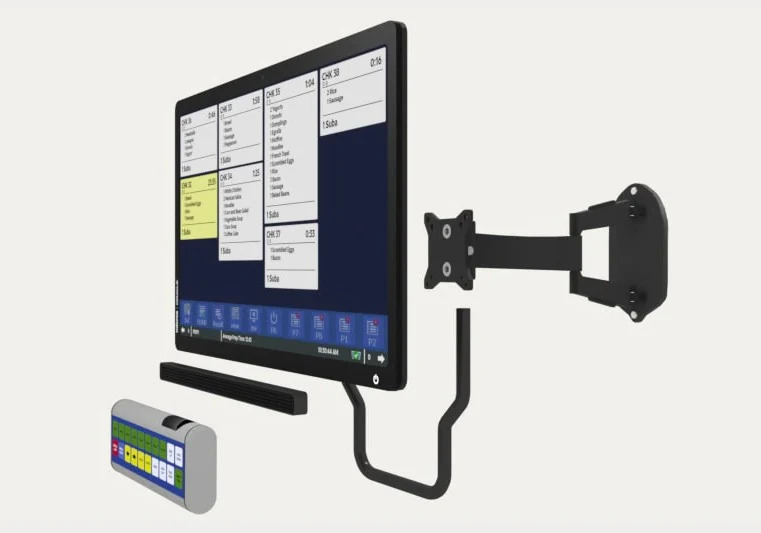
Displays & Scanners
Micros Kitchen Display System (KDS)
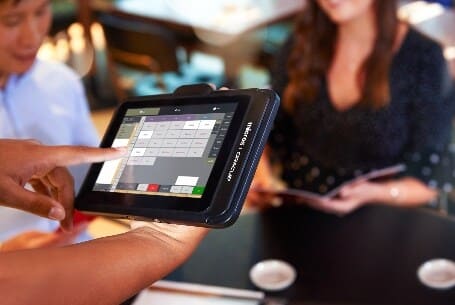
POS Terminals & Workstations
Micros 721P Mobile POS Workstation
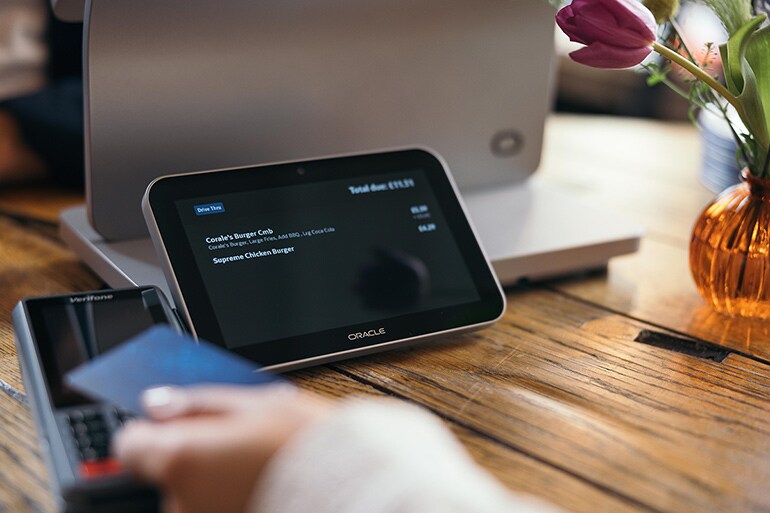
Displays & Scanners
Micros Customer Display
The Micros Oracle Tablet extends your Oracle MICROS POS system with mobile ordering, tableside payments, line busting, and faster service on the floor. It can be paired with compatible printers, payment devices, charging stations, kitchen routing, and wireless setup based on your hospitality workflow.
Integrations & Upgrade Path
Simphony Cloud POS & System Integration
The Micros Oracle Tablet runs on Simphony Cloud POS — Oracle's cloud-based hospitality platform. This means seamless integration with your existing Micros ecosystem, remote software updates, and a clear upgrade path as your business grows.
Simphony Cloud POS
The tablet runs the Micros Simphony Mobile application, connecting to your cloud POS system from anywhere. All menu items, prices, and floor layouts sync automatically across all devices.
Kitchen Display System (KDS)
Orders taken on the handheld tablet are sent directly to the kitchen display system in synchronized order, reducing errors and speeding up food preparation.
Inventory Management
Integrate with inventory management software to track stock levels, scan barcodes, and receive low-stock alerts — all accessible from the mobile device.
Third-Party Payment Processors
Connect with third-party payment processors for secure, PCI-compliant payment processing across EMV, contactless, and mobile wallet transactions.
Upgrading the Micros Oracle Tablet is a straightforward process done remotely through the Simphony Cloud POS system. When a new software update is available, the system prompts you to download and install it on your tablet. The update process takes just a few minutes, and the tablet automatically reboots once complete — no lengthy downtime or on-site technician visits required.
Because the Micros handheld tablet is cloud-based, any changes to menu items, pricing, floor layouts, or payment options are reflected on all connected devices instantly. This makes it easy to manage multiple tablets across a single location or multiple properties from a central cloud dashboard.
The Simphony Cloud platform also gives you access to delivery service and ordering platform integrations, making it easier to scale your operations. Businesses that start with one or two tablets can expand seamlessly, and volume discounts are available for multi-device purchases.
Setup & Support
Expert Setup, Training & 24/7 Support
Every Micros Oracle Tablet from Micros Integrated Payments comes with professional setup, staff training, and round-the-clock support — so your team is never left without help.
Professional Setup
Expert configuration of your handheld tablets — Simphony app installation, menu setup, floor layouts, payment options, and device pairing.
Staff Training
Hands-on training for your team on order taking, payment processing, table management, and system navigation — designed for fast onboarding.
24/7 Technical Support
Round-the-clock remote support for troubleshooting, software updates, and system issues. Our Micros specialists are available day or night.
Volume Discounts
Competitive pricing with volume discounts for businesses purchasing multiple handheld devices. Request a detailed quote tailored to your needs.
Trusted by 200,000+ Businesses Nationwide
Oracle Platinum Partner - Largest Micros-Exclusive Dealer - Full HMS Setup & Integration - 24/7 Support
FAQ
Frequently Asked Questions
What is a Micros Oracle Tablet?
What features does a Micros POS tablet offer?
Is the Micros Oracle Tablet suitable for restaurants and hotels?
Can the tablet process payments and manage tables?
Does it integrate with other POS devices and applications?
How easy is it to upgrade the Oracle Micros Tablet?
Is it easy for staff to learn?
Are there discounts for purchasing multiple tablets?
Reviews
What Our Clients Say About Us
Verified Google Reviews
Related Resources
Explore More Oracle Micros Solutions
Buy Micros POS
Browse Micros hardware, terminals, workstations, and compatible POS equipment.
Read MoreMicros Touchscreen
Touchscreen workstation and POS terminal options for Micros environments.
Read MorePrinters & Cash Drawers
Peripheral hardware resources for receipt printing, cash drawers, and POS stations.
Read MoreMicros Restaurant POS
Resource guide for restaurant POS workflows, hardware, and Oracle Micros setup.
Read MoreMicros Oracle POS System
Overview of Oracle Micros POS solutions for hospitality and restaurant operations.
Read MoreMicros RES 3700 POS
Resource page for legacy Micros RES 3700 systems and full-service dining.
Read MoreSimphony Cloud POS
Cloud-based Oracle Simphony POS information for modern restaurant operations.
Read MoreOracle Hospitality POS
Hospitality POS resource for hotels, bars, restaurants, and Oracle environments.
Read MoreGet a Quote
Ready to Go Mobile with Micros?
Tell us about your restaurant or hotel, and our Micros specialists will recommend the right handheld tablet setup — with competitive pricing and volume discounts for multi-device orders.
Request a Quote
Describe your business type and current POS setup — we'll prepare a tailored Micros Oracle Tablet pricing proposal.
We typically respond within 24 hours. Your information is kept confidential.
Need help with your Micros POS? Talk to an expert today.