Updated: January 2026. Reviewed by enterprise payment systems architect with 12+ years of POS integration and merchant processing experience.
What You Need to Know First
A merchant account is a specialized bank account that lets your restaurant accept credit and debit card payments—both at the counter and online. It sits between your customers’ banks and your business checking account, holding funds temporarily (usually 1–3 business days) while the payment network processes authorization, clearing, and settlement.
When a customer swipes their card at your POS terminal, the money doesn’t go straight to you. It flows through your payment gateway (which encrypts the data), the acquiring bank (your processor’s partner bank), the card network (Visa, Mastercard), the customer’s issuing bank (which approves the transaction), and finally back through the settlement process to your merchant account. After that holding period, net funds—gross transaction minus interchange fees, assessments, and processing charges—deposit into your business bank account.
“A merchant account is a specialized bank account enabling businesses to accept credit/debit card payments online and offline by holding funds temporarily (1-2 days) before transfer to business checking account.” — Hancock Whitney, 2023
For restaurants specifically, a merchant account means:
- Accepting multiple payment methods beyond cards: digital wallets (Apple Pay, Google Pay), contactless payments, gift cards.
- Managing risk: the acquiring bank monitors chargebacks, fraud patterns, and disputes to protect both your business and the payment system.
- Enabling POS integration: your point-of-sale system (Oracle MICROS, Square, Toast) connects directly to the merchant account, batching transactions and automating fund reconciliation.
- Compliance and reporting: you gain visibility into transaction volumes, fee breakdowns, chargeback disputes, and settlement schedules.
Data and Fund Flow for Merchant Accounts
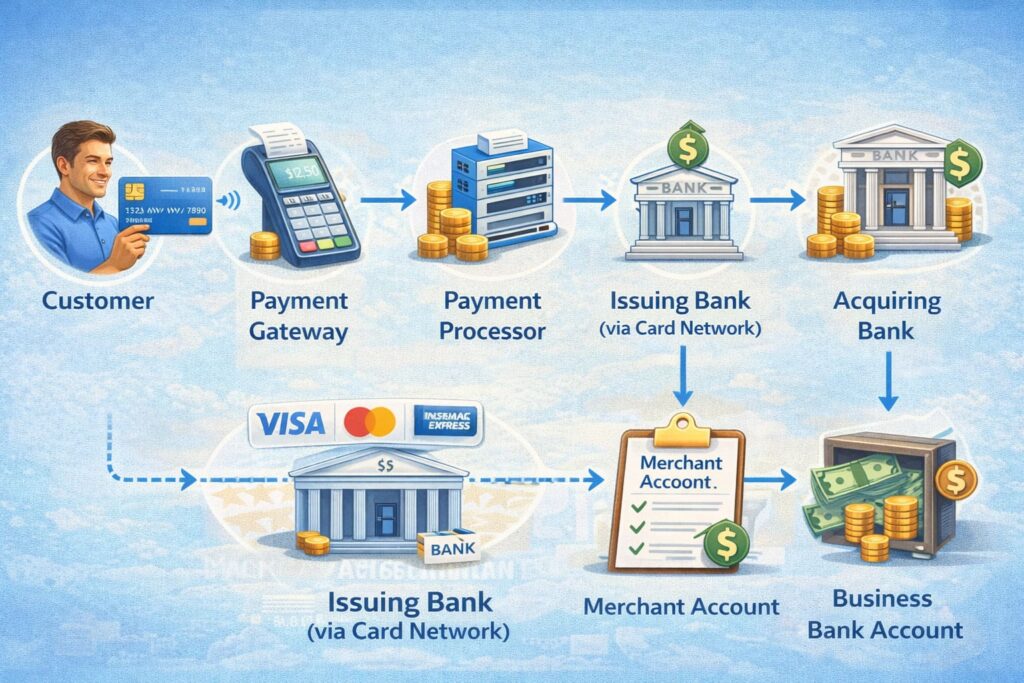
The Merchant Account Ecosystem: Who Does What
Understanding who sits where in the payment ecosystem helps you navigate vendor agreements, underwriting requirements, and integration workflows.
Acquiring Bank (Acquirer)
The acquiring bank is your financial institution in the merchant relationship. It opens and maintains your merchant account, receives authorized transactions from the card network, holds funds temporarily before settlement, transfers net proceeds to your business bank account (usually next business day or same-day for premium accounts), sets pricing and reserve requirements, and manages risk and chargebacks on your behalf.
Examples: Chase Merchant Services, Bank of America Merchant Services, First Data (now Fiserv).
Payment Gateway
The payment gateway is the software that captures and encrypts payment data at the point of entry—whether that’s your restaurant’s POS terminal, your online checkout, or a phone order. It encrypts cardholder data (card number, CVV, expiration), transmits securely to the payment processor, returns approval/decline responses to your POS in real time, and complies with PCI DSS encryption standards (TLS 1.2+, AES-256).
Examples: Authorize.net, Stripe, Square Gateway, NMI.
Payment Processor
The processor orchestrates the authorization, clearing, and settlement workflow. It routes transaction details through the card network to the issuing bank, receives approval or decline codes within seconds, batches transactions for clearing (usually nightly), calculates interchange fees and assessments, and manages chargeback notifications and disputes. For restaurants with POS integration, the processor often provides the gateway and merchant account bundle.
Examples: Stripe, Square, Toast, Shift4, Global Payments.
Issuing Bank (Cardholder’s Bank)
The issuing bank verifies the customer’s identity and available funds. It checks card validity, expiration, and customer’s balance/credit limit, approves or declines based on fraud detection and KYC/AML rules, temporarily holds funds in the customer’s account, and returns authorization code or decline reason to the processor.
Card Networks (Visa, Mastercard, Discover, AmEx)
Card networks set the rules, fees, and transaction routing. They define interchange fees (the percentage and per-transaction fee that your processor and acquiring bank deduct), set assessment fees (networks’ own cut), route transactions between processors, acquirers, and issuing banks, enforce compliance rules (PCI DSS, chargeback limits, fraud prevention), and maintain market share: Visa (roughly 50% of US credit card volume), Mastercard (30%), Discover (10%), American Express (9%).
[TABLE: Merchant Account Ecosystem Participants
| Participant | Primary Function | Contract with Merchant | Key Risks Managed |
|---|---|---|---|
| Acquiring Bank | Opens merchant account; settles funds; manages underwriting | Direct contract; merchant agreement | Settlement risk; fraud; chargebacks; compliance |
| Payment Gateway | Encrypts and transmits payment data securely | Often included in processor agreement | Data security; PCI compliance; uptime |
| Payment Processor | Authorizes transactions; clears and settles; calculates fees | Direct or via acquiring bank | Operational risk; chargeback disputes; fraud detection |
| Issuing Bank | Verifies customer identity and funds | No direct merchant contract | Credit risk; cardholder fraud; dispute initiation |
| Card Networks | Route transactions; set rules and fees | No direct merchant contract | Network integrity; rule enforcement; fee standardization |
Purpose: Clarifies who does what and who your merchant talks to directly.]
Merchant Account vs. Payment Aggregator: Which Model Fits Your Restaurant?
One of the biggest decisions when accepting card payments is whether to pursue a dedicated merchant account or use a payment aggregator (also called a payment facilitator or “payfac”).
Dedicated Merchant Account
You receive an individual merchant ID (MID) and a direct relationship with an acquiring bank. Your merchant account is yours alone.
Advantages:
- Transparent, customizable pricing: Often interchange-plus model (actual interchange rate + network assessment + processor markup). You see exactly what you’re paying per transaction type.
- Higher transaction volume limits: No artificial caps. Suitable for high-volume restaurants and chains.
- Direct fund control: Funds settle directly to your business bank account on a schedule you negotiate (same-day or next-day).
- Customizable risk management: You can negotiate reserve terms, chargeback handling, and dispute timelines.
- Multiple payment methods and currencies: Easier to add international payment methods or cryptocurrencies later.
- Lower long-term costs if you process >$10,000/month.
Disadvantages:
- Longer setup: Typically 3–14 business days due to underwriting, risk assessment, and compliance checks.
- Stricter requirements: Detailed financial history, business licenses, processing statements, personal credit checks, and site compliance reviews.
- Monthly or annual minimum fees: Depending on provider.
Payment Aggregator/Facilitator (Stripe, Square, PayPal)
You operate under an aggregator’s master merchant account. Your business is a “sub-merchant.”
Advantages:
- Fast onboarding: Often instant to 24 hours; minimal documentation.
- Flat-rate pricing: Simple, predictable (e.g., 2.9% + $0.30 per card transaction for Square). No monthly fees in most cases.
- No upfront investment: No POS equipment or gateway setup required; use the provider’s software.
- All-in-one solution: Payment processing, invoicing, basic accounting, team management often bundled.
- Suitable for small businesses: <$50,000/year revenue; startups; pop-ups.
Disadvantages:
- Higher costs at scale: Flat-rate pricing becomes expensive once you exceed ~$10,000/month volume.
- Funding holds and reserves: Aggregators frequently place holds on transactions or reserve a percentage of daily sales (5–20%) if they detect risk. Holds can last days or weeks.
- Limited transparency: You see total fees but not the breakdown. You don’t control pricing or have room to negotiate.
- Shared risk: If another merchant under the same aggregator account faces fraud or chargebacks, your account may be restricted or held.
- Less control over data and reporting: Limited API access; can’t easily export transaction-level data or connect custom CRM/ERP systems.
- Account termination risk: Aggregators reserve the right to close accounts with short notice if fraud or volume spikes occur.
Disclaimer: This information is general in nature and does not replace consultation with a financial professional or legal expert regarding your specific merchant account choice.
[TABLE: Merchant Account vs. Payment Aggregator Comparison
| Factor | Dedicated Merchant Account | Payment Aggregator |
|---|---|---|
| Setup Speed | 3–14 business days | Instant to 24 hours |
| Pricing Model | Interchange-plus (transparent) or tiered | Flat-rate (e.g., 2.9% + $0.30) |
| Monthly Costs | $15–$50 (varies by processor) | $0 (usually) |
| Effective Rate (high-volume) | ~1.95–2.2% for card-present | ~2.9% regardless |
| Fund Settlement | Direct to business bank account; negotiable | Aggregator’s control; often 1–7 day delay |
| Funding Holds/Reserves | Rare; typically only for risk flags | Common; 5–20% reserves typical |
| Business Requirements | Strict (license, tax ID, financials, site review) | Minimal (email, business name, ID) |
| Payment Methods | Cards, digital wallets, ACH, international methods | Cards, digital wallets (limited international) |
| Reporting & Integration | Full API access; MID customization | Limited API; basic reporting only |
| MID Ownership | You own your MID | Shared master MID; no individual MID |
Purpose: Helps restaurant owners decide between full control/transparency vs. speed/simplicity.]
Key Advantages of a Dedicated Merchant Account
If your restaurant processes enough volume or plans to grow, a dedicated merchant account offers substantial benefits.
Cost Control and Transparency
With interchange-plus pricing, you see the exact interchange rate (set by Visa/Mastercard), the card network assessment fee, and the processor’s markup. For a restaurant processing $150,000/month in card sales, the difference between aggregator flat-rate (2.9%) and interchange-plus (1.95%) can save $1,425/month or $17,100/year.
A full-service restaurant in Austin switching from Square (2.9% + $0.30) to interchange-plus ($1.95% avg) reduced monthly processing fees from ~$4,485 to ~$3,070—a $1,415 monthly savings that went directly to food cost improvements and payroll.
Stability and Predictable Fund Availability
Unlike aggregators, which can place holds on 20% of sales for days or weeks, a dedicated merchant account offers next-business-day funding (or same-day for premium accounts). Your cash flow becomes predictable—critical for a restaurant managing payroll, supplier invoices, and inventory.
POS Integration and Operational Efficiency
Your POS system (Oracle MICROS, Toast, Square, SkyTab) can connect directly to your merchant account and payment processor. This enables automatic batching (transactions batch at end-of-day automatically; no manual settlement), unified reporting (one dashboard shows sales, fees, chargebacks, deposits, and reconciliation), tokenization (customer cards can be securely stored and reused for recurring charges, loyalty programs, contactless upsells), and customizable descriptors (your restaurant’s name appears on customer statements exactly as you want—critical for reducing chargebacks from confused customers).
Multi-Location and Franchise Scalability
If you operate multiple restaurants or plan to franchise, a dedicated merchant account allows sub-MIDs (each location gets its own merchant ID for separate reporting and fee negotiation), consolidated reporting (view all locations’ transactions in one dashboard while maintaining financial separation), and tiered security and access (assign different roles—manager, accountant, owner—with granular permissions).
Chargeback Management and Dispute Control
Restaurants face higher chargeback rates than average merchants (3–5% for hospitality vs. ~1% industry average) due to customers disputing charges they don’t recognize (poor descriptor clarity), “no delivery” disputes (customer claims they didn’t receive food or service was poor), and duplicate charge disputes (system glitches or user error on POS).
With a dedicated merchant account, you control chargeback response workflows (upload delivery proof, receipts, and customer communications directly to the processor), dispute representment timelines (typically 7–45 days, longer than aggregators allow), and chargeback fee negotiation (after 6 months of low chargeback rates, many processors reduce or waive per-dispute fees of $15–$50 each).
Types of Merchant Accounts: Which Fits Your Business Model?
Merchant accounts come in several flavors, tailored to how and where you accept payments.
Retail/POS (Face-to-Face, Card-Present)
Best for: Restaurants, bars, coffee shops, retail stores, salons, food trucks.
Characteristics:
- Customer’s card is physically present (swiped, tapped, or inserted into a terminal).
- Lowest fraud risk and lowest fees (~1.50–1.80% interchange + processor markup).
- Requires 70%+ of sales to be swiped (card-present) to qualify for “retail” rates.
- Integrates with POS hardware (terminals, tablet readers, kitchen printers).
Typical setup: 3–7 days; moderate underwriting.
E-commerce/Internet (Card-Not-Present)
Best for: Online stores, SaaS platforms, ghost kitchens, delivery-only restaurants.
Characteristics:
- Customer enters card details online (checkout page, app, or phone order).
- Higher fraud risk and higher fees (~2.15–2.50% interchange + markup).
- Requires SSL encryption (HTTPS), PCI DSS compliance, and fraud detection tools (AVS, CVV, 3-D Secure).
- No physical card swipe; stronger authentication needed.
Typical setup: 5–10 days; stricter PCI requirements.
High-Risk (Industries with Elevated Chargeback/Fraud)
Best for: Travel agencies, subscription services, CBD/cannabis, adult entertainment, gambling, pharmaceuticals.
Characteristics:
- Chargeback rates >1.5% or fraud history flag the account as “high-risk.”
- Significantly higher fees (~3.5–5%+ interchange + 2–3% processor markup).
- Mandatory reserves (10–30% of monthly volume held for 6–12 months).
- Stricter underwriting; may require processing history or references.
- Longer approval (2–4 weeks).
Typical setup: 14–28 days; extensive documentation required.
For restaurants, high-risk status usually applies only if you have a history of excessive chargebacks (>1.5% of transactions), you’re a newly licensed establishment without processing history, or you operate as a ghost kitchen or delivery aggregator (harder to verify legitimacy).
International and Multi-Currency
Best for: Hotels, restaurants with international guests, e-commerce with global shipping.
Characteristics:
- Accept payments in multiple currencies (USD, EUR, GBP) and settle in local currency or USD.
- Support international card networks (UnionPay, JCB, Diners).
- Require compliance with local payment regulations (GDPR in EU, data residency rules).
- Higher fees due to FX conversion and compliance overhead (~2.5–3.5% + 1–2% FX conversion).
Typical setup: 10–21 days; international documentation required.
[TABLE: Merchant Account Types Comparison
| Type | Primary Use | Key Features | Typical Fees | Risks | Setup Time |
|---|---|---|---|---|---|
| Retail/POS | Restaurants, retail stores, food trucks | Card-present, swiped/tapped, POS terminals | 1.50–1.80% interchange + 0.25–0.35% markup | Low; physical card mitigates fraud | 3–7 days |
| E-commerce | Online stores, SaaS, delivery apps | Card-not-present, online entry, SSL/3-DS required | 2.15–2.50% interchange + 0.30–0.50% markup | Higher; card-not-present fraud risk | 5–10 days |
| High-Risk | Subscription services, travel, CBD | Elevated chargeback/fraud flags; reserves held | 3.5–5% interchange + 2–3% markup | Mandatory reserves; account termination risk | 14–28 days |
| International | Hotels, multi-currency e-commerce | Multi-currency settlement, FX conversion, GDPR | 2.5–3.5% + 1–2% FX conversion | Regulatory compliance; currency volatility | 10–21 days |
Purpose: Helps businesses identify which account type matches their payment patterns and risk profile.]
Merchant Account Pricing Models: How Fees Are Calculated
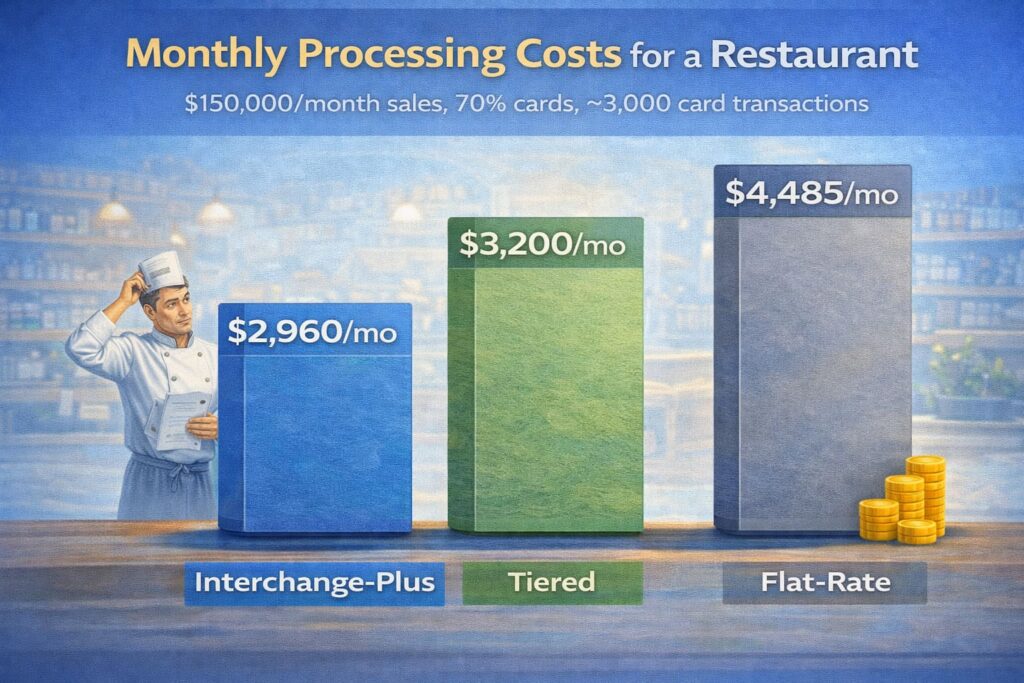
Merchant account costs break down into three components: interchange fees (set by card networks), assessment fees (paid to networks), and processor markup (the processor’s profit).
Interchange-Plus Pricing (Most Transparent)
You pay the actual interchange rate (set by Visa/Mastercard for each card type and transaction category) plus your processor’s fixed markup.
Example:
- Visa credit card (standard): 1.51% + $0.10 (interchange) + 0.25% + $0.05 (processor markup) = 1.76% + $0.15 per transaction
- Visa debit card (PIN): 0.99% + $0.25 (interchange) + 0.25% + $0.05 (processor markup) = 1.24% + $0.30 per transaction
- Mastercard credit (standard): 1.58% + $0.10 (interchange) + 0.25% + $0.05 (processor markup) = 1.83% + $0.15 per transaction
Monthly fees: $15–$50 depending on account tier and services.
Advantages:
- Full transparency: You see exactly what you’re paying and why.
- Lowest cost at scale: For restaurants processing >$10,000/month, savings are substantial.
- Negotiable markup: Processor’s margin (0.25–0.35%) can sometimes be negotiated based on volume and longevity.
Disadvantages:
- Rate variability: Costs differ per card type, so monthly invoices vary.
- Requires expertise: Understanding interchange categories takes effort.
Tiered Pricing
Cards are grouped into tiers (Qualified, Mid-Qualified, Non-Qualified) with a single rate per tier, but the rules for what lands in each tier are often opaque.
Example:
- Qualified tier: 1.69% + $0.10 (e.g., Visa debit, standard Mastercard)
- Mid-Qualified tier: 2.39% + $0.10 (e.g., rewards Visa, American Express)
- Non-Qualified tier: 3.29% + $0.10 (e.g., international cards, corporate American Express)
Advantages:
- Simpler than interchange-plus.
Disadvantages:
- Less transparent: You don’t know which cards fall into which tier.
- Often more expensive: Downgrade incentives (card networks push qualifying transactions into higher tiers) mean you pay more than interchange-plus.
- Rarely recommended by payment professionals for this reason.
Flat-Rate Pricing (Simplest, Often Most Expensive)
One fixed percentage applies to all card transactions, regardless of type.
Example: 2.9% + $0.30 per card transaction (Square, Stripe standard rates).
Advantages:
- Predictable: Same cost per transaction every time.
- Fastest onboarding: Aggregators use flat-rate exclusively.
- No monthly fees: Usually included.
Disadvantages:
- Higher costs at volume: A restaurant processing $150,000/month pays $4,485/month (2.9% + $0.30 × transaction count) vs. ~$2,960/month on interchange-plus.
- Shared risk: You subsidize losses from other merchants’ fraud or chargebacks.
- No negotiation: Terms are non-negotiable.
Cost Comparison Across Pricing Models (Restaurant Example)
Additional Merchant Account Fees to Budget For
Beyond transaction and monthly fees, merchant accounts often include:
- PCI Compliance fee: $50–$150/year (annual attestation that you’re PCI DSS compliant).
- Chargeback fee: $15–$50 per dispute (covers dispute investigation and representment).
- Batch fee: $0–$0.25 per batch (some processors charge per daily settlement; often waived).
- Setup/Application fee: $0–$500 one-time (many processors waive for competitive reasons).
- Gateway fee: $0–$30/month if you use a third-party gateway not bundled with the processor.
- Early termination fee: $500–$2,000+ if you cancel before contract end (typically 1–3 years).
- Minimum monthly processing volume: Some contracts require >$3,000/month in sales; if you don’t hit it, you pay the difference.
A restaurant processing $8,000/month with a $10,000 minimum pays $2,000 (the shortfall) even if actual transaction fees were lower.
Merchant Account Requirements: Complete Document Checklist
Banks and processors underwrite merchant accounts to verify legitimacy, assess risk, and ensure compliance with anti-money laundering (AML) and know-your-customer (KYC) rules.
Essential Documents for All Applicants
- Completed Merchant Application Form
- Business name, owner names, contact info.
- Anticipated monthly volume, products/services, business type.
- Processing history (if applicable).
- Business Registration/License
- Certificate of incorporation, articles of organization, DBA filing.
- Current business license (state/local).
- EIN (Employer Identification Number) from IRS or tax ID.
- Owner/Principal Identification
- Photo ID (driver’s license, passport, or state ID) for each owner >20% equity.
- Proof of residential address (utility bill, lease agreement, or bank statement dated within 90 days).
- Business Bank Account Verification
- Voided check or bank letter on official letterhead showing account number and routing number.
- Recent bank statements (usually 3–6 months).
- Website or Business Information
- URL of your restaurant’s website or online ordering platform.
- Screenshots of your online checkout/ordering pages (if e-commerce).
- Copies of your refund, delivery, and cancellation policies.
- Privacy policy and terms of service.
Additional Documents (Depending on Risk Profile)
- Processing History (if you’ve had another merchant account): Prior processor’s statement, chargeback ratio, and closure reason.
- Business Tax Returns (for accounts processing >$150,000/year): Last 1–2 years’ P&L statements and corporate tax returns.
- Personal Credit Report: Explicit authorization for a credit check (most processors pull Equifax/Experian).
- Video or Walkthrough Tour (for high-risk or new locations): Recording of your restaurant, kitchen, and POS setup to verify legitimacy.
- Proof of Delivery (if you operate delivery): Screenshots of your delivery app integration, driver policies, or fulfillment procedures.
[CHECKLIST: Merchant Account Application Document Readiness
Use this checklist to prepare before applying:
- Business license and registration documents (current, <1 year old).
- Owner/principal photo ID for all partners >20% equity.
- Proof of residence for owners (utility bill, lease, or bank statement, <90 days old).
- Voided business check or bank letter with account and routing numbers.
- 3–6 months of business bank statements.
- Website URL and screenshots of checkout pages.
- Refund policy, cancellation policy, privacy policy, terms of service (as PDFs).
- Prior merchant account statements (if applicable).
- Tax returns or P&L statements (if >$150,000/year revenue expected).
- PCI DSS self-assessment questionnaire (SAQ) form (processor provides template).
- Signed authorization for credit report and background check.
Purpose: Speeds up application by ensuring all documents are collected in advance; reduces delays and follow-up requests.]
Pro Tip: Assemble this package and send it proactively to the processor before applying. This signals credibility and can reduce underwriting time by 2–3 days.
The 5-Step Process: From Application to Payment Processing
Understanding the timeline and what happens at each stage helps you prepare mentally and operationally.
Step 1: Application Submission (Day 0–1)
You complete and submit the merchant application form with preliminary information: business name, type, location, ownership structure, anticipated monthly sales volume and product/service details, and owner contact info and basic identification.
Business actions:
- Fill out the application completely and accurately. Mismatches or incomplete information trigger delays.
- Attach all required documents (listed above).
- Provide a realistic estimate of monthly card volume. Underestimating can trigger reserves; overestimating can lead to rejection if you don’t hit targets.
Processor actions:
- Confirms receipt and assigns an underwriter.
- Runs basic compliance checks (business registration verification, owner identity screening against OFAC/sanctions lists).
Timeline: 1 business day.
Step 2: Underwriting (Days 2–14)
The processor’s underwriting team assesses your business risk, financial health, and compliance posture through financial review (credit checks on owners; bank statements analysis looking for consistent deposits, cash flow stability, or red flags like frequent overdrafts), business model validation (site review—if e-commerce, they’ll visit your website; if POS, they’ll verify your physical location), chargeback and fraud risk assessment (if you’ve had a prior merchant account, they’ll pull your processing history to see if you have excessive chargebacks), compliance checks (AML/KYC verification, UBO identification for corporate accounts, sanctions screening), and PCI DSS readiness (basic review of your security posture: encryption, tokenization, data storage).
Business actions:
- Respond promptly to any processor requests for additional documents or clarifications. Delays here add days to approval.
- Be transparent about any prior account closures, chargebacks, or issues. Honesty at this stage is critical; they’ll discover it in their investigation anyway.
- Provide realistic descriptions of your products, services, and fulfillment methods. For restaurants, be clear about delivery models (third-party vs. in-house) and refund policies.
Processor actions:
- Communicates underwriting findings and may request additional documents.
- Assesses risk level and determines pricing (fees), reserve amounts, and transaction limits.
Timeline: 2–14 business days (typically 5–7 for low-risk accounts; 10–14 for medium-risk or new locations).
Step 3: Verification (Days 8–12, Often Overlaps with Underwriting)
The processor formally verifies details from your application through ownership verification (confirm owner identity by matching photo ID against official databases), bank account verification (confirm that the bank account you provided actually exists and is in your business’s name—some processors send micro-deposits; others call your bank), business registration verification (confirm that your business license/EIN is active and matches your application), and address verification (confirm that your business location matches records).
Business actions:
- Provide any requested bank letters or proof of address immediately.
- If the processor sends micro-deposits to your account to verify ownership, watch for them (usually $0.01–$0.05) and report the amounts as requested.
Processor actions:
- Performs background checks and database lookups.
- Requests any missing or conflicting documentation.
Timeline: Usually 2–5 business days, but can extend if documents are missing or information is conflicting.
Step 4: Approval (Day 12–14)
Once underwriting and verification pass, the processor approves your merchant account and issues a formal approval letter specifying your Merchant ID (MID)—a unique 15-digit identifier for your account (you’ll use this on POS terminals, in integrations, and for reporting), pricing and fees (transaction rates: interchange-plus, tiered, or flat; monthly fees, PCI fees, chargeback fees), reserve terms (if applicable: amount held, duration, release schedule), transaction limits (daily and monthly maximum volumes; velocity controls), settlement schedule (next-business-day or same-day funding if premium), and signed Merchant Agreement (terms and conditions governing your account, your liability, chargeback handling).
Business actions:
- Review the approval letter and merchant agreement carefully. Verify pricing, MID, and reserve terms match your expectations.
- Ask questions about any terms you don’t understand—this is your opportunity to negotiate before signing.
- Sign and return the agreement (electronic or wet signature, depending on processor).
Processor actions:
- Issues MID and credentials.
- Prepares POS terminal setup or gateway integration.
Timeline: 1–2 business days.
Step 5: Setup and Integration (Days 14–21)
Your processor configures your payment processing infrastructure and integrates with your POS system through POS terminal provisioning (if applicable: ships payment terminals—for restaurants, these are often Verifone, Ingenico, or PAX devices—or activates tablet-based readers), gateway integration (provides API credentials, sandbox environment, and documentation for your POS system to connect), tokenization setup (configures secure card storage if you plan to store customer cards for recurring charges or subscriptions), and testing and go-live (you’ll test transactions in a sandbox environment—simulated transactions—to confirm the integration works before processing real payments).
Business actions:
- Coordinate with your POS vendor (Square, Toast, MICROS) to activate the new merchant account.
- Run test transactions through your POS to confirm payments are processing correctly.
- Train staff on the new checkout flow, troubleshooting, and how to handle declined payments.
- Plan your go-live date and communicate it to your team and customers (if doing a POS upgrade).
Processor actions:
- Provisions hardware, ships terminals.
- Activates gateway credentials.
- Provides API documentation and sandbox access.
- Offers technical support for integration.
Timeline: 2–7 business days from approval to first live transaction.
Merchant Account Reserves and Funding Holds: What They Are and Why They Exist
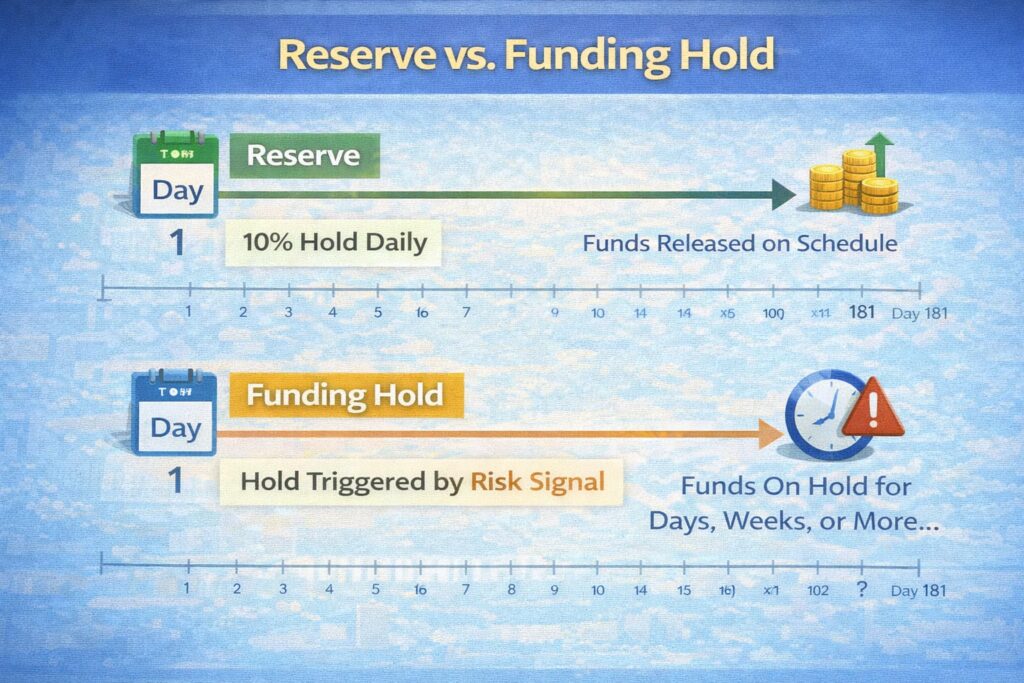
Two concepts often confuse restaurant owners: reserves and funding holds. Both involve the processor keeping money from you, but for different reasons and with different durations.
What is a Reserve?
A reserve is a predetermined amount (or percentage of daily sales) that the processor or acquiring bank holds from your settlements as a safeguard against future chargebacks, fraud losses, or account closure liabilities.
Types of reserves:
- Rolling Reserve (Most Common)
- Daily: A percentage (e.g., 10%) of each day’s net settlements is withheld.
- Released after 6–12 months (e.g., money held on Day 1 is released on Day 181).
- Example: You process $5,000 in sales on January 1. $500 (10%) is held. On Day 181, that $500 is released back to you.
- Up-Front Reserve
- A lump sum (e.g., $5,000) held before your first settlement.
- Released after a specified period (usually 6–12 months) if no major chargebacks occur.
- Capped Reserve
- Holds a percentage of daily sales until a cap is reached (e.g., “Hold 10% until $25,000 is reserved”). Once the cap is reached, no more withholding occurs.
Why reserves exist:
- Chargeback protection: If customers dispute charges, the processor covers losses from your reserve rather than losing money.
- Account closure safety: If you close your account, the processor holds the reserve to cover any pending chargebacks or disputes that arise post-closure.
- Risk mitigation: For new merchants or high-risk categories (restaurants have 3–5% chargeback rates), reserves offset the processor’s risk.
For restaurants:
- Expect 5–10% rolling reserves for the first 6–12 months of a new account.
- Reserves are most strict for first-time merchant accounts with no processing history, high-risk business categories (delivery-only, ghost kitchens, new franchises), and accounts flagged for high chargebacks (>1.5% dispute rate).
- After 12 months of clean processing (low chargebacks, no fraud), reserves are often reduced or eliminated.
What is a Funding Hold?
A funding hold is a reactive, temporary pause on payouts when the processor detects a risk signal in real-time.
Triggers for funding holds:
- Sudden volume spike: Sales jump 50%+ month-over-month without prior warning.
- Spike in chargebacks or disputes: If your chargeback rate suddenly jumps above 1%, the processor may hold payouts to investigate.
- Fraud signals: Unusual transaction patterns (e.g., thousands of $1 test transactions, transactions from high-fraud countries).
- Compliance issues: Failure to provide updated KYC/AML documentation, or your business model changes (e.g., you switch from dine-in to delivery-only, which has different chargeback profiles).
Duration:
- Typically 5–30 days while the processor investigates.
- Can extend if you don’t provide requested documentation or if the risk confirms.
Example:
Your restaurant normally processes $8,000/week in card sales. One week, you run a Valentine’s Day promotion and spike to $18,000. The processor detects this anomaly and places a 7-day hold on payouts while they confirm the spike is legitimate (not fraud). After you explain the promotion, the hold is lifted and funds are deposited.
Reserve vs. Funding Hold
Managing Reserves and Holds: Practical Steps
- Understand your reserve terms upfront: Ask your processor for the exact reserve percentage, duration, and release schedule before signing. Negotiate if possible (experienced merchants with strong credit can sometimes reduce from 10% to 5%).
- Track your chargeback ratio: Monitor your chargeback metrics (usually available in your processor’s dashboard). Keep it <1% by using clear, recognizable billing descriptors (so customers recognize the charge), implementing delivery proof (tracking numbers, photos, signatures), and responding quickly to customer service issues (fewer disputes = fewer chargebacks).
- Communicate changes early: If you’re planning a promotion, seasonal volume spike, or business model change, notify your processor in advance. They’ll adjust expectations and may not trigger automatic holds.
- Document everything: Keep records of refund policies, delivery proofs, customer communication, and transaction details. If a hold occurs and you need to dispute it, documentation speeds resolution.
- Plan cash flow around reserves: Don’t budget reserves as spendable income in your first 12 months. They’re held as insurance; treat them as a separate cash pool.
Security and Compliance: PCI DSS, 3-D Secure, and Anti-Fraud
Accepting card payments means you’re responsible for protecting sensitive cardholder data.
PCI DSS (Payment Card Industry Data Security Standard)
What it is:
PCI DSS is a mandatory standard set by Visa, Mastercard, Discover, and American Express to ensure that anyone handling credit card data maintains minimum security practices.
Who manages it:
The PCI Security Standards Council (PCI SSC), a consortium of the card networks and major banks.
Why it matters:
Violations can lead to fines ($5,000–$100,000/month) from your acquiring bank or card networks, account suspension or termination, mandatory security audits (expensive), and liability for data breaches (your insurance may not cover PCI violations).
Key requirements for restaurants:
- Network security: Firewalls, intrusion detection, and secure wireless networks (WPA2 or WPA3 encryption).
- Data protection: Encrypt card data in transit (TLS 1.2+) and at rest (AES-256). Never store full card numbers; use tokenization.
- Access control: Only authorized staff can access payment systems. Use multi-factor authentication (MFA) for admin access.
- Vulnerability management: Regular security scanning and patching. No default passwords.
- Monitoring and testing: Quarterly vulnerability scans by an approved scanning vendor (ASV); annual penetration tests for Level 1 merchants.
- Compliance documentation: Maintain a PCI DSS Self-Assessment Questionnaire (SAQ) and submit annual attestation.
For most restaurants (Level 4 merchants processing <20,000 transactions/year):
- Complete PCI DSS Self-Assessment Questionnaire (SAQ) A or A-EP annually.
- Ensure your POS system uses tokenization (the provider handles this; you don’t store card data).
- Maintain a basic firewall and avoid using default passwords.
- Cost: Often included in your processing fees or $50–$150/year attestation fee.
3-D Secure (3DS) – Optional but Recommended for E-commerce
What it is:
3-D Secure is an authentication protocol that adds an extra verification step (usually a one-time password or biometric) before authorizing a card transaction.
How it works:
- Customer enters card details online.
- Your payment gateway prompts for 3DS authentication (SMS code, app notification, or biometric).
- Customer completes authentication.
- Transaction is authorized with lower fraud risk.
Advantages:
- Reduces fraud chargebacks by 50–80%.
- Shifts fraud liability to the card issuer (they approved authentication).
Disadvantages:
- Adds friction to checkout (customer must complete extra step).
- May reduce conversion by 2–5% on e-commerce.
When to use:
- Recommended for online orders (e-commerce, app orders).
- Optional for in-person (card-present; risk is lower).
- Increasingly mandatory for high-risk merchants or high-value transactions.
Anti-Fraud Tools
Most processors include basic anti-fraud tools:
- Address Verification System (AVS): Confirms the customer’s billing address matches what’s on file with their issuing bank. Used for card-not-present transactions (online, phone orders).
- CVV/CVC verification: Confirms the 3-digit code on the back of the card (customer must manually enter it). Also used for card-not-present transactions.
- Velocity checking: Flags unusual patterns (e.g., 100 transactions in 1 hour from same card).
- Device fingerprinting: Identifies suspicious devices or geographic anomalies.
- Blocklists: Automatically declines transactions using known fraudulent cards or email addresses.
For restaurants:
- In-person (POS): Fraud risk is low; card-present transactions are inherently more secure.
- Online/delivery: Use AVS, CVV, and 3DS for orders >$50.
Disclaimer: This information is general in nature and does not replace consultation with a security professional or compliance expert regarding your specific PCI DSS and fraud prevention obligations.
Choosing the Right Merchant Account for Your Business Type
Different restaurants and hospitality businesses have different priorities. Here’s how to align your merchant account choice with your needs.
Full-Service Restaurant with Dine-In and Takeout
Payment methods: In-person card swipes (POS terminal), contactless/Apple Pay, online ordering with delivery.
Recommended account type: Retail/POS with e-commerce capability.
Key features:
- Primary: POS terminal integrated with your restaurant management system (MICROS, Toast, Square, SkyTab).
- Secondary: Online ordering gateway for to-go and delivery orders.
- Tokenization for tip adjustments (customer approves tip after transaction).
- Unified reporting showing dine-in, takeout, and delivery in one dashboard.
Pricing strategy:
- Negotiate interchange-plus for restaurant category (typically 1.50–1.80% for card-present).
- If >70% of sales are card-present swipes, you qualify for retail rates (not e-commerce rates, which are higher).
Processor recommendations: Shift4, Toast Payments, Square, First Data (Fiserv), Global Payments.
Ghost Kitchen or Delivery-Only Restaurant
Payment methods: Primarily online orders via delivery apps (DoorDash, Uber Eats, Grubhub) or your own delivery website.
Recommended account type: E-commerce with MOTO (mail/telephone order) option.
Key features:
- E-commerce gateway integration with your delivery app.
- Tokenization for saved customer cards (repeat order convenience).
- Fraud detection (3-D Secure for first-time customers or orders >$50).
- Delivery proof integration (tracking, photos, signature).
Pricing strategy:
- You’ll be quoted e-commerce rates (~2.15–2.50% interchange + markup) because most orders are card-not-present.
- You may face higher reserves (10–15%) initially because ghost kitchens are considered higher-risk (harder to verify legitimacy).
- After 6–12 months of clean processing, negotiate to reduce reserves.
Processor recommendations: Stripe, Square, Shopify Payments, DoorDash Merchant Services (if you’re enrolled in DoorDash).
Hotel or Resort with Multiple Revenue Streams
Payment methods: Front-desk card swipes (room charges), online booking/deposit, gift card sales, in-room dining, gift shop.
Recommended account type: Retail/POS with e-commerce; potentially multiple MIDs (one for front-desk, one for online booking) to separate processing volumes.
Key features:
- POS system with folio management (ability to add charges to room accounts; guest pays at checkout).
- Online booking gateway (OTA integration: Booking.com, Expedia).
- Gift card processing and balance tracking.
- Recurring charge capability (deposits, advance payments).
- Multi-currency if you accept international guests.
Pricing strategy:
- Negotiate a blended rate that reflects your mix of card-present and card-not-present sales.
- Typical rate: ~1.90–2.20% depending on mix.
- Negotiate high transaction limits (hotels can process $50,000–$500,000+ daily during peak seasons).
Processor recommendations: Global Payments, Chase Merchant Services, Worldpay, Shift4.
Quick-Service Restaurant (QSR) with POS and Mobile Order Ahead
Payment methods: In-person (fast checkout, contactless), mobile app pre-order-and-pay, drive-thru mobile.
Recommended account type: Retail/POS with mobile/app integration.
Key features:
- Fast, reliable POS (sub-3-second authorization is critical for high-volume QSR).
- Mobile ordering app integration (tokenization for saved cards, one-tap checkout).
- Loyalty program integration (scan code, apply discount, process payment in one step).
- High transaction velocity support (QSRs can process 1,000+ transactions/day per location).
Pricing strategy:
- 70%+ card-present = retail rates (~1.50–1.80% for card-present + 2.00–2.20% for app orders).
- Multi-location discount (negotiate lower rates for 5+ locations).
Processor recommendations: Square, Toast, Shift4, Global Payments (high-volume QSR networks).
[TABLE: Merchant Account Features by Restaurant Type
| Business Type | Primary Payment Method | Secondary Method | Key Features Needed | Typical Rate | Setup Priority |
|---|---|---|---|---|---|
| Full-Service Dine-In | POS swipe (card-present) | Online delivery orders | POS integration, tokenization, dine-in + takeout unified reporting | 1.50–1.80% (card-present) + 2.15% (online) | High: POS reliability critical |
| Ghost Kitchen | Online orders (card-not-present) | Delivery app integration | E-commerce gateway, 3-D Secure, delivery proof, fraud detection | 2.15–2.50% + 10–15% reserve | Medium: Higher reserves initially |
| Hotel/Resort | Front-desk card-present | Online booking, gift cards | Folio management, recurring charges, multi-currency, high velocity | 1.90–2.20% blended | Medium: Multi-stream complexity |
| QSR with App | Fast POS checkout | Mobile app pre-order | Sub-3-second auth, loyalty integration, high velocity support | 1.50–1.80% (in-store) + 2.0–2.2% (app) | High: Speed and reliability |
Purpose: Helps restaurant operators prioritize features and negotiate rates aligned with their business model.]
POS Integration: How Your Payment System Connects to Your Merchant Account
One of the biggest advantages of a dedicated merchant account is seamless integration with your POS system.
Oracle MICROS Integration (Example: Full-Service Restaurant)
If you operate a full-service restaurant using Oracle MICROS (one of the most common enterprise POS systems), your payment flow works like this:
- Server rings sale into POS: Food/beverage items are entered; check total is calculated.
- Customer provides card or requests payment: Card is swiped/tapped into the Verifone or Ingenico terminal connected to MICROS.
- POS sends authorization request: MICROS communicates with your payment processor’s gateway via secure connection (IP network or dial-up backup).
- Processor authorizes with issuing bank: Authorization response (approve/decline) returns to MICROS in ~1–3 seconds.
- Tip adjustment (optional): MICROS displays a tip screen; customer selects or enters tip amount.
- Transaction captures and batches: MICROS stores the authorized transaction and batches it with other transactions for end-of-day settlement.
- End-of-day settlement: MICROS sends the batch to your processor; transactions are cleared through the card networks overnight.
- Next-day funding: Funds (minus fees) deposit into your merchant account.
- MICROS reconciliation: Your back-office staff reconciles MICROS reports against processor statements.
Integration benefits:
- Unified reporting: One dashboard shows POS sales, payment methods, and processor fees.
- Automatic batching: No manual settlement; MICROS handles it.
- Encrypted card data: MICROS tokenizes cards; full numbers are never stored on your system.
- Multi-location support: If you have multiple restaurants, MICROS can consolidate reports across all locations while maintaining separate MIDs.
Integration Best Practices
- Ensure tokenization is enabled: Cards are tokenized (replaced with a secure token) within MICROS; full card numbers are never stored or transmitted outside the token.
- Use dedicated IP or dial-up backup: Ensure your POS terminal has a reliable internet connection (hardwired Ethernet is best). Many restaurants maintain a dial-up modem as backup if the primary internet fails.
- Synchronize timezone and time: POS terminal and processor must have synchronized clocks (within 60 seconds) to prevent timestamp mismatches on transactions.
- Monitor batch settlement reports: Review processor statements daily to confirm batches were processed and funds were deposited as expected.
- Test integration before go-live: Run test transactions on the processor’s sandbox environment (simulated transactions) before processing real payments.
Common Integration Challenges and Solutions
| Challenge | Cause | Solution |
|---|---|---|
| Declined transactions (approved in auth but failed in settlement) | Mismatch between authorization and capture; timeout issues | Ensure POS clock is synchronized; test batch settlement in sandbox. |
| Missing transactions in processor reports | Batch didn’t send; network interruption | Check POS error logs; confirm internet connectivity; resubmit batch manually if needed. |
| Slow authorization (>5 seconds) | Network lag; processor overload; high-risk transaction | Check internet speed (>2 Mbps recommended); contact processor if persistent. |
| Duplicate charges | User error (swiped twice); POS glitch | Train staff on single-swipe protocol; monitor POS logs for system glitches. |
| Token expiration (stored cards fail to process) | Token not refreshed by processor | Ensure tokenization provider refreshes tokens periodically; re-authenticate stored cards annually. |
Switching Merchant Account Providers: How to Avoid Downtime
If you decide to switch from one processor to another (e.g., from Square to an interchange-plus account, or from one bank to another), careful planning prevents payment processing disruption.
9-Step Switching Checklist
- Audit your current contract
- Review your merchant agreement for early termination fees, notice periods, and equipment lease terms.
- Calculate the cost of switching (early termination fee, equipment surrender, potential downtime).
- Determine the optimal switch date (ideally low-traffic time, e.g., Monday morning vs. Friday night).
- Map your current payment flows
- Document all systems accepting payments: POS terminals, online checkout, mobile app, subscription billing.
- Identify which systems connect to your current processor.
- Note any custom integrations or API dependencies.
- Select and onboard new provider
- Choose new processor based on pricing, features, and POS compatibility.
- Submit merchant application and go through underwriting (3–14 days).
- Request parallel testing (ability to process transactions with both old and new provider simultaneously to verify setup before go-live).
- Export and plan card data migration
- Ask current processor if they allow export of tokenized card data (for saved customer cards, subscriptions).
- If exports aren’t available, plan to delete saved cards and have customers re-enter them after switch (minor friction; acceptable if switch is quick).
- For subscriptions, coordinate with current and new processor to ensure no gaps in recurring charge timing.
- Configure account descriptors and settlement schedule
- Ensure new processor uses the same “billing descriptor” (the name that appears on customer credit card statements) to avoid customer confusion.
- Set settlement schedule to next-business-day funding to match prior processor (or better, if available).
- Verify reserve terms with new processor; negotiate if different from current.
- Run end-to-end tests and failover scenarios
- Test a few transactions end-to-end: card swipe through POS → processor → funding.
- Test failover (if POS loses internet, can it fall back to dial-up or alternate network?).
- Confirm new processor’s error handling (declined vs. approved).
- Communicate internally and externally
- Notify your finance team, ops team, and POS support vendor of the switch date.
- Send a brief email to regular customers (subscription or saved-card users) explaining the change and confirming no action is needed on their part.
- Execute switch during low-traffic window
- Plan the switchover for a specific time (e.g., Tuesday morning 6 AM, before breakfast rush).
- Have IT staff on standby.
- Update POS terminal IP addresses or gateway credentials (new processor provides details).
- Test a few live transactions; ensure payments are flowing to the new processor.
- Monitor for the first 2 hours closely; have the new processor’s technical support on call.
- Reconcile and close old account
- After 5–7 days of clean processing on new provider, request final settlement from old processor.
- Reconcile any in-flight transactions (payments authorized on old processor but settled on new processor).
- Formally close the old merchant account and return leased equipment.
- Update your accounting system to reflect the new processor’s bank deposits.
[INTERACTIVE QUIZ: Are You Ready to Switch Merchant Account Providers?
Answer 10 questions to assess your readiness:
- Have you reviewed your current contract for early termination fees?
- Do you understand all systems that accept payments (POS, online, mobile)?
- Have you selected a new provider and submitted an application?
- Do you have a plan for saved customer card data?
- Have you coordinated with your POS vendor on integration?
- Have you planned a low-traffic switchover time?
- Have you notified your finance and ops teams?
- Have you tested transactions end-to-end in the new processor’s sandbox?
- Do you have technical support contact for both old and new processor?
- Have you planned to monitor transactions closely for 2 hours post-switch?
Results:
9–10 “Yes”: You’re ready. Schedule the switch.
7–8 “Yes”: You’re mostly ready. Address the gaps and come back.
<7 “Yes”: Not yet ready. Spend 1–2 weeks on preparation.
Purpose: Builds confidence and highlights gaps before switching.]
Chargeback Management: Prevention, Response, and Monitoring
Restaurants face chargebacks at 2–5x the rate of other merchants. Understanding how to prevent, respond to, and monitor chargebacks protects your margin and account standing.
What is a Chargeback?
A chargeback occurs when a customer disputes a charge with their issuing bank instead of contacting you directly. The bank then pulls the funds back from your merchant account and launches an investigation.
Why restaurants have high chargebacks:
- “No delivery” disputes: Customer claims food didn’t arrive (delivery app glitches, wrong address).
- Quality complaints: Customer says food was inedible, cold, or wrong order; instead of calling you, they dispute the charge.
- Unrecognized charge: Customer doesn’t recognize the restaurant name on their statement (unclear billing descriptor).
- Duplicate charges: POS glitch causes same order to be charged twice.
- Friendly fraud: Customer receives food/service, then fraudulently disputes the charge to get a refund without losing the food.
Prevention: The Best Defense
- Use a clear billing descriptor: Ensure your restaurant’s name on customer statements is obvious (e.g., “OLIVE GARDEN ITALIAN 123 456 7890 DALLAS TX” instead of a generic merchant code). This alone reduces chargebacks by 20–30%.
- Implement delivery proof:
- For delivery orders: Require driver photo, GPS timestamp, and signature or photo of package at doorstep.
- For third-party delivery (DoorDash, Uber): Verify that the order was actually picked up and delivered via app confirmation.
- Respond quickly to customer complaints: If a customer calls about a cold meal or wrong order, offer an immediate refund, credit, or replacement. This prevents them from disputing later.
- Maintain refund policy clarity: Post your refund policy on your website, POS screen, and receipts. Make it easy for customers to contact you before resorting to chargebacks.
- Tokenize recurring customers: If customers order regularly, tokenize their cards (with permission). Stored cards have lower fraud rates.
- Use 3-D Secure for online orders: For orders >$50 or first-time customers, require 3-D Secure authentication (one-time password). This shifts fraud liability to the issuing bank.
- Monitor velocity and fraud patterns: Watch for unusual transactions (e.g., 100 orders to different addresses using the same card in one hour). Decline or verify these manually.
Response: When a Chargeback Occurs
- You receive a chargeback notification (via processor dashboard or email).
- The processor withdraws the disputed amount from your merchant account immediately.
- You’re charged a chargeback fee ($15–$50).
- You have 7–45 days to respond with evidence (varies by card network and reason code).
- Gather evidence:
- Proof of delivery: Tracking number, delivery photo, GPS timestamp, signature.
- Receipt: POS receipt showing transaction date, time, amount, and items ordered.
- Authorization proof: Cardholder’s signature, PIN, or 3-D Secure authentication.
- Customer communication: Email or chat confirming the order.
- Refund records: If you already refunded the customer, show the refund transaction.
- Submit representment: Upload evidence to your processor’s chargeback management system before the deadline.
- Processor submits to issuing bank: Your processor forwards your evidence to the cardholder’s bank for a second review.
- Bank decides: Usually 10–30 days later, the bank either upholds your representment (funds are returned to your account; you keep the sale) or sustains the chargeback (you lose the sale, the payment, and the chargeback fee).
[TABLE: Common Restaurant Chargeback Codes, Response Deadlines, and Evidence
| Reason Code | Visa / Mastercard Name | What the Customer Claimed | Bank Response Deadline | Evidence You Need |
|---|---|---|---|---|
| 10.1 / 4855 | Fraud / Cardholder Dispute | “I didn’t authorize this” or “My card was stolen” | 120 days (Visa) / 45 days (MC) | Cardholder signature, PIN, 3-D Secure auth, device ID |
| 10.4 / 4856 | Fraud / No Authorization | Same as above | 120 days / 45 days | Authorization proof + cardholder consent |
| 13.1 / 4853 | Merchandise/Service Dispute | “Food was cold/wrong order/quality issue” | 120 days / 45 days | Receipt, delivery proof, customer communication, refund record |
| 13.2 / 4855 | “No Merchandise Received” | “Food never arrived” | 120 days / 45 days | Delivery proof (photo, signature, GPS), tracking number, receipt |
| 13.3 / 4841 | “Cancelled Recurring Transaction” | “I didn’t approve this recurring charge” | 120 days / 45 days | Recurring transaction agreement, authorization proof, prior charges |
| 4.5 / 4871 | “Chip/PIN Liability / Counterfeit” | Fake card used; fraudster skimmed card | 120 days / varies | EMV/chip transaction proof; contact issuer |
Purpose: Enables quick response with correct evidence; reduces chargeback loss rate.]
Monitoring: Stay Ahead of Problems
- Track chargeback ratio: Most processors display this in your dashboard.
- Industry benchmark: <0.5% chargebacks (number of disputes ÷ total transactions).
- Restaurant average: ~1–2% (higher risk).
- Red flag: >1.5% triggers Visa VAMP (Visa Acquirer Monitoring Program, formerly VCMP) monitoring thresholds.
- Monitor chargeback trends: Watch for patterns—increase in “no delivery” disputes may indicate delivery app integration issues or staff error; increase in “unrecognized charge” may indicate unclear billing descriptor (update it); increase in disputes from specific order type may indicate quality or preparation issue (review with kitchen).
- Respond quickly to trends: If chargeback rate spikes, investigate and correct immediately. Quick action demonstrates responsibility to your processor.
- Participate in card network programs:
- Visa Acquirer Monitoring Program (VAMP): If you exceed thresholds (merchant 1.5%+ as of April 2026, acquirer 0.5% or 0.7% depending on category), Visa may impose fines or account restrictions.
- Mastercard Excessive Chargeback Program (ECP): Similar; Mastercard monitors excess ratios.
- Dispute notification often comes via your processor; respond by submitting a remediation plan (e.g., “We’ve updated our delivery process; chargeback rate should decline by X% in 30 days”).
Disclaimer: This information is general in nature and does not replace consultation with a financial expert or compliance specialist regarding chargeback prevention and remediation strategies specific to your business.
Common Mistakes When Choosing a Merchant Account
Avoid these pitfalls:
- Choosing provider based on lowest transaction fee alone
- Problem: You focus on 2.8% from Aggregator A vs. 2.5% from dedicated processor, ignoring reserves, holds, and monthly minimums.
- Reality: Aggregator may hold 15% of sales in reserve; dedicated processor’s total cost is lower due to fewer holds.
- Fix: Calculate total cost-of-ownership, including fees, reserves, and funding schedule. Ask for a 12-month cost comparison.
- Not understanding your contract’s early termination clause
- Problem: You sign a 3-year contract with a $2,000 early termination fee, then realize the processor is overcharging and you want to switch.
- Fix: Negotiate a 1-year term with a $500 max termination fee. Read the fine print before signing.
- Ignoring PCI DSS compliance
- Problem: You store customer card numbers in a spreadsheet or on a terminal without encryption, violating PCI DSS. Your processor audits you and either fines you or terminates your account.
- Fix: Only use tokenization (secure vaults provided by your processor). Never store full card numbers. Complete PCI DSS Self-Assessment Questionnaire annually.
- Accepting unrealistic transaction volume estimates
- Problem: You estimate $300,000/month volume during sign-up, but actually process $50,000/month. Your processor imposes a “minimum monthly volume” penalty of $250/month shortfall.
- Fix: Estimate conservatively. You can always increase later; escalation is easier than penalties.
- Not negotiating reserve terms
- Problem: Processor offers 10% rolling 12-month reserve as standard; you accept without asking. After 12 months of clean processing, you ask to reduce it; processor says no.
- Fix: Negotiate reserve terms upfront. Many processors will start at 10% for new accounts but drop to 5% after 6 months if chargeback rate is <0.5%.
- Choosing a processor without POS compatibility
- Problem: You operate Oracle MICROS, but the processor you chose doesn’t offer native MICROS integration. You pay a third-party integrator $5,000 to build a custom connection.
- Fix: Before signing, confirm that your POS system (Square, Toast, MICROS, SkyTab) is on the processor’s compatible list. Preferably, request a reference from another restaurant using the same POS + processor combination.
FAQ: Answers to Common Questions
What is a MID (Merchant ID)?
A Merchant ID (MID) is a unique 15-digit identifier assigned by your acquiring bank or payment processor when your merchant account is approved. It routes all your transactions through the payment networks to your account and identifies your business to Visa, Mastercard, and your processor.
Example MID: 123456789012345
Where you’ll see it:
– On your merchant agreement and approval letter.
– On POS terminal configuration (tells the terminal which account to deposit funds into).
– On processor invoice (identifies which charges apply to your account).
– On your business tax return (if you report processing fees as a business expense).
You use your MID whenever you need to reference your account (customer service calls, integration setup, reporting).
Can I have multiple merchant accounts?
Yes. Many restaurants operate 2–10+ merchant accounts for different purposes: by location (each restaurant location gets its own MID for separate financial reporting), by business type (dine-in POS and online delivery orders under separate MIDs to track performance separately), by risk level (your main restaurant account is low-risk, but you open a separate high-risk account for a new catering or meal-prep service), or by card network (some processors allow separate MIDs for Visa/Mastercard vs. American Express—AmEx often requires separate contracts).
Advantages:
– Granular financial reporting per location or business line.
– Lower fees if one line of business has different risk profile.
– If one MID gets flagged for fraud, others stay active.
Disadvantages:
– More complex accounting and reconciliation.
– Each MID has separate fees, reserves, and contracts.
– More processor relationships to manage.
What happens if my merchant account application is denied?
If your application is denied, you’ll receive a written notice explaining the reason. Common reasons: high chargeback history (prior merchant account had >1.5% chargeback rate), regulatory/compliance issue (you’re on OFAC sanctions list or have money laundering concern), business model concerns (processor deems your business model high-risk—unproven market, unclear fulfillment), incomplete documentation (missing required documents or conflicting information), poor credit (personal credit score <550 or bankruptcy in last 3 years), or industry exclusion (you’re in an industry the processor doesn’t support—tobacco, gambling in some states).
What to do:
1. Ask for a detailed reason: Request specific feedback from the processor (often provided in denial letter).
2. Address the issue: If it’s chargeback history, demonstrate how you’ve improved (lower dispute rate over last 3 months). If it’s documentation, provide missing items. If it’s credit, consider waiting 6 months for your score to improve.
3. Reapply with corrections: After addressing the issue, reapply to the same processor or try a different one (e.g., if Stripe denies you, try Square or Toast Payments).
4. Consider an aggregator as interim solution: If dedicated account rejection is due to credit or chargeback history, an aggregator like Square may approve you faster. After 6–12 months of clean processing, reapply for a dedicated account.
How long does it take to open a merchant account?
Typical timeline: 3–14 business days from application submission to first live transaction.
Breakdown:
– Application to underwriting: 1 day.
– Underwriting and verification: 2–10 days (faster for low-risk; slower for high-risk or complex business models).
– Approval and setup: 1–2 days.
– POS integration and testing: 2–5 days (if setup is complex, e.g., integration with legacy MICROS system).
Factors that speed things up:
– Complete documentation upfront.
– Transparent, straightforward business model.
– Positive prior processing history.
– Proactive communication with processor.
Factors that slow things down:
– Missing or conflicting documents.
– Prior account closures or high chargebacks.
– Complex integrations or unusual business models.
– Processor backlog (during holidays or peak seasons).
What are the most important documents for my application?
Top 3 (make or break):
1. Business registration and tax ID: Proof that your business exists and is legally registered. Without this, the processor can’t verify legitimacy.
2. Owner photo ID and proof of residence: Processor confirms you are who you claim to be and live where you say you live (KYC/AML requirement).
3. Bank statements (3–6 months): Processor reviews your cash flow to assess financial stability and flag unusual activity.
Top 3 (strongly recommended):
1. Website and refund policy: For online orders, shows that your business is legitimate and you have clear policies.
2. Prior processing statement (if applicable): Demonstrates your processing history and chargeback rate.
3. PCI DSS Self-Assessment Questionnaire (SAQ): Shows you understand security requirements.
Assemble these six documents before applying, and your application will move faster.
Conclusion and Key Takeaways
Opening a merchant account is one of the most important decisions you’ll make as a restaurant owner.
- A merchant account is your financial gateway for card payments, connecting your business to customers’ banks through a complex but essential infrastructure.
- Choose between a dedicated account (transparent pricing, control, better long-term economics) or an aggregator (speed, simplicity, higher costs at scale). Most restaurants >$50,000/year revenue benefit from dedicated accounts.
- Prepare your documents in advance (business license, owner ID, bank statements, refund policy). This speeds approval and reduces friction.
- Understand the 5-step process: Application → Underwriting → Verification → Approval → Setup. Budget 3–14 days; don’t assume it’s instant.
- Negotiate reserve and fee terms upfront. After 6–12 months of clean processing, reserves can be reduced. Monthly fees can be waived for high-volume accounts.
- Integrate your POS system directly to your merchant account for automated batching, unified reporting, and operational efficiency.
- Manage chargebacks proactively: Clear billing descriptor, delivery proof, fast customer response, and 3-D Secure for high-risk transactions reduce disputes by 50%+.
- Monitor your chargeback ratio and total cost-of-ownership over 12 months, not just transaction fees. The cheapest processor upfront may be the most expensive long-term.
- When switching providers, plan carefully to avoid downtime. Parallel testing, clear migration timelines, and backup systems prevent payment disruptions.
- Compliance is non-negotiable. PCI DSS requirements aren’t optional; violations result in fines, account suspension, or termination.
The merchant account you choose today affects your cash flow, customer experience, and profitability for years to come. Take time to understand your options, negotiate terms, and align your choice with your business model and growth plans.
Last updated: January 2026
Reviewed by: Max Artemenko, Enterprise POS Expert & Systems Architect, 12+ years experience in Oracle MICROS POS implementations, payment integration, and hospitality technology deployment across US restaurant and hotel networks.
Additional Resources:
- Internal Link: Micros Restaurant POS Systems & Integration
- Internal Link: Online Ordering Platform Integration
- Internal Link: Advanced Payment Technology & Security
- Internal Link: Cash Discount Programs & Fee Pass-Through
Sources:
- Visa Acquiring Network Rules (2024–2025 editions)
- Mastercard Transaction Processing Rules (2024–2025)
- PCI Security Standards Council, PCI DSS 4.0 Standard
- Nilson Report, Issue 1281 (2024 US card volume and fees analysis)
- Stripe Documentation: Merchant Accounts, Reserves, Funding (2024–2026)
- Square Documentation: Pricing, Settlement, Reserves (2024–2026)
- EY Cards and Payment Services Providers Report (2023)
- US Payments Forum, Payment Account Reference White Paper (2024)
- Payment Nerds, High-Risk Merchant Account Approval Tips (2026)
- Hancock Whitney, “What is a Merchant Account?” (2023)