Skip to content
Introduction
Payment processing fees are one of the largest controllable expenses in hospitality—often second only to labor costs.
Most restaurant and hotel owners don’t fully understand what they’re paying for. Which means they’re almost certainly overpaying.
Here’s what I’ve seen over a decade working with hospitality operations: when owners finally audit their merchant statements, they discover they’re bleeding $300–$800 per month in unnecessary charges. The worst part? These fees were buried in contracts they signed but never read.
The good news: understanding the anatomy of processing fees takes maybe 20 minutes. The cost savings can be substantial—$2,000 to $10,000+ annually depending on your volume and current setup.
This guide breaks down exactly how payment processing fees work, how to calculate your real costs, and which pricing models actually make sense for restaurants, hotels, and hospitality operations.
What Are Credit Card Processing Fees and Where Do They Come From?
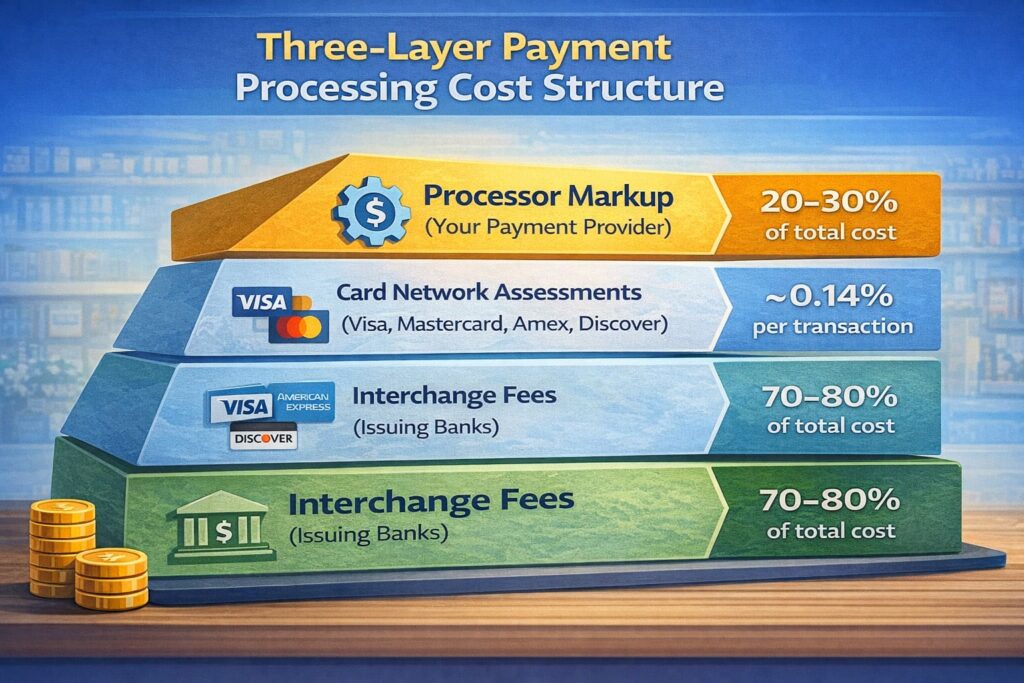
When a customer swipes or taps their card at your register, three distinct layers of fees are immediately triggered:
- Interchange fees (paid to issuing banks)
- Card network assessments (paid to Visa, Mastercard, Amex, Discover)
- Processor markup (retained by your payment provider)
The customer sees one transaction. You see three separate charges.
Understanding this structure is the foundation for reducing what you pay.
Why These Fees Exist
Interchange fees exist because issuing banks bear real costs: fraud prevention, customer service, default risk, and the infrastructure to move money. When Chase or Bank of America issues a card, they’re taking on liability. Interchange is how they get compensated for that risk.
Card network fees pay for the payment rails themselves—the system that routes your transaction from your terminal through multiple banks and back to your cash register in seconds. That infrastructure isn’t free.
Processor markup is straightforward: it’s how your payment provider makes money. Some processors are transparent about this. Others bury it.
The critical difference: interchange and network fees are non-negotiable. Your processor has zero control over them. The only component you can negotiate is the processor’s markup.
“Interchange rates are non-negotiable, regardless of the payment processor you choose.” — AllayPay, Payment Processing Provider (2026 Update)
Three-Layer Payment Processing Cost Structure
Anatomy of the Fee: Breaking Down the Three Components
Interchange Fees: The Base Cost That Changes Every Transaction
Interchange fees are set by the card networks—Visa, Mastercard, Discover, and American Express—not by your processor.
This is the most critical detail: you cannot negotiate interchange fees with anyone. Your processor cannot lower them. Your acquiring bank cannot lower them. They’re set by the networks and reviewed twice per year (typically in April and October).
Interchange varies dramatically based on:
- Card type (debit vs. credit, rewards vs. standard, corporate cards)
- How the card is entered (EMV chip, NFC/contactless, keyed online, phone order)
- Your industry (restaurant MCC codes have specific rates)
- Average transaction size (larger tickets sometimes qualify for better rates)
- Security practices (AVS/CVV verification can lower your rate)
For example, a standard debit card swiped in-person might be 1.51% + $0.04. A business rewards credit card entered as “card-not-present” could be 2.95% + $0.10.
Key fact from Visa USA Interchange Reimbursement Fees (October 2024): Retail credit transactions are typically charged 2.00% + $0.07, while rewards credit cards run higher—sometimes exceeding 2.5%+ depending on the card benefits tier.
The reason rates vary so widely is risk. A card-not-present e-commerce transaction (where you can’t verify the cardholder is present) is riskier than a chip card transaction verified with a PIN.
Higher risk = higher interchange.
You cannot change this. What you can do is understand it, so you’re not surprised by variance in your statement month-to-month.
Card Network Assessment Fees: The Fixed Cost from Visa, Mastercard, and Others
These are small but fixed charges assessed by the card networks themselves for maintaining the payment infrastructure.
Common assessment fees per transaction:
| Network | Fixed Fee | Percentage Fee |
|---|---|---|
| Visa | $0.0195 | 0.14% |
| Mastercard | $0.0195 | 0.1275% (under $1,000) / 0.1475% (over $1,000) |
| American Express | Varies | 0.15% |
| Discover | $0.0195 | 0.13% |
These aren’t large—we’re talking cents per transaction—but they add up across thousands of transactions monthly.
And like interchange, they’re non-negotiable. Every processor passes them through identically.
Processor Markup: The Only Part You Can Actually Negotiate
This is where your processor makes their margin. It typically includes:
- Percentage fee (e.g., 0.25% of each transaction)
- Per-transaction fee (e.g., $0.15 per swipe)
- Monthly statement fee ($5–$15)
- PCI compliance fee ($10–$30/month, sometimes waived)
- Gateway fee (if you use a payment gateway, $10–$25/month)
- Batch fee (per batch of transactions settled)
- Chargeback fees ($15–$100 per dispute)
- Annual fees (sometimes buried in contracts)
- Early termination fees (ETF)—Can range from $100–$500+ or be calculated as liquidated damages based on remaining contract months (e.g., $200/month × 30 months = $6,000)
- Equipment lease fees (if leasing instead of owning terminals)
This is your negotiation territory.
When a processor quotes you a rate, they’re typically quoting you: (Interchange + Assessment) + (Your Negotiated Markup).
The better your understanding of interchange/assessment, the more leverage you have in negotiations.
Understanding Your Real Costs: The Effective Rate Formula
You probably see a “rate” advertised—”2.9% + $0.30″ or “Interchange Plus 0.35%.”
But what are you actually paying?
The answer is your effective rate—the true percentage of your monthly revenue that goes to payment processing.
Formula for Effective Rate
Effective Rate = (Total Monthly Processing Fees ÷ Total Monthly Card Volume) × 100%
Example calculation:
| Item | Amount |
|---|---|
| Total card volume (sales) | $50,000 |
| Interchange fees | $850 |
| Assessment fees | $75 |
| Processor markup (0.35% + $0.15 per txn × 1,200 txns) | $355 |
| Total fees | $1,280 |
| Effective Rate | 2.56% ($1,280 ÷ $50,000 × 100%) |
That 2.56% is what actually matters.
Not the “2.9% + $0.30” advertised rate, but the real percentage of your revenue going to processing.
💳 Credit Card Processing Fee Calculator
📊 Pricing Model Comparison
Estimates only. Actual fees vary by card type, interchange category, and processor pricing.
Pricing Models: Which One Actually Costs You Less?
Most processors offer one of four pricing models. Each has trade-offs.
Interchange-Plus: Maximum Transparency (And Usually Lowest Cost at Scale)
How it works: You pay the actual interchange rate for each transaction, plus the network assessment, plus a fixed markup percentage and per-transaction fee set by your processor.
Example:
- Card type: Standard credit card
- Interchange: 2.00% + $0.07
- Assessment: 0.14%
- Your processor markup: 0.35% + $0.15
- Total: 2.49% + $0.22 per transaction
Advantages:
- Complete transparency—you see exactly what the networks charge vs. what your processor charges
- Best for high-volume merchants; more volume = better negotiating power on the markup
- Easy to compare providers; you’re comparing only the processor’s markup, not bundled rates
Disadvantages:
- Monthly fees vary based on transaction mix
- Requires understanding of different interchange categories
- Less suitable for very small operations with unpredictable card mixes
When to choose: If you process over $10,000/month and want the lowest long-term costs, this is almost always the right choice.
Tiered Pricing: Simplicity at a Hidden Cost
How it works: All transactions are sorted into 3–4 rate tiers based on risk/card type. Each tier has a fixed percentage.
Example:
- Qualified (standard debit, in-store): 1.95%
- Mid-qualified (standard credit, in-store): 2.25%
- Non-qualified (rewards credit, online, keyed): 3.25%
Advantages:
- Easy to understand at first glance
- Predictable on paper
Disadvantages:
- Hidden surprises; transactions don’t always land in the tier you expect
- Premium/rewards cards almost always qualify as “non-qualified,” pushing you to the 3%+ tier
- Effectively penalizes customers who use better card benefits
- Harder to audit; disputes about qualification are common
When to choose: Rarely. Tiered pricing benefits your processor more than you. Avoid if possible.
Flat-Rate Pricing: Simplicity for Predictability
How it works: One fixed percentage applies to every transaction, regardless of card type or method.
Example: Square charges 2.6% + $0.10 for swiped cards, 3.5% + $0.15 for keyed.
Advantages:
- Maximum simplicity for accounting
- Budget predictability
- Good for very small operations (<$3,000/month)
Disadvantages:
- Often 0.5–1% more expensive than Interchange-Plus at higher volumes
- You pay the same rate for cheap debit cards as expensive rewards cards
- No incentive for you to optimize—every transaction costs the same regardless of risk
When to choose: If you process under $5,000/month and want zero complexity, this might work. But as soon as you grow beyond that, the cost difference becomes painful.
Membership/Subscription Models: Pay Monthly, Pay Less Per Transaction
How it works: You pay a fixed monthly fee ($99–$299) and a lower per-transaction rate (sometimes 0% markup on interchange+assessment).
Advantages:
- Lowest per-transaction cost if you process consistently
- Good for stable, high-volume operations
- True cost transparency
Disadvantages:
- Requires high volume to break even
- Monthly fee is sunk cost if you have slow months
- Not ideal for seasonal businesses
When to choose: If you consistently process $20,000+ monthly and transactions are predictable.
Quick Comparison: Which Model Costs Less?
Table comparing payment processing pricing models by cost, transparency, and suitability for different business types
| Model | Transparency | Cost at $10k/mo | Cost at $50k/mo | Best For | Typical Effective Rate |
|---|---|---|---|---|---|
| Interchange-Plus | Highest | ~$250/mo | ~$1,150/mo | Growing restaurants, high-volume | 1.8–2.4% CP; 2.5–3.5% CNP |
| Tiered | Lowest | ~$225/mo | ~$1,400+/mo | (Avoid—benefits processor) | 2.4–3.8% (unpredictable) |
| Flat-Rate | Medium | ~$260/mo | ~$1,300+/mo | Very small/new businesses | 2.6–2.9% + fixed fee |
| Membership | High | ~$325/mo (w/ fee) | ~$950/mo (w/ fee) | Stable, high-volume operations | 1.5–2.2% + monthly fee |
Note: Costs vary by card mix, region, and processor. Debit-heavy merchants favor Interchange-Plus; card-not-present merchants pay higher rates across all models.
Six Key Factors That Determine Your Final Rate
1. Card Type: Rewards vs. Standard vs. Debit
Your customer’s card type is the single biggest factor in your interchange cost.
Standard credit card (Visa Classic): ~2.00% + $0.07
Rewards/premium credit card (Visa Signature, World Mastercard): ~2.50% + $0.10+
Basic debit card: ~1.51% + $0.04
Corporate/commercial card: ~2.95% + $0.10+
This means a customer paying with a premium card costs you 50–100 basis points more than one using a debit card.
You can’t change this, but you can encourage debit cards or cash through incentives (which we’ll cover later).
2. How the Card Is Entered: EMV vs. Online vs. Keyed
Card-present (in-person):
- EMV/Chip card: Lowest cost (~1.5–2.0%)
- NFC/Contactless (Apple Pay, Google Pay): Same as EMV
- Swipe (magnetic stripe): Slightly higher due to higher fraud risk
Card-not-present (online, phone, mail):
- E-commerce with 3D Secure: ~2.5–2.8%
- Recurring/subscription: ~2.5–3.0%
- Keyed entry (MOTO—mail/phone order): ~2.95–3.5%
- No address verification: ~3.5%+
The difference is substantial. A restaurant with 99% card-present transactions will have a much lower effective rate than an online retailer or hotel handling significant phone bookings.
3. Your Industry and Risk Profile (MCC Code)
Every business is assigned a Merchant Category Code (MCC). Restaurants are typically 5812. Hotels are 7011.
Different industries have different chargeback rates and fraud risk, so networks adjust interchange accordingly:
- Low-risk (grocery, gas): ~1.4–1.8%
- Medium-risk (restaurants, retail): ~2.0–2.4%
- High-risk (travel, online gaming, subscription): ~2.8–3.5%+
You cannot change your MCC, but you can reduce chargebacks and fraud, which can improve your effective rate classification over time.
4. Monthly Volume and Average Ticket Size
Higher volume gives you negotiating power on the processor’s markup.
Average ticket size matters too. Small average tickets ($15–$25) mean more per-transaction fees as a percentage of sale. Large average tickets ($100+) spread the fixed fees thinner.
Example: A $0.15 per-transaction fee on a $20 ticket is 0.75% of the sale. On a $100 ticket, it’s 0.15%.
5. Security Practices: AVS, CVV, 3D Secure
When you use Address Verification System (AVS), CVV verification, or 3D Secure (3DS) on card-not-present transactions, networks downgrade your risk classification, lowering interchange rates.
If you run a hotel and don’t require CVV verification for phone bookings, you’re paying premium rates on those transactions.
Implementing these security layers directly reduces your effective rate.
6. Chargebacks and Fraud Rate
A high chargeback rate signals risk. Networks respond by increasing your interchange category.
If chargebacks exceed 1% of transactions, processors may reassess your risk tier or add surcharges. This creates a vicious cycle: high chargebacks → higher fees → lower margins.
Reducing chargebacks through clear billing statements, customer communication, and fraud prevention directly lowers your effective rate.
How to Read Your Merchant Statement and Find Hidden Fees
Your processor sends you a monthly statement. Most merchants never fully read it.
That’s a mistake.
Key Fees to Look For (And What They Mean)
| Fee | What It Is | Typical Cost | Negotiable? |
|---|---|---|---|
| Batch Fee | Charged per settlement batch (usually daily) | $0.25–$1.00/batch | Yes |
| Authorization Fee | Charged per approved transaction attempt | $0.02–$0.10 | Yes |
| Gateway Fee | Monthly fee for payment gateway | $10–$25 | Yes |
| PCI Compliance Fee | Monthly fee for PCI DSS assessment | $10–$30 | Often waived |
| Monthly Minimum | Minimum fee if volume is low | $10–$25 | Yes |
| Statement Fee | Cost to email/print statement | $5–$10 | Yes—often removed |
| Chargeback Fee | Per dispute/reversal | $15–$100 | No (network-mandated) |
| Early Termination Fee | Penalty for ending contract early | $200–$500+ | Yes |
| Annual Fee | Yearly account maintenance | $50–$150 | Yes—negotiate or remove |
Common Hidden Fees That Processors Won’t Volunteer
Equipment Lease Fees: If you’re leasing a terminal instead of owning it, you might be paying $30–$50/month for a device worth $200–$300. Total cost over 3 years: $1,000+.
Just buy the equipment.
PCI Non-Compliance Fees: Your processor charges $20–$30/month if your account fails PCI DSS scans. Often, this is their way of forcing you to pay for their compliance solution.
“Regulatory” or “Network” Fees: These are vague charges ($10–$50/month) that don’t correspond to actual network or regulatory requirements. Push back. If your processor can’t explain exactly what it is, it shouldn’t be on your bill.
Upgrade or “Service” Fees: Sometimes processors raise your rate 0.10–0.25% and call it an “account review” or “service upgrade.”
Check your statement month-to-month to catch these.
7 Proven Ways to Reduce Your Processing Fees
1. Audit Your Current Costs (The Starting Point)
Pull your last 3 months of merchant statements. Calculate your effective rate for each month.
What to look for:
- Does your quoted rate match your effective rate?
- Are there fees on your statement not mentioned in your contract?
- Is your rate consistent month-to-month, or does it spike unexpectedly?
A $50,000/month restaurant paying 2.8% effective rate is paying $1,400/month. The same restaurant at 2.0% is paying $1,000/month.
That’s $4,800/year in difference.
Action: Request an itemized statement showing interchange, assessments, and markup separately. If your processor won’t provide this, that’s a red flag.
2. Switch to Interchange-Plus Pricing (If You’re Not Already)
If you’re on flat-rate or tiered pricing and processing over $8,000/month, switching to Interchange-Plus will almost certainly save money.
Why: Flat-rate charges you the same for a $20 debit transaction as a $100 rewards credit transaction. Interchange-Plus charges you based on actual cost.
How to propose it: When renegotiating with your processor, ask for “Interchange-Plus with a fixed markup of X% + $Y per transaction.”
Aim for:
- 0.25–0.35% markup if you process $20,000+/month
- 0.35–0.50% if you process $10,000–$20,000/month
- 0.50–0.75% if under $10,000/month
These are achievable rates for restaurants with decent volume and low chargebacks.
3. Reduce Risk and Chargebacks (Directly Lowers Your Interchange)
Every time you reduce a chargeback, you reduce your risk classification, which lowers future interchange rates.
Practical steps:
- Use CVV verification on all card-not-present transactions
- Implement clear billing descriptors so customers recognize charges
- For hotels and restaurants: keep detailed records of guest stays, purchases, and communication
- Reduce refund disputes by having clear return/cancellation policies
- For online transactions: use 3D Secure for card-not-present
- Monitor your chargeback rate; target below 1% of monthly transactions
Impact: Reducing your chargeback rate from 1.2% to 0.6% can lower your effective rate by 15–25 basis points, saving hundreds monthly.
4. Encourage Lower-Cost Payment Methods
Train your staff to offer alternatives:
Debit cards: Cost you ~1.51% vs. ~2.50% for credit. A small incentive ($0.50 off or “use debit and get free water”) can shift transaction mix and lower your effective rate.
ACH/Bank transfers: For advance bookings (hotels, catering), offer a 2% discount for ACH payment. You save 2%+ in fees, customer gets a discount—it’s a win-win.
Cash: Still the lowest-cost payment method (0% fees), but impacts customer experience and introduces security/handling costs.
5. Eliminate Unnecessary Fees
Go through your statement line-by-line and challenge everything:
- Statement fee? Ask for it to be waived or switched to digital-only.
- Gateway fee? If you’re using a bundled gateway, see if that’s truly necessary.
- Annual fee? Most processors will waive this if you ask.
- PCI compliance fee? Often waived for accounts using compliant POS systems.
- Monthly minimum? Negotiate based on your volume.
In practice: I’ve seen merchants eliminate $50–$150/month in fees by simply asking. Most processors assume you won’t notice; they’re banking on inattention.
6. Negotiate on Volume
When your volume hits $15,000+/month, you have leverage. Use it.
Approach:
- Get competing quotes from 2–3 processors (Helcim, Stripe, Square, PayPal, your bank)
- Share the best quote with your current processor
- Ask: “Can you beat this rate? If so, I’ll stay; if not, I’m switching.”
Processors will often drop your markup 0.05–0.15% to keep your business rather than lose you.
7. Use Rate Comparison and Monitor Quarterly
Payment processing rates shift twice a year (April and October) when Visa and Mastercard update interchange. Your effective rate will naturally fluctuate.
Best practice: Recalculate your effective rate every quarter. If it’s creeping up and chargebacks haven’t, ask your processor why—sometimes rates are raised without notification.
Competitive shopping: Every 12–18 months, get fresh quotes from competitors. Rates change, and you might find a better deal.
Processors often give better rates to new customers than they do to loyal ones (a frustrating reality).
Funding Speed and Settlement Practices: Ensuring Payment Stability
Beyond fees, the speed and reliability of your payouts significantly impact your business operations and cash flow predictability.
Settlement Timelines: T+1, T+2, and Batching
T+1 (Next business day): Your processor deposits funds into your merchant account one business day after transactions settle. Most modern processors offer this standard.
T+2 (Two business days): Older or regional processors may batch funds on T+2, which delays your access to cash by an extra day.
Important timing factors:
- Cut-off times: Transactions processed after your processor’s daily cut-off (usually 11 PM–midnight) settle the next day, not the same day
- Weekends and holidays: If your cut-off falls on Friday, settlement doesn’t occur until Monday; holiday weekends extend this further
- Batch processing: Your processor may batch transactions in multiple daily settlements (morning, afternoon, evening) or one consolidated daily batch
Reserve Holds and Chargebacks
Processors can hold a percentage of your settlement to cover potential chargebacks or fraud:
- Typical reserve: 0.5–2% of daily settlement, released after 180 days of low chargeback history
- Chargeback impact: High chargebacks can trigger increased reserves (5–10%), severely restricting your cash flow
- Reserve conditions: Some contracts specify reserves held indefinitely; negotiate for automatic release conditions
Processor Comparison: Funding Speed
Different payment providers vary in settlement speed:
| Provider | Typical Funding | Reserve Policy | Best For |
|---|---|---|---|
| Helcim | T+1 | Minimal (0.25–0.5%) | Standard businesses |
| Square | T+1 to T+2 | 0.5–1% | Retail/food service |
| Stripe | T+2 to T+7 | Variable by risk | E-commerce/high-volume |
| Bank Direct | T+1 to T+2 | Bank-dependent | Established businesses |
Action item for contracts: Always specify funding timeline, ask whether weekends/holidays affect timing, and negotiate reserve percentages downward.
A difference of one day in funding can significantly impact working capital for seasonal businesses.
Debit Card Deep Dive: Understanding Durbin-Regulated vs. Unregulated Debit
Debit cards are not all created equal.
Understanding the distinction between Durbin-regulated and unregulated debit transactions can directly lower your processing costs, particularly for restaurants with small average checks.
The Durbin Amendment: What Changed in 2010
The Durbin Amendment (part of the Dodd-Frank Act, 2010) capped interchange fees on debit card transactions initiated by regulated financial institutions (typically banks with >$10 billion in assets).
Durbin-regulated debit interchange cap:
- PIN-based debit: $0.21 + 0.05% of transaction
- Signature-based debit: $0.21 + 0.05% of transaction (same cap)
Example: A $50 debit transaction costs you $0.215 (roughly 0.43%) vs. a credit card at 2.00%+.
Unregulated Debit Cards
Banks with <$10 billion in assets, credit unions, and some prepaid card issuers are exempt from the Durbin cap. Their debit interchange is not capped and can range from 1.2% to 1.8%—still cheaper than credit, but significantly higher than Durbin-regulated debit.
PIN vs. Signature: Does It Matter?
Legally: No. Both PIN and signature debit cards are Durbin-capped at the same $0.21 + 0.05%.
Practically: Card networks occasionally test whether your POS system can accept PIN entry. Signature-only systems may trigger “non-compliant” fees or be reclassified as riskier, so supporting PIN entry is best practice.
Impact on Restaurant Operations
For quick-service restaurants with $15–$25 average checks, debit card optimization can yield significant savings:
Scenario: 50% debit mix, $50,000 monthly volume, 1,000 transactions
- If 500 transactions are Durbin-regulated debit @ 0.43%: $215/month
- If 500 are unregulated debit @ 1.5%: $375/month
- Combined debit cost: $590/month
- Equivalent credit at 2.25%: $1,125/month
- Monthly savings from debit optimization: $535
Action: Verify with your processor which debit transactions are Durbin-regulated vs. unregulated. If your mix includes significant unregulated debit, request that your processor route transactions through Durbin-regulated networks when possible.
Cash Discount and Dual Pricing: Legally Passing Fees to Customers
If you’ve done everything above and still want to reduce costs further, you can legally transfer some or all of the processing fee to the customer who chooses to pay by card.
There are three legal approaches in the USA: Cash Discount, Dual Pricing, and Surcharge. They’re different and have different legal requirements.
Cash Discount: Offering a Discount for Cash or Non-Card Payment
Definition: You offer a discount to customers who pay with cash, debit card, ACH transfer, or other non-credit-card methods.
How it works:
- Base price: $100 (includes your processing fee estimate)
- Cash payment: $98 (2% discount)
- Card payment: $100 (standard price, you absorb processing fee)
Why call it a “discount” instead of “credit card fee”? Because networks and regulators are more comfortable with discounts than surcharges. Psychological framing matters.
Legal status: Legal in all 50 states under the Durbin Amendment (Dodd-Frank Act, 2010). Courts have upheld cash discounts repeatedly.
Setup requirements:
Checklist for setting up a cash discount program for credit card processing fee recovery
- Decide discount percentage (typically 2–3%, matching your processing fee estimate)
- Update POS system to apply discount at card selection, not before
- Create signage for entrance: “Cash Discount Available: Pay with Cash and Save 2%”
- Update menu/pricing with base price (card price)
- Train staff on policy
- Test with sample transactions
- Notify your processor (not required by law, but good practice)
- Verify compliance with local city/county laws
Key points:
- Discount must be applied at checkout, not advertised as a “credit card fee”
- Apply discount uniformly—don’t offer it to some customers and not others
- The base price should be your standard published price (menu, price list, website)
- Works well for restaurants, retailers, and service businesses
Dual Pricing: Displaying Two Prices Upfront
Definition: You publicly display two prices—one for card, one for cash—and customers choose which to pay.
How it works:
- Cash price: $98
- Card price: $100
- Customer decides which payment method they prefer
Difference from cash discount: With dual pricing, both prices are visible upfront. With cash discount, the customer sees the card price first and learns about the discount at checkout.
Legal status: Legal in all 50 states. Visa explicitly allows dual pricing and considers it compliant if both prices are displayed clearly.
Card price displayed upfront with side-by-side visibility of cash/card prices, plus signage at entrance and register, constitute full compliance.
Setup requirements:
Dual Pricing Signage for Restaurants and Retail
Example 1 – Restaurant Menu:
“Dine In Pricing (Card): $45 | Cash Discount: $43”
Example 2 – Register Signage:
“Cash Price: $45 | Card Price: $46”
Example 3 – Online/Website:
“$45 (Card) | $43 (Cash)”
Example 4 – Point-of-Sale Display:
[Two-column display at checkout showing card vs. cash price]
Key requirements:
- Both prices must be equally prominent (not tiny cash price, huge card price)
- Disclose at point of sale (menu, shelf labels, website, checkout)
- Cannot be described as “fee”—must frame as “two prices” or “cash discount”
- Apply consistently to all transactions
Best practice: Dual pricing works well for restaurants with fixed menu prices. It’s transparent and doesn’t create friction at checkout.
Surcharge: Adding a Fee for Card Payments
Definition: You add a percentage fee on top of the listed price when a customer chooses to pay by card.
How it works:
- Base price: $100
- Card payment: $102.50 (2.5% surcharge added)
- Cash payment: $100
Legal status: Restricted in some states. As of January 2026:
| Prohibited Entirely | Restricted/Capped |
|---|---|
| California | Colorado (2% max) |
| Connecticut | New Jersey (must not exceed actual cost) |
| Maine | New York (must not exceed actual cost) |
| Massachusetts | Nevada (1.5% max) |
| Puerto Rico | Maryland (4% cap) |
| Texas (restricted) |
Why restrictions? Surcharges feel like a “fee” to customers (negative psychology), while cash discounts feel like a reward.
Notification requirements:
- You must notify Visa, Mastercard, Discover, and Amex 30 days before starting surcharging
- Cannot surcharge debit cards (network rule)
- Must disclose surcharge amount on receipt
- Some states require additional disclosures
When to use: Only if dual pricing or cash discount don’t work for your business model, and surcharging is legal in your state.
Disclaimer: This section covers general information about payment method pricing strategies. Payment processing regulations are complex and vary by jurisdiction. Consult with your payment processor, legal counsel, and relevant state/local authorities before implementing cash discount, dual pricing, or surcharge programs to ensure full compliance with applicable laws and network rules in your jurisdiction.
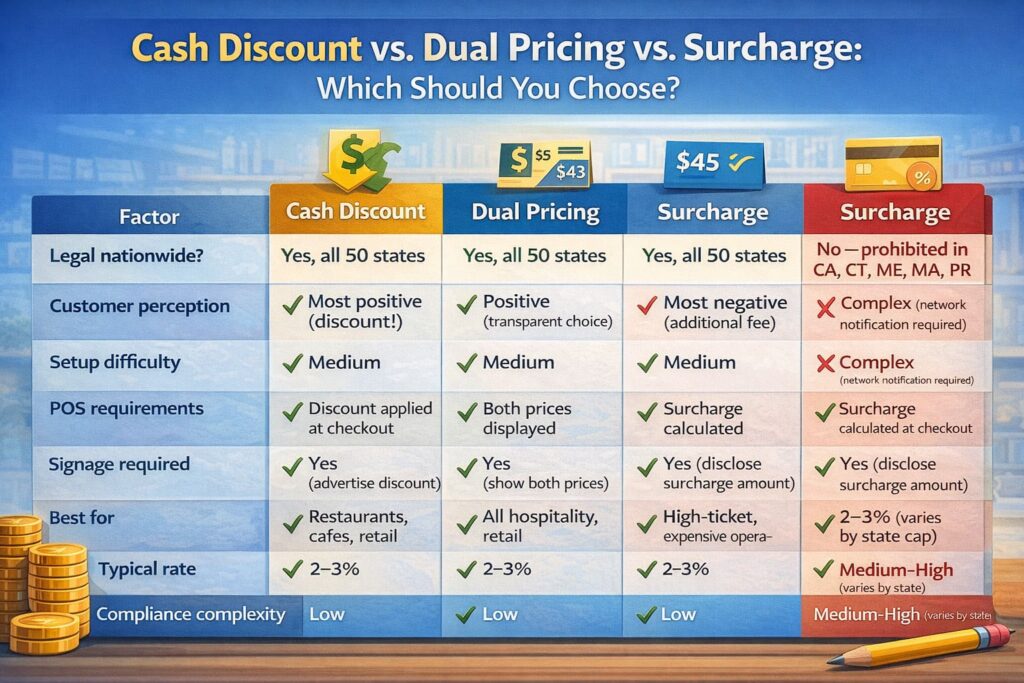
Cash Discount vs. Dual Pricing vs. Surcharge: Which Should You Choose?
Comparison of cash discount, dual pricing, and surcharge programs across legal, customer, and operational factors
| Factor | Cash Discount | Dual Pricing | Surcharge |
|---|---|---|---|
| Legal nationwide? | Yes, all 50 states | Yes, all 50 states | No—prohibited in CA, CT, ME, MA, PR |
| Customer perception | Most positive (discount!) | Positive (transparent choice) | Most negative (additional fee) |
| Setup difficulty | Medium | Medium | Complex (network notification required) |
| POS requirements | Discount applied at checkout | Both prices displayed | Surcharge calculated at checkout |
| Signage required | Yes (advertise discount) | Yes (show both prices) | Yes (disclose surcharge amount) |
| Best for | Restaurants, cafes, retail | All hospitality, retail | High-ticket, expensive operations |
| Typical rate | 2–3% | 2–3% | 2–3% (varies by state cap) |
| Compliance complexity | Low | Low | Medium–High (varies by state) |
My recommendation for restaurants and hospitality:
Start with dual pricing or cash discount. Both are legal nationwide, customer perception is positive, and setup is straightforward.
- Dual pricing works best if you can update menus/signage (restaurants, cafes, retail shops)
- Cash discount works best if you want to keep advertised prices unchanged (existing POS systems)
Avoid surcharging unless:
- You’re in a state where it’s legal
- You want to charge 3%+ (which offends customers more than 2%)
- Your customers expect it (luxury hospitality, high-ticket items)
Frequently Asked Questions
-
Is it legal to offer a discount for cash or charge a fee for cards?
Yes, with conditions:
– Cash Discount: Legal in all 50 states. Frame as a discount, not a fee.
– Dual Pricing: Legal in all 50 states if both prices are clearly displayed upfront.
– Surcharge: Legal in 44 states with restrictions; prohibited in CA, CT, ME, MA, PR. Cannot surcharge debit cards.Key rule: You’re legally offering pricing incentives, not imposing “fees” (which have stricter regulations).
-
How often do interchange rates change?
Visa and Mastercard update interchange rates twice yearly:
– Spring (April): Quarterly review
– Fall (October): Quarterly reviewYour processor passes these changes through automatically. Your effective rate may fluctuate 0.05–0.15% twice per year depending on your transaction mix.
-
What’s the difference between interchange and processing fees?
Interchange = the fee you pay to the issuing bank (customer’s bank). Non-negotiable, set by networks. ~70–80% of your total cost.
Processing fee = the total cost including interchange + assessment + processor markup. This is the fee you actually see on your statement.
-
Can I negotiate interchange rates?
No. Interchange is set by card networks and goes to issuing banks. Your processor has zero control over it.
What you can negotiate: Processor markup (the 0.35% or 0.25% portion of the rate). This is the only component that varies between processors.
-
How do I know if my effective rate is competitive?
Benchmark by business type:
– Restaurants (card-present, mostly credit): 2.0–2.5% effective rate is competitive; 2.8%+ means you’re overpaying
– Hotels (mix of CP and CNP, plus bookings): 2.2–2.8% is competitive
– E-commerce (all CNP): 2.8–3.5% is typical; hard to go lower due to fraud risk
– High-volume ($100k+/month): Should be under 2.2% on Interchange-PlusIf you’re significantly above these benchmarks, it’s time to shop processors or renegotiate.
-
What’s a “chargeback” and how does it affect my fees?
Chargeback: A customer disputes a transaction and their bank reverses the charge. You lose the sale, pay a chargeback fee ($15–$100), and risk higher future rates if chargebacks exceed ~1% of volume.
Reduce chargebacks by:
– Using clear billing descriptors (customer recognizes the charge)
– Requiring signature/CVV verification for card-not-present
– Maintaining detailed transaction records (especially for hospitality)
– Responding quickly to customer disputesLower chargebacks = lower rates over time.
-
Should I use a payment gateway or my POS system’s built-in processor?
Rule of thumb:
– If your POS includes integrated payment processing, use it (fewer integration points, simpler support)
– If you need flexibility (accepting multiple payment methods, higher volume), a dedicated gateway may offer better ratesKey factor: Compare total cost—POS processing + gateway fee vs. standalone gateway. Integrated is often cheaper.
-
What is the effective rate and how is it calculated?
The effective rate is the true percentage of your monthly revenue that goes to payment processing, calculated by dividing total fees by total sales volume.
For example: $1,280 in fees on $50,000 sales = 2.56% effective rate. This accounts for all components: interchange, assessments, and processor markup combined.
Conclusion: Your Action Plan
Processing fees are complicated, but here’s what actually matters:
- Know your effective rate. Calculate it monthly. It’s the only number that matters.
- Understand the three components. Interchange (non-negotiable), assessment (non-negotiable), markup (negotiate this).
- Choose the right pricing model. Over $8,000/month? Interchange-Plus. Under $5,000/month and want simplicity? Flat-rate. Otherwise, Interchange-Plus.
- Reduce the controllables. Lower chargebacks, improve security practices (AVS/CVV/3DS), encourage debit, eliminate waste fees.
- Negotiate annually. Get competitive quotes. Processors expect it.
- Consider passing costs if margins justify it. Dual pricing or cash discount can recover 1–3% of revenue without harming customer experience.
- Monitor funding speed and settlement. T+1 funding vs. T+2 affects working capital; negotiate reserves downward.
For restaurants and hospitality, payment processing is typically the second-largest controllable expense after labor.
The time you spend optimizing this will pay for itself within months.
Free Payment Processing Audit
Sources & References:
- Visa USA Interchange Reimbursement Fees (October 2024). https://usa.visa.com/content/dam/VCOM/download/merchants/visa-usa-interchange-reimbursement-fees.pdf
- Visa Core Rules and Product and Service Rules (19 October 2024), Section 1.11. https://usa.visa.com/dam/VCOM/download/about-visa/visa-rules-public.pdf
- Mastercard Transaction Processing Rules (2024–2025). Assessment fee structure for credit/debit transactions.
- Electronic Transactions Association (ETA). ETA CPP Certification Program Standards (2026).
- AllayPay. “Current Interchange Rates in the USA (Updated 2026).” Blog.
- BillFlash. “Navigating Payment Processing Fees” (2025). https://www.billflash.com
- Helcim. “What is Interchange-Plus Pricing?” Learn Platform (2024). https://learn.helcim.com/docs/what-is-interchange-plus
- Durbin Amendment (Dodd-Frank Act, 2010). Debit card interchange fee cap regulations.
This article is educational and does not constitute financial or legal advice. Payment processing terms, fees, and regulations vary by jurisdiction, processor, and business type. Consult with your payment processor, acquiring bank, and legal counsel regarding compliance with applicable card network rules, state laws, and regulations governing pricing strategies (cash discounts, dual pricing, surcharges) before implementation.