Skip to content
Updated: January 2026. This guide reflects current payment processing standards, FedNow integration timelines, PCI DSS v4 compliance requirements, and real merchant fee data for 2026.
TL;DR: Quick Reference for Decision-Makers
Payment processing moves customer funds to your account through five stages: authorization (5–10 sec), clearing (overnight), settlement (24–48 hrs or FedNow same-day), and reconciliation. Total cost ranges 2.0%–3.5% + per-transaction fees, split among interchange (to issuing bank), network assessments (~0.14%), and processor markup. For restaurants/hotels under $40k/month, flat-rate (2.9% + $0.30) is simpler; above $40k/month, interchange-plus (2.0% IC + 0.30% markup) saves 30–50%. Modern processors like Toast, Stripe, and Adyen integrate with POS/PMS, offer next-day settlement (or FedNow same-day), and handle PCI DSS v4 compliance for you. The biggest mistake: ignoring rates for years—renegotiate annually or switch processors every 3–5 years for 0.5%–1.5% savings.
What is Payment Processing and Why It’s Critical for Your Restaurant or Hotel
Payment processing is the complete infrastructure that moves money from your customer’s card to your business bank account. It sounds simple—swipe, approve, deposit—but behind that transaction are eight distinct participants working in coordinated steps: authorization, clearing, settlement, and reconciliation.
For restaurants and hospitality businesses, this isn’t theoretical. A payment processing failure during dinner service doesn’t just cost you one transaction—it costs you table turns, staff efficiency, customer experience, and trust. A hotel without reliable payment processing loses room bookings and creates friction at check-in. A retail location with slow checkout drives customers to competitors.
From my experience advising hospitality businesses over 12 years: The businesses that treat payment processing as core infrastructure—not an afterthought—see 2–3% improvement in transaction completion rates, faster cash flow (24–48 hours instead of 5–7 days), and predictable monthly costs. Those that ignore it? They leak 5–8% of revenue to failed transactions, chargebacks, and hidden fees.
The difference between a well-designed payment stack and a broken one is often just one conversation with the right technical advisor and one intentional choice about which processor to use.
This guide walks you through how payment processing actually works, what it costs, which solutions fit your business model, and how to optimize it for your specific industry—whether you’re running a quick-service restaurant, a fine-dining establishment, a hotel chain, or a retail location.
The Payment Processing Ecosystem: Who Does What
Payment processing involves eight key players, each with a specific role and risk. Understanding who they are and what they do is essential for troubleshooting problems and negotiating better rates.
The Eight Participants in Every Transaction
Cardholder (Your Customer)
Initiates the transaction by providing card data (swipe, insert, tap, or online entry). The cardholder’s bank (issuing bank) verifies their identity and funds, then authorizes or declines the transaction.
Merchant (You)
Accepts the payment and submits it for processing. You’re responsible for PCI DSS compliance, accurate transaction records, and dispute resolution.
Payment Gateway
Your technical entry point. The gateway encrypts card data at your POS or checkout form and securely transmits it to the payment processor. It’s the “door” between your business and the payment system. The gateway also handles tokenization—replacing sensitive card details with a reusable token so you never store the full card number.
Payment Processor
The operational engine. It receives your transaction from the gateway, validates it, routes it through the card network to the issuing bank for authorization, and then manages clearing and settlement. The processor also handles refunds, chargebacks, and dispute resolution. Most processors also manage your merchant account and control your reserves and payout schedule.
Acquiring Bank (Your Bank)
Provides your merchant account and holds funds pending settlement. When a transaction clears, the acquiring bank receives money from the card network and deposits it into your account, minus processing fees.
Issuing Bank (Customer’s Bank)
The customer’s financial institution. During authorization, the issuing bank checks the cardholder’s available credit or funds, performs fraud checks, and either approves or declines the transaction in real time.
Card Network (Visa, Mastercard, American Express)
The infrastructure operator. Networks set rules, manage routing between issuers and acquirers, operate clearing and settlement systems, and update security standards (like 3D Secure 2). They also collect fees from merchants and issuers. Official interchange tables for 2026 are available from Visa USA Interchange Reimbursement Fees and Mastercard U.S. Region Interchange Rates.
Merchant Account
A specialized holding account where your processor deposits cleared funds before they reach your main business bank account. The merchant account is where reserves and disputes are managed.
Ecosystem Visualization: The Transaction Path
Payment Processing Ecosystem.
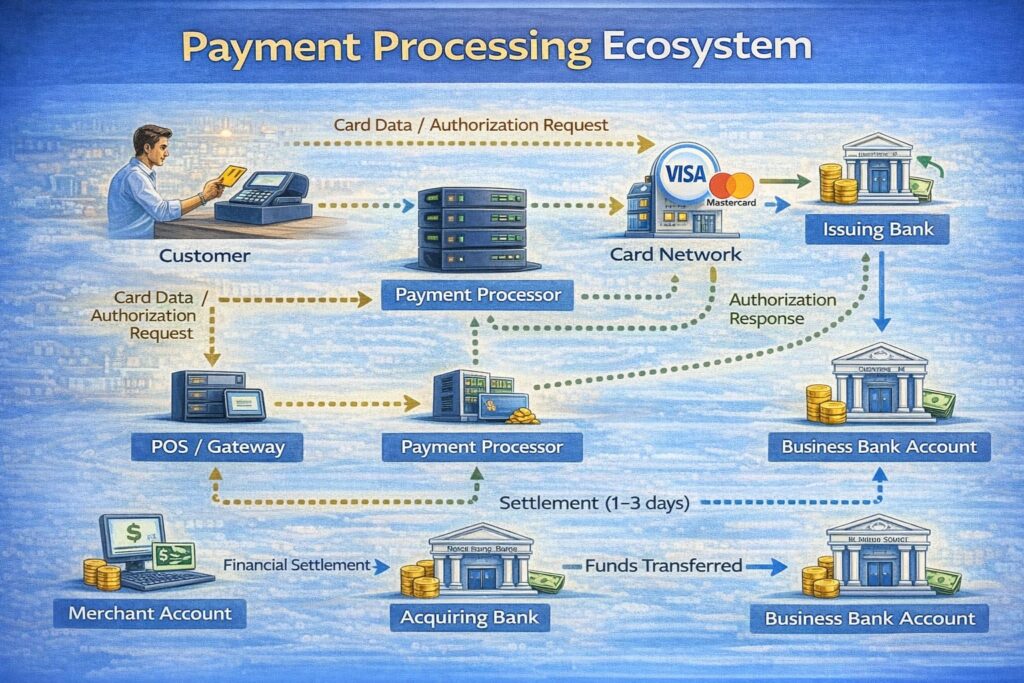
Each of these eight participants touches the transaction at a specific point. Delays or failures at any one point ripple through the entire system—which is why a single weak link (like outdated POS software or a payment processor with poor fraud detection) can undermine your entire operation.
How Payment Processing Works: The Complete Transaction Flow
A payment transaction from your customer’s card to your bank account follows five distinct stages, each with specific timelines and failure points. Understanding this flow is critical for troubleshooting delays and optimizing your checkout experience.
Stage 1: Initiation — Customer Provides Payment Details
What happens:
Customer initiates payment at your POS terminal, mobile app, or online checkout. They enter or tap their card, provide the amount, and may add tip or gratuity (restaurant/hospitality-specific).
For restaurants: Tipping data, split checks, or pre-authorization for bar tabs must be captured at this stage.
For hotels: Pre-authorization for incidental charges (room, minibar, services) occurs here.
For retail: The full transaction amount is submitted immediately.
Technical detail:
The payment gateway captures card data (card number, expiry, CVV/security code) and immediately tokenizes it—replacing the sensitive data with a unique token. This token is what moves through the rest of the system, not the actual card number. Per PCI DSS v4 requirements, tokenization protects cardholder data and reduces compliance scope for merchants.
Failure point:
If tokenization fails, the transaction stalls. If the gateway is down or slow, checkout times increase and customer frustration rises. For high-volume businesses (peak dinner service, conference check-in), gateway latency directly impacts throughput.
Stage 2: Authorization — Issuing Bank Approves or Declines
What happens:
Your processor sends the tokenized transaction through the card network to the customer’s issuing bank. The issuing bank performs real-time checks:
- Balance/credit verification: Does the customer have available funds or credit?
- Fraud scoring: Does the transaction match the customer’s typical spending pattern? Is the location unusual? Is the amount outside normal range?
- 3D Secure 2 (3DS2) challenge: For some transactions (especially online or international), the issuing bank may ask the customer for additional verification (fingerprint, OTP, or device recognition).
- Velocity checks: Is this the customer’s 5th transaction in 10 minutes? (Often a fraud indicator.)
The issuing bank responds within 5–10 seconds with an approval code or a decline code (e.g., “Insufficient Funds,” “Do Not Honor,” “Pick Up Card”).
For restaurants: Authorization must complete within 2–3 seconds to maintain checkout speed. Slower authorizations = longer lines and frustrated customers.
For hotels: Pre-authorizations for incidental charges may expire after 7–10 days and need to be re-authorized at checkout. Specific expiration windows follow network rules (Visa rules differ from Mastercard).
Failure point:
Network latency, merchant category code (MCC) mismatches, or issuer fraud rules can cause declines. International transactions and certain card types (debit vs. credit vs. rewards) have different decline rates. If 5–10% of your transactions are being declined, you’re losing revenue directly.
Stage 3: Clearing — Batching Transactions for Settlement
What happens:
Once authorized, your transaction enters a “batch” of other transactions from your location. Your POS or processor automatically groups these into a clearing file at the end of the business day (or multiple times per day if configured).
The processor submits the clearing file to the card network, which then submits it to the customer’s issuing bank. The issuing bank confirms it received the transaction, verifies that the authorization still matches, and marks the funds for debit.
This process is fully automated and happens overnight or within hours. The batch also includes refunds and adjustments from earlier in the day.
For restaurants: Batch clearing includes sales, tips, refunds, and any manual adjustments (comped meals, corrections).
For hotels: Multiple batches may be needed if charges span multiple days (room stay + incidental charges settled separately).
For high-volume retail: Multiple daily batches are standard to reduce per-batch settlement risk.
Failure point:
Batch files that contain errors (incorrect totals, mismatched authorization codes, duplicate transactions) get rejected and must be resubmitted. This delays settlement by 24 hours. Restaurants with manual POS adjustments or high refund rates see more batch errors.
Stage 4: Settlement — Funds Move from Issuer to Your Account
What happens:
After the card network confirms the batch, the issuing bank transfers funds to the acquiring bank (your bank). This happens via Fedwire (Federal Reserve) or RTGS (Real-Time Gross Settlement) for high-value transactions, or batched ACH for smaller transactions.
FedNow Integration (New in 2026):
The Federal Reserve’s FedNow Service, live since May 2023, now supports transaction limits of up to $10 million (increased from $1 million in 2025). Participating banks can enable near-instant settlement within hours rather than the traditional 24–48 hour window. Per FRB Services 2026 Fees documentation, adoption is expanding among major processors.
Timeline (as of 2026):
- Traditional settlement: 24–48 hours after batch submission.
- FedNow (new Federal Reserve rail, adopted by major banks in 2024–2025): Near-real-time settlement, available within hours for participating institutions. NACHA mandates risk-based fraud detection for all ACH originators effective June 22, 2026, strengthening safety.
- Faster rails (Stripe, Square, Adyen): Same-day or next-day settlement if you opt for faster payout (at a small additional fee).
The acquiring bank deposits cleared funds into your merchant account, minus:
- Interchange fee (1.51%–3%, set by card networks per official Visa and Mastercard tables)
- Assessment fee (~0.14%, collected by networks)
- Processor markup (0.10%–0.50% + $0.10–$0.25 per transaction)
- Monthly account fee (if applicable)
- Reserve holds (if your processor holds back 5–10% for 90 days as fraud/chargeback protection)
For restaurants: Settlement timing directly impacts cash flow. A restaurant processing $20,000 in daily sales receives $19,200–$19,600 in their account 1–2 days later (after all fees).
For hotels: Settlement may be delayed if chargebacks or disputed incidental charges are pending.
For retail: Same-day or next-day settlement is standard for high-volume locations.
Failure point:
If your acquiring bank is slow (rare) or your processor has outdated settlement infrastructure, funds can take 3–5 days. This directly impacts working capital. If settlement keeps getting delayed, you’re either using an outdated processor or don’t have proper integration with your bank’s modern settlement rails.
Stage 5: Reconciliation — You Verify the Numbers
What happens:
You (or your accountant) compare three documents:
- Your POS records: Transaction count, total sales, refunds, voids.
- Your processor’s settlement report: Approved transactions, failed transactions, chargebacks, fees.
- Your bank deposit: The net amount that landed in your account.
These should match exactly. If they don’t, you identify the discrepancy and contact your processor to resolve it.
For restaurants: Reconciliation includes tips (which may be added after the initial transaction), voids (comped meals), and refunds. This must be automated or it creates manual accounting work.
For hotels: Multiple settlement batches (room charges vs. incidental charges) must be reconciled separately, plus any pre-auth reversals.
For retail: High refund rates or multi-location reconciliation can be complex.
Failure point:
If your processor doesn’t provide detailed settlement reports, reconciliation becomes a nightmare. You can’t identify which transactions failed, which fees were applied, or where discrepancies exist. This is a critical reason to choose a processor with strong reporting tools.
The Complete Timeline: From Swipe to Deposit
Timeline of Payment Processing Steps.
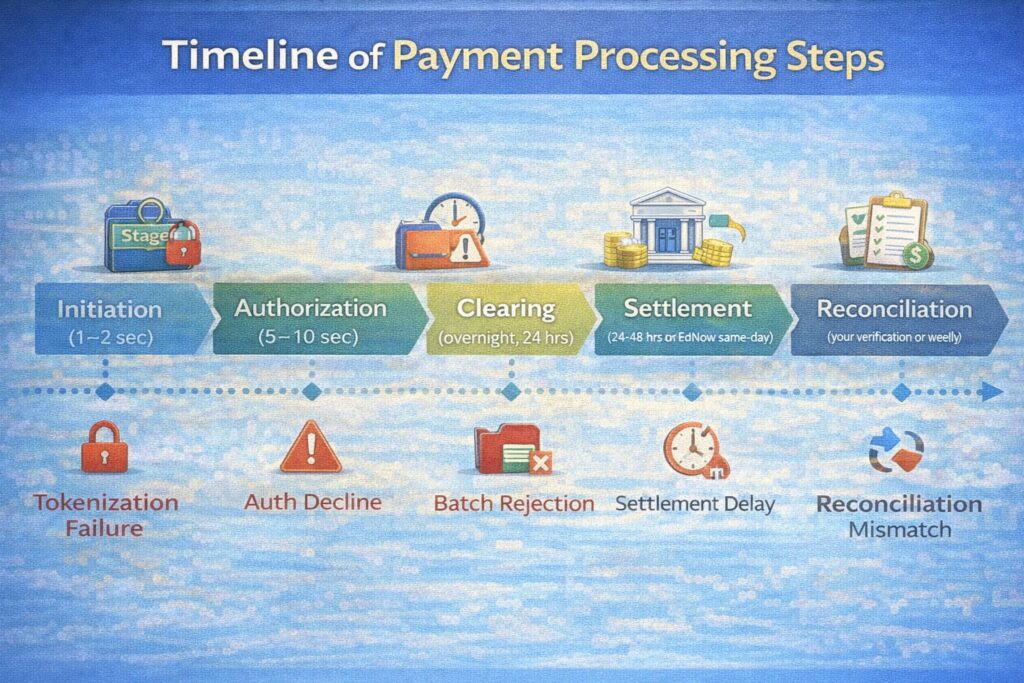
For most hospitality businesses, the customer sees only the first two stages (initiation + authorization). Everything else happens behind the scenes. But all five stages are equally critical to your cash flow and customer experience.
What Payment Processing Costs: The Complete Fee Breakdown
Payment processing fees are structured in layers. Most hospitality business owners see the total percentage deducted from their account but don’t understand where each piece goes or how to negotiate it down.
The total cost of a single transaction typically ranges from 2.0% to 3.5% + $0.15–$0.30 for most restaurants, hotels, and retail locations. But inside that number are three distinct components, each paid to a different entity.
The Three Core Fee Components
Interchange Fee (1.51%–3.0% + $0.00–$0.25)
This is the largest component and goes directly to the customer’s issuing bank, not to your processor. Interchange rates are set by Visa and Mastercard, reviewed twice yearly, and vary by:
- Card type (debit vs. credit vs. rewards vs. corporate)
- Transaction type (online vs. card-present vs. keyed-in)
- Business category (MCC code—restaurants are 5812, hotels are 7011, retail is 5411, etc.)
- Region (domestic vs. international)
Official 2026 interchange rates are published by Visa (CPS/Retail Debit Regulated at 0.05% + $0.21; Credit Rewards Traditional at 1.65% + $0.15) and Mastercard (effective April 11, 2025; rates vary by card tier).
Example: A customer using a Visa Rewards credit card to pay for a $100 restaurant bill incurs an interchange fee of 1.99% + $0.10 = $2.09. A customer using a debit card incurs 0.55% + $0.15 = $0.70. Your customer base’s card mix directly impacts your total processing cost.
For restaurants: Most transactions are card-present (swiped at POS), which lowers rates compared to keyed-in or online transactions. But reward cards and corporate cards carry higher rates (1.65%–2.20% vs. 1.51%–1.80% for non-rewards).
For hotels: Pre-authorizations and international cards have higher interchange (2.0%–2.5% range). Chargebacks from disputed incidental charges further increase rates.
For retail: High-ticket items and rewards cards push rates higher.
Assessment Fee (~0.10%–0.15%)
This is a network fee collected by Visa and Mastercard to fund their infrastructure, compliance programs, and fraud prevention. It’s a fixed percentage applied to every transaction and goes directly to the network, not to your processor or bank.
Example: On a $100 transaction, the assessment is 0.14% × $100 = $0.14.
Fixed Fees per Transaction ($0.10–$0.30)
Your processor charges a small fixed fee per transaction to cover their operational costs (transaction routing, fraud prevention, customer service). This ranges from $0.10 to $0.30 depending on your processor and your agreement.
Processor Markup (0.10%–0.50% + $0.00–$0.25)
On top of interchange and assessment, your processor adds their own margin—this is their profit. Depending on your agreement, this might be:
- Flat-rate model: 2.9% + $0.30 (includes everything)
- Interchange-plus model: Interchange + 0.25% + $0.10 (you pay actual interchange plus processor’s cut)
The second option is more transparent but requires you to understand interchange rates.
Monthly Account Fee ($0–$30)
Many processors charge $10–$30 per month to maintain your account. Some waive it for high-volume merchants.
Real-World Cost Examples
Restaurant Processing: $25,000 Monthly Sales
Using a 2.9% + $0.30 flat-rate agreement (typical for hospitality):
- Total fees: ($25,000 × 0.029) + (1,000 transactions × $0.30) = $725 + $300 = $1,025
- Monthly cost as % of sales: 4.1%
- Net deposit: $23,975
If you switch to interchange-plus (2.0% average interchange + 0.30% markup + $0.10 per transaction + $15/month):
- Total fees: ($25,000 × 0.020) + ($25,000 × 0.003) + (1,000 × $0.10) + $15 = $500 + $75 + $100 + $15 = $690
- Monthly cost as % of sales: 2.76%
- Net deposit: $24,310
- Monthly savings: $335 (32% reduction)
Hotel Processing: $50,000 Monthly Charge Volume
Using a 2.5% + $0.15 agreement (hotel-specific rates are higher due to pre-auth and international card complexity):
- Total fees: ($50,000 × 0.025) + (800 transactions × $0.15) = $1,250 + $120 = $1,370
- Monthly cost: 2.74%
- Net deposit: $48,630
Retail Processing: $100,000 Monthly Sales
Using a 2.6% + $0.25 agreement:
- Total fees: ($100,000 × 0.026) + (2,000 transactions × $0.25) = $2,600 + $500 = $3,100
- Monthly cost: 3.1%
- Net deposit: $96,900
Hidden Fees to Watch For
Beyond the core fee structure, watch for:
- Monthly minimum fees: Some processors charge $25–$50/month minimum even if you process less than that. For a restaurant with $10,000/month sales, this adds 0.25%–0.50%.
- ACH/Bank fees: $1–$5 per ACH transfer if you request funds move to a secondary account.
- Chargeback fees: $15–$100 per chargeback dispute (in addition to the transaction reversal and potential reserve holds).
- PCI compliance fees: $99–$300/year if your processor includes it (or if they claim you’re non-compliant and charge for remediation).
- Batch fees: Some older processors charge per batch submission ($0.50–$1.00). Modern processors don’t.
- Refund fees: Some processors charge $0.10–$0.25 per refund. Most don’t anymore.
- Setup fees: $0–$500 one-time if you’re switching processors mid-contract.
A $50,000/month restaurant with high chargebacks and poor PCI practices can easily pay an extra $200–$400/month in hidden fees—that’s 5–10% of total processing cost.
Flat-Rate vs. Interchange-Plus: Which Pricing Model Is Right for You
Payment processors offer pricing in two fundamentally different models. Each has tradeoffs for restaurants, hotels, and retail locations. Understanding the difference is essential to knowing what you’re actually paying and whether you can negotiate better rates.
Flat-Rate Model: Simplicity Over Transparency
How it works:
You pay one fixed percentage + one fixed per-transaction fee for all transactions, regardless of card type or complexity.
Typical example: 2.9% + $0.30
Pros:
- Simple to understand and budget
- Same rate for debit, credit, rewards, international—no surprises
- Monthly cost is predictable
- No need to understand interchange or network fees
- Good for startups or low-volume businesses that need predictability over optimization
Cons:
- You pay the same rate for low-cost transactions (debit cards at 0.55% interchange) as high-cost transactions (rewards cards at 2.0% interchange)
- Embedded in the flat rate is the processor’s assumption of average card mix—if your actual mix is better, you’re overpaying
- For high-volume businesses ($50k+/month), flat-rate fees compound into substantial overcharge
Best for:
- Restaurants with $5,000–$20,000/month volume
- Retail locations with consistent, mixed card types
- Businesses that don’t want to manage complex pricing
- Businesses with minimal chargebacks or special transactions
Cost for $50,000/month: ~$1,450/month
Interchange-Plus Model: Transparency Over Simplicity
How it works:
You pay the actual interchange rate (set by Visa/Mastercard and varying by card type) + a fixed processor markup + per-transaction fee. This means your rate changes monthly based on your card mix and Visa/Mastercard rate updates.
Typical example: Interchange (variable) + 0.30% + $0.10 per transaction + $15/month
If your average interchange is 2.0% (mix of debit, credit, rewards), your effective rate is 2.30% + $0.10.
If a high-reward card batch increases your average to 2.3%, your rate becomes 2.60% + $0.10.
Pros:
- Most transparent model—you see exactly what card networks charge and what processor takes
- Better rates for business-heavy or debit-heavy card mixes
- Smaller processor markup ($0.20–$0.35%) means savings scale with volume
- If card networks lower interchange (rare but happens), you save immediately
- Industry standard for businesses processing >$100k/month
Cons:
- Monthly rates fluctuate (unpredictable budgeting)
- Requires understanding of card types and interchange tables
- More complex to audit and verify rates are accurate
- Processor markup ($0.20–$0.40%) is negotiable but many businesses don’t know this
- Bad for monthly cash flow forecasting (rates vary month-to-month)
Best for:
- Restaurants with $30,000+/month volume
- Hotel chains processing national/international cards
- Retail chains with >$100k/month sales
- Businesses with sophisticated accounting that can monitor and audit rates
- Businesses willing to negotiate and shop for better processor markup rates
Cost for $50,000/month (assuming 2.0% average interchange): ~$1,050/month (30% cheaper than flat-rate)
What Most Hospitality Businesses Actually Choose (and Why)
Flat-Rate vs. Interchange-Plus Comparison.
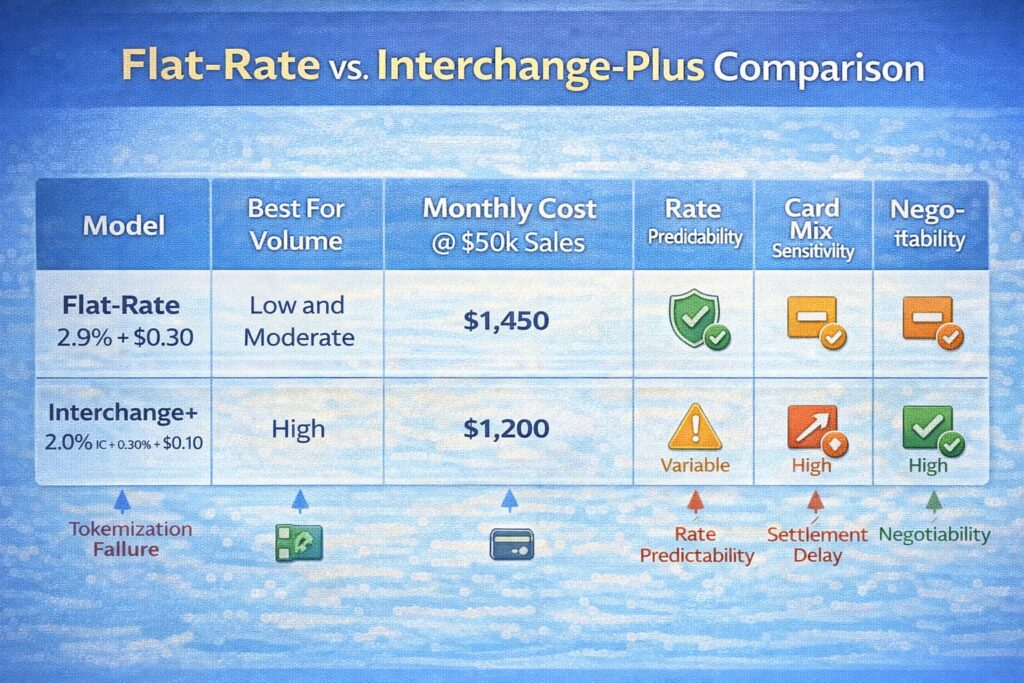
For restaurants:
- Under $15k/month: Flat-rate (simplicity wins)
- $15k–$40k/month: Flat-rate (few providers offer interchange-plus at this size)
- Over $40k/month: Negotiate for interchange-plus or IC+0.30 with fixed monthly fee
For hotels:
- Generally use interchange-plus due to complexity of pre-auths, international cards, and incidental charges
- Typical rate: Interchange + 0.35% + $0.15 + $25/month
For retail:
- Small locations ($5k–$20k/month): Flat-rate
- Chain/multi-location (>$50k/month): Negotiate for IC+ with custom markup
Choosing a Payment Processor: The Key Evaluation Criteria
Selecting a payment processor is one of the highest-leverage business decisions you’ll make for a hospitality business. The processor you choose determines:
- Your monthly costs (can vary by 0.5%–1.5% = hundreds of dollars)
- Your settlement speed (same-day vs. 3-day delays)
- Your transaction approval rate (80%–95%+ approval, depending on fraud rules)
- Your support quality (24/7 vs. business hours)
- Your future flexibility (can you easily switch? Are you locked in?)
Most hospitality businesses make this choice once every 5–10 years and don’t revisit it. Yet the market has changed dramatically since 2020. New processors offer faster settlement, better reporting, lower rates, and mobile-first integration. If you’ve been with the same processor for more than 3 years, you’re almost certainly overpaying.
Six Critical Evaluation Criteria
1. Supported Payment Methods
Does the processor support all methods your customers use?
- Card types: Visa, Mastercard, Amex, Discover (required); Diners Club, Union Pay (optional, depending on clientele)
- Card-present vs. online: For hospitality, you need strong card-present support (POS, mobile app)
- Digital wallets: Apple Pay, Google Pay, Samsung Pay (increasingly expected by customers, reduces friction)
- Alternative methods: QR codes (China/Asia), contactless/NFC, BNPL (Buy Now Pay Later—Afterpay, Klarna), ACH (for subscriptions)
- International cards: If you serve international customers or have international suppliers, you need processors supporting non-US cards
For restaurants: Must support card-present, digital wallets, QR (especially post-COVID), and tipping.
For hotels: Must support card-present, international cards (Visa/Mastercard at minimum), digital wallets, and pre-authorizations.
For retail: Must support card-present, digital wallets, BNPL (increasingly used by younger customers).
Test with your processor: “What % of our customers will be declined because of unsupported payment methods?” If they can’t answer, the processor doesn’t have visibility into your card mix.
2. Settlement Speed and Availability
How fast do funds reach your account after a transaction?
- Traditional settlement: 24–48 hours
- Next-day settlement: 1 business day (most common for modern processors)
- Same-day settlement: Available within hours (PayPal, Stripe, Square offer this, usually with 0.5% additional fee)
- FedNow: Real-time settlement via Federal Reserve (new in 2024–2025, available through some processors, limited bank participation)
For restaurants: Next-day settlement is acceptable. Same-day settlement is a luxury, not a necessity (unless you have tight daily working capital).
For hotels: Next-day settlement is standard. FedNow would be valuable if available.
For retail: Same-day or next-day is standard.
Red flag: If a processor can’t commit to next-day settlement or offers only 3–5 day settlement, they’re using outdated infrastructure. Avoid them.
3. Fraud Prevention and Authorization Rates
What % of your customers’ transactions will be approved on the first attempt?
- Authorization rate: 90–95%+ is standard. If a processor’s rate is below 90%, either their fraud rules are too aggressive (declining legitimate customers) or their network routing is poor.
- Decline codes: Can the processor tell you why transactions are being declined? (E.g., “Insufficient Funds,” “Do Not Honor,” “Fraud Score Too High”). If not, you can’t optimize.
- Retry logic: Does the processor intelligently retry declined transactions? (Some decline codes indicate temporary issues and respond well to retries 30–60 seconds later.)
- 3D Secure 2: Does the processor support 3DS2 for frictionless (passive) authentication? This is becoming required for online and international transactions.
- Machine learning: Does the processor use AI/ML to continuously improve fraud detection? Or are they static?
For restaurants: High approval rates are critical for throughput. A 1% decline rate on a busy Saturday (500 transactions, 5 declines) = lost revenue and customer frustration.
For hotels: International card support and 3DS2 are critical due to international guests.
For retail: Fraud prevention should be customizable by location (high-risk areas may see higher decline rates; you should be able to adjust rules).
Question to ask: “What’s your typical authorization success rate for hospitality merchants, and how does it compare to industry average?” (Industry average is 92–94%.)
4. Integration with Your POS and Business Systems
Can the processor integrate smoothly with your existing POS, accounting software, reservation system, and management tools?
- POS integration: Does the processor connect directly to your POS (Lightspeed, Toast, Square, TouchBistro for restaurants; Infor for hotels)? Or do you need a third-party middleware?
- API quality: For online orders or custom checkout, does the processor offer well-documented APIs and SDKs?
- Reporting API: Can you pull settlement reports, transaction details, and reconciliation data via API? (This is critical for accounting automation.)
- Webhook support: Can the processor send real-time notifications when transactions succeed, fail, or chargebacks occur? (Enables automated incident response.)
- CRM/accounting sync: Can data flow to QuickBooks, Xero, NetSuite? Or do you need to manually export CSVs?
- Inventory sync: For retail, can transaction data sync to inventory management?
For restaurants: Integration with Toast, TouchBistro, or Square POS is table stakes. If a new processor requires expensive middleware, add that cost to your evaluation.
For hotels: Integration with your PMS (Property Management System—Opera, Fosse, Micros) is critical. Some processors specialize in hospitality; others don’t and integration becomes a nightmare.
For retail: Integration with inventory and point-of-sale is essential for tracking sales by location and product.
Red flag: “We can integrate via SFTP file transfer once daily.” This is 2010s-era technology. Avoid.
5. Security Compliance and Support
Is the processor PCI DSS compliant and do they actively help you comply?
PCI DSS v4 Requirements (Mandatory March 31, 2026):
Per PCI Security Standards Council, v4 mandates 12 requirements in 6 categories: secure networks and configurations, vulnerability management, access control and monitoring, information security policies. Tokenization is required to replace stored card data. The new standard replaces v3.2.1.
- PCI DSS level: Does the processor achieve Level 1 (highest security) or lower? (Most modern processors are Level 1.)
- Tokenization: Does the processor automatically tokenize cards so you never store full card numbers? (You should never store CVV or full PAN.)
- Encryption: Are all data transfers encrypted with TLS 1.2+ or better?
- Compliance support: Does the processor provide guidance on your PCI obligations, SAQ forms, and annual compliance steps? Or do you have to figure it out yourself?
- Breach notification: If their system is compromised, do they immediately notify you? (They must, by law, but responsiveness varies.)
- Compliance updates: When Visa/Mastercard update security requirements, does the processor proactively update their infrastructure and notify merchants?
For all businesses: Modern processors handle PCI DSS v4 for you. You shouldn’t have to think about it. If a processor is slow to support compliance, they’re penny-wise and pound-foolish.
Red flag: “You’re responsible for PCI DSS; here’s a link to a compliance checklist.” This means the processor has minimal support. Avoid unless you have sophisticated IT.
6. Customer Support Quality and Responsiveness
When something breaks (and it will), can you reach a human who understands your problem?
- Support channels: Phone, email, chat? 24/7 or business hours only?
- Response time: How long until you get a response? (1 hour vs. 24 hours is a huge difference during dinner service.)
- Technical competence: Are support staff trained on hospitality-specific issues? Or do they give generic scripts?
- Escalation: If first-line support can’t solve it, how quickly can you reach an engineer?
- Incident response: If there’s an outage affecting your location, does the processor automatically notify you? Or do you discover it yourself?
For restaurants: A payment processor outage during dinner service costs you thousands in lost sales. You need 24/7 support with <30 min response time.
For hotels: Same urgency—payment failures at check-in block room revenue. 24/7 support is non-negotiable.
For retail: Business hours support is acceptable for most locations, but flagship stores need 24/7.
Question to ask: “If our payment system goes down at 6 PM on a Friday, what’s your response time?” (Good answer: “We’ll have an engineer on it within 15 minutes.” Bad answer: “You’ll hear from us Monday.”)
Evaluating the Top Processors for Hospitality
Square
- Flat-rate: 2.6% + $0.10 (card-present); 2.9% + $0.30 (online)
- Settlement: Next-day
- POS integration: Native—Square POS is integrated
- Support: 24/7 via phone
- Best for: Small restaurants and retail, simple checkout, budget-conscious
- Limitation: Higher rates than interchange-plus; limited for enterprise chains
- Link: https://squareup.com
Stripe
- Flat-rate: 2.9% + $0.30; custom rates for volume
- IC+: Available at higher volumes (0.25% + $0.05 negotiable)
- Settlement: Next-day or same-day (0.5% fee)
- POS integration: Strong API for custom integrations; partnerships with Toast, Lightspeed
- Support: Email/chat; no phone support (limitation for urgent issues)
- Best for: Tech-savvy restaurants, online ordering, API-first businesses
- Limitation: Weak phone support; better for startups than established chains
- Link: https://stripe.com
PayPal
- Flat-rate: 2.9% + $0.30 (standard); 1.5% + $0.49 (ACH)
- IC+: Not available for most merchants
- Settlement: Next-day or same-day
- POS integration: PayPal Here (older POS, not integrated with modern systems)
- Support: 24/7 via phone
- Best for: Existing PayPal users, high-ACH businesses (low cost for ACH)
- Limitation: Higher rates; POS integration is dated
- Link: https://www.paypal.com/en-us/business
Adyen
- IC+: Requires custom negotiation (typical: 2.0%–2.5% IC + 0.25% + $0.15 + $25/month)
- Settlement: Next-day or FedNow (where available)
- POS integration: Strong omnichannel platform; partnerships with major PMS systems (Opera, Fosse)
- Support: 24/7; dedicated account manager for enterprise
- Best for: Hotel chains, retail chains, omnichannel complexity, high-volume
- Limitation: Minimum processing volume required; setup complexity
- Link: https://www.adyen.com
Toast Integrated Payments
- Flat-rate: 2.59% + $0.10 (proprietary to Toast POS)
- Settlement: Next-day
- POS integration: Seamless (native to Toast)
- Support: 24/7 via Toast; direct to processor
- Best for: Toast POS users, mid-market restaurants, integrated operations
- Limitation: Locked into Toast ecosystem; leaving Toast means switching processors
- Link: https://www.toast.com
Custom Merchant Processor (Direct Merchant Account + Processor)
- IC+: 2.0%–2.3% IC + 0.20%–0.35% + $0.08–$0.15 per transaction (negotiable)
- Settlement: Next-day to FedNow
- POS integration: Depends on processor; typically requires Integration with Opera PMS or other specialized platforms
- Support: Varies; often phone-first
- Best for: Restaurant groups >$500k/month, hospitality chains, negotiation-savvy operators
- Limitation: More complex to set up; requires merchant account underwriting; best for established, stable businesses
- About us: Micros Integrated Payments specializes in hospitality integration and custom processor solutions
My Recommendation Based on Your Business Size
Under $15k/month: Square or Stripe (simplicity, no contracts, easier to switch).
$15k–$40k/month: Stripe or Toast (if you use Toast POS). Negotiate for better rates once you hit $30k.
$40k–$100k/month: Request interchange-plus from your current processor, or switch to Adyen or a custom merchant account (30–50% cost savings possible).
Over $100k/month: Direct merchant account + processor, custom rates, FedNow settlement. This is where you negotiate real leverage.
For hotels: Adyen or direct merchant account (hotel-specific rates, PMS integration, international card support).
For retail chains: Adyen or Square with custom enterprise rates.
Setting Up Payment Processing: The Step-by-Step Checklist
Moving to a new payment processor or setting up payment processing for the first time is a complex project. It touches your POS, your bank account, your accounting, compliance, and customer experience. Do it wrong and you lose transactions or revenue. Do it right and you’re positioned for years of smooth operations.
Here’s the exact checklist I follow when implementing payment processing for restaurant, hotel, and retail clients.
Pre-Implementation: Assessment & Planning (Weeks 1–2)
☐ Step 1: Audit Your Current Setup
- What processor are you using now? Flat-rate or IC+? What’s your actual effective rate?
- What’s your monthly processing volume? (Check past 3 months of settlement reports.)
- What payment methods do you currently support? Which ones decline most often?
- How long does settlement take? Where are the delays?
- Are you PCI DSS compliant? When was your last audit?
- Export your last 3 months of settlement reports and examine them for errors, chargebacks, refunds, hidden fees.
☐ Step 2: Define Your Requirements
- What payment methods must you support? (Card-present, online, wallets, international, etc.)
- What’s your target approval rate? (Aim for 94%+)
- What settlement speed do you need? (Next-day is standard; same-day if working capital is tight.)
- What POS, accounting, or other systems must the processor integrate with?
- What’s your budget? (How much are you willing to pay per transaction, and what’s your monthly volume trigger for better rates?)
- Do you need omnichannel (online + in-store + mobile)?
☐ Step 3: Identify 3–5 Processor Candidates
- Research processors that specialize in your industry (restaurant, hotel, retail).
- Request quotes from each, based on your actual volume and payment methods.
- Ask for customer references (other restaurants/hotels in your region).
☐ Step 4: Negotiate
- Compare rates across candidates.
- Ask each processor what volume would trigger an IC+ rate or flat-rate reduction.
- Don’t accept the first offer. Ask: “What’s your best rate if we sign a 2-year contract?” or “If we guarantee $X/month volume, what’s possible?”
- Get competing quotes in writing.
Implementation: Technical Setup (Weeks 2–4)
☐ Step 5: Complete Merchant Account Application
- Provide business tax ID, owner information, bank account details (for settlement).
- Submit business license, proof of address, processing history.
- For first-time processors: Be prepared for underwriting (3–10 days). They may request bank statements, sales forecasts, or additional documentation.
- Some processors ask for proof of PCI DSS compliance (SAQ or audit).
☐ Step 6: Obtain Your Processor Credentials
- Merchant ID (unique identifier for your location)
- Terminal ID(s) if using PIN pads or card readers
- API keys and webhooks (if you’re integrating programmatically)
- FTP credentials for batch file uploads (if using older integration methods)
- Test merchant account (for testing transactions before go-live)
☐ Step 7: Plan Your POS Integration
- If using a cloud POS (Square, Toast, Lightspeed): Integration is often plug-and-play. Enable the new processor in your POS settings and test.
- If using a legacy POS (Micros, PAR, Aloha): You may need a gateway (like Clover, Ingenico) or middleware to bridge your POS to the new processor. Confirm compatibility before purchasing.
- If building a custom checkout (online orders, app, website): Integrate via the processor’s API. Request sample code or SDK from the processor.
- For omnichannel: Ensure the processor’s gateway supports your payment terminals, mobile readers, and online checkout.
☐ Step 8: Configure Your Processor Settings
- 3D Secure 2: Enable for online and international transactions (fraud protection).
- AVS (Address Verification Service): Enable to verify billing address. (Reduces fraud; may slightly increase declined transactions.)
- CVV checks: Require CVV for online and keyed transactions.
- Daily settlement: Enable automatic batching and settlement each day.
- Fraud rules: Review the processor’s default fraud scoring. If it’s too aggressive (declining too many transactions), ask to adjust thresholds.
- Reserve holds: If the processor requires reserves (holding back 5–10% of transactions for 90 days as fraud/chargeback protection), negotiate waiving it if you have clean history.
- Declined transaction retry: Enable intelligent retry for soft declines (temporary failures).
☐ Step 9: Security & Compliance Setup
- Tokenization: Ensure the processor or your POS is tokenizing all cards (storing tokens, not full card numbers).
- Encryption: Confirm all data is sent over TLS 1.2+ or better.
- PCI DSS: Complete your PCI DSS Self-Assessment Questionnaire (SAQ) in collaboration with your processor. File with your acquiring bank annually.
- Breach notification: Confirm the processor’s breach notification policy (they must notify you within 30 days if your data is compromised).
Testing & Validation (Week 3–4)
☐ Step 10: End-to-End Testing
- Test transactions: Process 10–20 test transactions across different card types (debit, credit, rewards, international if applicable).
- Approval vs. decline: Submit test transactions that should be declined (e.g., insufficient funds, bad CVV) and confirm the processor declines them correctly.
- Refunds: Process a refund on a test transaction and confirm it works.
- Voids: Attempt to void a transaction before it clears and confirm that works.
- Batch operations: If using batch files (for multiple locations or high volume), test a batch submission.
- Reporting: Extract a settlement report and reconcile it to your test transactions.
☐ Step 11: Parallel Testing (Optional but Recommended)
- Run the new processor in parallel with your old processor for 1–2 weeks.
- Process a portion of live transactions through the new processor while keeping the old one active.
- Compare approval rates, settlement times, and reporting between the two.
- If approval rates drop significantly, investigate (fraud rules, card network routing, etc.) before full cutover.
☐ Step 12: Train Your Team
- POS team: New processor may look different in your POS; train on settlement process, void/refund, error handling.
- Front desk/cashiers: New payment terminals? Show them the flow (swipe, tap, insert, contactless).
- Accounting: New settlement reports? Review the format, fee structure, and reconciliation steps.
- Managers: How to monitor transaction success rates, chargebacks, and report discrepancies.
Go-Live & Cutover (Week 4)
☐ Step 13: Set Go-Live Date
- Choose a low-volume day (Tuesday–Thursday, not weekend or holiday).
- Avoid doing this mid-month (harder to reconcile).
- Notify your acquiring bank and old processor of the cutover date.
☐ Step 14: Final Pre-Cutover Checklist
- Confirm all integrations are working in production.
- Verify settlement and reserve account details are correct.
- Confirm team is trained and ready.
- Have the new processor’s escalation contact on speed dial.
- Prepare a rollback plan (know how to switch back to the old processor if something breaks).
☐ Step 15: Execute Cutover
- Disable the old processor in your POS at the designated time.
- Enable the new processor.
- Process 5–10 live test transactions to confirm everything works.
- Monitor for the first 2 hours to catch any immediate issues.
☐ Step 16: Reconciliation & Monitoring (Week 5+)
- Monitor transaction volumes for the first 3 days (watch for unusual declines or failures).
- Reconcile your first settlement from the new processor to your POS records.
- Confirm funds are depositing to your account on the expected schedule.
- Review the first settlement report for accuracy and hidden fees.
- After 1 week, compare your approval rate and authorization success to your baseline. If significantly different, investigate.
Payment Processing for Specific Industries: Restaurants, Hotels, and Retail
Payment processing requirements vary significantly by industry. A solution that works perfectly for a retail store might be inadequate for a hotel chain, and both might miss critical requirements for a restaurant.
Restaurants: Speed, Tipping, and Split Checks
Restaurant payment processing must support three operations that are core to hospitality revenue and operations:
Tipping and Gratuity Management
In restaurants, tips are added after the initial transaction and can be modified by the customer before authorization. Your processor must support:
- Post-authorization tipping: Customer pays $50, then later decides to tip $8. Your system adds the tip, and the new total ($58) is authorized for settlement.
- Tip modifications: Customer’s tip can be increased or decreased before settlement.
- Tip pooling: Some restaurants tip-pool; your processor must allow tips to be applied without triggering duplicate transactions.
- Tipping on pre-authorization: For bars with open tabs, you may pre-authorize $100, then tip is added later and the final charge could be $110.
Not all processors handle post-auth tipping cleanly. Square and Toast do this natively. Some legacy processors require middleware or manual workarounds. If your processor doesn’t support post-auth tipping, server experience and customer satisfaction drop significantly.
Split Checks and Separate Settlements
Some restaurants split bills between multiple customers (e.g., table of 6 wants separate checks). Your processor must:
- Split one authorization into multiple payments: One table = one tab = one authorization. But split into 6 payments, each from a different customer card.
- Settle each split separately: Each of the 6 payments should have its own transaction record and settlement.
- Calculate tips independently: If each customer can tip their portion, those tips must be handled separately.
Inadequate split check handling leads to incorrect tips, missing revenue, and reconciliation nightmares.
Pre-Authorization for High-Value Transactions
For high-value restaurant events (corporate catering, private dining, wedding receptions), you may want to pre-authorize the customer’s card early (to verify funds), then process the actual charge after delivery. Your processor must:
- Support pre-authorization (hold funds for 3–7 days) without actually charging.
- Allow you to later “capture” the pre-auth at a different amount (e.g., pre-auth $500, capture $480 after accounting for comped items).
- Manage pre-auth expiration (Visa pre-auths expire after 7–30 days depending on card).
Offline Mode
During internet outages, a restaurant’s POS must still accept payments. This requires:
- Queuing failed transactions: When the network is down, your POS queues transactions locally.
- Batch submission when connection restores: Once internet returns, the POS automatically submits the queued transactions.
- Reconciliation: All queued transactions must match the processor’s settlement report (no lost transactions, no duplicates).
Not all POS systems handle offline mode well. Some freeze during an outage. For restaurants where network reliability is poor, offline capability is critical.
Industry-Specific Processors for Restaurants:
- Toast: Card-present specialist; split checks, tipping, and POS integration are best-in-class.
- Square: Good for independent restaurants; simpler but solid for tipping and splits.
- Lightspeed: Point-of-sale and payments integrated; good for upscale restaurants.
Questions to ask a new processor:
- “How do you handle post-authorization tipping?”
- “Can we split one transaction into multiple payments?”
- “What happens to queued transactions if our internet goes down?”
Hotels: Pre-Authorization, International Cards, and Incidental Charges
Hotel payment processing has three requirements that are distinct from restaurants:
Pre-Authorization for Room Charges and Incidentals
When a guest checks in, you don’t yet know the final charge (room + minibar + room service + spa, etc.). Hotels pre-authorize the guest’s card for an estimated amount (e.g., $300 for a $200 room + $100 incidentals buffer).
This requires:
- Pre-auth submission: Authorize $300 without actually charging.
- Pre-auth hold duration: Typically 7–10 days; expires if not captured.
- Partial capture: If guest only incurs $220 in charges, you capture $220, not the full $300.
- Pre-auth reversal: If guest leaves early and has no incidentals, reverse the pre-auth entirely.
- Pre-auth extension: Some guests stay longer; you may need to extend or increase the pre-auth.
Integration with Property Management Systems (PMS)
A hotel’s PMS (Opera, Fosse, Infor) is the source of truth for guest folios, charges, and payment authorizations. Your payment processor must integrate with your PMS so that:
- Guest check-in automatically triggers a pre-auth request (you don’t manually pre-auth each guest).
- Incidental charges in the PMS (room service, spa) automatically get added to the guest’s pre-auth.
- At checkout, the final charge is automatically captured based on the guest’s folio total.
- Refunds or credits flow automatically from the PMS to the payment processor.
International Card Support and Currency Handling
Hotels often serve international guests with cards issued outside the US. Your processor must:
- Support international card networks (JCB, Diners, UnionPay, etc., not just Visa/Mastercard).
- Handle currency conversion if the guest’s card is in a foreign currency.
- Manage 3D Secure for international cards (common requirement in EU, Asia).
- Report on chargebacks that may be disputes due to currency confusion.
Industry-Specific Processors for Hotels:
- Adyen: Omnichannel platform with PMS integration; strong international card support.
- Worldpay: Hotel-specific solutions with pre-auth and PMS integration.
- TouchNet: Hospitality-focused payment platform (owned by Heartland).
- Direct integration with your PMS provider (many PMS systems include native payment processors).
Questions to ask a new processor:
- “Do you integrate with [our PMS]?”
- “How do you handle pre-authorization and partial captures?”
- “What international card networks do you support?”
- “How are international card chargebacks handled?”
Retail: Omnichannel, Returns, and Real-Time Analytics
Retail payment processing must support three requirements:
Omnichannel Integration: In-Store, Online, Mobile, Curbside
A modern retail business accepts payments across multiple channels, and the processor must unify them:
- In-store (POS): Card-present transactions via PIN pads or contactless readers.
- Online (e-commerce): Card-not-present transactions via website checkout.
- Mobile (buy online, pick up in store): Pre-payment online, pickup in store.
- Curbside: Mobile reader payment during curbside pickup.
The processor’s architecture must handle routing transactions from all these channels through a unified merchant account, maintain consistent fraud rules across channels, and provide cross-channel analytics.
Returns and Exchanges with Original Payment Method
Retail requires hassle-free refunds to the original payment method. Your processor must:
- Maintain a history of all transactions so refunds can be linked to originals.
- Support multi-way refunds (partial refunds, split refunds if transaction was split).
- Handle refunds across different channels (e.g., customer paid in-store card, but wants refund applied to their digital wallet account—some processors don’t support this).
- Manage disputes if a refund is rejected (e.g., customer’s account is closed; funds must go back to the card).
Real-Time Analytics and Inventory Reporting
Retail requires immediate insights into sales, by product, location, and category. Your processor must:
- Provide real-time reporting on transaction volume and value.
- Integrate with inventory management so sales data automatically updates stock.
- Support predictive analytics (which items are selling fast, which are slow).
- Enable promotional reporting (did this week’s sale increase volume?).
Industry-Specific Processors for Retail:
- Adyen: Omnichannel and analytics-heavy.
- Square: Good for single-location or small chain retail; omnichannel support is strong.
- Shopify Payments: If you’re already on Shopify, integrated payments are seamless.
Questions to ask a new processor:
- “Do you support omnichannel [in-store, online, mobile]?”
- “How do you handle refunds to the original payment method?”
- “What analytics can you provide on sales by product, location, category?”
Monitoring, Optimization, and Troubleshooting Payment Processing
After you go live with a new processor, the work doesn’t stop. Ongoing monitoring and optimization ensure you’re maximizing approval rates, minimizing costs, and catching problems before they become crises.
Ongoing Monitoring: What to Check Daily, Weekly, and Monthly
Daily Monitoring (5 minutes)
- Transaction volume: Did we process the expected number of transactions? If significantly lower, was there an outage?
- Settlement status: Did today’s batch settle successfully? Any errors?
- Approvals vs. declines: What % of transactions were approved? Sudden drop = potential issue.
- Outage alerts: Any payment system outages or status page updates from your processor?
Weekly Monitoring (30 minutes)
- Weekly settlement report: Pull your weekly settlement report and spot-check totals against your POS.
- Approval rate trend: Is your approval rate stable (94%+) or trending down?
- Decline analysis: Which decline codes are most common? (E.g., “Insufficient Funds” vs. “Fraud Score Too High”—different causes.)
- Chargeback notifications: Any new chargebacks or disputes? If yes, investigate the transaction.
Monthly Monitoring (1 hour)
- Full reconciliation: Reconcile your POS sales, processor settlement, and bank deposits. All three should match.
- Fee audit: Did you pay the expected amount in fees? Calculate your effective rate: total fees ÷ total volume. Did it match your contract?
- Hidden fees: Did you incur unexpected charges (PCI compliance, batch fees, chargeback fees, monthly minimum)? If so, dispute them or plan to negotiate down next renewal.
- Processor performance scorecard: Track approval rate, settlement time, support response time. Has anything degraded?
Cost Optimization: Where You Can Negotiate or Save
Most hospitality businesses are leaving 10–30% in potential savings on the table. Here’s where to look:
1. Negotiate Your Processing Rate Every 12 Months
Even if you don’t plan to switch processors, call them annually and ask: “What’s your best rate for my volume and profile?”
- If you’ve grown volume (higher sales), you may qualify for lower rates.
- If you have a clean track record (low chargebacks, low fraud), you may qualify for loyalty rates.
- If you have competing offers from other processors, show them—most will match or beat the competition.
Typical negotiation: “My current rate is 2.9% + $0.30. Processor X is offering 2.6% + $0.25. Can you match or beat that?” Often they will.
Impact: 0.2–0.3% reduction on a $50k/month business = $100–$150/month savings = $1,200–$1,800/year.
2. Reduce Chargebacks (Which Increase Your Processing Rate)
Every chargeback you receive increases your risk profile, which can trigger rate increases or reserve holds. Preventing chargebacks directly improves your bottom line.
- Clear billing descriptors: Make sure your business name on the customer’s statement is recognizable. (Confused customers are more likely to dispute.)
- Clear communication: Send order confirmations, shipping notices, and delivery confirmations so customers have a record and can’t claim they never received it.
- Easy refund process: Customers who can easily refund through you are less likely to chargeback. Make returns frictionless.
- Address Verification Service (AVS): For online transactions, verify the customer’s billing address matches their card. Reduces fraud and disputes.
Impact: Reducing chargebacks by 50% can lower your processing rate by 0.1–0.2%, saving $500–$1,000/year on a $50k/month business.
3. Shift Your Card Mix Toward Lower-Cost Methods
Not all payment methods cost the same to process. If you can nudge customers toward cheaper methods, your effective rate drops:
- Debit cards (0.55%–0.80% interchange) vs. credit cards (1.51%–2.20% interchange)
- PIN debit (0.55%–0.80%) vs. signature debit (1.51%–1.80%)
- Rewards cards charge more: A customer using an airline rewards card incurs 2.15%+ interchange. A customer using a basic credit card incurs 1.51%.
How to shift: Ask customers at checkout: “Is this a debit card?” (Debit is cheaper.) Offer small incentives for cash or ACH payments where applicable. Some restaurants offer 1–2% cash discount, which is cheaper than card processing fees.
Impact: If you shift 10% of volume from rewards cards (2.15%) to debit (0.65%), you save 0.15% on that 10% = 0.015% on total volume. On $50k/month, that’s $7.50/month ($90/year). Small, but real.
4. Consolidate to Fewer Processors
If you operate multiple locations or channels and use different processors for each, consolidate to one. Processors give volume discounts when you consolidate to them.
- Before: Location A uses Processor X (2.9% + $0.30), Location B uses Processor Y (2.8% + $0.25). Combined volume: $100k/month, split across two processors.
- After: Both locations use Processor X. Combined volume: $100k/month with one processor. Negotiate a 2.6% + $0.25 rate for the consolidated volume.
Impact: 0.2–0.3% savings on total volume = $200–$300/month = $2,400–$3,600/year.
Troubleshooting Common Issues: Error Codes and Resolution Steps
When transactions fail or chargebacks arrive, knowing what went wrong helps you fix it faster.
Declined Transactions: Common Error Codes
| Error Code | What It Means | Why It Happens | What You Do |
|---|---|---|---|
| Do Not Honor | Issuer won’t approve this transaction. | Customer’s card is blocked, suspended, or issuer detected fraud. Issuer won’t give reason. | Ask customer to contact their bank. Try with a different card. If happens repeatedly to same customer, they may have a real issue. |
| Insufficient Funds | Customer’s account doesn’t have enough money. | Card has insufficient balance. | Customer needs to add funds or use a different card. |
| Fraud Score Too High | Your processor’s fraud detection system flagged this transaction as risky. | Transaction doesn’t match customer’s normal profile (unusual location, amount, card type). AI scored it as likely fraud. | Ask customer for ID verification. If legitimate, ask your processor to lower fraud threshold for this customer’s account. |
| CVV Mismatch | Security code doesn’t match the card. | Customer entered wrong CVV, or you’re processing an old transaction with bad data. | Ask customer to re-enter CVV. If consistently failing for online, check if your checkout form has a UI bug (misaligned fields, placeholder text). |
| AVS Mismatch | Billing address doesn’t match card on file. | Customer moved, entered wrong address, or address format is different from what the issuer has. | Ask customer to verify billing address. Sometimes minor differences (Unit vs. Apt., missing zip+4) cause this. |
| Pick Up Card | Issuer wants to retain the card (it’s flagged for some issue). | Card is lost, stolen, or has fraud holds. | Customer must contact their bank. Don’t process this card again until they confirm it’s safe. |
| Duplicate Transaction | You’re trying to process the same transaction twice. | Customer hit “pay” button twice, or your POS resubmitted a queued transaction. | Check your POS logs. Don’t retry the transaction manually. If it’s a duplicate, void it. |
Chargebacks: Why They Happen and How to Respond
A chargeback is a customer dispute initiated through their bank. When a chargeback occurs, you lose the transaction amount + a $15–$100 chargeback fee, and your chargeback ratio rises (increasing your processing rate).
| Chargeback Type | Why It Happens | How to Prevent | How to Fight It |
|---|---|---|---|
| Unrecognized transaction (“I didn’t make this charge”) | Customer forgot they made the purchase, or someone used their card without permission. | Send email receipt immediately after transaction. Send follow-up email before charge hits (for subscriptions). | Provide transaction receipt, shipping confirmation, delivery proof showing customer accepted order. |
| Service not rendered (“I paid but didn’t get what I ordered”) | Customer claims they didn’t receive the service (delivery didn’t happen, restaurant meal was missing items, etc.). | For delivery: send tracking info and photo proof of delivery. For restaurant: get customer’s acknowledgment during order. | Provide delivery proof, photos, or in-person receipt signed by customer. |
| Duplicate charge (“I was charged twice”) | System error or customer clicked “pay” twice. | Implement duplicate detection in your POS to alert if same card is being charged twice in 60 seconds. | Provide settlement report showing single transaction, refund proof if you already issued one. |
| Quality dispute (“Food was cold / room was dirty / item broken”) | Service was poor or product was defective. | For hospitality: have staff note quality issues at time of transaction and offer solution (comp, refund). For retail: have easy returns process. | Provide communication showing you offered to fix the issue (comp, refund, replacement). |
| Currency confusion (Customer paid $100 but thought they were paying in different currency) | International transaction or online form showed wrong currency. | For international payments: clearly state currency before charge. Confirm exchange rate. | Provide screenshot of payment page showing currency clearly stated. |
Settlement Delays: When Funds Don’t Arrive on Time
If you expected a deposit on Wednesday and it hasn’t arrived by Thursday afternoon, investigate:
- Check your processor’s status page: Are they experiencing an outage or delay? If yes, wait—it’s their infrastructure issue.
- Verify settlement was submitted: Log into your processor’s dashboard. Did yesterday’s batch settle successfully? Or is it stuck in “pending”?
- Check for holds or reserves: Did your processor place a reserve hold on the settlement? (They sometimes hold back 5–10% as fraud/chargeback buffer.) Check your settlement report for “hold” or “reserve” line items.
- Verify your bank account is correct: Is the settlement destination account correct? Have you changed banks and not updated your processor?
- Contact support: If settlement is truly delayed (>48 hours and no status page issue), contact your processor’s support. Provide:
- Date of transaction
- Expected settlement date
- Batch reference number or settlement ID
- Amount expected
Settlement delays of >1 business day are rare with modern processors but unacceptable if they happen. This is a reason to escalate to management or consider switching.
Security and PCI DSS Compliance: The Non-Negotiable Foundation
Payment processing involves handling customer card data, which is heavily regulated. Compliance isn’t optional—it’s a legal and operational requirement.
PCI DSS v4: What It Is and What You’re Responsible For
PCI DSS (Payment Card Industry Data Security Standard) is a set of 12 security requirements mandated by card networks (Visa, Mastercard, Amex) to protect cardholder data.
PCI DSS v4 (Mandatory March 31, 2026):
Effective immediately, v4 replaces v3.2.1 and mandates 12 requirements organized in 6 categories per PCI Security Standards Council:
- Secure networks and configurations
- Vulnerability management
- Access control and monitoring
- Information security policies
PCI DSS is enforced in four levels based on your annual transaction volume:
| Level | Annual Transaction Volume | Validation Method | Frequency |
|---|---|---|---|
| Level 1 | >6 million transactions/year | Formal audit by QSA (Qualified Security Assessor) | Annually + quarterly network scans |
| Level 2 | 1–6 million transactions/year | Self-assessment (SAQ) + quarterly network scans | Annually |
| Level 3 | 20,000–1 million e-commerce transactions/year | Self-assessment (SAQ) + quarterly network scans | Annually |
| Level 4 | <20,000 e-commerce OR <1 million total transactions/year | Self-assessment (SAQ) | Annually or per-incident |
Most restaurants, hotels, and small retail fall into Level 2–4. You complete a self-assessment questionnaire (SAQ) annually and submit it to your acquiring bank.
The 12 PCI DSS Requirements (Summarized for Non-Technical Owners)
1. Install and maintain a firewall. Keep network attackers out. Your IT team handles this.
2. Use strong default passwords. Change all default passwords on network devices. Don’t use “admin/admin.”
3. Protect stored cardholder data. Encrypt any card data you store. (Best practice: don’t store card data at all—tokenize instead.)
4. Encrypt transmission of cardholder data. All data moving over the network must use TLS 1.2+ encryption.
5. Protect systems against malware. Install and maintain antivirus software on all systems that process card data.
6. Develop and maintain secure systems. Install security patches and updates on time (don’t run outdated software).
7. Restrict access to cardholder data. Only employees who need to see card data should have access. Use role-based access (servers can see transactions; customers can’t).
8. Identify and authenticate users. Use unique user IDs and strong passwords. Don’t share logins.
9. Restrict physical access to systems. Lock up servers and payment terminals. Don’t leave them unattended where someone could steal them or install malware.
10. Track and monitor access. Log all access to cardholder data systems. Review logs for suspicious activity.
11. Regularly test security systems. Run network scans quarterly to find vulnerabilities. Patch them.
12. Maintain a security policy. Document your security practices and keep them up to date.
What You Don’t Have to Do (Processor Handles It)
If you’re using a modern payment processor (Stripe, Square, PayPal, Toast, Adyen), they handle PCI DSS for you:
- They tokenize all card data (you never see full card numbers).
- They encrypt all data in transit and at rest.
- They maintain firewalls and security monitoring 24/7.
- They pass annual PCI DSS audits (Level 1) on your behalf.
- They maintain updated patches and security controls.
Your responsibility is minimal: You just need to ensure you don’t store or process card data outside their system, and you need to complete an annual SAQ acknowledging this.
What Could Go Wrong (And How to Prevent It)
Scenario 1: Your POS crashes and staff manually writes down card numbers to process later.
This is a PCI DSS violation. You’ve now stored unencrypted card data.
Prevention: Train staff never to manually write down card numbers. If POS is down, use offline mode (transactions queue on POS and resubmit when it restarts). If offline mode fails, contact your processor for manual authorization.
Scenario 2: A staff member’s laptop gets stolen, and it had card transaction logs (with full card numbers) saved to the desktop.
Violation. Unencrypted card data left the secure environment.
Prevention: Don’t save transaction logs to employee machines. If you need access to logs, pull them from your processor’s dashboard (encrypted, audited, secure).
Scenario 3: You integrate a custom payment form on your website and store card data locally.
Major violation. You’ve built a custom payment processing system that doesn’t meet PCI DSS standards.
Prevention: Always use your processor’s payment form or API (which are PCI DSS compliant). Never store card data yourself.
Annual PCI DSS Compliance: The Checklist
Every January, complete this checklist:
- Determine your PCI DSS level (based on your transaction volume last year).
- Download the appropriate SAQ (SAQ A, SAQ B, SAQ C, etc., depending on your level and setup).
- Complete the SAQ by answering yes/no/not applicable to each requirement. Many answers are simple: “Do you use TLS 1.2? Yes.”
- Get an Attestation of Compliance (AOC) from your processor (they provide a template; you just sign).
- Submit the SAQ and AOC to your acquiring bank.
- Keep records for your files in case of an audit.
The whole process takes 1–2 hours and is mostly checkbox compliance. Your processor usually provides the completed AOC for you; you just review and sign.
FAQ: Answers to 10 Common Payment Processing Questions
What’s the difference between a payment gateway and a payment processor?
Payment Gateway = the “entry point” that captures and encrypts your customer’s card data. It’s the physical POS terminal or online checkout form.
Payment Processor = the engine that moves that data through authorization, clearing, and settlement. The processor is what talks to the card networks and banks.
In practice, many companies blur these terms. Stripe, PayPal, and Square are all three in one: they’re the gateway (checkout), processor (authorization/settlement), and merchant account holder.
How long does settlement actually take?
Standard: 24–48 hours (1–2 business days after the transaction is authorized).
Faster: Next-day settlement is now standard for modern processors (Stripe, Square, Toast).
Fastest: Same-day or FedNow (Federal Reserve real-time payment rail) is available from some processors for an extra fee ($0.5%–1% on volume) or for enterprise customers.
For cash flow planning, assume next-day settlement. If you get same-day or faster, it’s a bonus.
What exactly is PCI DSS and why does it matter for my business?
PCI DSS = a set of 12 security rules that protect customer card data. Card networks (Visa, Mastercard) require all merchants to comply or face fines.
Why it matters:
– If you violate PCI DSS and customer data is stolen, you can be fined $100–$50,000+ by the networks.
– If customer data is breached, you’re liable for notification costs, credit monitoring, and lawsuits.
– If you don’t comply, your processor can shut you down and your acquiring bank can close your merchant account.
Bottom line: Compliance isn’t optional. But with a modern processor, you’re mostly hands-off.
What’s a chargeback and what do I do when I get one?
Chargeback = a customer dispute initiated through their bank. Customer claims they didn’t authorize the charge or didn’t receive the service, and their bank reverses it.
What happens to you:
– The transaction amount is reversed (customer gets their money back).
– You lose the revenue for that transaction.
– You’re charged a chargeback fee ($15–$100).
– Your chargeback ratio rises (increasing your processing rate).
– If your chargeback ratio exceeds 1–2%, you can be shut down by your processor or acquiring bank.
What to do:
– Investigate the transaction. Was it legitimate? Do you have proof (receipt, delivery confirmation, communication with customer)?
– Respond to the chargeback within 7 days (your processor will notify you and set a deadline). Provide evidence (order confirmation, shipping proof, signed receipt, etc.).
– If you can prove the transaction was legitimate, fight it. Provide evidence to your processor. They’ll submit it to the customer’s bank. If the bank sides with you, the chargeback is reversed.
– If you lose the chargeback, eat the loss. You’ve paid the chargeback fee and lost the revenue. Use this as a learning opportunity to prevent future disputes (clear billing descriptors, easy refund process, etc.).
Should I use a flat-rate or interchange-plus pricing model?
Flat-rate (2.9% + $0.30): Simple, predictable, best for low-volume or startups.
Interchange-plus (variable + 0.25% + $0.10): More complex, but 20–40% cheaper if you’re processing >$30k/month.
Decision rule:
– Under $20k/month: Flat-rate (not much savings from IC+, and complexity isn’t worth it).
– $20k–$50k/month: Choose based on your card mix. If you see a lot of debit cards (cheaper interchange), IC+ wins. If mostly rewards cards (expensive interchange), flat-rate might be better.
– Over $50k/month: Always negotiate for IC+ or a custom flat-rate.
How do I compare payment processors to find the best one?
Evaluate on six criteria:
– Pricing: Flat-rate or IC+? Get actual quotes based on your volume.
– Approval rates: Ask the processor, “What’s your typical authorization success rate?” (Should be 94%+.)
– Settlement speed: Next-day is baseline; same-day is nice.
– Integration: Does it connect to your POS, accounting software, and other systems?
– Support: 24/7 phone support is critical for hospitality (you can’t have downtime).
– Security: Is the processor PCI DSS Level 1 compliant? Do they tokenize cards and handle encryption?
After evaluating, get 3–5 quotes and negotiate. Most processors will beat their first offer if you show them competing quotes.
Can I negotiate a better rate with my current processor?
Yes. Call your processor annually and say: “I’ve grown my business. What’s your best rate for my volume? I have competing offers at 2.6%; can you match or beat that?”
Most processors will offer a small reduction (0.1–0.3%) to keep your business. The worst they can say is no.
What happens if my payment processor goes out of business?
Short answer: Your funds are protected; there’s no direct impact.
Long answer: Your processor holds your merchant account with an acquiring bank. If the processor shuts down, the acquiring bank immediately transfers your merchant account to another processor or bank. You’ll get a 30-day notice. You may lose custom integrations temporarily, but your funds are safe and settlement continues.
This is rare but has happened (e.g., smaller processors in 2015–2020 consolidation).
How do I reduce chargebacks?
Top tactics:
– Clear billing descriptors: Your business name on the customer’s statement should match your storefront.
– Quick customer communication: Send order confirmations, tracking, and delivery proof immediately.
– Easy refunds: Make refunds simple and instant (you’ll lose the whole transaction anyway if you make them fight).
– Collect proof: For restaurants, get signatures or receipts. For hotels, document any service issues. For retail, photo proof of shipment/delivery.
– Address verification (AVS): For online, verify billing address matches card. Reduces fraud and disputes.
Reducing chargebacks by 50% can lower your processing rate by 0.1–0.2% = $500–$1,000/year for mid-sized businesses.
What if transactions are being declined too often? (Authorization rate is low.)
Possible causes:
– Your processor’s fraud rules are too strict. They’re declining legitimate transactions. Request they lower the fraud threshold for your account.
– Your card mix has changed. You’re now accepting more international cards or high-risk card types, which have higher decline rates. Not much you can do here.
– Your POS integration is broken. Data isn’t being transmitted correctly to the processor. Contact support to debug.
– Network latency. Transactions are timing out before authorization completes. Check your internet connection speed and firewall rules.
– Your merchant category code (MCC) is wrong. You’re coded as “high-risk” category (e.g., jewelry instead of restaurant). Ask your processor to correct it.
Fix: Contact your processor and ask for an authorization rate audit. Provide your transaction volume and ask, “What % of our transactions are being declined and why?” They should have this data.
Future Trends in Payment Processing: What’s Coming in 2026 and Beyond
The payment processing landscape is evolving rapidly. Understanding upcoming changes helps you future-proof your infrastructure and stay competitive.
AI-Powered Fraud Detection and Authorization Optimization
Artificial intelligence is transforming fraud prevention from rule-based systems to predictive systems that learn from patterns.
Current state (2026): Most processors use basic rule sets: “If transaction is >$1,000, require 3DS. If card is international, flag it.” This misses fraud and over-declines legitimate transactions.
Near future (2026–2027): AI systems analyze 100+ data points per transaction (device fingerprint, geolocation, customer history, similar transactions from other merchants, behavioral patterns) to predict fraud probability in real time.
Impact: Authorization rates improve to 96–98% (fewer legitimate transactions declined), while fraud detection improves to catch 98%+ of actual fraud.
What you should do: When evaluating processors, ask, “Do you use machine learning to improve fraud detection?” If they say “no, we use manual rules,” they’re behind.
Biometric Authentication and Invisible Payments
Passwords and card numbers are increasingly being replaced by biometric verification (fingerprint, face recognition, iris scan) and passive authentication (device recognition, geolocation).
Current state (2026): Apple Pay and Google Pay support biometric unlock. 3D Secure 2 supports passive authentication.
Near future (2026–2028): Biometric payments become standard. You walk up to a POS, it recognizes your face, and payment completes automatically (or with a fingerprint tap). No card needed.
Impact for hospitality: Checkout becomes frictionless. Restaurants see faster table turns. Hotels see faster check-in/check-out. Retail sees faster line throughput.
What you should do: When evaluating POS systems, choose one that supports Apple Pay, Google Pay, and biometric wallets. These will become table stakes.
Embedded Finance and In-App Payments
Payments are disappearing from checkout forms and being embedded directly into applications (SaaS apps, marketplaces, on-demand services).
Current state (2026): Some apps (Uber, DoorDash, Shopify) embed payments natively. Most merchants still redirect to external checkout.
Near future (2026–2027): Embedded payments become standard via low-code solutions. You can add payments directly to your app without building complex integrations.
Impact: Checkout conversion improves (fewer customers abandon mid-checkout). Faster payment experience.
What you should do: If you’re building a mobile app or online platform, ask your processor, “Do you offer embedded payment APIs?” and evaluate their ease of integration.
Real-Time Settlement and FedNow Adoption
Traditional settlement takes 24–48 hours. FedNow (Federal Reserve’s new real-time payment rail) enables near-instant settlement (within minutes or hours).
Current state (2026): FedNow is live but only available through participating banks and processors. Limited adoption.
Near future (2026–2028): FedNow adoption grows; more processors integrate it. Real-time settlement becomes an option for most merchants.
Impact: Working capital improves (funds available immediately instead of next day). Small businesses benefit most.
What you should do: Ask your processor, “Do you support FedNow?” If yes, set it up. If no, track their roadmap for adoption.
ISO 20022 Data Standards and Structured Messaging
ISO 20022 is a new global standard for payment messaging that replaces older protocols (ISO 8583). It enables richer data exchange between payment systems.
Current state (2026): Large processors (Adyen, Worldpay) have adopted ISO 20022. Smaller processors still use ISO 8583.
Near future (2026–2027): ISO 20022 becomes mandatory for all processors (by year-end 2027 in some regions).
Impact: More transparent data flows, better reconciliation, fewer errors.
What you should do: Not urgent unless you’re enterprise-level. But when switching processors, ask, “Do you support ISO 20022?”
Stablecoins and Cryptocurrency Integration
While Bitcoin and Ethereum volatility makes them impractical for payments, stablecoins (digital currencies pegged to USD, like USDC) are increasingly accepted as a settlement option.
Current state (2026): Only a handful of processors accept stablecoins. Mostly experimental.
Near future (2026–2028): If regulatory clarity improves, stablecoins could become an alternative settlement rails for business-to-business payments (not customer-facing yet).
Impact: Potentially lower settlement fees for high-volume merchants. But unlikely to replace traditional card processing for consumer-facing businesses.
What you should do: Monitor, but not urgent. Don’t let processors pressure you into stablecoin integration as a value-add.
Action Plan: What To Do Right Now
If you’ve read this far, you have enough knowledge to make informed decisions about payment processing. Here’s what to do next, by situation:
If You’re Currently Happy With Your Processor
- Audit your effective rate: Calculate your total fees ÷ total volume. What’s your effective rate percentage?
- Negotiate annually: Call your processor once a year and ask for better rates based on volume growth.
- Monitor approval rates: Track weekly. Should be 94%+. If dropping, investigate.
- Review PCI DSS compliance: File your annual SAQ. Takes 1 hour.
If You’re Considering Switching Processors
- Get in touch with 3–5 processors that specialize in your industry.
- Evaluate on the six criteria outlined in this guide (pricing, approval rate, settlement, integration, support, security).
- Request references from merchants similar to your business (size, volume, industry).
- Negotiate: Show competing quotes. Most processors will improve their offer.
- Plan a 2–4 week implementation (testing, training, go-live).
- Monitor the first month for approval rate changes or integration issues.
If You’re Setting Up Payment Processing for the First Time
- Determine your processing volume (estimate monthly sales ÷ number of transactions).
- Choose your processor based on the six criteria. For hospitality, Square, Stripe, or Toast are safe choices.
- Set up integrations (POS, accounting, etc.) before go-live.
- Train your team on the POS workflow and payment process.
- File your PCI DSS compliance annually. It’s simple but don’t skip it.
Final Thoughts: Payment Processing As Core Infrastructure
Payment processing is not a commodity utility that you “set and forget.” It’s core infrastructure that directly impacts:
- Your cash flow (settlement speed and fees)
- Your customer experience (checkout speed, approval rates)
- Your operational efficiency (reconciliation, reporting, support)
- Your risk profile (fraud, chargebacks, security)
Restaurants, hotels, and retail locations that treat payment processing strategically—negotiating rates, monitoring approval rates, optimizing integrations—see 3–5% improvements in net revenue compared to those that ignore it.
The cost of getting it wrong is significant: a 0.5% rate increase on $50,000/month sales = $250/month = $3,000/year in lost profit.
The return on getting it right is equally significant: switching from flat-rate to interchange-plus, consolidating processors, or reducing chargebacks can save $1,000–$5,000/year for mid-sized businesses.
That’s why this infrastructure decision deserves the same level of attention you’d give to any other $10,000+/year expense in your business. It deserves strategic thinking, negotiation, and ongoing optimization.
“The best payment processing setup is the one you review and optimize annually. Businesses that ignore it for 5+ years are guaranteed to be overpaying.” — Recommendation based on 12+ years advising hospitality businesses
Questions? Need a consultation?
If you’re evaluating payment processors for your restaurant, hotel, or retail business and want a consultation, the analysis is straightforward: We’ll audit your current setup, model your cost under different processors, and help you negotiate the best rates based on your volume and profile.
From my 12 years advising hospitality businesses on payment infrastructure, the most valuable conversation is the one where we compare “what you’re paying now” vs. “what’s possible with optimization.” That 30-minute analysis often reveals $200–$500/month in untapped savings.
Disclaimer: This guide provides general information about payment processing, fees, and compliance. Specific rates, features, and requirements vary by processor, region, and business type. Always verify current pricing and requirements directly with your processor or acquiring bank. For regulated areas (financial services, compliance, legal obligations), consult a specialist. This content is not a substitute for professional financial or legal advice.