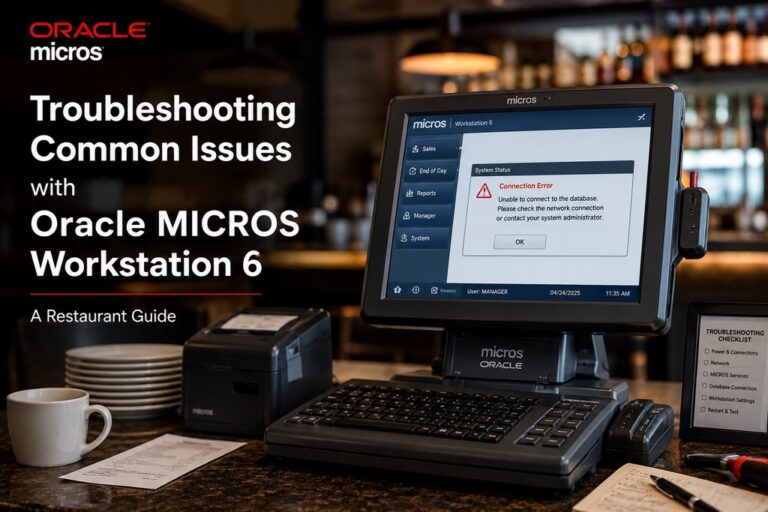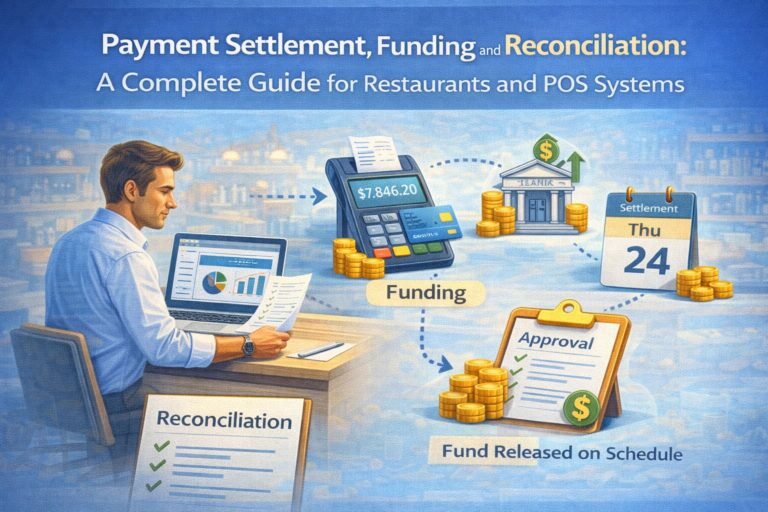
“After 12 years managing payment flows for restaurant networks across the US, I’ve learned that settlement and reconciliation aren’t back-office details—they’re the operational heartbeat of cash flow stability. Most owners focus on point-of-sale transactions, but what happens after the payment is authorized determines whether your cash arrives on time, accurately, and without friction. This guide walks you through the entire process so you understand exactly when your money arrives, why reconciliation matters, and how to catch problems before they compound into audit headaches.” — Max Artemenko, Enterprise POS Expert & Payment Systems Architect
What is Payment Reconciliation and Batch Settlement?
Payment reconciliation and batch settlement are two interconnected processes that ensure your restaurant’s payment transactions are accurately captured, grouped for processing, transferred to your acquiring bank, and finally reflected in your business account with complete financial accuracy.
Here’s the foundational difference:
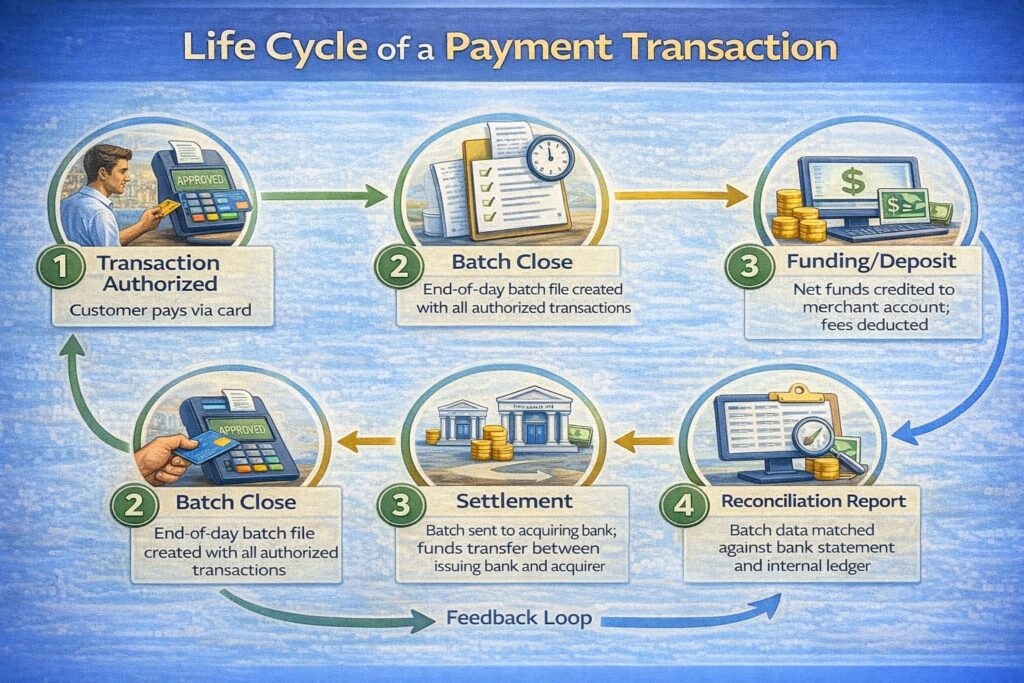
Batch Settlement — the process of grouping authorized transactions from a trading day (or shift), closing that batch for processing, and sending it to the acquiring bank so funds can be transferred through the card networks to your merchant account.
Batch Close — the specific operational action that locks a batch and initiates transmission to the processor. Once closed, no new transactions can be added to that batch.
Settlement — the transfer of funds from the card issuer (customer’s bank) through the acquiring bank to your merchant account, typically occurring 1–3 business days after batch close.
Payment Reconciliation — the process of comparing your internal sales records, batch reports from your payment gateway, acquiring bank deposit statements, and your actual bank account deposits to verify that every dollar is accounted for, fees are correctly deducted, and no transactions are missing or duplicated.
Funding (Deposit) — the actual crediting of net funds (gross settlement minus fees) to your merchant account, typically 1–2 business days after settlement completes.
Together, these processes answer two critical operational questions:
- Settlement: Did my batch close on time, and when will my money arrive?
- Reconciliation: Does the money that actually landed in my account match what the processor says I earned?
Without proper reconciliation, you won’t know if discrepancies stem from processing errors, chargebacks, refunds posted after batch close, payment processor fees, bank holds, or simple timing mismatches. Scheme: “From Transaction to Batch to Settlement to Reconciliation”
Quick Answer: How to Verify All Payments Are Deposited and Reconciled
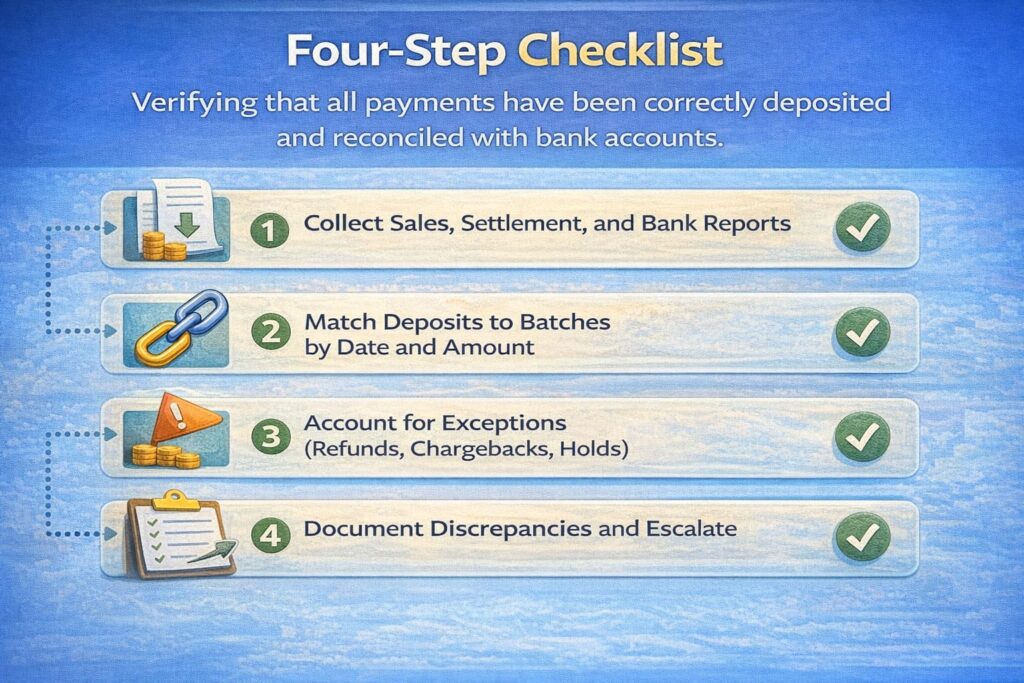
If you want a fast checklist before diving into detail, here are the four essentials:
- Collect Reports — Export your POS sales report for the day/week, download the settlement report from your payment processor, and pull your bank statement.
- Match Deposits to Batches — Compare the total net deposits (gross sales minus fees) shown in your settlement report against the deposits that appeared in your bank account, matched by date and processor deposit reference.
- Handle Exceptions — Account for returns, refunds posted after batch close, chargebacks, tips added after settlement, and any holds or reserve deductions.
- Document and File — Record any discrepancies in a reconciliation report, note the reasons, and escalate unresolved items to your processor or bank within 2–3 business days.
Four-Step Checklist
What is Batch Settlement? Core Concepts for Restaurant Operations
Understanding Batches: From Single Transaction to Daily Grouping
In restaurant operations, every transaction—whether a card payment for lunch, a tip added at terminal close, or a refund for a voided order—is captured individually by your POS system. However, payment processors don’t send individual transactions to the bank. Instead, they aggregate all authorized transactions from your business into batches.
A batch is simply a grouped collection of transactions closed at a specific point in time. When your restaurant’s manager closes the POS at end of shift or end of day, the terminal (or gateway) creates a batch record containing:
- Batch ID (unique identifier)
- Transaction count (how many payments processed)
- Gross sales total (sum of all transaction amounts before fees)
- Batch open/close timestamps
- Cardholder and merchant data
This batch record is then transmitted to your acquiring bank’s processor for settlement.
How Batch Close Works: The Triggering Event for Fund Movement
Batch close is the operational action that signals the end of transaction capture for a time period and initiates the settlement process.
When you close a batch in your POS terminal or payment gateway:
- Terminal/Gateway Locks Transactions — No new authorizations can be added to the closed batch; the system creates a final record of all transactions in that batch.
- Batch File Generated — A file containing all batch metadata (ID, totals, transaction details) is created and ready for transmission.
- Transmission to Acquirer — The batch file is sent electronically to your acquiring bank’s processor (either immediately if online, or queued if offline and retried when connectivity restores).
- Processor Validation — The acquirer validates the batch file format, checks that transaction totals match the count, and prepares the batch for settlement through the card network (Visa, Mastercard, Discover, Amex).
- Movement Toward Settlement — Once the batch is accepted by the acquirer, it enters the settlement queue. The processor will begin preparing instructions to move funds from issuing banks to your acquiring bank, and then from the acquiring bank to your merchant account.
For restaurants using Oracle MICROS or similar enterprise POS systems, batch close typically happens automatically at a scheduled time each night (e.g., 11:59 PM local time). For smaller terminals, a manager may manually initiate batch close via a button or menu command.
Important Note: If a batch close fails (due to network loss, terminal malfunction, or duplicate batch ID), transactions may remain in an “open” state, preventing settlement. This is a common operational issue in multi-location restaurants and requires IT intervention to clear the stuck batch and re-close.
The Role of Cut-Off Time: When Your Batch Makes the Day’s Settlement Window
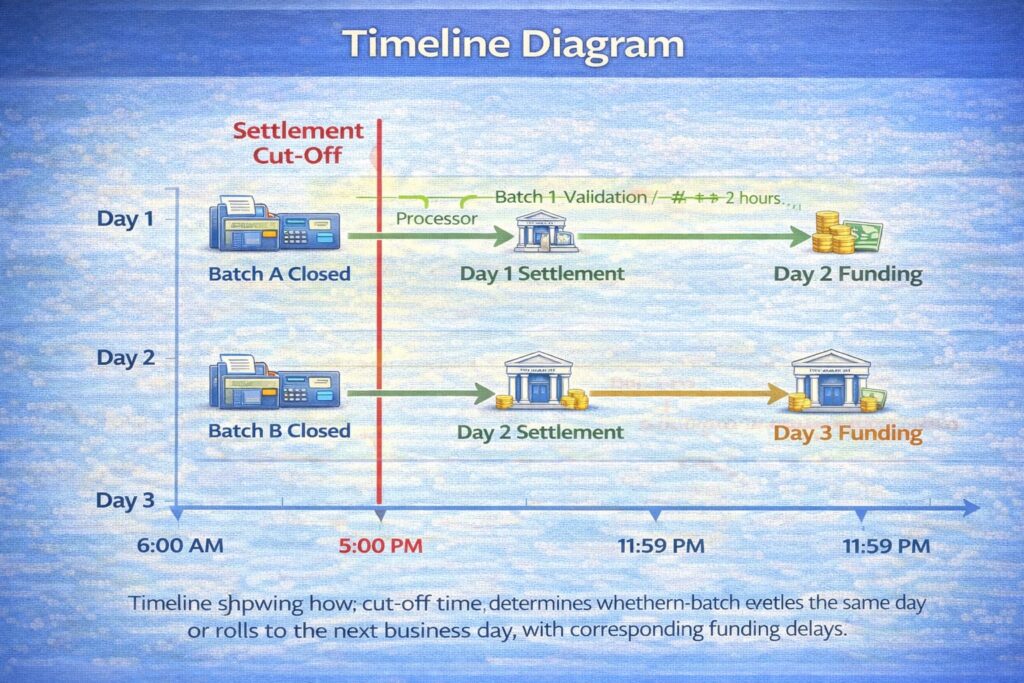
Cut-off time (also called batch cut-off or settlement cut-off) is the deadline set by your acquiring bank or payment processor for closing batches that will settle on a given business day.
Here’s why cut-off matters operationally:
- Transactions Before Cut-Off → Settle Today
- Transactions After Cut-Off → Settle Tomorrow (or later)
For example, if your processor’s cut-off is 5:00 PM local time:
- A restaurant that closes its batch at 4:45 PM → that batch will be processed and settled on the current business day.
- A restaurant that closes its batch at 6:30 PM → that batch will be held and processed on the next business day, delaying your funding by 24 hours.
Financial Impact:
Missing cut-off can delay funding by 1–3 days, which compounds for multi-location operators. In a restaurant chain processing $50,000 per day across 10 locations, a single day’s settlement delay means $50,000 unavailable for payroll, inventory reorder, or operating expenses. Timeline: Cut-Off Time Impact on Batch Settlement and Funding Day
“Cut-off time is often the biggest operational lever restaurants overlook. I worked with a 12-location chain that was consistently missing the 5 PM cut-off because the corporate office didn’t close batches until 8 PM. We shifted the closing to 4:45 PM, and they gained one full business day of cash flow across the board—roughly $15,000 in improved working capital without any other operational change.” — Max Artemenko, Enterprise POS Expert
The Payment Funding Timeline: From Batch Close to Your Bank Account
Understanding when your money arrives requires understanding the complete chain of events. Restaurant and retail owners often assume that once a customer’s card is swiped, the cash is on its way. In reality, there are multiple intermediate steps, each with its own timing window.
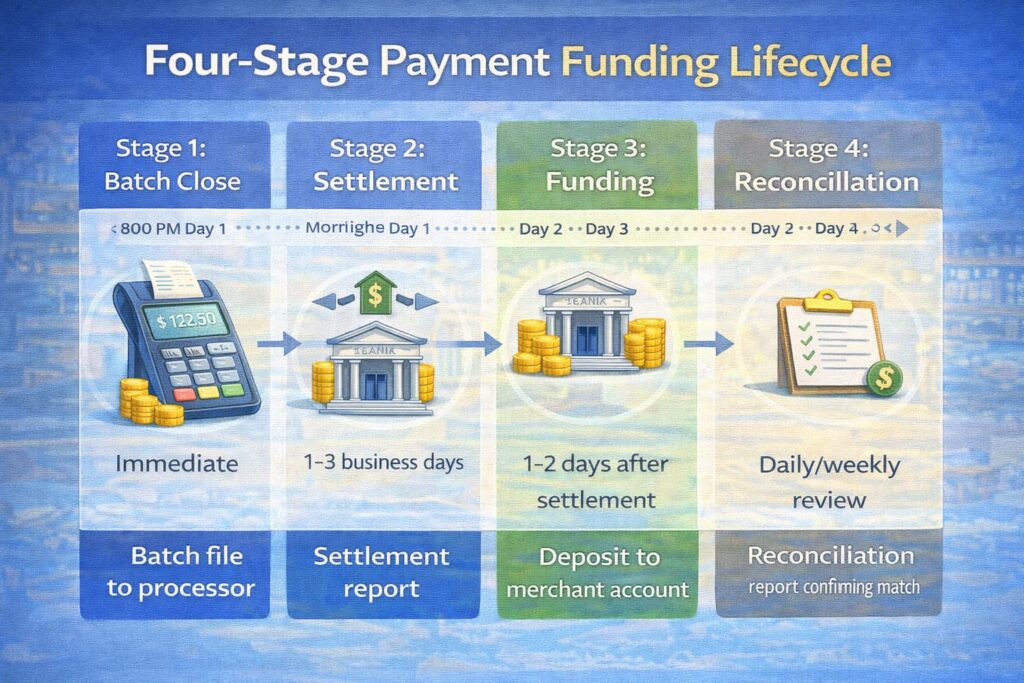
Stage 1: Batch Close (0–2 Hours)
What happens: Your POS terminal or gateway closes all authorized transactions for the period and sends the batch file to your acquiring bank’s processor.
Typical timeline: Immediate (if the terminal is online) or queued for retry (if offline).
Your action required: Ensure the batch close initiates before the processor’s cut-off time. For multi-location restaurants, coordinate closing procedures across all terminals to avoid missing the window.
Stage 2: Settlement with the Acquiring Bank (1–3 Business Days)
What happens: The acquiring bank receives your batch file and begins the settlement process. This involves:
- Validating the batch format and transaction totals
- Routing the batch through the card network (Visa, Mastercard, Discover, Amex)
- Sending settlement instructions to issuing banks (customer’s card issuers)
- Receiving confirmation that issuers have authorized the debit to cardholders’ accounts
- Crediting the acquiring bank with the gross settlement amount
Typical timeline: 1–3 business days, depending on:
- The card type (Visa/Mastercard typically faster; some debit cards or international cards slower)
- The processor’s settlement schedule
- Whether the batch is flagged for fraud review or compliance hold
Your action required: Monitor your processor’s dashboard for batch status. If a batch is flagged as “pending” or “held,” contact your processor to understand the reason and timeline.
Stage 3: Funding to Your Merchant Account (1–2 Business Days After Settlement)
What happens: Once settlement is confirmed, the acquiring bank initiates a funds transfer to your merchant account. Fees (discount rate, processing fees, gateway fees) are deducted, and the net amount is deposited.
Typical timeline:
- Next-Day Funding (most common): Funds arrive 1 business day after settlement completes.
- Same-Day Funding (premium option): If available from your processor, funds can arrive within 2.5–4 hours of batch close (if batch closed before the processor’s same-day cut-off, typically 1–2 PM ET).
- T+2 or T+3 Funding: For higher-risk merchants, international transactions, or certain payment types, funding may be delayed 2–3 business days.
Your action required: Verify the funding timeline in your merchant agreement. If you process more than $10,000 daily, ask your processor about same-day funding options—the cost may be justified by improved cash flow. Infographic: Payment Funding Lifecycle (Batch Close → Settlement → Bank Deposit)
ROADMAP
Same-Day vs. Next-Day Funding: Understanding Your Payment Timeline
Most restaurants operate on a next-day funding model by default. However, understanding the alternatives helps you make informed decisions about payment processing and cash flow management.
⚠️ Disclaimer: The following information on funding timelines, fees, and service conditions is general in nature and does not replace professional consultation with your payment processor or financial advisor. Actual terms vary by processor, account risk profile, transaction volume, and jurisdictional regulations. Verify specific timelines and fees in your merchant agreement before relying on funding schedules for operational planning. Table: Comparison of Funding Models
| Funding Type | Deposit Timeline | Requirements & Conditions | Best For | Trade-Offs |
|---|---|---|---|---|
| Same-Day Funding | 2.5–4 hours after batch close (if before processor’s same-day cut-off, typically 1–2 PM ET) | Batch must close before cut-off; available from processor; may require higher transaction volume ($5K+ daily); premium fee (0.25–0.50% of settlement) | High-volume restaurants, franchises, or locations with tight daily cash flow requirements | Higher processing fees; less common; may have transaction minimums |
| Next-Day Funding | 1 business day after settlement completes; typical total time from batch close is 24–36 hours | Standard offering; batch closes by end of business day; processor settles overnight; bank deposits next morning | Most SMB restaurants, retail, and service businesses; accounts with moderate transaction volume | Delayed cash flow by 1 day; insufficient for very high-volume or multi-location operators with tight working capital |
| T+2 Funding | 2 business days after settlement; total time from batch close is 48–60 hours | Standard for accounts flagged for elevated risk, international transactions, or specific payment types; processor may require additional compliance review | Newer merchants; accounts with historical chargebacks or disputes; high-risk verticals (e.g., gaming, adult services) | Significant cash flow delay; creates working capital gaps for daily operations |
| Deferred/Scheduled Funding | Per agreement (weekly, bi-weekly, or monthly payout schedule) | Processor holds funds in reserve or settlement account; scheduled release on agreed dates | Subscription/SaaS businesses; marketplace platforms with holdback requirements; vendor management systems | Severely delayed cash flow; processor retains float; suitable only for businesses with monthly revenue cycles |
Alt text: “Table comparing same-day, next-day, T+2, and deferred funding models by deposit timeline, requirements, ideal business types, and trade-offs.”
Key Insights:
- Cut-off time is critical. Same-day funding requires batch close before the processor’s same-day cut-off (often 1–2 PM ET). After that, your batch rolls to next-day settlement.
- Next-day funding is the industry standard for restaurant POS operators because it balances processing efficiency with reasonable cash flow.
- Your processor determines available options. Ask your payment processor (Stripe, Adyen, Worldpay, Square, Toast, etc.) which funding models you qualify for based on your transaction volume and risk profile.
“I worked with a 50-unit restaurant franchise that was on next-day funding. They shifted to same-day funding for high-volume locations and reduced their working capital requirement by $100,000 across the entire chain. The fee was 0.35% of settlement—roughly $5,000 per month—but the cash flow improvement and predictability made it a no-brainer.” — Max Artemenko
How to Reconcile Card Deposits: A Step-by-Step Process
Reconciliation is where the rubber meets the road. This is the operational process that confirms whether your payment system is working correctly and whether your money arrived as expected.
The Eight-Step Reconciliation Workflow
Step 1: Export Sales Transactions from Your POS by Day and Payment Type
From your POS system (MICROS, Toast, Square, etc.), run a Daily Sales Report filtered by:
- Date range (single day or week)
- Payment tender type (card payments only, if also accepting cash)
- Location/terminal (if multi-location)
This report should show:
- Transaction count
- Gross sales amount
- Refunds/voids (with amounts)
- Tip total (if tips were added at point of sale)
- Net card sales (gross minus refunds/voids)
Action: Export this report as CSV or PDF and label it with the date. This is your internal source of truth for what was actually sold.
Step 2: Download the Settlement Report from Your Payment Processor
Log into your payment processor’s dashboard (or request via email) and download the settlement report for the same date/period. This report should show:
- Batch ID
- Settlement date
- Transaction count (should match Step 1)
- Gross sales amount
- Processor fees (discount rate, gateway fee, etc.)
- Adjustments (chargebacks, refunds, holds)
- Net settlement amount (what the processor says you earned)
Action: Save this report. This is your processor’s view of what happened.
Step 3: Extract Bank Deposits from Your Bank Statement
Log into your business bank account and pull the statement for the same date/period. Filter for deposits and note:
- Deposit date
- Deposit amount
- Deposit description (should reference batch ID or processor name)
- Any holds or reversals
Action: Identify which deposits correspond to which batches or settlement periods.
Step 4: Match Settlement Amounts to Bank Deposits
Create a simple spreadsheet with columns:
| Date | Batch ID | POS Gross Sales | Processor Fees | Processor Net | Bank Deposit | Match? | Variance |
|---|---|---|---|---|---|---|---|
| 1/15/2025 | BATCH001 | $5,200 | $156 | $5,044 | $5,044 | ✓ | $0 |
| 1/16/2025 | BATCH002 | $6,100 | $183 | $5,917 | $5,875 | ✗ | $42 |
Key equation: Processor Net Deposit = POS Gross Sales − Processor Fees
If your POS gross matches the processor’s gross, and the fees are correct, then the processor’s net should match your bank deposit (assuming no other holds or adjustments).
Action: For each batch, verify:
- Gross sales from POS = Gross settlement from processor
- Fees charged = Fees listed in merchant agreement
- Net settlement = Bank deposit (or identify variance reason)
Step 5: Investigate Discrepancies
If the amounts don’t match, the variance likely stems from one of these categories:
A. Timing Differences
- Refunds posted after batch close (will appear in the next batch’s settlement)
- Tips added late (will appear as an adjustment in next settlement)
- Chargebacks filed after settlement (deducted from subsequent deposit)
B. Fee Variations
- Tiered pricing based on card type (Amex fees higher than Visa)
- AVS or CVV fees for certain transaction types
- Gateway or POS rental fees (not always visible in settlement report)
C. Processor Holds or Reserves
- Reserve holds (processor deducts a % of settlement for fraud protection)
- Rolling reserves released over time
- Account underwriting holds (new accounts or flagged for review)
D. Bank Holds or Reversals
- Bank deducting ACH transaction fees
- Chargeback reversals hitting the bank account, not the settlement report
Action: For each variance, document the likely cause. For example:
Variance for BATCH002 ($42): Refund of $42 (order #1847) was voided on 1/16 at 11:30 PM, after batch close at 11:00 PM. Refund will appear in BATCH003 settlement. No action required.
Step 6: Record Exceptions in a Reconciliation Report
Create a Reconciliation Report documenting:
- Date of reconciliation
- Batches reviewed
- Total POS gross sales
- Total processor net
- Total bank deposits
- Reconciled variance (should be $0 or documented exceptions)
- Unresolved discrepancies (if any)
- Preparer name and approval
Example Reconciliation Report Template
Sample Reconciliation Report
Reconciliation Report – Week of January 15–21, 2025
| Location | Main Street Restaurant |
| Period | 1/15/2025 – 1/21/2025 |
| Preparer | John Manager |
| Date Prepared | 1/22/2025 |
| Summary | |
| Batches Reconciled | 7 |
| POS Gross Sales | $41,680 |
| Processor Fees | $1,250 |
| Processor Net | $40,430 |
| Bank Deposits Received | $40,430 |
| Reconciled Variance | $0 |
| Exceptions Noted | |
| 1/16 Refund ($42) | Voided after batch close; in next settlement ✓ |
| 1/19 Chargeback hold ($75) | Deducted from 1/19 deposit; documentation sent to processor ✓ |
| Unresolved Items | |
| None | |
| Approval | |
| Manager signature: ___________ CFO: ___________ | |
Alt text: “Example reconciliation report template showing weekly settlement summary, batch details, exceptions, and sign-off fields for restaurant POS reconciliation.”
Action: Use this template weekly. File and archive for audit trail.
Step 7: Escalate Unresolved Discrepancies to Your Processor
If a discrepancy remains unexplained after 2–3 business days, escalate to your processor with:
- Batch ID and settlement date
- Screenshot of settlement report (from processor)
- Screenshot of bank deposit (from bank)
- Amount of variance
- Your internal POS records showing transaction detail
Include a statement like:
“Batch BATCH002 shows net settlement of $5,917, but bank deposit received is $5,875 (variance $42). POS gross sales match processor gross. Please advise if this variance is due to a fee adjustment, hold, or processing error.”
Timeline: Most processors respond within 24–48 business hours with an explanation or correction.
Action: Document the response and any corrective action in your reconciliation report.
Step 8: Finalize and Archive
Once all discrepancies are resolved (or documented with explanation), mark the reconciliation as Complete and file:
- Digitally: Archive the reconciliation report in a shared drive (e.g., Google Drive, OneDrive) with folder structure by month/year.
- For Audit: Retain for a minimum of 3–7 years, depending on your accounting policies and regulatory requirements.
Action: Lock the reconciliation (mark as final) in your accounting system (QuickBooks, NetSuite, etc.) to prevent accidental changes.
Understanding Settlement and Reconciliation Reports
It’s easy to confuse these two critical documents. Here’s the distinction:
Settlement Report
Source: Your payment processor (Stripe, Adyen, Worldpay, Square, Toast, etc.)
Contains:
- Batch ID and settlement date
- Gross transaction amount for the batch
- Count of transactions
- Processor fees (discount rate, gateway fee, PCI fee, etc.)
- Chargebacks or refunds deducted
- Adjustments (holds, reserves, corrections)
- Net settlement amount (what the processor will deposit to your bank)
Purpose: Shows the processor’s view of what they processed and what they’re paying you. It’s the “bill” from your processor to your business.
Frequency: Daily (one report per batch close) or summarized weekly/monthly.
Example:
Settlement Report – Batch BATCH001
- Settlement Date: 1/15/2025
- Transactions: 142
- Gross: $5,200
- Fees: $156
- Adjustments: $0
- Net Deposit: $5,044
Reconciliation Report
Source: Your business (created by you, your accountant, or your bookkeeper)
Contains:
- Summary of POS sales for the period
- Settlement report details (from processor)
- Bank statement deposits for the period
- Comparison of processor net vs. bank deposit
- Documented exceptions (timing, fees, holds)
- Unresolved discrepancies (if any)
- Preparer and approval signatures
Purpose: Provides independent verification that the processor’s settlement matches your bank account. It’s your internal control to detect errors, fraud, or missing funds.
Frequency: Daily, weekly, or monthly (depending on transaction volume and account reconciliation policy).
Example:
Reconciliation Report – Week of 1/15–1/21/2025
- Batches Reconciled: 7
- POS Total: $41,680
- Processor Fees: $1,250
- Processor Net: $40,430
- Bank Deposits: $40,430
- Variance: $0 ✓
- Exceptions: [Documented and resolved]
The Relationship
- You process transactions → POS records them
- Batch closes → Settlement report generated by processor
- Funds move → Bank deposits the net amount
- You reconcile → Compare processor report + bank deposit against your POS records
- Match confirmed → Reconciliation report filed
Payment Reconciliation Template: Ready-to-Use Structure
Reconciliation Template Structure and Sample Row
| Column | Purpose | Example Data |
|---|---|---|
| Date | Transaction/settlement date | 1/15/2025 |
| Batch ID | Processor batch identifier (reference number for processor support) | BATCH001 |
| POS Gross Sales | Total sales from your POS report for the period | $5,200 |
| Refunds/Voids | Returns and voided transactions (if tracked separately) | ($45) |
| Adjusted Gross | POS Gross minus Refunds/Voids | $5,155 |
| Processor Fees | Discount rate + gateway fee + other processor fees | ($156) |
| Processor Net Deposit | What the processor says they’re sending (Adjusted Gross − Fees) | $4,999 |
| Bank Reference | Bank deposit confirmation number or descriptor | DEP-12345 |
| Bank Deposit Amount | Actual amount received in bank account | $4,999 |
| Status | Reconciled, Pending, or Exception | Reconciled ✓ |
| Comments | Notes on timing, holds, discrepancies, or follow-up | Matches perfectly |
Alt text: “Table showing reconciliation template structure with columns for date, batch ID, sales amounts, fees, deposits, status, and comments.”
How to Use:
- Create a spreadsheet (Excel, Google Sheets, or your accounting software) with these columns.
- Add a row for each batch/settlement period (daily or weekly, depending on volume).
- Fill in data from POS export, processor settlement report, and bank statement.
- Calculate variance in the Status column (should be $0 for reconciled items).
- Archive weekly or monthly with supporting documents (screenshots of reports).
Common Payment Reconciliation Problems and Solutions
Problem 1: Settlement Mismatch — Processor Net Doesn’t Match Bank Deposit
Symptoms:
- Settlement report shows $5,044 net deposit
- Bank account only shows $4,975 deposit
- Variance: $69 unexplained
Root Causes:
- Refund posted after batch close — A customer’s return was voided at 11:15 PM, after the 11:00 PM batch close. The $69 refund will be deducted from the next day’s settlement, not today’s.
- Chargeback hold — A customer disputed a transaction; processor deducted the amount from the deposit and is holding it pending resolution.
- Reserve hold — Processor withholds a percentage of settlement (e.g., 2%) as a fraud reserve, releasing it over weeks or months.
- Late tip addition — A customer added a $69 tip after settlement was already sent to the bank.
- Bank fee — Your bank deducted a $69 ACH fee or monthly fee from the deposit.
Resolution Steps:
Step 1: Check your processor’s settlement report for notes or adjustments. Search for the variance amount ($69) in the Adjustments column.
Step 2: Review your POS for any refunds/voids processed after the batch close time. If found, note the expected settlement date for that refund.
Step 3: Check your processor’s dashboard for “pending” or “held” amounts. Many processors show a summary of reserves and holds.
Step 4: Review your bank statement for any fees or deductions around the deposit date.
Step 5: If still unresolved, contact your processor with:
- Batch ID and settlement date
- Screenshots of settlement report and bank deposit
- Amount and date of discrepancy
- Any refunds/chargebacks you suspect are related
Expected Resolution Time: 1–3 business days (processor investigates and issues corrective deposit if error is found).
Problem 2: Missing Deposit — Bank Account Never Shows the Expected Funds
Symptoms:
- Settlement report shows $5,200 net deposit scheduled for 1/16
- Today is 1/18, and the deposit has not appeared in the bank account
- Processor dashboard shows “completed” or “settled,” but bank shows nothing
Root Causes:
- Late batch close — Batch closed after the processor’s cut-off time and rolled to next-day settlement (now delayed even further).
- Funding delay — Settlement completed, but the processor is still in the funding queue (common during high-volume periods or holidays).
- Bank processing delay — Processor sent the transfer, but the bank is holding it (new merchant, account verification, or seasonal hold).
- Account issue — Processor flagged the account for compliance review and is holding funds pending documentation.
- Processor error — Rare but possible: the batch failed to route correctly and was never settled.
Resolution Steps:
Step 1: Check the processor’s dashboard for the batch status. Look for:
- “Settled” = processor confirmed settlement
- “Pending” = processor is still processing
- “Held” = processor has flagged the account
- “Failed” = processor encountered an error
Step 2: If status is “Settled,” confirm the bank received the transfer. Log into your bank account and:
- Check for pending deposits (may appear before clearing)
- Search the activity feed for the processor name or batch ID
- Look for ACH transfers from the processor’s bank
Step 3: If the bank shows no record, the transfer may not have been sent. Contact your processor immediately with the batch ID and request a manual trace.
Step 4: If the bank shows the transfer but it’s held or reversed, contact your bank’s merchant services team and ask:
- Why is the deposit held?
- What documentation is needed to release it?
- When will it be available?
Step 5: Document all findings in a support ticket with:
- Batch ID and settlement date
- Screenshots of processor dashboard (status)
- Screenshots of bank statement (or lack thereof)
- Timeline of events
Expected Resolution Time: 2–5 business days (processor re-routes transfer if lost, or bank releases hold upon verification).
Problem 3: Batch Close Failed — Batch Remains Open and Blocking Settlement
Symptoms:
- POS shows batch status as “Open” or “Pending Close”
- Subsequent batch closes fail with error: “Duplicate Batch ID” or “Previous Batch Still Open”
- Settlement has not occurred; funds have not been received
Root Causes:
- Network connectivity lost during batch close — Terminal lost connection to processor mid-close, leaving batch in an indeterminate state.
- Terminal malfunction — POS crashed or powered off during batch close sequence.
- Duplicate batch ID — System attempted to create a second batch with the same ID due to a retry.
- Processor gateway error — Processor received the batch close request but failed to confirm, leaving the terminal thinking it failed while the processor thinks it succeeded (rare but critical).
Resolution Steps:
Step 1: Try closing the batch again (if the terminal allows). Sometimes a network retry succeeds.
Step 2: Check the processor’s dashboard. If the batch appears there as “Settled” or “Pending Settlement,” the close actually succeeded on the processor’s side, and the problem is just the terminal’s status display. In this case, you can safely re-boot the terminal or manually reset the batch status.
Step 3: If the processor shows no record of the batch, force-close the batch via the POS menu (if supported) or contact your POS vendor’s support line. They can issue a command to close the stuck batch and clear the terminal for new batches.
Step 4: Once cleared, attempt batch close again during a low-transaction period to ensure it completes successfully.
Step 5: Document the incident:
- Time of failure
- Error message (screenshot if possible)
- Resolution steps taken
- Time batch finally closed successfully
Prevention:
- Ensure your POS terminal has a stable internet connection (wired Ethernet preferred over Wi-Fi for batch close)
- Close batches during off-peak hours (late evening, not during lunch/dinner rush)
- Test your backup connectivity (cellular or secondary internet) quarterly
Manual vs. Automated Reconciliation: Trade-Offs and Efficiency
Most small to mid-size restaurants perform reconciliation manually: an accountant or manager exports reports, compares numbers in a spreadsheet, and documents exceptions. While this works, it’s time-consuming and error-prone at scale.
The Challenges of Manual Reconciliation
1. High Error Risk
- Typographical errors when copying batch IDs or amounts
- Incorrect formulas in spreadsheets (e.g., wrong cell references)
- Missing transactions due to incomplete exports
- Late-night fatigue leading to oversight
2. Time-Intensive
- Exporting reports from POS, processor, and bank (5–10 min)
- Manually comparing numbers in a spreadsheet (15–30 min)
- Investigating discrepancies (10–45 min depending on complexity)
- Documenting and filing (5–10 min)
- Total per day: 45 min to 2 hours; scaled across a week, that’s 5–10 hours
3. Poor Scalability
- Adding a second location doubles the time (no built-in aggregation)
- Adding a second payment processor multiplies complexity (different report formats)
- Franchises with 50+ locations spending 50+ hours weekly on reconciliation
4. Delayed Problem Detection
- If reconciliation happens weekly, discrepancies may not surface until 7 days later
- By then, the issue may have compounded (e.g., a chargeback triggered by an unresolved first-day error)
5. Audit Trail Weaknesses
- Spreadsheets lack change tracking; it’s unclear who edited what and when
- No integrated exception tracking or sign-off workflow
- Compliance reviews require manual file gathering
The Strategic Advantages of Automation
Automated reconciliation tools (like Stripe Sigma, Adyen’s Reconciliation Hub, or dedicated software like Ramp or Tipalti) connect directly to:
- Your POS system (REST API or SFTP feed)
- Your processor (settlement report API)
- Your bank (via Plaid or direct bank API)
- Your accounting system (QuickBooks, NetSuite, Xero)
Advantages:
1. Speed
- Reconciliation completes within minutes of all data sources updating
- 95%+ of transactions auto-matched without manual intervention
- Unmatched items flagged in real-time (not at week-end)
2. Accuracy
- No manual data entry → no typos
- Algorithms detect outliers and edge cases (e.g., partial refunds, split batches)
- Built-in validation rules prevent impossible matches
3. Scalability
- 1 location, 50 locations, or 500: same tool, same process time
- Multiple processors and payment methods aggregated in one view
- Batch processing allows nightly or hourly reconciliation
4. Real-Time Detection
- Discrepancies flagged within 1–2 hours of settlement
- Quick identification of fraud or processing errors
- Faster escalation to processor/bank (before 24+ hour delay)
5. Compliance and Audit
- Complete audit trail (who viewed, changed, or approved each reconciliation)
- Integrated exception tracking and resolution workflow
- Automatic archival for regulatory retention (3–7 years)
6. Cash Flow Insight
- Automated forecasting of deposits based on historical settlement patterns
- Early warning if deposits are delayed (so you can plan working capital)
- Integration with accounting system improves month-end close speed
Table: Manual vs. Automated Reconciliation
| Factor | Manual | Automated |
|---|---|---|
| Time per day | 45 min – 2 hours | 5–15 min (setup + review) |
| Error rate | 2–5% of transactions | 0.1–0.5% (algorithm mismatches) |
| Discrepancy detection | Weekly (if reconciled weekly) | Real-time / hourly |
| Scalability | Breaks down at 10+ locations | Handles 100+ locations seamlessly |
| Cost | Labor (accountant salary / contractor hourly rate) | Software subscription ($100–$500+ per month, depending on volume) |
| Audit trail | Manual documentation; weak change history | Complete digital log; exportable for auditors |
| Integration | Manual exports; file handling | API-driven; automatic data flow |
| Time to month-end close | Delayed by manual reconciliation bottleneck | Accelerated; reconciliation pre-completed |
Alt text: “Table comparing manual and automated reconciliation across time, error rate, scalability, cost, audit trail, integration, and month-end close speed.”
When to Automate
Start automating reconciliation if:
- You operate 3+ locations
- You process $15,000+ daily
- You use 2+ payment processors
- Your accounting team spends 5+ hours weekly on reconciliation
- You need real-time cash flow visibility
ROI Calculation:
- Assume reconciliation takes 1 hour per day × 5 days = 5 hours weekly
- Accountant cost: $30–50/hour = $150–250/week
- Annual labor cost: $7,800–13,000
- Automated software cost: $2,400–6,000/year
- Net savings: $1,800–10,600/year + faster problem detection
Common Types of Payment Reconciliation in Restaurant and Retail Operations
Core Business Reconciliations
Bank Reconciliation
Definition: Comparing your internal cash ledger (or POS cash account) with your bank’s statement to ensure all deposits, withdrawals, and bank fees are accounted for.
Applied to restaurants:
- Verify that daily card deposit matches what your processor says it’s sending
- Ensure bank fees (ACH, maintenance, chargeback fees) are recorded in your general ledger
- Reconcile monthly bank statement with your accounting system before month-end close
Frequency: Daily (small restaurants) to weekly (mid-size chains)
Accounts Receivable (AR) Reconciliation
Definition: Matching invoices issued to customers (or expected revenue) against actual cash received and reconciling any timing differences or unpaid balances.
Applied to restaurants:
- Typically relevant for catering, corporate events, or wholesale accounts with invoice-based billing
- Less common for retail point-of-sale operations (which are mostly immediate cash/card)
Frequency: Weekly to monthly
Accounts Payable (AP) and Vendor Reconciliation
Definition: Matching invoices received from vendors against payments made, ensuring no duplicate payments and all expenses are recorded.
Applied to restaurants:
- Reconcile invoices from food suppliers, equipment vendors, and service providers
- Match against check registers, ACH payments, and credit card charges
- Less directly related to payment reconciliation, but important for overall financial control
Frequency: Weekly to monthly
Specialized Reconciliations
Point-of-Sale (POS) Reconciliation
Definition: Comparing POS daily/shift reports (sales by category, tender type, discounts) against settlement reports from your processor and actual bank deposits.
Unique to restaurants and retail:
- Reconcile POS tender breakdown (cash, card, gift card, check) against settlement (card only, since cash/checks are separate)
- Identify voids, refunds, and discounts to ensure they’re properly accounted for in the settlement
- Validate that tips added at POS are correctly included in card settlement
Frequency: Daily (best practice) to weekly
Digital Wallet and E-commerce Platform Reconciliation
Definition: Matching transactions processed through PayPal, Apple Pay, Google Pay, Square, Toast, or marketplace platforms (DoorDash, Uber Eats, Grubhub, etc.) against actual deposits and fees.
Applied to restaurants:
- Third-party delivery platforms may deduct their commission before depositing net funds
- Margin is lower than direct sales; reconciliation helps identify over-deductions
- Each platform has different fee structures and timing; reconciliation reveals discrepancies
Frequency: Weekly to daily (for high-volume delivery orders)
Credit Card Reconciliation
Definition: Reconciling company credit card statement (for business expenses) against receipt records, policy compliance, and expense categorization.
Applied to restaurants:
- Track business credit card used for vendor payments, supplies, maintenance
- Separate from customer payment card reconciliation (above)
Frequency: Monthly (aligned with credit card statement cycle)
Payment Gateway and Processor Reconciliation
Definition: Reconciling transactions as recorded in your payment gateway (e.g., Stripe, Adyen) against settlement reports to ensure all transactions are settled correctly and no fees are missing or duplicated.
Frequency: Daily (critical control) Matrix: Types of Reconciliation and Data Sources
| Reconciliation Type | Internal Source | External Source | Frequency | Key Control |
|---|---|---|---|---|
| Bank | Cash ledger / POS | Bank statement | Daily–Weekly | Deposits match POS totals |
| POS | POS daily/shift reports | Processor settlement report | Daily–Weekly | POS gross = Processor gross |
| Card Processor | Processor dashboard | Bank deposits + settlement report | Daily–Weekly | Settlement net = Bank deposit |
| Digital Wallet | App dashboard (PayPal, Apple) | Bank deposits | Weekly–Daily | App net = Bank deposit |
| Marketplace | POS (delivery orders) | Marketplace settlement report | Daily–Weekly | Delivery commission correctly deducted |
| AR/AP | Invoice register | Vendor statements / customer payments | Monthly | Invoices match paid amounts |
Matrix showing six types of reconciliation, their internal and external data sources, recommended frequency, and key control point.
Best Practices for an Effective Payment Reconciliation Strategy
Building a sustainable, scalable reconciliation process requires clear policies, regular execution, and continuous improvement. Here are the proven best practices:
1. Establish Clear Reconciliation Policies
Document:
- Reconciliation frequency (daily, weekly, or monthly—based on transaction volume)
- Responsible parties (who reconciles, who approves, escalation path)
- Materiality threshold (what variance amount requires investigation vs. accrual)
- Cutoff procedures (when does one period end and the next begin?)
- Exception handling (what discrepancies are acceptable; what requires escalation?)
Example policy:
“Daily POS and card processor reconciliation is performed by the restaurant’s shift manager by 11:00 AM the next day. Discrepancies over $100 are escalated to the restaurant manager. Weekly summary reconciliation is performed by the accounting team on Fridays and approved by the area finance director. All reconciliations are documented in [system name] and archived for audit.”
2. Reconcile on a Regular and Frequent Schedule
Recommendation:
- High-volume locations (>$20K daily): Daily reconciliation
- Mid-volume locations ($5K–20K daily): 2–3 times weekly
- Low-volume locations (<$5K daily): Weekly
Benefit: Early detection of errors or fraud. A discrepancy found the next day is easier to investigate than one discovered a week later when context is lost.
Practical implementation:
- Schedule reconciliation during a slow period (mid-morning or early afternoon, not during service)
- Assign a dedicated person or rotation (accountability)
- Use a checklist to ensure no step is skipped
3. Implement Automation (or Progressive Automation)
Start small:
- Use spreadsheet templates with built-in formulas to reduce manual calculation errors
- Set up automatic alerts in your accounting system when a batch doesn’t settle within expected timeline
Scale up:
- Integrate POS with processor via API (some POS systems offer this natively)
- Use a dedicated reconciliation tool (Ramp, Tipalti, HighRadius, or processor-native tools like Stripe Sigma)
Long-term:
- Fully automated daily reconciliation with exception-only manual review
4. Set Materiality Thresholds for Acceptable Discrepancies
Define:
- Immaterial variance: $0–$50 (investigation required, but not blocking approval)
- Material variance: $50–$200 (investigation required; approval withheld until resolved or documented)
- Critical variance: >$200 (immediate escalation to management; possible halt to settlement acceptance)
Benefit: Prevents analysis paralysis on tiny rounding errors while ensuring material issues get attention.
Example:
“Reconciliation approved if variance is ≤$50 and documented. Variance >$50 requires investigation with documented conclusion before approval. Variance >$200 triggers immediate escalation to CFO and processor support.”
5. Track and Resolve Exceptions Systematically
Process:
- Identify the discrepancy (amount, date, batch ID)
- Categorize (timing, fee error, hold, chargeback, etc.)
- Investigate (check processor dashboard, bank statement, POS logs)
- Document (reason for discrepancy, resolution steps taken, expected outcome)
- Escalate (if unresolved after 2 business days)
- Close (once resolved, file with supporting documentation)
Tool: Create a simple exception log:
| Date Found | Amount | Batch ID | Issue | Status | Resolution | Date Closed |
|---|---|---|---|---|---|---|
| 1/16 | $42 | BATCH002 | Late refund | Documented | Will appear in 1/17 settlement | 1/17 |
| 1/17 | $75 | BATCH003 | Chargeback hold | Escalated | Support investigating | Pending |
6. Maintain an Audit Trail
Document:
- Who performed the reconciliation (name, date, time)
- Which reports were compared (batch IDs, dates, amounts)
- What exceptions were identified and resolved
- Who approved the final reconciliation
Storage:
- Archive all supporting documents (settlement reports, bank statements, POS exports, exception logs) in a centralized location (cloud drive, accounting software, document management system)
- Retain for 3–7 years per regulatory requirements (IRS, SOX for public companies, state tax authorities)
7. Reconcile Across Processors (If Multi-Processor)
Challenge: Most restaurants use a single primary processor, but some use multiple (e.g., Stripe for online orders, Toast for in-house POS, PayPal for gift cards).
Solution:
- Reconcile each processor separately (using the same methodology)
- Create a master reconciliation that aggregates all processors
- Ensure all processor nets add up to total bank deposit
- Document any timing differences between processors
8. Continuously Review and Improve
Monthly review:
- Are discrepancies resolved in a timely manner? If not, why?
- Are reconciliation times increasing? If so, identify bottlenecks
- Are the same exceptions recurring? If so, fix the root cause (e.g., if tips always post late, adjust your process to account for this)
Quarterly improvements:
- Benchmark reconciliation time against peers or best practices
- Evaluate automation opportunities
- Update policies based on lessons learned
“The most successful restaurant chains I’ve worked with treat reconciliation as a continuous improvement process, not a one-time setup. They track metrics (reconciliation time, variance $, exception count), identify trends, and adjust policies every quarter. Over a year, they cut reconciliation time in half and catch errors days faster.” — Max Artemenko
A Practical Example: Reconciling One Day’s Sales for an Online Restaurant
Let’s walk through a real-world scenario to show how all these pieces fit together.
Scenario: Pizza Restaurant with Online Orders
Facts:
- Location: Suburban pizza restaurant processing $6,000–8,000 daily
- Ordering channels: In-house POS (Toast), DoorDash for delivery orders, online ordering via website (processed through Stripe)
- Payment processors: Toast (primary), Stripe (online orders), DoorDash (commission deducted by platform)
- Reconciliation frequency: Daily
Date: January 17, 2025
Step 1: Collect Reports
POS Report (Toast):
- In-house (counter) sales: $4,200
- POS refunds: ($85)
- Net POS sales: $4,115
Stripe Report (Online Orders):
- Online orders: $1,800
- Stripe fees: ($54)
- Net Stripe: $1,746
DoorDash Report (Delivery):
- Food sales: $2,100
- DoorDash commission (25%): ($525)
- Net DoorDash payout: $1,575
Total Expected Deposit: $4,115 + $1,746 + $1,575 = $7,436
Step 2: Check Bank Deposit
Bank Account (1/18/2025):
- Deposit 1 (Toast): $4,115 (received 1/18 at 6 AM)
- Deposit 2 (Stripe): $1,746 (received 1/18 at 7 AM)
- Deposit 3 (DoorDash): $1,575 (received 1/18 at 11 AM)
- Total received: $7,436 ✓
Step 3: Account for Exceptions
During review, the manager notes:
- In-house POS: One void for $45 (order #1847) at 9:45 PM (after batch close at 9 PM). This refund will appear in 1/18’s settlement as a $45 deduction.
- Stripe: One chargeback dispute filed ($120) on 1/17, but not yet deducted from deposit. Expected to be deducted from tomorrow’s settlement.
- DoorDash: All orders from 1/17 appear to be correctly accounted for.
Step 4: Document Reconciliation Report
Example: Daily Reconciliation Report
Daily Reconciliation Report – January 17, 2025
| Location | Suburban Pizza Restaurant |
| Date Reconciled | 1/17/2025 |
| Preparer | Sarah (Shift Manager) |
| Approver | Mike (Restaurant Manager) |
| Approval Date | 1/18/2025 |
| Summary by Processor | |
| Toast (in-house POS) | $4,115 |
| Stripe (online orders) | $1,746 |
| DoorDash (delivery) | $1,575 |
| Total Expected Deposit | $7,436 |
| Bank Deposits Received | |
| Toast deposit: | $4,115 ✓ |
| Stripe deposit: | $1,746 ✓ |
| DoorDash deposit: | $1,575 ✓ |
| Total Received | $7,436 ✓ |
| Reconciled Variance | $0 |
| Exceptions Noted | |
| 1/17 Void ($45) | Order #1847 voided at 9:45 PM, after Toast batch close (9 PM). Refund will be deducted from 1/18 settlement. No action needed. ✓ |
| 1/17 Chargeback ($120) | Customer dispute filed 1/17, submitted to Stripe. Chargeback not yet deducted. Expected deduction from 1/18 Stripe deposit. Monitoring. ✓ |
| Outstanding Items | |
| None | |
| Signature | |
| Sarah: __________ (preparer) Mike: __________ (approver) | |
Alt text: “Daily reconciliation report for a pizza restaurant showing deposits from three processors (Toast, Stripe, DoorDash), exceptions (post-batch refund and pending chargeback), and final reconciled state.”
Step 5: Follow-up and Archive
1/18 morning:
- Sarah reviews 1/18 deposits to confirm the $45 refund was deducted from Toast and the $120 chargeback was deducted from Stripe.
- Updated reconciliation report filed for 1/18 reflecting these expected adjustments.
- 1/17 reconciliation finalized and archived in the restaurant’s accounting folder.
Key learning: By reconciling daily, Sarah caught the two exceptions immediately and documented their expected resolution. When 1/18’s deposits came in with the expected deductions, there were no surprises—the reconciliation was seamless.
Troubleshooting Batch Errors and Settlement Delays
Issue 1: Batch Close Failed — “Previous Batch Still Open”
Error Message: “Cannot close batch. A previous batch is still open. Please close it first.”
Root Cause: A batch from an earlier session (yesterday, or hours ago) never completed its close sequence. The terminal is preventing a new close until the old one is resolved.
Resolution:
Option 1: Check the Processor Dashboard
- Log into your processor’s gateway (Toast, Square, Stripe, etc.)
- Search for the oldest “open” batch by batch ID or date
- If you see it listed as “Pending” or “Settled,” the close actually succeeded on the processor’s side—the terminal just didn’t receive confirmation
- Action: Contact your processor’s support and ask them to manually close/finalize the old batch in their system
Option 2: Force-Close via POS
- Navigate to Batch Menu on the terminal
- Select View Open Batches or Batch Status
- If the old batch appears, select it and choose Force Close (if available)
- Confirm the action
- Attempt a new batch close
Option 3: Clear Terminal and Restart
- Power off the POS terminal
- Restart it (hard reboot, 30+ seconds off)
- Log in as a manager/admin
- Attempt batch close again
- If it fails again, contact POS support—hardware or software may be corrupted
Prevention: Close batches during quiet times; ensure stable internet during close.
Issue 2: Settlement Delay — Batch Shows “Pending” After 48 Hours
Symptoms:
- Batch closed 1/17 at 4 PM
- Settlement report shows status: “Pending” or “In Progress”
- It’s now 1/19 and status hasn’t changed
- Bank deposit has not arrived
Root Causes:
- Processor backlog (rare, but happens during major holidays or system incidents)
- Compliance hold (new account or flagged for review; processor may hold settlement pending verification)
- Processor error (batch rejected due to format/validation issue; was not re-routed)
- Bank routing issue (processor sent settlement, but bank didn’t receive it due to routing error)
Resolution Steps:
Step 1: Check your processor’s system status. Visit their status page (e.g., stripe.com/status, adyen.com/status) to see if there’s a known outage or delay.
Step 2: Log into your processor’s dashboard and locate the batch:
- Status: “Settled” → processor confirms settlement sent; issue is at the bank level
- Status: “Pending” → processor is still processing; contact support to escalate
- Status: “Failed” → processor encountered an error; support should re-submit or advise on next steps
Step 3: Reach out to your processor’s support with:
- Batch ID
- Settlement date
- Current status
- Amount pending
- Request: “Can you prioritize this settlement and confirm the status? If it failed, please resubmit. If it’s pending, provide an ETA.”
Step 4: If the processor confirms “Settled” but the bank shows no deposit, contact your bank:
- Ask if they received the ACH/wire transfer from the processor
- If received, ask why it’s not in the account (hold, account verification, etc.)
- If not received, request the processor contact the bank directly to trace
Expected Resolution Time: 24–48 hours (processor escalation + bank investigation)
Temporary Cash Flow Fix: If the delay is significant (>$5,000), ask your processor if they can issue an advance/emergency deposit while investigating.
Issue 3: Settlement Mismatch — Processor Shows Different Amount Than POS
Symptoms:
- POS reports gross sales of $5,200 for 1/17
- Settlement report shows gross of $5,100 (missing $100)
- Everything else matches
Root Causes:
- POS and processor timing mismatch — POS report pulls all transactions from 12:00 AM–11:59 PM; processor may use 1:00 AM–12:59 AM cut-off, causing a 1-hour misalignment
- Offline transaction — A transaction was captured offline and synced with delay; not yet included in processor report
- Voided transaction — A transaction was voided before it reached the processor; POS may still count it in “gross sales” if not properly filtered
- Partial settlement — Processor only sent a portion of the batch (rare); remaining transactions in queue
Resolution Steps:
Step 1: Check the date ranges. Compare:
- POS Report Date: What time range does it cover? (Usually calendar day, 12 AM–11:59 PM)
- Processor Settlement Date: What time range? (Usually aligned but sometimes offset by 1–2 hours)
Step 2: Look for the missing $100 in:
- POS void log: Was a $100 transaction voided? If yes, it shouldn’t count as gross sales (some POS systems exclude voids; others list separately)
- Offline transaction queue: Did a $100 transaction sync late? Check your POS’s offline transaction history
- Next batch report: Is the missing $100 in the next day’s settlement (indicating a batch timing issue)?
Step 3: If found, document the reason in your reconciliation report and move on.
Step 4: If the $100 remains missing after 2 business days, open a support ticket with your processor:
- Batch ID, date, and the missing $100 amount
- Screenshot of POS gross sales report
- Screenshot of processor settlement report
- Ask: “Where is the $100 transaction? Was it settled in a different batch, or is it still pending?”
Issue 4: Chargeback Unexpectedly Deducted From Deposit
Symptoms:
- Settlement report shows net deposit of $5,200
- Bank deposits only $5,100
- Difference of $100
Lookup: You find a chargeback notice in your processor’s dashboard: “Chargeback filed 1/17 for order #2847 ($100). Deducted from 1/18 deposit pending resolution.”
Root Cause: A customer disputed a charge (legitimate reason or fraud). The processor deducted the amount from your next deposit and is holding it while investigating.
Resolution Steps:
Step 1: Log into your processor’s chargeback/dispute center and find the case:
- Review the dispute reason (customer didn’t recognize charge, unauthorized, defective product, etc.)
- Note the deadline for your response (usually 7–10 days from filing)
Step 2: Gather evidence:
- Order details (date, amount, order #, items ordered)
- Proof of delivery (if applicable)
- Customer communication (email, chat logs showing satisfaction or dispute statement)
- POS receipt (if in-house order)
Step 3: Submit a response (called a “chargeback defense” or “dispute response”):
- Attach evidence showing the transaction was legitimate
- Provide a brief narrative (e.g., “Customer ordered pizza for delivery on 1/17. Delivery confirmed via driver GPS tracking. Customer did not report any issues until chargeback filed 1/19.”)
Step 4: Track the case:
- Processor investigates (3–10 days)
- If you win, the $100 is re-credited
- If you lose, the $100 is forfeited
- Document the outcome in your reconciliation
Prevention: Maintain detailed order records and follow up with customers proactively if there are issues (refund immediately rather than waiting for chargeback).
How to Close Your Payment Batch for Settlement
Five-Step Process for Reliable Batch Closure
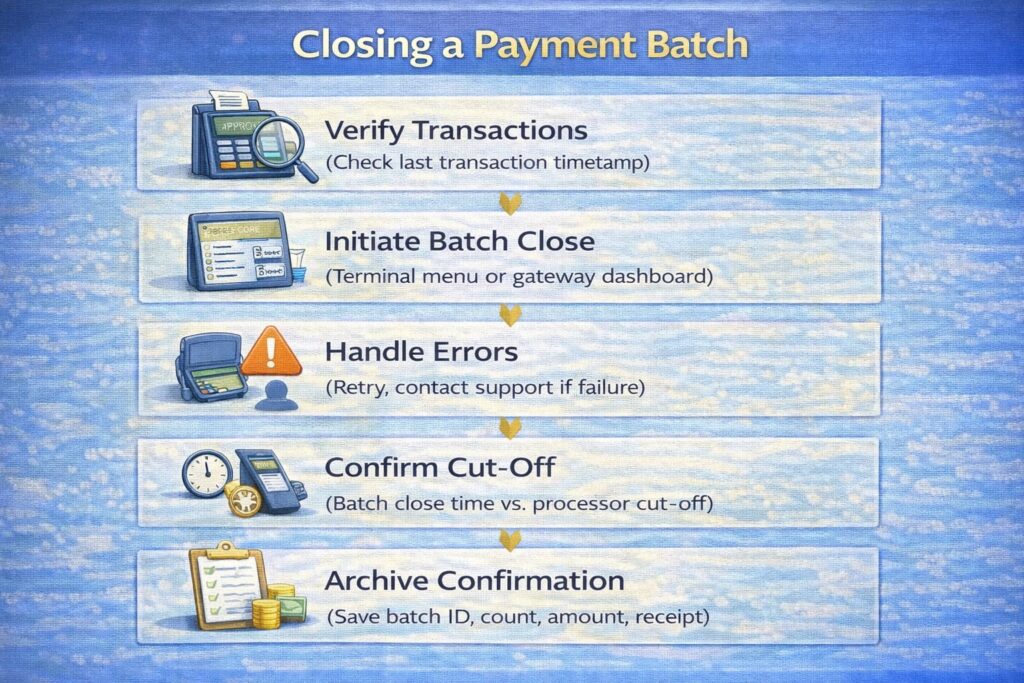
Batch closure is mechanical but critical. Here’s the procedure:
Step 1: Verify All Transactions Are Captured
Before closing, confirm that all transactions from your business day/shift have been authorized and are showing in your POS:
- Walk the floor or review last transactions on the terminal
- Check the POS transaction log for the latest timestamp (should be within 5 minutes of current time)
- If you spot a missing transaction (customer says they paid, but it’s not on the terminal), process it again before closing batch
Why: Once a batch is closed, new transactions can’t be added to it. They’ll have to go into the next batch, creating timing confusion.
Step 2: Initiate Batch Close via Your Terminal or Gateway
For POS Terminal (Toast, Oracle MICROS, Square, etc.):
- Navigate to Back Office or Admin Menu
- Select Batch → Close Batch (or End of Day → Settle; menus vary)
- Confirm the batch ID, transaction count, and total amount
- Press Confirm or Yes
For Payment Gateway (Stripe, Adyen, etc.):
- Log into your processor’s dashboard
- Navigate to Batch or Settlements
- Click Close Batch for the current date
- Confirm the batch details
- Click Submit
Step 3: Check for Errors and Retry if Needed
The system will process your close request and return a status:
- Success: “Batch [ID] closed successfully. [Count] transactions totaling $[Amount].”
- Action: Proceed to Step 4.
- Error: “Batch close failed: Network timeout” or “Duplicate batch ID”
- Action: Wait 60 seconds and retry. If it fails again, check your internet connection or contact support.
- Warning: “X transactions not authorized. Void before closing?” or “Tips still pending.”
- Action: Review the warning. If tips are pending but common, proceed with close (tips will post after). If there are unauth transactions, void them (don’t settle them without auth).
Step 4: Confirm the Cut-Off Time Is Met
After closing, verify the timestamp:
- Batch close time: 4:45 PM
- Processor cut-off: 5:00 PM
- Status: ✓ Before cut-off → Same-day settlement
If you closed after the cut-off, note that settlement will roll to the next business day.
Step 5: Archive the Batch Close Confirmation
The processor will send a confirmation email or you can screenshot the batch close receipt:
Information to save:
- Batch ID
- Close timestamp
- Transaction count
- Gross amount
- Processor confirmation number
Storage: Save in a folder labeled “Batch Closes – 2025” in your cloud storage (Google Drive, OneDrive, etc.) or accounting system.
Why: Useful for troubleshooting if the batch doesn’t settle as expected. You have proof of when and how it was closed. Diagram: Five Steps to Batch Closure
PCI DSS Compliance and Reconciliation: Protecting Payment Data
⚠️ Disclaimer: The following information on PCI DSS compliance is general in nature and does not replace professional consultation with your PCI compliance officer or security consultant. Compliance requirements vary based on merchant category, processor, acquiring bank, and merchant service providers. Consult your processor’s compliance team and official PCI SSC documentation for your specific obligations.
PCI DSS (Payment Card Industry Data Security Standard) is a set of requirements designed to protect credit card data. While PCI focuses on data security, it intersects with reconciliation in several important ways.
Key PCI DSS Requirements for Batch and Settlement Data
Requirement 3: Protect Stored Cardholder Data
- If your POS or processor stores cardholder data (card numbers, expiration dates) in batch files, it must be encrypted or hashed (unreadable).
- Action for you: Ensure your POS vendor and processor don’t store raw cardholder data. Verify this in their security documentation.
Requirement 4: Encrypt Data in Transit
- When batch files are transmitted from your terminal to the processor, they must travel over encrypted/secure connections (HTTPS, TLS).
- Action for you: Verify your terminal has internet connectivity (wired Ethernet). Don’t batch close over public Wi-Fi.
Requirement 10: Log and Monitor Access
- All access to batch files, settlement reports, and cardholder data must be logged with user ID, timestamp, and action.
- Action for you: Limit access to settlement reports and reconciliation files to authorized staff only. Maintain a list of who has access (accountant, restaurant manager, franchisee) and audit annually.
Requirement 12: Maintain Policies
- Your business must have written policies for handling batch data, settlement reports, and disputes.
- Action for you: Ensure your processor’s merchant agreement and your reconciliation policy clearly document how data is handled, who has access, and what happens if a breach occurs.
Practical Compliance Steps
- Classify your data: Does your reconciliation report include cardholder data (PAN, expiration date)? If yes, encrypt files at rest and in transit.
- Limit access: Reconciliation reports should only be viewed by accounting/finance staff. Use password-protected folders or role-based access in your accounting system.
- Audit annually: Once a year, verify that only authorized staff have access to settlement/reconciliation data.
- Retain records securely: Store reconciliation files in encrypted cloud storage (not on unencrypted USB drives or shared folders).
- Incident response: If a settlement report or batch file is accidentally shared externally, notify your processor and your bank immediately.
“PCI compliance isn’t just about the payment gateway; it extends to how you handle reconciliation files and reports. I’ve seen restaurants store settlement reports in shared OneDrive folders accessible to all staff. That’s a compliance risk. Restrict access to finance/accounting staff only.” — Max Artemenko
Frequently Asked Questions (FAQ)
How Often Should a Business Reconcile Its Payments?
Short Answer: Daily for high-volume operations; at minimum, weekly for lower volumes.
Detail:
– High-volume (>$20K daily): Daily reconciliation is best practice. Discrepancies discovered the next day are easier to resolve than those found a week later.
– Mid-volume ($5K–20K daily): 2–3 times per week. A good compromise between control and effort.
– Low-volume (<$5K daily): Weekly. Sufficient for most SMB operations if discrepancies are typically small.
Regulatory minimum: Regulatory minimum requires at least monthly reconciliation per internal control frameworks (COSO, SOX Section 404 for public companies). However, industry best practice for food service and retail is weekly or daily.
What Is the Main Purpose of Reconciliation?
Primary purpose: Verify that the money your business earned (shown in POS sales) matches the money that was deposited into your bank account.
Secondary purposes:
– Detect errors (duplicate transactions, miscalculated fees, system glitches)
– Prevent and detect fraud (unauthorized refunds, account access)
– Improve cash flow forecasting (understand settlement timing and adjust budgets)
– Support audit and compliance (document financial control processes)
– Identify operational issues (batch close failures, processor delays, bank holds)
What Is a Common Example of a Reconciliation Discrepancy?
Most common: Refund posted after batch close.
Scenario:
– Your restaurant closes batches at 9:00 PM every night
– A customer requests a refund for an order at 9:15 PM (after batch close)
– The refund is processed in your POS, reducing the next day’s sales total
– But it also reduces the next day’s settlement, not today’s
– Result: Today’s POS shows the refund but today’s settlement doesn’t, creating a $X variance until the next day settles
Other common discrepancies:
– Late tips: Customer adds tip after initial settlement; appears in next day’s deposit
– Chargeback: Customer disputes charge; processor deducts from subsequent deposit, not the original settlement
– Processor hold: New account or flagged account; processor holds a portion of funds for 10–30 days
– Bank fee: Bank deducts fee from deposit after it clears; not visible in processor settlement report
All of these are normal and expected. The key is documenting them so you understand why the variance exists.
What Is Cut-Off Time and Why Does It Matter?
Definition: The deadline set by your payment processor for closing batches that will settle on a given business day.
Why it matters: Transactions closed before cut-off settle the same day; transactions closed after cut-off roll to the next day, delaying your funding by 24+ hours.
Example: If cut-off is 5:00 PM ET:
– Close at 4:45 PM → Same-day settlement → Funds arrive next morning
– Close at 6:30 PM → Next-day settlement → Funds arrive 2 days later
Financial impact: A 1-day delay on $50,000 daily sales affects working capital for payroll, inventory, and operations.
How Long Does It Take for Settlement and Funding?
Typical timeline:
– Batch close: Immediate (or queued if offline)
– Settlement: 1–3 business days (processor routes through card networks)
– Funding: 1–2 business days after settlement (bank deposits net amount)
– Total: 24–36 hours for next-day funding; 2.5–4 hours for same-day funding
Holidays and weekends: Settlement does not occur on weekends or holidays, so Friday batches typically fund on Monday morning (or Tuesday if Monday is a holiday).
What Should I Do If a Batch Close Fails?
Immediate steps:
– Check your processor’s dashboard to see if the batch actually settled (processor view vs. terminal view)
– If the processor shows “Settled,” you can safely retry on the terminal
– If the processor shows no record, contact support to clear the stuck batch
– Retry batch close once resolved
Prevention:
– Close batches during slow periods, not during rush service
– Ensure stable internet (wired Ethernet preferred)
– Test backup connectivity (cellular/secondary internet) quarterly
How Do I Handle a Settlement Mismatch?
Quick diagnosis:
– Verify POS gross matches processor gross (if not, check for voids/timing issues)
– Verify fees charged match your merchant agreement (if not, investigate fee type)
– Calculate processor net (gross minus fees) and compare to bank deposit
– If mismatch persists, investigate timing (late refunds, chargebacks, holds)
If unresolved after 2 days:
– Contact your processor with batch ID, settlement date, and variance amount
– Provide screenshots of settlement report, bank deposit, and POS records
– Request investigation and resolution
What Is the Difference Between Reconciliation and Auditing?
| Reconciliation | Auditing |
|---|---|
| Who: Your staff (accountant, manager) | Who: External, independent third party (CPA firm) |
| When: Regularly (daily, weekly, monthly) | When: Annually or on-demand |
| Purpose: Verify accuracy of settlement and deposits; detect errors | Purpose: Review control processes; verify compliance with standards; assess risk |
| Scope: Match processor report to bank deposit | Scope: Review all financial controls, including reconciliation process itself |
| Depth: Transactional level (individual batches and deposits) | Depth: Strategic level (policy, process, control design) |
| Outcome: Reconciliation report (approved/excepted) | Outcome: Audit report with findings and recommendations |
Relationship: Auditors review your reconciliation process as part of their audit. A well-documented, accurate reconciliation process actually strengthens your audit results.
Summary and Next Steps
Key Takeaways
- Batch settlement and reconciliation are distinct but linked.
- Settlement: Closing your batch and moving funds from the processor to your bank account.
- Reconciliation: Verifying that the funds arrived correctly and match your internal records.
- Cut-off time is critical. Missing the cut-off by minutes delays your funding by a full business day.
- Reconciliation requires three data sources: POS sales report, processor settlement report, and bank deposits. A discrepancy means one of these is out of alignment.
- Manual reconciliation is time-consuming but manageable for small restaurants. Automation is worth the investment if you operate 3+ locations or process $15K+ daily.
- Documentation and exceptions handling are the key to smooth operations. When discrepancies arise (and they will), having a clear process and audit trail prevents escalation and confusion.
- Establish policies, execute consistently, and improve continuously. Reconciliation becomes easier and more reliable over time.
Recommended Next Steps
If you haven’t started reconciliation yet:
- Download the reconciliation template provided in this guide
- Perform your first manual weekly reconciliation using the 8-step process
- Document any discrepancies and their reasons
- Establish a weekly reconciliation schedule with staff accountability
If you’re reconciling manually and want to improve:
- Calculate your current time/cost for weekly reconciliation
- Evaluate automation tools (Ramp, Tipalti, HighRadius, or processor-native tools)
- Pilot automation for 1–2 weeks
- Scale if the time/accuracy improvements justify the cost
If you’re a franchise or multi-location operator:
- Audit your current reconciliation process across all locations
- Standardize reconciliation policies (schedule, thresholds, documentation)
- Implement automation to aggregate data from all locations
- Conduct quarterly reviews to identify bottlenecks and improvements
Resources and Contacts
Payment Processors (Lookup Your Settlement Report Process):
- Stripe: stripe.com/payments/settlement (see “Payouts” section for settlement details)
- Adyen: adyen.com/business/payments (see “Reports” section)
- Worldpay: worldpay.com/en-us/merchants (see “Reporting” section)
- Square: squareup.com/help (search “settlement” or “deposits”)
- Toast: toast.com/resources (see “Reports and Analytics”)
PCI DSS and Compliance:
- PCI Security Standards Council: pcisecuritystandards.org (download PCI DSS v4.0)
- Your Processor’s Security Page: Most processors link to their PCI DSS certification/compliance details
Regulatory and Accounting Standards:
- SOX Section 404 on Internal Controls: sec.gov/statutes (Sarbanes-Oxley Act Section 404)
- COSO Internal Control Framework: coso.org/COSO-Internal-Control-Integrated-Framework
- FASB GAAP Standards: fasb.org
Conclusion
Payment settlement and reconciliation are the operational backbone of accurate cash flow management for restaurants and retail businesses. While the processes can seem complex at first—with multiple data sources, fee structures, timing windows, and exceptions—they become routine with a clear policy, consistent execution, and good documentation.
The restaurants and chains that succeed in this area treat reconciliation as a daily operational activity, not a monthly chore. They catch discrepancies early, resolve them quickly, and use the insights to forecast cash flow accurately and catch fraud before it compounds.
By following the processes, templates, and best practices outlined in this guide, you’ll establish a reliable foundation for financial control, audit readiness, and operational confidence—knowing that every dollar earned is accounted for and deposited correctly.
Updated: January 2026
Reviewed by: Enterprise POS expert and payment systems architect with 12+ years’ experience in restaurant finance and payment processing.