Skip to content
Introduction: Why Bars Are Moving to Tableside Ordering Technology
I’ve worked with bars and restaurants across the US for over a decade, and there’s a pattern I keep seeing: the places making the most money aren’t necessarily bigger or fancier. They’re faster.
The difference? How quickly a guest can order a drink, pay, and free up the table for the next customer.
That’s where tableside ordering tablets come in. Instead of servers walking back and forth to a fixed station, they’re taking orders and processing payments right at the table. For bars especially, this changes the game. Speed drives revenue. Convenience drives loyalty. Data drives better decisions.
The Oracle MICROS 721P is built specifically for this workflow. It’s not a consumer tablet with a card reader bolted on—it’s a purpose-built mobile POS terminal designed to work inside the Oracle MICROS ecosystem. That means it syncs seamlessly with your kitchen display system (KDS), your menu, your inventory, and your payment processing. No lag. No errors from handwritten tickets. No guessing.
This is what happens when bars standardize on a system designed to move speed and money at the same time.
Quick Decision Guide: Is MICROS 721P Right for Your Bar?
Choose 721P if:
- You run Oracle MICROS Simphony or RES 3700 POS
- Uptime and reliability matter more than lowest upfront cost
- You want tableside payments and order accuracy as core competitive advantages
- Your bar does 50+ covers per shift with peak-hour bottlenecks
Typical ROI: 3–6 months based on increased covers and upsells. Expected ongoing benefit: $20,000–100,000+ annually depending on volume.
Not the right fit if:
- You use Square, Toast, or Lightspeed POS (iPad + reader is your alternative)
- You operate a very small bar with minimal complexity
- Budget constraints outweigh operational efficiency gains
What Is Oracle MICROS 721P? The Hardware Built for the Bar Floor
The Oracle MICROS 721P is a 7-inch rugged handheld POS with a hot-swappable battery for hospitality use, designed to work inside enterprise-grade hospitality networks. It’s not trying to be an iPad. It’s trying to be a reliable tool that survives drops, spills, and 12-hour shifts without needing IT support.
Hardware specifications:
- Processor: Intel Atom Quad Core 1.44GHz (up to 1.92GHz)
- RAM: 4GB
- Storage: 64GB Flash
- Display: 7-inch capacitive touch display, 1280×800 resolution
- Connectivity: Wi-Fi 802.11a/b/g/n/ac, Bluetooth 4.2, USB 3.0
- Battery: Hot-swappable 8,800 mAh Li-ion battery with bridge cell that enables battery replacement without shutdown
- Weight: 656g (1.45 lbs) without payment terminal bracket
- Operating temp: 0°C to 40°C; humidity 0–90% non-condensing
From a durability standpoint, the 721P is built with an AES+PC reinforced enclosure that handles drops and dings you’d expect in a bar environment. The screen stays responsive even with wet hands or bar gloves—critical when someone’s handling ice, spirits, and sticky drink mixes. The capacitive touch works, doesn’t ghost, and doesn’t require you to press hard like older POS hardware.
The hot-swappable battery is the detail most bars miss until they need it. You don’t shut down a shift to swap in a fresh battery. A small bridge battery (240mAh) powers the device for up to 3 minutes while you swap the main battery. Your open tickets stay live. Service doesn’t stop.
Comparing MICROS 721P to Other Mobile POS Tablets
Before diving into implementation details, here’s how the 721P stacks up against alternatives:
| Criteria | MICROS 721P | iPad + Card Reader | Android POS Tablet |
|---|---|---|---|
| Enterprise integration (Simphony/RES) | Native, real-time | Third-party app, lag | Third-party app, lag |
| Hardware durability | Ultra-rugged, AES+PC enclosure | Consumer plastic, easily damaged | Consumer plastic, easily damaged |
| Payment security (PCI certified) | Yes, encrypted transmission and tokenization | Requires separate certification | Requires separate certification |
| Hot-swap battery | Yes, 240mAh bridge cell | No (iPad battery locked) | No (Android battery locked) |
| Price per unit | ~$2,500 | ~$800 iPad + $200 reader = $1,000 | ~$400–600 |
| Lifespan in bar environment | 4–5 years | 2–3 years (degradation) | 2–3 years (degradation) |
| Support (Oracle-backed) | Yes, 24/7 | Apple support (not POS-specific) | Vendor-dependent |
When to Choose 721P vs. iPad vs. Android
Choose 721P if:
- You’re running Oracle MICROS Simphony or RES (native integration, no third-party delays)
- Uptime and reliability are critical—device failures cost you revenue and goodwill
- You want integrated payment without additional gateway complexity
- You’re a larger bar or multi-location operation where standardization matters
Choose iPad/Android if:
- You use a lighter POS like Toast, Square, or Clover
- You want lower upfront cost and can tolerate higher replacement rates
- Your bar is small with low complexity (no KDS, simple inventory)
- You’re okay with syncing delays and potential payment processing friction
Total Cost of Ownership (5 years): While iPad appears cheaper upfront (~$4,000 per device over 5 years), the 721P often breaks even or wins when you factor in replacement frequency, support costs, and revenue lost to downtime.
Tableside Ordering Workflow: From Table to Bar to Payment
Here’s what the actual flow looks like when someone orders a drink at your bar using the 721P:
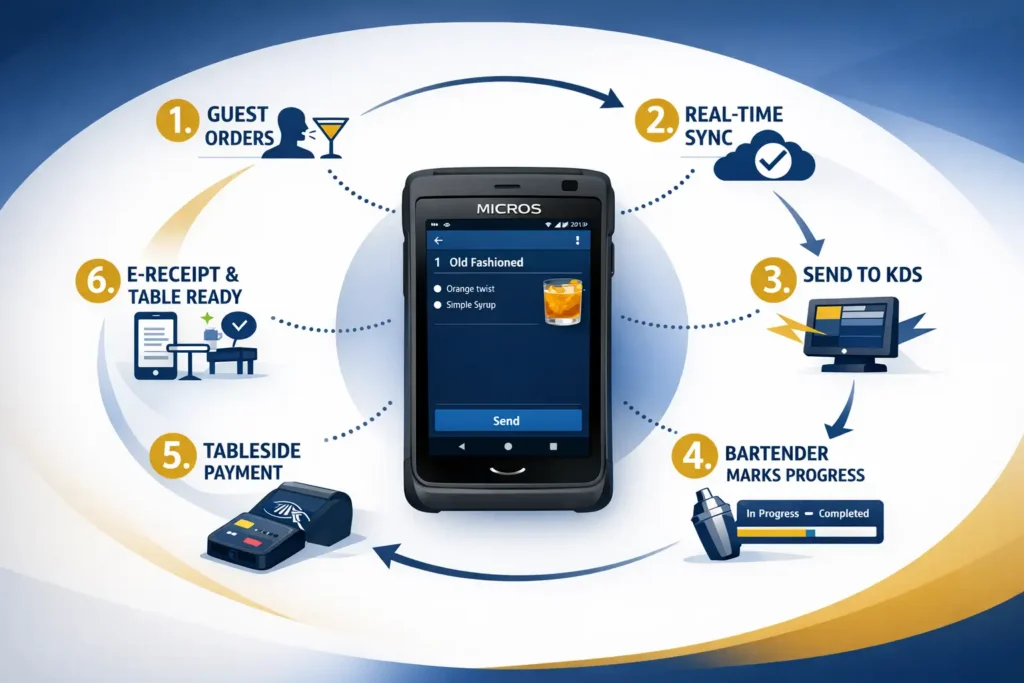
The path of a drink order on MICROS 721P:
- Guest orders at table/bar → Server opens order screen on 721P, taps drink categories (Beer, Spirits, Wine, Non-Alc).
- Real-time menu & stop-list sync → 721P shows what’s available in real-time. Out of a spirit? It’s grayed out instantly. Price changes? They’re live. Allergen warnings? Pop up before the server finalizes.
- Instant send to bar KDS → One tap sends the order to the bar’s kitchen display system. No handwritten ticket. No lost orders. The bartender sees it in 1–2 seconds.
- Bartender marks progress → As the drink is made, bartender taps “In Progress” (orange) then “Completed” (green) on the KDS. The server’s 721P gets the update in real-time so they know when to pick it up.
- Payment at table/bar → Once the drink arrives, server taps the 721P to generate the check. Guest sees the amount, selects tip, and either taps their card (EMV/contactless) or inserts it into the attached payment terminal.
- E-receipt or printed → Order closes. Guest gets digital or printed receipt. Table is ready for the next customer.
Service cycles improve measurably because there’s no walking back and forth to a fixed terminal. Orders don’t get lost in translation. Bartenders see exactly what they’re making. Payment happens at the moment of satisfaction, not 10 minutes later.
How Tableside Ordering Increases Accuracy and Reduces Kitchen Errors
One of the overlooked benefits of moving to handheld POS is accuracy. When someone hand-writes a drink order, mistakes happen. “Vodka, soda, lime” becomes “Vodka, soda, lemon.” A single modification—”no ice” or “extra lime”—gets missed. The bartender makes it the wrong way, it goes out, guest sends it back, you lose time and goodwill.
With the 721P, that doesn’t happen.
How accuracy improves:
- No handwriting. The server taps the drink name, modifiers appear as buttons. “Grey Goose vodka” + “Tonic” + “Lime wedge” + “Extra lime” is impossible to misread because it’s digital.
- Automatic validation. The system knows which modifications go with which drinks. Incompatible options are disabled or flagged before the order is sent.
- Modifier templates. Bar managers set up quick presets: “Standard Margarita” includes tequila, triple sec, lime, salt rim. One tap. No room for the server to forget the salt.
- Instant KDS visibility. The bartender doesn’t have to decipher bad handwriting under bright lights and noise. They see: “Margarita (Patrón, salt rim, extra lime)” in 18-point text on a screen 2 feet away.
Real-world impact: reduced order remake rates, fewer wasted spirits, faster service, and guests who aren’t waiting for corrections. The system tracks accuracy by staff member and drink category, so managers can identify training gaps quickly.
Increasing Bar Revenue: Speed + Upselling + Premium Positioning
Now we get to the money part. How does a tablet actually increase what you’re bringing in per shift?
There are three levers:
1. Higher Table Turnover = More Covers
Faster service cycles mean more guests per table per shift. In a typical cocktail bar, reducing order-to-payment time by 2–3 minutes per cycle adds 1–2 additional covers per table per night. Multiply that across your floor, and you’re looking at 20–30% more revenue from the same real estate.
For a 60-seat bar doing 18 covers per table per night, shaving 2 minutes per cycle moves you to 21–24 covers. That’s direct revenue growth without increasing headcount.
2. Upselling Prompts Built Into the Ordering Screen
When a server takes an order on the 721P, the system can display upsell suggestions right on the screen. Guest orders a well whiskey? The screen shows a “Suggested Upgrade” button that highlights a premium bourbon at +$3. The server sees it. Two taps later, the guest upsells.
The prompt is right there—no memory required, no awkwardness, just a natural suggestion at the point of sale. In a bar doing 100 drinks per night, even a modest 8–12% upsell conversion rate translates to meaningful revenue impact.
3. Premium Positioning and Speed Creates Perceived Value
When service is fast and smooth, guests feel like they’re in a premium experience. They’re more likely to order higher-margin drinks and add rounds. A guest waits 8 minutes for a drink order to be processed, they feel like the bar is slow. A guest gets served in 4 minutes with a professional payment experience at the table, they feel like the bar is professional and worth coming back to. They order the next round faster. They tip better. They spend more.
How Tableside Payment Processing Works on MICROS 721P
Let’s talk security and payment mechanics because this is where bars get nervous—and rightfully so.
When a guest pays at the table on the 721P, here’s what’s happening under the hood:
The payment flow:
- Server taps “Finalize Check” on the 721P. The total amount appears on screen. The server shows it to the guest.
- Guest sees amount and selects tip (no tip, 15%, 18%, 20%, or custom). Amount displays. Guest confirms.
- Guest inserts or taps card into the MSR (magnetic stripe reader) or contactless/EMV terminal attached to the 721P. The 721P has mounting points for payment devices from major vendors (Verifone E355/E285, Ingenico Link 2500, BBPOS WisePad 2).
- Data encryption. Payment information is tokenized and encrypted before transmission to reduce card data exposure during payment.
- Secure transmission to payment gateway (uses TLS 1.2+ encryption). The 721P communicates with your payment processor over encrypted Wi-Fi.
- Authorization response comes back in 2–3 seconds. If approved, the receipt prints or displays digitally.
- Order closes. Table is ready for the next customer.
Security Standards: PCI DSS Compliance
The 721P is designed to meet PCI DSS v4.0 (Payment Card Industry Data Security Standard). Here’s what that means practically:
- AES-256 encryption for stored payment data
- TLS 1.2+ for all data in transit
- Tokenization to reduce scope—your bar doesn’t handle raw card numbers
- Tamper inspection protocols for the physical device
- Role-based access control (manager vs. server permissions on the device)
Supports encrypted transmission and tokenization to reduce card data exposure during payment. The device runs a locked enterprise OS; installing unsupported apps voids official support and PCI compliance scope.
For a bar, this matters because:
- Fewer PCI compliance headaches
- Guests trust the device (familiar card-tapping experience)
- You reduce chargebacks from “I didn’t authorize this” claims because the guest physically approves the amount right there
- Your liability for breaches is lower because the device itself is hardened
“Security is not negotiable in hospitality POS. Guests expect their payment information to be protected, and regulators expect you to prove it.” — Max Artemenko, Enterprise POS Expert (Smart Payment Solutions USA)
Real-World Bar Case: How MICROS 721P Drove Revenue Growth
Let me walk through an actual implementation we worked on.
The client: Mid-scale cocktail bar in Denver, 60 seats, heavy happy hour traffic (4–8 PM).
The problem: Fixed POS terminals at the bar meant servers had to walk 20–30 feet to process orders and payments. During peak hours, lines formed at the terminals. Guests got annoyed. Drinks sat on the bar waiting for payment. Money left on the table.
The solution: MICROS 721P tablets (four devices for the floor), integrated with their existing Oracle MICROS Simphony POS and bar KDS. 721P provides native integration with Oracle MICROS Simphony and RES for real‑time syncing.
Implementation:
- Week 1: Wi-Fi infrastructure audit and upgrade (dedicated POS VLAN, QoS configuration, additional access points)
- Week 2: Tablet deployment, Simphony integration testing, staff training on order entry and payment workflows
- Week 3: Soft launch during off-peak hours (lunch service) with manager supervision
- Week 4: Full rollout with ongoing support and nightly debriefs
What changed:
- Day 1: Servers learned the basics in 2 hours. Nervous about payments at the table, but the flow was intuitive.
- Week 2: Service started visibly faster. Guests commented on speed and convenience.
- Week 4: Measurable impact:
- Happy hour covers: 18 → 24 covers per table per shift (+33%)
- Average check: $28 → $31 (+11%)
- Nightly revenue: $4,100 → $5,540 (+35%)
What drove the gains:
- Fewer bottlenecks at payment. No queue at the register = faster table turnover
- Reduced errors. Handwritten happy-hour tickets were gone. Fewer remakes meant bartender was making real drinks
- Guest experience. Guests felt seen and served, not rushed
The cost: Four 721P tablets ($2,500 each), 4-Bay charger ($300), Wi-Fi infrastructure ($3,000–5,000), initial setup and training (~$1,200). Total: ~$15,500–18,000 upfront.
ROI: Payback in 3 months based on incremental revenue (conservative: $1,440 monthly revenue lift). Ongoing annual benefit: ~$56,000 in added revenue at current volume (35% revenue increase sustained).
Platform Costs and Implementation Budget
Typical cost breakdown (per location):
| Component | Cost | Notes |
|---|---|---|
| 4× MICROS 721P tablets | $10,000 | ~$2,500 each |
| 4-Bay charger + dock | $500 | Shared across tablets |
| Payment terminal brackets & cables | $400 | ~$100 per tablet |
| Wi-Fi infrastructure upgrade | $3,000–5,000 | Professional install, dedicated VLAN, QoS |
| POS software licensing | $0–200/month | Depends on Simphony agreement |
| Initial setup & training | $1,500–2,000 | IT + staff training, 1 week |
| Total first-year cost | $15,400–19,000 | One location, ~60 seats |
Multi-location pricing: Costs drop 10–15% per location when you buy in volume and use the same IT team for rollout.
Ongoing costs: Monthly Simphony license ($0–200), device maintenance, annual support plan ($500–1,000 per device), network support, and device replacement cycle (every 4–5 years).
ROI Calculation:
- Incremental monthly revenue from 35% uplift: $4,100 × 0.35 = $1,435
- First-year payback: $17,000 ÷ $1,435 ≈ 3.2 months
- Ongoing annual benefit (Year 2+): $1,435 × 12 = $17,220 (net of licensing/support costs)
This assumes the 35% revenue gain from the case study scales to your operation. Conservative estimates (20% uplift) still yield 5–6 month payback.
Integrating MICROS 721P with Your Existing POS and KDS
Here’s where the real enterprise value shows up. The 721P doesn’t live in isolation. It’s part of the Oracle MICROS ecosystem.
Compatibility matrix:
| System | Compatibility | Function |
|---|---|---|
| Oracle MICROS Simphony | Native | Runs as a POS workstation; syncs menu, prices, taxes, modifiers, inventory, guest checks in real-time. |
| Oracle MICROS RES 3700 | Network-connected | 721P can access RES reservations and guest history for pre-populated orders (loyalty, preferences). |
| Bar KDS (Kitchen Display System) | Real-time sync | Orders sent from 721P instantly appear on KDS in respective stations (bar, food prep, expo). Status updates return to tablet. |
| Payment processors | Tokenized | Works with major gateways (Shift4, National Processing, etc.) for secure card processing. Supports encrypted transmission and tokenization. |
| Wi-Fi network | Requires dedicated VLAN | 802.11a/b/g/n/ac; needs QoS configuration to prioritize POS traffic. |
| Inventory & reporting | Automatic | Orders tracked for pour cost analysis, inventory depletion, sales reporting. |
What this means operationally:
- Menu changes are instant. Update a price in Simphony? It’s live on all 721P tablets in seconds.
- Inventory syncs real-time. Run out of Tito’s? Mark it on the KDS, and it’s grayed out on the 721P immediately.
- Orders are never lost. The order exists in Simphony the moment it’s sent. If a server drops the tablet, the order is still in the system.
- Reporting is automatic. You don’t manually count drinks poured. You get real-time sales, mix, and profitability data by spirit and drink category.
Setting Up Your Network: Wi-Fi Requirements for Reliable Tableside Service
Here’s where most bars stumble.
You can have the best 721P tablets in the world, but if your Wi-Fi is weak or unstable, they’re paperweights. Orders fail to send. Payments timeout. Guests get angry. You lose money.
Network requirements for MICROS 721P:
Wireless Infrastructure
- Dual-band access points (2.4 GHz + 5 GHz) strategically placed so no seat is more than 30 feet from an AP
- Minimum signal strength: -67 dBm (realistic in crowded bar environments)
- 802.11ac (Wi-Fi 5) or newer for 1200 Mbps+ throughput per AP
- Roaming protocol: WPA2-Enterprise or WPA3-Enterprise with 802.1X authentication for seamless device handoff between APs
VLAN Segmentation
- Dedicated POS VLAN: Separate from guest Wi-Fi and back-office networks
- QoS (Quality of Service) rules: Prioritize POS traffic over browsing. POS gets guaranteed bandwidth
- Failover mechanism: If Wi-Fi drops, 721P buffers orders locally and syncs when connection returns. Orders are never lost
Security
- WPA2-Enterprise minimum (WPA3-Enterprise recommended) with RADIUS authentication
- TLS 1.2+ for all data in transit
- MAC filtering (optional) to limit device connections to authorized POS hardware
Why this matters: A bar with weak Wi-Fi might lose 5–10% of orders to transmission failures. You’re serving drinks that don’t exist in the POS system (inventory becomes meaningless) and losing revenue because orders fail silently.
Setup cost: Professional Wi-Fi audit and installation ($2,500–5,000) for a 5,000–8,000 sq ft space. Worth the investment. See Oracle setup guides and datasheets for device configuration and provisioning steps.
Staff Training: What Servers Need to Know to Use 721P Effectively
Rolling out tableside ordering tablets isn’t just “here’s a tablet, go use it.”
Servers need to understand three core workflows: order entry, payment processing, and error recovery. Miss one, and your implementation stalls.
Core Training Modules
Module 1: Order Entry (30 minutes)
- Opening an order on the 721P
- Navigating drink categories and modifiers
- Handling special requests (no ice, extra lime, etc.) as modifiers or notes
- Sending order to bar KDS
- Checking order status on the tablet
Module 2: Tableside Payment (20 minutes)
- Finalizing a check
- Presenting total and tip to guest
- Processing card (tap, insert, or swipe)
- Handling declines (card rejected—what to do)
- Printing or emailing receipt
- Closing the order
Module 3: Troubleshooting (15 minutes)
- Order doesn’t send to KDS (reconnect Wi-Fi, resend)
- Payment device disconnects (restart pairing)
- Tablet freezes (force restart, impact on open orders)
- Battery dies mid-shift (swap to fresh battery without losing orders)
Module 4: Upselling (10 minutes)
- Recognizing upsell prompts on the screen
- How to present premium suggestions naturally (“We have a great Patrón if you’d like to upgrade”)
- Conversion expectations (18–25% of guests will upgrade if asked)
Implementation Timeline
- Week 1: IT deploys Wi-Fi, tests network, configures VLAN
- Week 2: Tablet setup, POS sync, initial staff training (core modules)
- Week 3: Soft launch (one shift, limited order volume) with close manager supervision
- Week 4: Full rollout with ongoing support and nightly debriefs
Common mistakes to avoid:
- Training in a quiet back office. Train on the actual bar floor during a service shift—that’s the chaos servers face
- Expecting mastery on day one. Expect 15–20% slower service the first week. Improve daily
- Not charging devices. Use the 4-Bay charger religiously. Dead tablets don’t make money
- Inconsistent upsell messaging. Agree on what to say when you see a prompt (“Upgrade to our top-shelf?”)
Risks and Merchant Responsibilities: What You Need to Know
When you implement tableside payment processing, security and compliance don’t disappear—they shift. Here’s what remains your responsibility:
What the 721P Handles (Scope Reduction)
- Card data encryption and tokenization
- Secure transmission to payment processor
- Device-level security (tamper resistance, access controls)
- Payment authorization workflow
What You Still Own (Your Responsibility)
1. PCI DSS Compliance Planning
- Maintain written security policies and access controls
- Train staff on data handling (what card data can be handled, who can access it, how long it’s retained)
- Regular security assessments and vulnerability scans
- Incident response procedures (what to do if a device is lost or breached)
2. Payment Processor Selection
- Choose a PCI-compliant processor
- Understand your processor’s SLA (Service Level Agreement) and uptime guarantees
- Know their chargeback and dispute resolution procedures
- Review merchant fees and how they’re applied
3. Device Management
- Physical security: devices aren’t left unattended, secured at end of shift
- Loss/theft reporting: immediate notification to processor and POS vendor
- Device decommissioning: data wipe before disposal or resale
- Staff access: role-based permissions (who can process payments, void transactions, etc.)
4. Network Security
- Wi-Fi configuration and monitoring (your IT responsibility)
- Regular password and access credential changes
- Backup/failover procedures for network outages
- Segregation of POS traffic from guest/administrative networks
5. Chargebacks and Disputes
- Documentation of authorization (guest signed or tapped approval)
- Clear refund and return policies posted and enforced
- Record-keeping for 6+ months (transaction receipts, guest signatures, POS records)
- Timely dispute response (processor’s window is typically 10 days)
Common Merchant Mistakes That Increase Liability
- No authorization documentation: Guest claims they didn’t authorize the charge. You have no proof they did.
- Retained card data: Saving card numbers, even encrypted, increases PCI scope and liability.
- Weak password management: Multiple staff using same credentials, passwords not changed seasonally.
- No dispute process: Chargebacks arrive and you don’t respond within processor’s timeframe.
- Unencrypted Wi-Fi: Guest payment data transmitted over unsecured network (your liability).
“Payment security is a shared responsibility. The device is hardened, but your policies, staff training, and network design determine whether that hardening actually protects you.” — Max Artemenko, Enterprise POS Expert
FAQ: Questions Bars Ask About MICROS 721P
Is the 721P actually waterproof? What if it gets spilled on?
The 721P is not fully waterproof, but it’s highly water-resistant. It handles humidity up to 90% non-condensing and operating temperatures 0°C–40°C.
In practice: Spill wine on it? It will likely survive. You’ll want to wipe it down immediately and let it dry. The capacitive touchscreen works wet, so you can keep using it while cleaning.
What it won’t survive: being submerged or deliberately doused. Don’t throw it in the sink.
Best practice: Use a protective case, assign tablets to stations with less splash risk, and have a spare charged tablet ready just in case.
How does the 721P handle Wi-Fi interference in a packed bar?
The 721P supports Wi-Fi 802.11a/b/g/n/ac (dual-band), which is solid. But “solid” only works if your network is built right.
The real issue: Most bars have weak Wi-Fi. One AP in the back, guest Wi-Fi on the same network, no QoS. That’s a recipe for failure.
Solution: Dedicated POS VLAN, multiple APs (one per 1,500–2,000 sq ft), QoS rules that prioritize POS. With proper infrastructure, the 721P maintains connection through high-density environments (100+ guests).
Can I use third-party apps on the 721P?
The 721P runs Windows 10 IoT Enterprise 2019 LTSC, so technically you could install apps. But Oracle doesn’t support it.
Device runs a locked enterprise OS; installing unsupported apps voids official support.
My advice: Don’t. The device is locked down for security and PCI compliance. Running unauthorized software voids your support agreement and creates compliance gaps.
If you need additional functionality (time tracking, advanced reporting, etc.), request it through Oracle MICROS. They’ll add it properly.
How long does the battery actually last in a shift?
The 8,800 mAh battery is rated for 8 hours of continuous use. In a bar setting with moderate use (order entry + payment every 3–5 minutes), you’ll get 10–12 hours per charge.
The hot-swap advantage: You don’t need the battery to last your entire shift. You swap it mid-shift (takes 30 seconds) and keep going. Hot-swappable battery design with bridge cell enables battery replacement without shutdown.
Setup: One 4-Bay charger per 4 tablets. Rotate tablets in/out of the charger. Always have at least one fully charged spare on the floor.
What’s the actual cost to implement MICROS 721P across multiple locations?
See the “Costs and ROI” section above for detailed breakdown. Typical first-year cost per location: $15,400–19,000.
Multi-location discounts: 10–15% per location with volume purchasing and coordinated IT rollout.
Is the MICROS 721P compatible with my current POS system?
The 721P is native to Oracle MICROS environments (Simphony, RES 3700). If you’re running Square, Toast, or Lightspeed, the 721P won’t integrate directly.
Check your POS system. If it’s Oracle MICROS, you’re a fit. If not, consider iPad + third-party card reader as an alternative, or migrate to Simphony if the ROI justifies it.
How long does implementation take?
Typically 3–4 weeks from hardware delivery to full rollout:
Week 1: Wi-Fi setup and network configuration
Week 2: Tablet deployment, Simphony sync, staff training
Week 3: Soft launch (limited shifts)
Week 4: Full operation with support
Smaller bars (one location) can move faster. Multi-location rollouts take 8–12 weeks.
What if the Wi-Fi drops during service?
The 721P buffers orders locally and syncs when connection returns. Your orders are never lost. Payment processing requires a live connection, but the order data persists.
Best practice: Robust network design with multiple APs and failover. A professional Wi-Fi audit is worth the $3k–5k investment.
What’s the warranty and support like?
Oracle provides 3-year hardware warranty. MICROS support is 24/7 (included in software agreement). For hardware issues, same-day or next-day replacement is typical.
A good partnership with your MICROS reseller adds a layer of proactive support and optimization.
The Bottom Line: Why Smart Bars Are Switching to Tableside Ordering
Tableside ordering tablets aren’t a luxury upgrade anymore. They’re a revenue tool. Every minute a guest waits for payment is a minute they’re not ordering the next drink. Every missed upsell is money left on the table. Every order error costs you in remakes and lost efficiency.
The MICROS 721P is built for bars that want to move fast and make money without sacrificing security or reliability. It’s not fancy. It’s effective.
Here’s what happens when you implement it:
- Service gets faster. Orders go to the bar in seconds, not minutes. Guests notice.
- Accuracy improves. No more handwritten ticket errors. Bartenders make drinks right the first time.
- Revenue increases. More covers, higher checks from upsells, faster table turnover.
- Staff confidence rises. Servers stop worrying about remembering orders and start focusing on hospitality.
- Data gets real. You finally know what’s selling, what’s profitable, where waste is happening.
- Security is managed. Payment data is encrypted, tokenized, and handled by a hardened device—not a consumer iPad.
Key Takeaways
- Tableside ordering tablets are revenue drivers, not just convenience features. They reduce service time, increase covers, and unlock upselling.
- MICROS 721P is purpose-built for bars and restaurants running Oracle MICROS Simphony/RES. It’s not a consumer iPad with a card reader.
- Implementation matters as much as hardware. Network quality, staff training, and organizational buy-in determine success. Budget 3–4 weeks and $15,000–20,000 per location.
- Wi-Fi and training are the critical implementation factors. The hardware is solid; success depends on network reliability and staff adoption.
- Integration with your KDS and POS is seamless when you’re in the Oracle ecosystem. Orders sync instantly, inventory updates in real-time, reporting is automatic.
- Security is enterprise-grade but shared responsibility. Device encrypts and tokenizes; you handle policies, staff training, network security, and compliance.
- ROI is measurable and achievable: 3–6 month payback based on conservative 20%+ revenue growth, with ongoing annual benefits of $20,000–100,000+ depending on volume.
Start with a pilot (2–3 tablets, one shift a day) to prove the concept. Measure covers, check average, and labor. If the numbers work (and they usually do), roll out full fleet.
The bars making 20–30% more revenue in 2026 are the ones that moved to tableside ordering in 2024–2025. You’re not getting a competitive advantage by waiting.
Author: Max Artemenko | Enterprise POS Expert & Systems Architect | 12+ years implementing Oracle MICROS in high-volume restaurants and hospitality environments across the US.
Reviewed for accuracy against Oracle MICROS 721P Datasheet, Simphony technical specs, PCI DSS v4.0 compliance standards, and field implementations.
Connect: For free consultation on MICROS 721P implementation, cost analysis tailored to your bar, or pilot program setup, contact Smart Payment Solutions USA.
“In 12 years of enterprise POS deployments, the difference between bars that scale and bars that plateau is almost always the same: they moved to mobile service earlier. The 721P is the tool that makes that jump manageable and profitable. It’s not about the tablet—it’s about the operating model. Speed + data + reliability equals revenue.” — Max Artemenko