Skip to content
Quick Reference: Key Installation Timelines at a Glance
Before diving into details, here are the critical benchmarks for your operation:
| Restaurant Type | Terminals | Timeline | Primary Risk | Pre-Work Required |
|---|---|---|---|---|
| Small | 1–3 | 4–7 days | Internet stability | Minimal (1 day) |
| Medium | 4–10 | 7–12 days | Staff training, network capacity | 2–3 days |
| Enterprise | 10+ | 2–4 weeks (phased) | Integration validation, data consistency | 5–7 days per location |
Industry Benchmark: MICROS Simphony deployment typically spans 4–6 weeks for standard deployments or 6–10 weeks when payment processing and third-party integrations are involved (Smart Payment Solutions, 2025).
For phased rollouts across multiple locations, expect 6–16 weeks for enterprise chains, starting with 1–2 pilot stores for 2 weeks of end-to-end data validation before full deployment.
Introduction: What You Need to Know About MICROS POS Installation Time
When you’re planning to deploy Oracle MICROS POS, the first question isn’t “Is this system right for us?”
It’s: “How long will this take, and when can we actually start ringing sales?”
The honest answer: it depends on your operation’s complexity, your infrastructure readiness, and how well you’ve prepared before day one.
“If you walk in unprepared, you’re not adding days—you’re multiplying them.” — Max Artemenko, Enterprise POS Expert
Real experience from 40+ implementations shows: the restaurants that complete installation in 5–7 days (instead of 3–4 weeks) are the ones that spent 3–5 days preparing before installation started. The ones that skip preparation discover problems on day-of. A 1-week project stretches into a month.
Here’s what this guide covers: realistic timelines for different restaurant sizes, the exact stages that consume time, how to avoid the delays that plague most deployments, and the infrastructure checklist that separates smooth go-lives from operational nightmares.
Oracle Micros POS Deployment Timeline and Installation Time
Standard Deployment Duration: What the Industry Says
Oracle MICROS Simphony deployment spans 4–6 weeks for standard deployments or 6–10 weeks when payment processing and third-party integrations are involved. For enterprise chains rolling out across multiple properties, add 2–4 additional weeks for phased rollout planning and validation.
“MICROS Simphony: Enterprise deployment typically 6–16 weeks.” — Smart Payment Solutions (industry comparison, 2025). https://smartpaymentsolutions.us/compare/skytab-vs-micros-which-pos-system-is-right-for-your-restaurant/
This isn’t arbitrary. According to industry deployment benchmarks, the timeline breaks down like this:
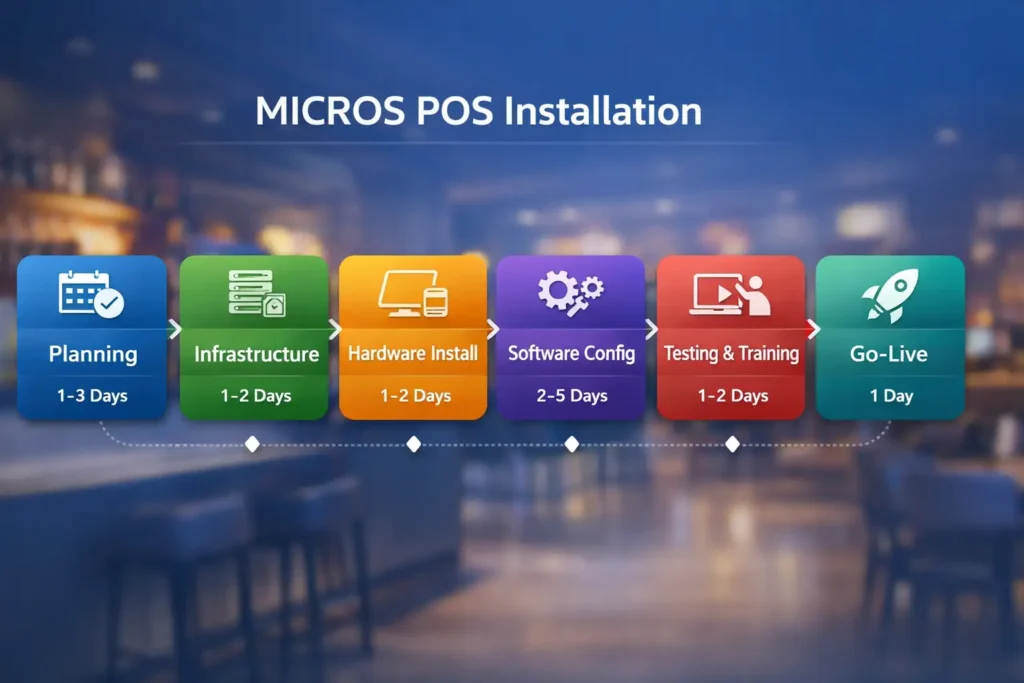
- Requirements gathering and planning: 1–3 days
- Network and server infrastructure prep: 1–2 days
- Hardware unboxing and physical installation: 1–2 days
- Software provisioning and configuration: 2–5 days
- Menu programming and system settings: 1–3 days
- Testing and staff training: 1–2 days
- Soft launch (pilot shift): 1 day
- Full go-live and post-install support: 1 day
For a single small restaurant with minimal menu complexity and no integrations: expect 4–7 days total, assuming infrastructure is already prepared. Simpler systems commonly deploy in about 2–7 days (Smart Payment Solutions, 2025).
For a chain rolling out 20+ locations: expect 6–16 weeks, starting with 1–2 pilot stores for 2 weeks of end-to-end data validation before full deployment across remaining properties.
The critical difference: time spent preparing before installation starts is what prevents the project from spiraling into weeks of configuration hell.
What Consumes the Most Time?
From my experience implementing MICROS across restaurants ranging from 2-terminal cafes to 200+ terminal hotel chains, three things consistently derail schedules:
1. Incomplete or inaccurate pre-install data.
Menu items, category mappings, tax configurations loaded incorrectly from legacy systems. Fix it once correctly, you gain a week. Discover errors mid-rollout, you lose two.
2. Network and infrastructure gaps.
Missing switches, inadequate PoE budgets for KDS screens, poor cable runs, no backup internet. These aren’t discovered during the planning call; they’re discovered when the technician arrives on-site. Routine system health checks catch issues before they become problems (DCRS, industry guide, 2025-08-04). https://dcrs.com/2025/08/04/5-essential-health-checks-to-keep-your-oracle-simphony-pos-system-running-smoothly/
3. Inadequate staff preparation.
Users trained during go-live instead of before. This converts a 1-day launch into a 3-day troubleshooting session where you’re teaching operations while simultaneously fixing system issues. Incomplete pre‑install data, infrastructure gaps, and poor staff prep multiply deployment time (Max Artemenko, article metadata).
Oracle Micros POS Installation Guide: Step-by-Step Implementation Process
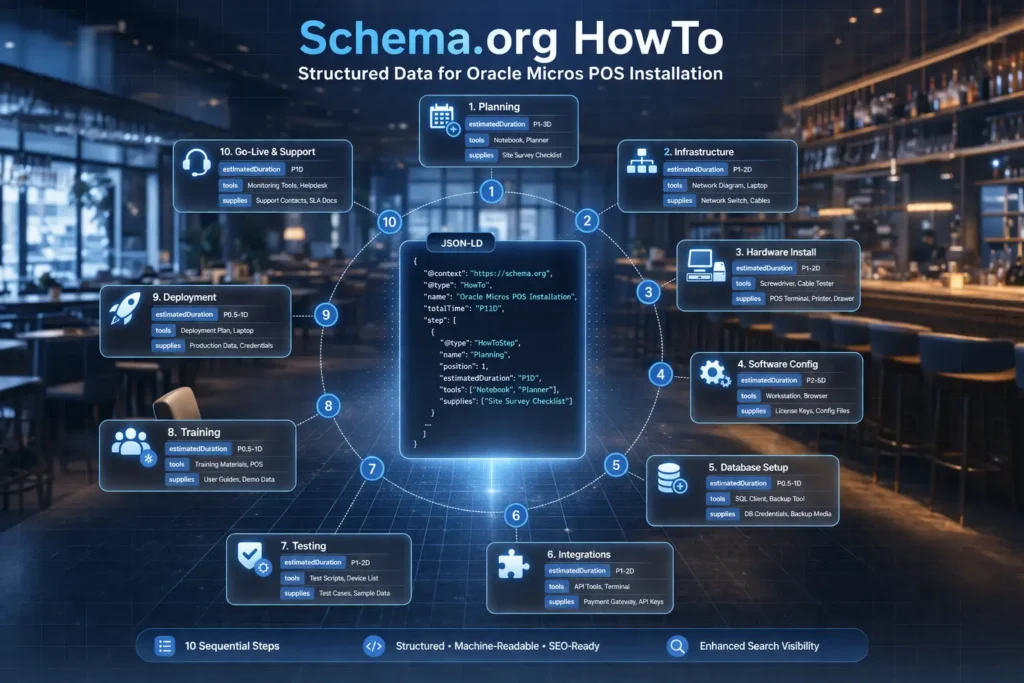
Follow this 10-step process to move from planning to go-live systematically. Each step is designed to prevent the cascading delays that turn a week-long project into a month-long one.
Step 1: Planning & Requirements Gathering (1–3 Days)
What happens: You and the implementation team define scope: How many locations? How many terminals per location? What’s your menu structure—simple (50 items) or complex (500+ items with modifiers)? What integrations are required (delivery platforms, accounting software, inventory systems)? What’s your current POS system, and what data needs to migrate?
Why it matters: This step determines whether you’re building a simple single-location POS or a distributed enterprise system. Get this wrong, and subsequent phases take 2–3x longer.
Deliverable: A signed Scope of Work document that specifies: number of terminals, locations, integrated systems, data migration requirements, and target go-live date.
Step 2: Site Audit & Infrastructure Assessment (1–2 Days)
What happens: The technical team visits your location(s) and verifies network readiness:
- Internet stability (recommend ≥50 Mbps upload/download with consistent latency; test during peak hours for realistic assessment)
- Electrical capacity and UPS backup power
- Network topology (VLAN segmentation, switch capacity, PoE availability)
- Cabling infrastructure (Cat6/Cat6a runs, fiber optic for long distances)
- Firewall configuration and port availability
“Routine system health checks catch issues before they become problems.” — DCRS (industry guide, 2025-08-04). https://dcrs.com/2025/08/04/5-essential-health-checks-to-keep-your-oracle-simphony-pos-system-running-smoothly/
Why it matters: Discovering network gaps during installation costs 2–5 days of remediation. Finding them now costs 0 days.
Deliverable: Network diagram, infrastructure report with red-flag items, remediation plan.
Step 3: Equipment Procurement & Validation (3–5 Days)
What happens: You receive MICROS hardware (workstations, KDS screens, payment terminals, receipt printers, servers). The team inventories every item, verifies compatibility with your operating environment, and flags any missing components.
Why it matters: Missing a single cable or discovering a printer driver incompatibility at go-live adds 4–6 hours of delay per incident.
Deliverable: Signed equipment manifest, compatibility check-off list, hardware serial numbers logged.
Step 4: Hardware Installation & Cabling (1–2 Days)
What happens: Physical setup of all equipment—mounting terminals, connecting networks, arranging KDS screens, connecting printers, installing payment terminals. Cable runs are labeled. Power is verified. Backup power systems are tested.
Why it matters: Poor cabling and mounting creates ongoing stability issues for months after go-live. Do this right once; don’t troubleshoot it repeatedly.
Deliverable: Cabling diagram, equipment mounting verification, power load calculations confirmed.
Step 5: Server & Database Configuration (2–3 Days)
What happens: The central MICROS server is configured with:
- Oracle database initialization (if on-premise Simphony)
- Static IP assignment
- NTP time synchronization (recommended best practice; ensures accurate transaction timestamps across terminals)
- UPS integration
- Backup scheduling
- Enterprise Management Console (EMC) setup for cloud-based Simphony
Why it matters: A misconfigured database or time sync issue cascades into transaction failures across all terminals. These are foundation-level problems that, if missed, require entire reconfiguration.
Deliverable: Server configuration document, database verification checklist, backup test completion.
Step 6: Simphony Provisioning & License Activation (1–2 Days)
What happens: For cloud-based Simphony:
- License keys are activated in the Oracle Hospitality provisioning portal
- CAL (Client Activation License) packages are created
- Workstation deployment schedules are defined
- Service credentials are configured
Why it matters: Licensing delays can block entire phased rollouts. This must be completed before workstations can be deployed.
Deliverable: License activation confirmation, CAL package configuration document.
Step 7: Menu Programming & System Configuration (2–4 Days)
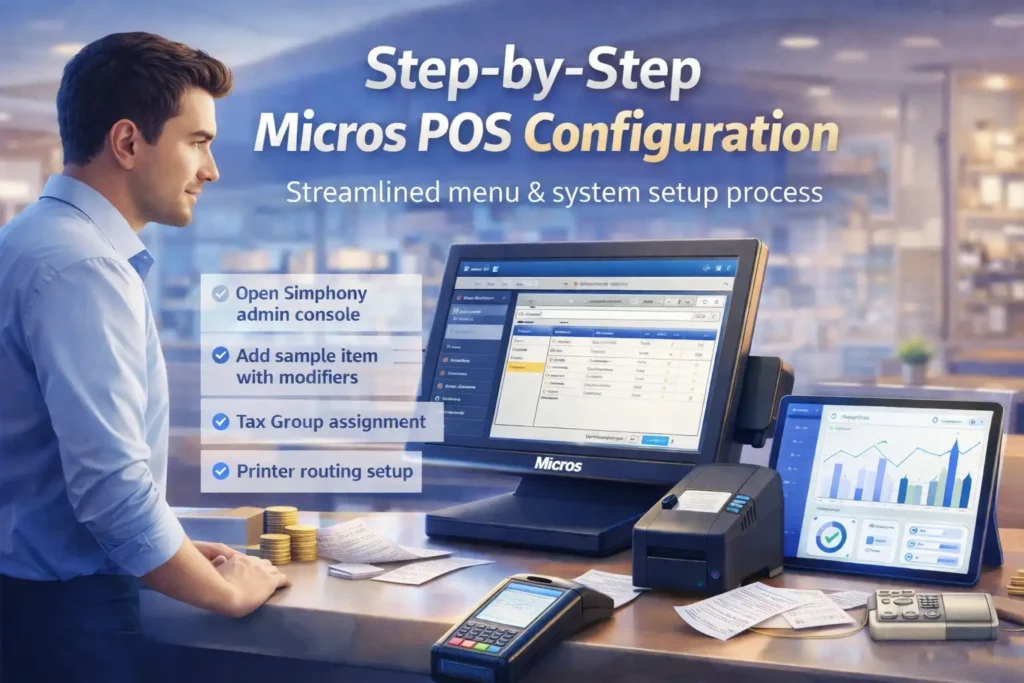
What happens: Your menu is loaded into MICROS—categories, items, prices, modifiers, portion sizes. Tax groups are mapped to menu items. Tender types (cash, card, gift card) are configured. Revenue centers are mapped to physical locations (bar, dining, patio). Meal periods are defined. Printer routing is configured (which items print to which kitchen station).
Why it matters: Menu configuration errors cost thousands in lost revenue and operational confusion. A misconfigured tax group might undercharge customers. A mislabeled revenue center breaks financial reporting.
Deliverable: Menu import verification, tax configuration test, printer routing test results.
Step 8: Payment Terminal Setup & Integration (1–2 Days)
What happens: Payment terminals (EMV/NFC readers) are paired with workstations, merchant accounts are linked, batch processing is configured, test transactions are processed (approved and declined scenarios tested). Integration with Oracle Simphony often requires GLID file setup and revenue‑center mapping (Yellow Dog Software, integration guide, undated). https://help.yellowdogsoftware.com/micros-simphony-2x-oracle-hosted
Why it matters: Payment processing is your lifeblood. A misconfigured terminal costs you sales or fraud exposure.
Disclaimer: Payment processing configuration and PCI compliance recommendations require qualified technical expertise and should be verified by a certified implementation partner. This information is general in nature and does not replace consultation with a POS security specialist.
Deliverable: Terminal pairing verification, test transaction log, PCI compliance checklist.
Step 9: System Testing & User Training (1–2 Days)
What happens: Comprehensive testing of the complete system—sales transactions, voids, refunds, menu modifications, KDS routing, report generation. Simultaneously, staff training on basic operations (selling items, handling payments, closing shifts) and manager training on reporting and configuration changes.
Why it matters: Discovering issues during go-live costs 10x what it costs to fix them during testing. Undertrained staff creates operational errors that look like system problems.
Deliverable: Test case checklist (100% completion), staff sign-off on training completion.
Step 10: Soft Launch (Pilot Shift) & Go-Live (1 Day)
What happens: You run a controlled shift with MICROS alongside your existing system (if you have one). All transactions are processed through both systems. Errors are logged. The team is present for immediate escalation. After successful validation, you switch to MICROS as primary system.
Why it matters: The soft launch is your insurance policy. It identifies real-world issues (network blips, staff confusion, integration failures) before they impact revenue.
Deliverable: Soft launch transaction log, incident report (if any), stakeholder sign-off to proceed to full operations.
Understanding Installation Timelines by Restaurant Size
Typical Deployment Duration for Small vs. Enterprise Restaurants
The timeline isn’t linear—it scales differently based on operational complexity, not just terminal count.
Small restaurants (1–3 terminals, single location, simple menu):
- Timeline: 4–7 days
- Why: minimal infrastructure prep, straightforward menu, single shift workflow
- Risk factors: inadequate internet (common in older buildings), staff resistance to change
- Cost consideration: $1,500–$3,000 professional installation (excluding hardware)
Medium restaurants (4–10 terminals, 1–2 locations, moderate menu):
- Timeline: 7–12 days
- Why: multiple workstations require network redundancy; menu complexity increases (modifiers, combos); multiple shifts and staff roles
- Risk factors: insufficient network switches, inadequate staff training, multi-location coordination challenges
- Cost consideration: $3,000–$7,000 professional installation
Enterprise networks (10+ terminals, multiple locations, complex integrations):
- Timeline: 2–4 weeks minimum for phased rollout
- Why: requires pilot locations, data validation across locations, integration testing (accounting, delivery, inventory), distributed training
- Risk factors: legacy data inconsistencies, multi-location coordination delays, third-party integration failures, regulatory compliance verification
- Cost consideration: $8,000–$25,000+ professional services (excluding hardware and ongoing support)
The jump from medium to enterprise isn’t proportional to terminal count—it’s driven by distributed validation requirements. A 20-location rollout isn’t 4x as complex as a 5-location rollout; it’s 8–10x more complex because you need to validate that menu changes propagate correctly across all locations, that reporting aggregates accurately, and that integrations work consistently.
Restaurant size comparison showing installation timeline ranges, terminal counts, and primary installation challenges
| Scale | Terminals | Locations | Menu Items | Timeline | Primary Risk | Required Pre-Work |
|---|---|---|---|---|---|---|
| Small | 1–3 | 1 | 50–150 | 4–7 days | Internet stability | None (minimal) |
| Medium | 4–10 | 1–2 | 150–400 | 7–12 days | Staff training, network capacity | 2–3 days |
| Enterprise | 10+ | 3+ | 400+ with modifiers | 14–28 days (phased) | Integration validation, data consistency | 5–7 days per location |
Pre-Installation Requirements and Site Readiness
Micros POS Network Configuration and Server Setup Requirements
Before a single piece of MICROS hardware arrives, your infrastructure must be verified and, in many cases, remediated. This is where most delays originate—not during installation, but during the week before it starts when you discover your network isn’t ready. Routine system health checks catch issues before they become problems (DCRS, 2025-08-04).
Network Configuration Checklist:
- VLAN segmentation: POS traffic isolated on dedicated VLAN (separate from guest Wi-Fi, administrative networks). Prevents bottlenecks and improves security.
- Internet stability: Recommend testing with ≥50 Mbps upload/download and consistent latency. Verify with your ISP during peak hours (lunch/dinner) for realistic assessment.
- Backup internet: LTE failover configured with automatic switching. MICROS can operate offline briefly, but continuous connectivity is required for cloud-based Simphony.
- Static IP assignment: Server and all workstations assigned fixed IPs (no DHCP). Prevents terminal offline status due to IP conflicts.
- NTP synchronization: Network Time Protocol configured to atomic time source. Recommended best practice for ensuring transaction timestamp consistency across all terminals.
- UPS (Uninterruptible Power Supply): Server and core network equipment on battery backup. Ride-through for 10–15 minutes minimum (long enough to graceful shutdown).
- Firewall configuration: Ports for MICROS communication opened (typically TCP 5432 for database, TCP 80/443 for web services). Outbound restrictions configured to prevent data exfiltration while allowing payment processing.
Hardware Infrastructure:
- Switches: Managed Gigabit Ethernet switches with PoE (Power over Ethernet) support for KDS screens and wireless access points. Budget: 48–96W PoE per location depending on terminal count.
- Cabling: Cat6/Cat6a twisted pair for runs ≤100m. Fiber optic for longer distances or high-noise environments.
- Wireless: WPA2/WPA3 encryption, non-overlapping channels (1, 6, 11 on 2.4GHz), dedicated SSID for POS handhelds.
- Server specifications: Minimum 4-core processor, 16GB RAM, 256GB SSD for single-location Simphony. Enterprise deployments typically use dedicated database servers.
PCI DSS Compliance Baseline:
- Network segmentation: cardholder data isolated on dedicated, firewalled segment
- Payment terminal encryption: EMV-compliant readers with end-to-end encryption (P2PE preferred)
- Firewall documentation: written firewall rules, open ports logged
- Access controls: unique user IDs (no shared login), role-based permissions
Skipping this audit costs 3–5 days during installation when infrastructure issues emerge.
Network Infrastructure and Internet Stability
MICROS Simphony (cloud-based) requires consistent internet connectivity. If your connection drops for 15 minutes during lunch service, your POS goes offline. Yes, it has local caching, but customers see “Network Error” messages, staff panic, and operational recovery takes time.
Internet Verification Approach:
- Speed assessment: Run tests from multiple locations within the restaurant during peak hours. Test for:
- Download: ≥50 Mbps (recommended baseline; test actual speed, not ISP-advertised speed)
- Upload: ≥10 Mbps (critical for cloud POS; many restaurants underestimate upload needs)
- Latency and packet loss: minimal variance during peak service periods
- Failover configuration: If using cellular LTE as backup:
- Activate dedicated business LTE line (not consumer hotspot)
- Configure automatic switching if primary ISP latency exceeds acceptable threshold
- Test failover during pre-installation
- ISP SLA verification: Confirm your Internet Service Provider offers uptime SLA (typically 99.9% = 43 minutes downtime/month). Get this in writing.
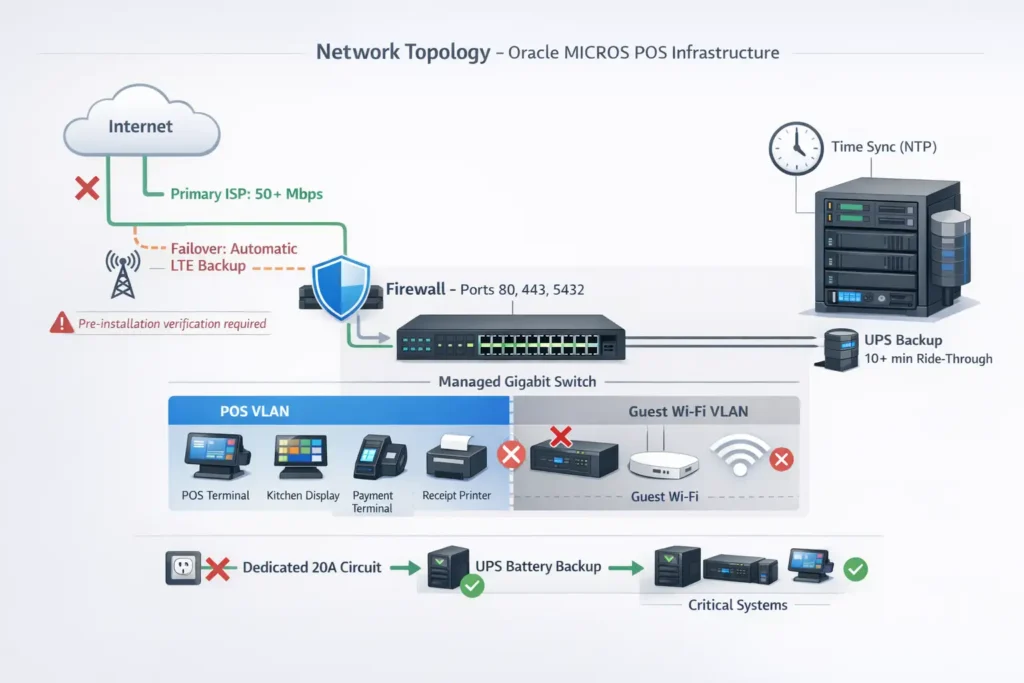
Why this matters: Poor internet stability is cited as one of the top three reasons installations extend beyond projected timelines. Internet issues discovered on day-of require ISP intervention (5–7 day delay typical).
Hardware Compatibility and Windows Kiosk Mode Setup
MICROS workstations run either standard Windows 10/11 or a locked-down Windows Kiosk Mode configuration that restricts users to the POS application only.
Kiosk Mode considerations:
- Supported on: Windows 10 Pro/Enterprise, Windows 11 Pro/Enterprise
- Peripheral driver compatibility: USB devices (barcode scanners, receipt printers, payment terminals) require compatible drivers. Some older peripherals aren’t compatible with Windows 11—verify before purchase.
- Configuration time: 30 minutes per terminal. If you’re deploying 20 terminals with multiple printer types, allocate 2–3 hours just for driver compatibility troubleshooting.
- Testing requirement: Test kiosk mode with your specific peripherals on one terminal before rolling out to all terminals.
Workstation hardware specifications (typical recommendations; verify with vendor docs):
- Processor: Intel Core i5 or i7 (8th gen or newer)
- RAM: 8GB DDR4
- Storage: 256GB SSD
- Display: 14″–15″ touchscreen, portrait orientation (for KDS screens, 10″–12″)
- Ports: 6+ USB 3.0, 2 serial RS232 (for legacy printers), 2 cash drawer connections
If you’re mixing hardware generations (some workstations i5, others i3), expect driver conflicts and variable performance.
Database Migration and Historical Data Recovery
If migrating from legacy MICROS 3700 or another POS system, data recovery is a multi-step process that adds 3–7 days depending on data complexity.
Migration workflow:
- Data export from legacy system: Menu items, categories, prices, tax groups, customer data, historical transaction summaries exported to CSV or database dump.
- Data validation & mapping: Your accountant/manager verifies:
- All menu items are present
- Prices match what’s in your legacy system
- Tax mappings are correct (tax group A in old system maps to tax group A in new system)
- Historical sales totals reconcile
- Import into Simphony: Data is loaded via MICROS import utilities. If validation catches errors, they’re corrected and re-imported.
- Reconciliation testing: Test transactions are processed, and results are compared to legacy system output (same item should calculate the same tax, subtotal, total).
Historical transaction data (last 6 months of actual sales) typically cannot be imported directly—instead, summary balances are verified against your accounting system as a verification that the new system’s starting point is accurate.
Cost of skipping this step: If your historical data is inaccurate, your Year-to-Date reporting will be wrong for months.
Essential Micros POS Hardware Components
Micros POS Hardware Setup and Workstation Installation for Restaurants
Hardware setup is the most visible phase—terminals going on counters, screens mounted above bars—but it’s also where attention to detail prevents 6 months of performance problems.
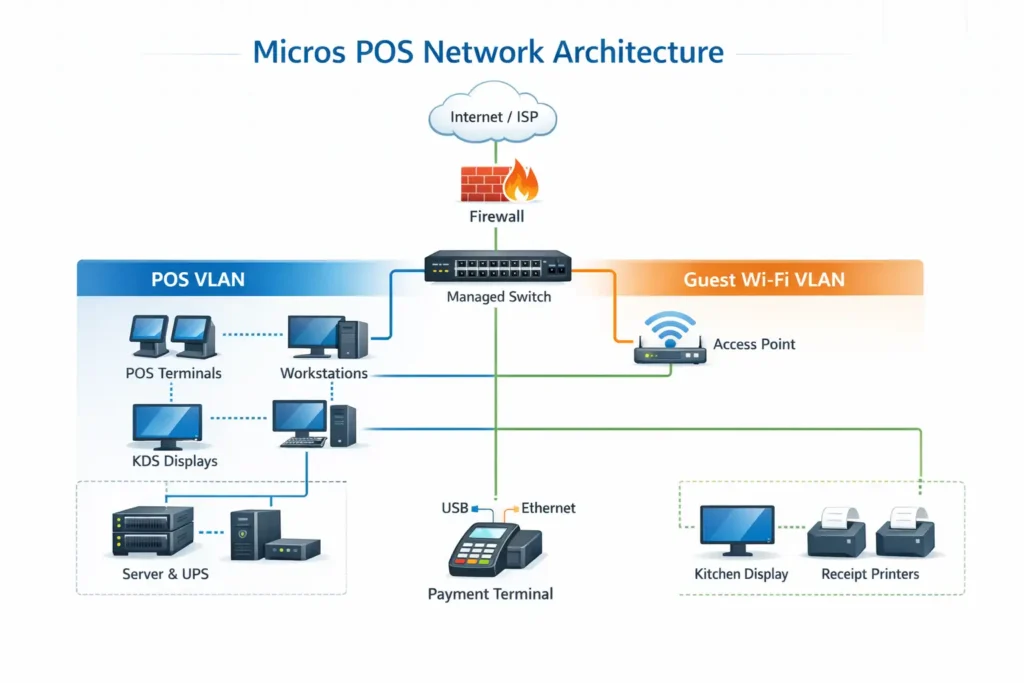
Core hardware stack:
POS Workstations (front-of-house terminals where servers/cashiers process sales)
- Mounted on height-adjustable stands (ADA compliance: 28–34″ height)
- Connected via Ethernet to managed switch (never Wi-Fi for primary POS—reliability is critical)
- USB connections to card readers, barcode scanners, customer display
- Cash drawer connected via specific serial port (usually COM2)
- Power via UPS, never direct outlet
Kitchen Display Systems (KDS) (back-of-house screens showing food orders)
- Mounted at eye level (52–60″ high) for kitchen staff visibility
- Larger screens (10″–12″) than front terminals
- Often powered via PoE (Power over Ethernet) to reduce cable clutter
- Configured to display only relevant items (don’t show bar drinks on food prep screen)
Receipt Printers (thermal printers for itemized receipts)
- Multiple types: kitchen printer (fast, wide receipt), register printer (customer-facing), bar printer (drinks only)
- Connections: USB, RS232 serial, or Ethernet depending on model
- Ribbon/paper stocking and maintenance responsibility assigned
- Print queue routing configured in Simphony (Item X goes to Kitchen Printer; Item Y goes to Bar Printer)
Payment Terminal (EMV/NFC reader for card transactions)
- Mounted within arm’s reach of cashier
- USB or Ethernet connection to workstation
- Must support tap/chip/swipe (if card-present transactions)
- Paired with payment processor account (Shift4, First Data, etc.)
Network Switch & UPS
- Managed Gigabit switch with PoE support
- Uninterruptible Power Supply backing up server, switch, and core network (not workstations—they’ll cache offline)
- Critical infrastructure: if switch or UPS fails, entire location goes offline
Installation workflow:
- Mount verification: All equipment mounted securely, anti-tamper hardware (for remote locations), cable protection (no tripping hazards).
- Cabling: Ethernet runs labeled at both ends, power cables organized with velcro ties, backup power verified.
- Connectivity testing: Each terminal pings server successfully, workstations connect to network printer, KDS screens display test patterns.
- Peripheral pairing: Payment terminal paired with workstation, receipt printers respond to test print commands, customer displays show correct content.
- Power load verification: UPS capacity confirmed to handle peak load (all terminals on simultaneously).
This phase typically takes 1–2 days for a small restaurant, 2–4 days for enterprise locations. Rushing it creates reliability issues that persist for months.
Workstations and Tablets Setup
POS workstations (stationary terminals) and tablets (handheld order entry) require different configurations.
Stationary Workstations:
- Fixed mounting with cable management
- Direct Ethernet connection (no wireless)
- Assigned printer queues (which workstation prints to which printer)
- User login restrictions (kiosk mode for security)
Handheld Tablets (for remote ordering in large restaurants):
- Wireless connectivity (dedicated Wi-Fi SSID for POS)
- Battery management (charge stations, battery life ~8 hours per shift)
- Secure pairing with central MICROS server (encrypted comms)
- Limited menu display (customer-facing items only, not labor/cost data)
For restaurants with 8+ terminals, tablets are typically optional but valuable for high-volume periods when cashier terminals get backed up.
Setup time: 15–20 minutes per terminal (mounting, OS configuration, MICROS client deployment).
Kitchen Display Systems (KDS) and Printers
KDS is where operational efficiency lives or dies. A misconfigured KDS creates kitchen chaos—tickets printing to wrong stations, items missing from display, cooks missing orders during peak service. Kitchen Display System (KDS) setup is one of the critical success factors for smooth operations.
KDS configuration elements:
- Ticket routing: Menu items automatically route to correct kitchen station. Example: “Grilled Salmon” → Saute Station; “Caesar Salad” → Cold Prep; “House Wine” → Bar.
- Priority flagging: VIP tables, special requests, allergen alerts display in different colors.
- Timing controls: System shows how long each order has been in queue. If an item exceeds 20 minutes, it’s highlighted red.
- Completion workflow: Kitchen staff marks items complete; KDS automatically sends update to server’s terminal (shows “ready for pickup”).
Printer routing specifics:
- Kitchen Ticket Printer: Prints full order details, positioned near food prep.
- Bar Ticket Printer: Beverages and shots only, positioned at bar.
- Register Receipt Printer: Customer-facing itemized receipt; at payment point.
- Manager Report Printer: Summary reports, positioned at office.
Each printer requires separate configuration in MICROS to ensure items route correctly.
Temperature & environmental specs:
- KDS screens require stable temperature (50–85°F); not behind hot grills or near steam
- Receipt printers need humidity control (avoid kitchens; condensation clogs mechanisms)
Server and Networking Hardware
The server is your system’s heart. Everything depends on it.
Server specifications (for single-location Simphony):
- CPU: Intel Xeon (or equivalent) 4-core minimum
- RAM: 16GB DDR4 (32GB for multi-location)
- Storage: 500GB SSD (RAID 1 mirrored) for database + backups
- Network: Dual Gigabit Ethernet (primary + failover)
- Power: UPS battery backup, 10–15 minute ride-through minimum
Database infrastructure:
- Oracle Database 19c or MySQL (depending on Simphony version)
- Automatic daily backups (incremental)
- Weekly full backup (stored offsite or cloud)
- Recovery Time Objective (RTO): ≤4 hours from backup
Network switch requirements:
- Managed Gigabit switch (not unmanaged)
- Minimum 48 ports for multi-location
- PoE budget: 600W+ (for KDS screens, wireless APs, handheld charging)
- VLAN capability: at least 2 isolated networks (POS + Guest Wi-Fi)
Wireless infrastructure:
- Business-grade access points (not consumer-grade Wi-Fi 6 routers)
- PoE-powered for centralized management
- WPA3 encryption (WPA2 minimum)
- Non-overlapping channels: 1, 6, 11 on 2.4GHz
This infrastructure doesn’t require exotic equipment—it requires the right equipment, properly configured.
Hardware components required for Micros POS installation with configuration specifications
| Component | Quantity | Spec | Status |
|---|---|---|---|
| Workstation | 1 per register | Intel i5+, 8GB, 256GB SSD | ☐ |
| KDS Screen | 1 per station | 10″–12″ PoE-powered | ☐ |
| Receipt Printer | 2–3 | Thermal, USB/Ethernet | ☐ |
| Payment Terminal | 1 per station | EMV/NFC, USB/Ethernet | ☐ |
| Server | 1 per location | Xeon 4-core, 16GB RAM, 500GB SSD | ☐ |
| Network Switch | 1 per location | Managed Gigabit, 48 ports, PoE | ☐ |
| UPS | 1 per location | 10+ minute ride-through | ☐ |
| Wireless AP | 1–2 per location | Business-grade, PoE | ☐ |
| Network Cables | As needed | Cat6/Cat6a, labeled runs | ☐ |
| Power Cables | As needed | Via UPS, protected | ☐ |
Step-by-Step Micros POS Installation Process
Step 1: Site Readiness and Cabling
Before hardware arrives, the physical location must be prepared.
Tasks:
- Cable pathways identified: Determine where Ethernet cables will run. Avoid high-traffic areas (tripping hazard), stay away from high-voltage power lines (interference), run through cable trays or conduit where possible.
- PoE power budget calculated: If using PoE for KDS/wireless, verify switch has sufficient power capacity.
- Electrical load verified: Server and UPS require dedicated outlet (not shared with ice machines, refrigerators, or other high-draw equipment). If location doesn’t have adequate 20A circuit, electrical work is required (adds 1–2 days).
- Internet access confirmed: ISP confirmed to deliver fiber/cable to specified location; test drops are installed.
- Backup power staged: UPS is positioned near server, tested for battery functionality.
Common delays encountered here:
- Inadequate electrical circuits require electrician (adds 2–3 days)
- Existing cable runs are below minimum standards (Cat5, unshielded) and require replacement
- Internet provider delays activation (adds 5–7 days)
Step 2: Hardware Unboxing and Mounting
Equipment arrives and is physically installed.
Tasks:
- Inventory verification: Every item is counted against the packing list.
- Damage assessment: Equipment tested for shipping damage.
- Mounting installation: Stands, brackets, wall mounts secured. Anti-tamper hardware installed for high-theft locations.
- Cable management: All cables labeled at both ends, color-coded by function (power, network, peripheral), protected from foot traffic.
- Proximity verification: Terminals positioned for ergonomic access, receipt printers accessible for paper/ribbon replacement, KDS screens at eye level for kitchen visibility.
Quality check:
- Payment terminal arm’s length from cashier
- Receipt printer paper drawer accessible without moving terminal
- KDS screen 52–60″ high (staff eye level)
- All mounting bolts torqued (terminals secured for high-transaction-volume locations)
This phase typically takes 1–2 days for 1–3 terminals, 2–4 days for 10+ terminals.
Step 3: Software Configuration and Simphony Provisioning
Now the software layer begins.
For cloud-based Simphony:
- License keys activated in Oracle Hospitality provisioning portal
- CAL (Client Activation License) packages created
- EMC (Enterprise Management Console) configured for property deployment
- Simphony environment confirmed ready for client deployment
For on-premise Simphony:
- Oracle Database initialized
- Simphony application server installed
- Back Office application deployed
- Initial system configurations (restaurant name, address, property ID) entered
Post-provisioning verification:
- EMC console shows property as “active”
- Test client deployment successful (workstation can download and launch Simphony)
- License count verified (no license errors)
Step 4: Database Setup and Menu Programming
The database is now populated with your operational structure.
Tasks:
- Menu import: CSV file with all menu items uploaded to Simphony. Each item includes:
- Name (visible to customer)
- Price
- Category (appetizers, entrees, beverages, desserts)
- Modifiers (sides, cooking temps, add-ons)
- Revenue center (used for sales categorization)
- Tax group (what tax rate applies)
- Tax configuration: Tax rates are mapped to items. Example:
- Food items: 8.5% sales tax
- Beverages: 8.5% sales tax
- Alcohol: 8.5% + 2% local liquor tax
- Non-taxable (gift certificates): 0%
- Tender type setup: Payment methods are defined:
- Cash
- Credit/Debit Card
- Gift Card
- Check
- Comps (complimentary/free items)
- Revenue center mapping: Physical locations are defined:
- Bar (beverages, shots)
- Kitchen (hot food)
- Cold prep (salads, cold items)
- Counter (quick service area)
- Meal period definition: Time-based operational periods:
- Breakfast (6am–11am)
- Lunch (11am–4pm)
- Dinner (4pm–close)
- Late night (if applicable)
- Printer routing: Which items print to which printers:
- Entrees → Kitchen printer
- Beverages → Bar printer
- Desserts → Cold prep printer
Testing: Sample transactions processed with each item type to verify pricing, tax calculation, and printer output.
Micros POS Configuration Process: Menu and System Settings
Configuration is where the system goes from generic template to your operation’s specific ruleset.
Key configuration areas:
Menu Item Configuration
- Item name: What customers see on receipt
- Item number: Internal SKU (typically 3–4 digits)
- Price: Base price before tax
- Category: For menu organization and reporting
- Modifiers: Optional add-ons (e.g., choice of sides, extra protein)
- Revenue center: Where sale is recorded (affects inventory/accounting integration)
- Tax group: Tax rate applied to this item
Tax Configuration
- Tax groups: Rate = 8.5%, Name = “Food Tax”
- Multiple taxes: Alcohol items might have base sales tax + local tax
- Tax-exempt items: Gift cards, non-food items marked as zero-tax
- Tax reporting: Which category items roll into (ensures accurate tax filings)
User Roles and Permissions
- Cashier: Can sell, void transactions, process refunds
- Manager: Can access reports, modify menu, close shift, view employee labor
- Admin: Can create users, configure system, backup database
- Supervisor: Can override discount approvals
Each role has specific transactions it’s authorized to perform.
Discount and Promotion Configuration
- Manager discretionary: Percentage/dollar discounts approved in real-time by manager
- Time-based: Automatic discounts during specific hours (happy hour, early bird)
- Loyalty: Points earned per transaction, redeemed for discounts
- Staff discounts: Employees get percentage off; tracked separately for accounting
Integration Configuration
- Accounting software: Menu items mapped to GL accounts (Item “Caesar Salad” posts to GL account “Food Sales”)
- Inventory system: Item quantities decremented when sold
- Delivery platforms: Menu syncs to DoorDash/Grubhub; orders appear in MICROS as they’re placed
- Loyalty program: Customer phone number captured, points tracked centrally
Configuration time: 2–4 days depending on menu complexity. A 50-item menu takes 1 day. A 300-item menu with complex modifiers and multi-location integration takes 3–4 days.
Micros POS Payment Terminal Setup and Integration
Payment processing is your revenue nerve. A misconfigured terminal costs sales or creates chargebacks.
Payment Terminal Hardware Setup
Physical integration:
- Terminal mounted within cashier arm’s reach (16–24″ from edge of counter)
- USB or Ethernet cable connected to workstation
- Power cable (via UPS, never direct outlet)
- Receipt roll installed, tested for printing
EMV/NFC capability verification:
- Terminal supports chip reading (EMV)
- Contactless payment support (tap, Apple Pay, Google Pay)
- Swipe/magstripe support (legacy compatibility)
Processor Configuration
Merchant account setup:
- Processor account established (Shift4, First Data, Square, etc.)
- Merchant ID and terminal ID obtained from processor
- Batch settlement configured (when should funds be deposited—daily, weekly?)
- Interchange rates reviewed and documented
Terminal pairing with MICROS:
- Terminal identified in Simphony configuration
- Payment processing gateway URL configured (where transactions are routed)
- Encryption credentials exchanged (terminal must authenticate with payment gateway)
- Test transaction initiated and verified in merchant account
PCI Compliance Setup
Tokenization enabled: Card data is encrypted at the terminal and replaced with non-sensitive token. MICROS and receipt records show token, not actual card number.
P2PE certification: Point-to-Point Encryption (P2PE) certification ensures card data never touches unencrypted systems.
Audit requirements:
- Monthly test transactions logged
- Failed transactions reviewed and resolved
- PCI compliance scans scheduled quarterly
Payment Processing Testing
Before go-live, verify all transaction types work:
Approved transactions:
- Tap payment (contactless)
- Chip payment (EMV)
- Swipe payment (magstripe)
- Manual entry (no card present, keyed)
- Multiple tender types (card + cash, split payment)
Decline/error scenarios:
- Insufficient funds (decline message displays)
- Card expired (system rejects, prompts for different card)
- Network timeout (system retries, logs error)
- Offline payment (if internet down, transaction queued for later)
Refund and reversal:
- Partial refund processes correctly
- Full refund within settlement window works
- Disputed transaction chargebacks are tracked
Batch processing:
- Daily settlement occurs automatically
- Batch report available in MICROS (reconciles to bank deposit)
- Bank deposits match batch totals within standard interchange fees
Testing this alone takes 1–2 days, but it’s critical. Payment processing errors compound revenue issues.
Micros POS Onboarding: Training Staff for the New System
Staff training is the phase where 50% of operational problems originate. Undertrained staff creates errors that look like system bugs.
Training Structure
Pre-training preparation (1 day before go-live):
- Staff attend 30-minute orientation explaining why POS is changing
- Basic system overview (terminals, printers, payment method)
- Login credentials provided and tested
Day-one hands-on training (3–4 hours before shift):
- Cashiers: Sales transactions, voids, refunds, payment processing, shift login/logout
- Managers: Shift reports, manual price adjustments, opening/closing procedures
- Kitchen: KDS ticket acceptance, marking items complete, responding to modifiers
- Bartenders: Drink ordering, modifier requests, speed of service expectations
Training scenarios (role-play):
- Customer orders appetizer + entree + dessert + wine (multiple items, different printing zones)
- Customer changes order (menu item modified, price updated)
- Void transaction (item ordered incorrectly, transaction voided)
- Partial refund (customer requests refund for one item, keeps others)
- Split payment (cash + card for same transaction)
- Card declined (system prompts for alternative payment)
Each scenario is walked through with a trainer present, then repeated by staff member without assistance.
Training Materials
- Quick reference cards: Laminated 4″x6″ cards showing common operations (how to void, how to process refund, where to find reports)
- Video tutorials: Recorded training sessions can be reviewed by new staff
- User manual: Link to MICROS documentation for advanced procedures
- Help contact: Trainer’s phone number for post-training questions
Post-Launch Follow-Up
Day 3: Trainer returns to observe shift, answer questions, document any persistent issues
Day 7: Follow-up session reinforces procedures, addresses staff feedback
Week 2: Refresher training on advanced features (reports, inventory, labor tracking)
Training Duration
- Small restaurant (1–3 terminals): 3–4 hours training, all staff
- Medium restaurant (4–10 terminals): 6–8 hours, split sessions by shift
- Enterprise location: 12+ hours, multiple iterations for all staff
Rushing training is false economy. Every untrained interaction costs 5–10 minutes of troubleshooting later.
❓ MICROS POS Staff Readiness Quiz
Test basic restaurant staff readiness for Oracle MICROS POS setup and day-to-day operations. This short quiz covers sales, voids, refunds, payment handling, and shift-close awareness.
System Testing and Restaurant POS Go-Live Process
Comprehensive Testing Checklist
Testing is your insurance policy against go-live disasters. Every untested scenario becomes a real-world incident.
Pre-go-live testing (1–2 days):
Comprehensive testing checklist for Micros POS pre-launch verification
| Test Category | Test Case | Expected Result | Status |
|---|---|---|---|
| Menu | Item displays in all cashier terminals | Item visible immediately after configuration | ☐ |
| Menu | Menu item price correct with tax | Price + tax = exact total (no rounding errors) | ☐ |
| Menu | Modifiers apply to item | Side selection changes item price correctly | ☐ |
| Transactions | Simple transaction (1 item + tax) | Receipt totals correctly | ☐ |
| Transactions | Complex transaction (multiple items, modifiers) | Each item prices correctly, modifiers apply | ☐ |
| Transactions | Void transaction | Transaction removed from register, not reportable | ☐ |
| Transactions | Partial refund | Refund amount correct, inventory adjusted | ☐ |
| Printing | Kitchen ticket prints to correct printer | Item goes to kitchen, not bar | ☐ |
| Printing | Bar ticket prints to correct printer | Drink goes to bar, not kitchen | ☐ |
| Printing | Receipt prints correctly | Customer receipt legible, formatted correctly | ☐ |
| Payments | Credit card approval | Transaction approved, receipt shows confirmation | ☐ |
| Payments | Card decline handling | Decline message displays, customer re-prompted | ☐ |
| Payments | Multiple payment methods | Cash + card split works | ☐ |
| Reports | Daily sales report | Total matches transaction log, no discrepancies | ☐ |
| Reports | Category sales | Food/beverage/alcohol totals break out correctly | ☐ |
| Reports | Inventory adjustment | Item count decrements when sold | ☐ |
| Security | User login | Only valid credentials authenticate | ☐ |
| Security | Role-based access | Managers can void, cashiers cannot | ☐ |
| Offline | Internet disconnection | Terminal caches sales, resyncs when online | ☐ |
| Offline | Recovery after outage | No transactions lost, reporting accurate | ☐ |
Soft Launch: Controlled Pilot Shift
Instead of flipping a switch to go-live, run a soft launch—a controlled shift with MICROS running alongside your old system.
Soft launch protocol:
- Timing: Schedule during a moderately busy shift (not slowest, not peak—validate under real conditions)
- Parallel operation: Both old and new POS process transactions
- Full staff present: Trainers and IT support on-site
- Issue logging: Every problem is logged with time/detail (not fixed immediately—just recorded)
- Recovery plan: If MICROS fails completely, you flip back to old system (no lost revenue)
What to observe:
- Staff comfort with new system (can they process transactions without trainer help?)
- System stability (any crashes, slowdowns?)
- Payment processing success (card approvals working?)
- Printing accuracy (receipts legible, items routing to correct printers?)
- Customer experience (do customers notice the change?)
Duration: 1 full shift minimum. For high-volume locations, consider 2–3 shifts.
Decision gate: If soft launch reveals critical issues, fix them before full go-live. If issues are minor, proceed with full go-live.
Full Go-Live
After successful soft launch, you transition permanently.
Go-live procedure:
- Timing: Typically overnight or during slowest hours (3am–6am for restaurants)
- Old system deactivated: Data archived, old terminals turned off
- MICROS activated: New system becomes primary
- Opening shift validation: Trainer present for opening shift, validates system stability
- Escalation protocol: 24-hour support hotline for any issues
Post-launch monitoring (48 hours):
- Transaction volume matches historical baseline (no lost sales due to system friction)
- Receipt accuracy verified by manager
- Payment processing success rate ≥99.5%
- No critical errors in system logs
Common Installation Challenges and How to Avoid Delays
Data Discrepancies and Sales Mapping Issues
Challenge: Menu items imported from old system don’t match actual prices/categories.
Root causes:
- Menu changes made in old system but not documented (spreadsheet out-of-date)
- Tax mappings changed but not recorded (item was 8.5% tax, now 9.5%, but import file still shows 8.5%)
- Multiple revenue centers with same item name but different prices (Salad = $12 at bar, $10 at counter)
Prevention:
- Export current menu from old system
- Have manager verify every item—name, price, category, tax rate
- Cross-check against actual menus/POS system (print current register screen)
- Reconcile discrepancies before import
- Run test import to sample environment, verify totals match old system
Time to resolve if missed: 2–3 days (if caught during testing); 1–2 weeks (if discovered after go-live when sales don’t reconcile to accounting).
Printer Routing Configuration Errors
Challenge: Items print to wrong kitchen station (entrees go to bar, drinks go to kitchen).
Root causes:
- Printer routing not configured (all items print to single printer)
- Revenue centers mapped incorrectly (appetizers assigned to “bar” instead of “food”)
- Kitchen layout changed since POS implementation plan was written (printers relocated, routing config not updated)
Prevention:
- Document current printer locations with photo + label
- Map each menu item to correct printer in Simphony config
- Test 3–5 items in each category (send sample appetizer, entree, drink, dessert to verify routing)
- Have kitchen manager verify ticket layout (is ticket information clear? Do kitchen staff understand priorities?)
Time to resolve if missed: 4–8 hours (if caught during soft launch); 2–3 shifts (if discovered during normal service when orders back up).
Database Sync and Timing Issues
Challenge: Workstations go offline frequently showing “Sync Error” or “Connection Lost.”
Root causes:
- Network latency >50ms (internet connection congested)
- Server database not responding (database corrupted or restarted)
- Firewall blocking communication between workstation and server
- NTP (time synchronization) not configured (database rejects connections if terminal clock is off)
Prevention:
- Run network diagnostics during peak hours (not just test at 11am)
- Verify NTP is synchronized on server and all workstations (should sync within <1 second)
- Test firewall rules (can workstation ping server? Can workstation connect to port 5432?)
- Run 2-hour sustained load test (process transactions continuously; see if sync issues emerge under load)
- Configure server to auto-restart on crash with database recovery
Time to resolve if missed: 4–8 hours (database logs reviewed, timing verified, firewall rules adjusted).
Menu Import Failures
Challenge: CSV import file with 300 menu items fails at 250 items with cryptic error message.
Root causes:
- CSV formatting error (invalid character, improper field delimiter)
- Duplicate item numbers (system can’t import two items with same ID)
- Missing required fields (category column blank for some items)
- Special characters in item names not UTF-8 encoded
Prevention:
- Prepare CSV with small test set (10–20 items)
- Import test set; verify all fields populated correctly
- Expand to 50 items, test again
- Check for duplicate item numbers programmatically (sort, look for duplicates)
- Use Simphony import template file (not custom Excel file)
Time to resolve if missed: 1–3 hours (file reviewed, errors identified, re-imported).
Common Installation Issues
| Problem | Cause | Solution | Time to Fix |
|---|---|---|---|
| Workstations offline | Network congestion, server down | Check ping latency, restart database | 30 min |
| Items print to wrong printer | Printer routing misconfigured | Verify revenue center mapping, test routing | 1–2 hours |
| Menu import fails | CSV formatting error, duplicates | Validate file, check for special characters | 1–3 hours |
| Tax calculation wrong | Tax group not applied to item | Map tax group, run test transactions | 30 min |
| Payment terminal won’t pair | USB driver missing, encryption mismatch | Update drivers, verify terminal credentials | 1–2 hours |
| Reports don’t reconcile | Revenue center mapping incorrect | Verify GL account mapping, reconcile balances | 2–4 hours |
Post-Installation: Maintenance and Updates
Regular System Maintenance Schedules
After go-live, ongoing maintenance prevents failures and keeps the system optimized. Routine health checks catch issues before they become problems and reduce downtime (DCRS, 2025-08-04).
Daily:
- Check error logs (any transactions failed to post?)
- Verify backup completion (did last night’s backup finish successfully?)
Weekly:
- Restart server (clears memory cache, forces clean startup)
- Test payment processing (run sample approved/declined transactions)
- Review inventory variance (sold items vs. physical count match?)
Monthly:
- Full system backup exported (stored off-site or cloud)
- Database optimization run (removes old transaction logs, frees space)
- User access audit (remove departed employees, verify role assignments)
Quarterly:
- Security patch installation (OS and application updates)
- Network audit (verify firewall rules still correct, no unauthorized devices)
- Disaster recovery test (restore from backup to test environment, verify completeness)
Annually:
- Hardware refresh assessment (are terminals showing age? Battery degradation? Keyboard wear?)
- Software version upgrade evaluation (cost/benefit of upgrading to latest Simphony version)
- PCI compliance audit (terminal encryption, data isolation, access controls)
Adding Menu Items or Changing Revenue Centers Post-Launch
After go-live, you’ll frequently need to add menu items (seasonal specials) or adjust prices.
Procedure:
- Menu addition: In Simphony console, add item with name, price, category, modifiers, revenue center, tax group
- Printer routing: If new item type (e.g., new appetizer), verify it routes to correct printer
- Test transaction: Process test transaction using new item to verify pricing/tax
- Deploy to workstations: If using CAL packages, new menu is automatically downloaded at next sign-in
Time required: 5–10 minutes per item
Price changes: Similar process—change price in Simphony, deploy to workstations, test.
Software Updates and Version Upgrades
Monthly security patches: Applied via CAL package deployment (automatic, happens during non-business hours)
Major version upgrades (e.g., 19.8 → 20.1): Requires planned downtime
- Update sequence: Database → Application Server → Workstations
- Test environment validation before production deployment
- Parallel operation (old and new systems run simultaneously) if available
- Rollback plan documented (how to revert to previous version if upgrade fails)
Upgrade window: 4–6 hours typically. Coordinate with operations manager for optimal downtime.
Reinstallation Procedures for System Upgrades
If a critical issue requires complete system reinstallation:
- Pre-reinstall: Full database backup exported, stored securely
- Backup creation: Transaction data archived for last 6 months
- Clean database install: Database deleted, reinstalled from scratch
- Data restoration: Transaction summaries restored (not individual transactions—they’re archived)
- Configuration reload: Menu, users, revenue centers reloaded from backup
- Testing: Verify menu, pricing, reporting before reopening
- Rollback plan: Previous backup available if anything fails
Timeline: 8–12 hours for complete reinstallation. Typically done overnight, validated next morning before opening.
The Ultimate Restaurant POS Installation Checklist
Before you start, print this checklist and work through it systematically. It’s the single best predictor of smooth deployment.
Expert Tips for a Faster Micros POS Deployment
Data Preparation (Saves 2–3 Days)
Prepare menu data in advance:
- Export current menu from old system into CSV
- Manager validates every line item (name, price, category, tax rate)
- Use MICROS import template (don’t create custom format)
- Test import with 10% of items first
Pre-stage historical data:
- Last 6 months of sales exported (for cutover validation)
- Tax totals reconciled against accounting records
- Discrepancies resolved before migration date
Result: Menu import completes in 2 hours instead of 1–2 days.
Infrastructure Pre-Validation (Saves 1–2 Days)
Network diagnostics run during peak hours:
- Latency, packet loss, jitter measured when system will actually be under load
- Issues identified before installation: poor Wi-Fi coverage, aging router, internet plan too small
- Remediation completed in advance
Server environment staged and tested:
- Database initialized and tested
- Backup automation configured
- UPS capacity verified
- Firewall rules documented
Result: Go-live deploys to proven infrastructure; no discoveries on day-of.
Parallel Tasks (Saves 1–2 Days)
Network team and software team work simultaneously:
- While network team is cabling and testing connectivity, software team is configuring Simphony
- Both teams coordinate via daily standup (15 minutes)
Hardware staging happens during software testing:
- While menu is being imported and tested, terminals are being mounted and networked
- Parallel work reduces critical path
Result: Overall project timeline compressed 1–2 days.
Role Assignment (Prevents Delays)
Assign a single owner for each major area:
| Area | Owner | Responsibility |
|---|---|---|
| Network | IT Manager | Internet, switches, firewall, cabling |
| Servers | Database Admin | DB setup, backup, security |
| Menu | Operations Manager | Data validation, printer routing, revenue centers |
| Payment Processing | Finance | Processor config, terminal pairing, batch settlement |
| Staff Training | HR/Training | Schedule, materials, conduct training, follow-up |
| Hardware | Facilities | Mounting, power, physical security |
| Testing | Quality Assurance | Test plan execution, issue logging, sign-off |
Clear ownership prevents bottlenecks where “nobody knows who’s responsible for X.”
Micros 3700 (Legacy) vs. Oracle Simphony (Cloud-Based)
If you’re migrating from legacy MICROS 3700, understand the architectural differences. They affect installation time and ongoing operations.
Micros 3700 vs. Oracle Simphony
| Aspect | MICROS 3700 | Oracle Simphony |
|---|---|---|
| Architecture | On-premise server + workstations | Cloud-based + local terminals |
| Server requirements | Dedicated Windows/Linux server, significant IT overhead | No local server needed; cloud-hosted |
| Offline capability | Limited (server down = POS down) | Full local operation; syncs when online |
| Update frequency | Manual patches; version upgrades require downtime | Automatic cloud updates, no downtime |
| Installation time | 2–4 weeks (includes server setup) | 1–2 weeks (faster cloud provisioning) |
| Scalability | Adding locations = doubling server costs | Adding locations = minimal incremental cost |
| Data backup | Local backups; recovery depends on admin skill | Automatic cloud backups; easier recovery |
| TCO (20 locations, 3 years) | $700K–$1.2M | $300K–$500K (lower at scale) |
| Support complexity | Requires local IT expertise | Oracle-managed; less local IT burden |
Migration Considerations
If upgrading from 3700 to Simphony:
Data migration: 3–5 days
- Export menu, customer data, historical sales from 3700
- Map tax groups and revenue centers (3700 structure ≠ Simphony structure)
- Test data integrity in new system
- Reconcile sales totals against accounting records
Hardware refresh: Some 3700 workstations may not meet Simphony requirements (OS support, memory, storage)
- Budget for new terminals if hardware is older than 5–7 years
Downtime consideration: Cloud Simphony can run parallel with 3700 during pilot phase, reducing cutover risk
Integrations and Third-Party Tools
Most restaurants integrate MICROS with accounting software, delivery platforms, or inventory systems. Integration setup (GLID mapping, revenue centers) often adds several days to deployment (Yellow Dog Software, integration guide, undated). https://help.yellowdogsoftware.com/micros-simphony-2x-oracle-hosted
Common Integration Points
Avero (Restaurant Analytics):
- Menu items sync automatically
- Sales data flows to Avero for analytics
- Setup: API credentials configured, revenue centers mapped to GL accounts
- Time to integrate: 1–2 days
Accounting Software (QuickBooks, Xero):
- Daily sales post to GL accounts
- Tax collected tracked separately from sales
- Setup: GL account mapping created, batch posting scheduled
- Time to integrate: 1–2 days
Delivery Platforms (DoorDash, Uber Eats):
- Menu syncs to delivery apps
- Orders appear in MICROS KDS automatically
- Setup: API integration, kitchen training on delivery orders
- Time to integrate: 1–2 days
Inventory Management:
- Item quantities decrement when sold
- Low-stock alerts generated
- Setup: Item-to-inventory-SKU mapping, count frequency defined
- Time to integrate: 1–2 days
Payroll Software:
- Employee hours from MICROS labor tracking sync to payroll
- Setup: Employee ID mapping, pay period configuration
- Time to integrate: 1 day
Total integration time: If integrating 3+ systems, add 5–7 days to overall project. If none, save 5–7 days. Integration with Oracle Simphony often requires GLID file setup and revenue‑center mapping with specialized configuration expertise.
FAQ: Common Micros POS Setup Questions
How much does professional MICROS POS installation cost?
Professional installation services typically run:
Small restaurant (1–3 terminals): $1,500–$3,000
Medium restaurant (4–10 terminals): $3,000–$7,000
Enterprise network (10+ locations): $8,000–$25,000+
These estimates exclude hardware (terminals, servers, printers), which typically add $15,000–$50,000+ depending on scale.
Many vendors offer “bundled” pricing where hardware + software + installation is priced as package deal.
“Max has done a great job from the C/C transition and our Sky Tab POS install. Look forward to doing business in the future with SHIFT4.” — Customer testimonial, Smart Payment Solutions
Can I install Oracle Micros POS myself?
Technically possible but not recommended.
You can handle if:
Small single-location restaurant (1–3 terminals)
Simple menu (<100 items)
Basic network setup (no integrations)
You have IT experience (network configuration, database basics)
You should hire professional if:
Multi-location rollout (complexity multiplies)
Complex integrations (delivery platforms, accounting, inventory)
PCI compliance required (payment processing security)
Zero IT staff experience
DIY risk: Misconfigured system looks operational but has hidden issues (tax calculation wrong, payment processing not secure, data not backing up properly). These issues compound and cost more to fix after go-live than paying professionals upfront.
Can I pull historical data from my Micros 3700 server after a new install?
Yes, with caveats.
What you can migrate:
Menu items (names, prices, categories)
Customer records
Summary sales data (totals by date/category)
Employee master records
What you can’t:
Individual transaction details (receipts) older than 180 days (typically archived, not directly importable)
Exact tax audit trails (format differs between 3700 and Simphony)
Process:
Export data from 3700 database (SQL export)
Map fields to Simphony structure
Test import on non-production environment
Validate data integrity (sales totals reconcile to accounting records)
Migrate to production
Timeline: 3–5 days for data migration validation
Why do my meal periods not match my reporting software?
Root cause: Meal period definitions in MICROS don’t align with how your accounting or scheduling software defines them.
Example:
MICROS defines “Lunch”: 11am–4pm
Accounting software defines “Lunch”: 11:30am–3:30pm
Report for “Lunch sales” shows different total because it’s capturing different transactions
Resolution:
Document meal period definitions across all systems (MICROS, accounting, scheduling, delivery platforms)
Standardize on single set of definitions
Update MICROS meal periods to match
Re-sync integrations
Validate reporting
Timeline: 2–4 hours
Why do my meal periods not match my reporting software?
Root cause: Meal period definitions in MICROS don’t align with how your accounting or scheduling software defines them.
Example:
MICROS defines “Lunch”: 11am–4pm
Accounting software defines “Lunch”: 11:30am–3:30pm
Report for “Lunch sales” shows different total because it’s capturing different transactions
Resolution:
Document meal period definitions across all systems (MICROS, accounting, scheduling, delivery platforms)
Standardize on single set of definitions
Update MICROS meal periods to match
Re-sync integrations
Validate reporting
Timeline: 2–4 hours
Does the installation process compromise credit card security?
No, if done correctly.
Security measures during installation:
Payment terminals use EMV encryption (chip/contactless)
Card data tokenized (replaced with non-sensitive token)
P2PE (Point-to-Point Encryption) certification ensures data never stored in clear text
PCI compliance audited before go-live
Security measures after installation:
Monthly test transactions logged and reviewed
User access audited quarterly
Network segmentation maintained (POS data isolated from guest Wi-Fi)
Encryption credentials rotated annually
Risk if skipped:
Payment terminal not configured for encryption → card data stored in terminal
Network not segmented → POS data exposed to guest network traffic
Weak passwords on server → unauthorized access possible
The installation process itself doesn’t compromise security if best practices are followed.
Post-Installation Micros POS Support and Configuration Services
After go-live, you have ongoing support needs—configuration changes, troubleshooting, staff training for new hires. Technical Support for your Micros POS is critical for long-term success.
Standard Support Models
Managed Support (recommended for all installations):
- Help desk access 24/7
- Response time: 30 minutes (critical issues), 2 hours (standard)
- Includes remote troubleshooting, configuration updates
- Typical cost: $200–$400/month per location
Break-Fix Support:
- Support available during business hours only
- Pay-per-incident (typically $75–$150/hour)
- Good for small restaurants with few issues
Onsite Support:
- Technician on-site for emergencies or complex changes
- Typical cost: $150–$250/hour + travel
- Usually reserved for major system changes
Configuration Changes (Post-Installation)
Common post-launch changes and typical timeframe:
| Change | Complexity | Time to Implement | Cost |
|---|---|---|---|
| Add menu item | Low | 15 min | $0 (if self-service) |
| Change item price | Low | 10 min | $0 |
| Add revenue center | Medium | 1 hour | $50–$100 |
| Integrate new delivery platform | High | 4–8 hours | $300–$500 |
| Add location to network | High | 2–3 days | $1,000–$2,000 |
| Upgrade Simphony version | Very high | 6–12 hours + testing | $500–$1,500 |
SLA (Service Level Agreement) Commitment
Reputable MICROS providers offer:
- Response time: 30 minutes for critical (system down), 4 hours for major, 24 hours for minor
- Resolution time: Target fix within 24 hours; if not, workaround provided
- Uptime target: 99.5% (≤22 minutes downtime/month)
- Escalation: Access to vendor engineers if local support can’t resolve
- Communication: Status updates every 2 hours during incident
Conclusion: Setting Realistic Expectations for Your Go-Live Date
When you quote a timeline for MICROS POS installation, add a 15–20% buffer for unknowns:
- Internet provider delays activation (common delay: 3–5 days)
- Network infrastructure gaps requiring remediation (common: 1–3 days)
- Menu data inconsistencies discovered during validation (common: 1–2 days)
- Integration vendor delays (common: 2–5 days)
- Staff scheduling conflicts requiring training reschedule (common: 1–2 days)
Expected timeline for single restaurant:
- Quoted: 7 days
- Realistic: 8–9 days
Expected timeline for 5-location rollout:
- Quoted: 21 days (phased 4 days per location)
- Realistic: 28–35 days (1–2 week buffer for coordination, validation, integration issues)
Key success metrics post-launch:
- Transaction processing success rate ≥99.5%
- Receipt accuracy: 100% (spot-check 50+ receipts)
- Staff error rate drops to <2% within week 2
- Customer satisfaction maintained or improved
- Accounting reconciliation: ≤0.5% variance day 1–7
You’ll know the installation was successful when, 2 weeks after go-live, your staff is processing transactions without thinking, customers aren’t noticing the system changed, and your accounting numbers reconcile cleanly to POS reports.
Real Client Experiences
Successful implementations span diverse restaurant types and scales. Here’s what clients have achieved:
“SkyTab POS has been a heaven sent system for us. The system itself is so user friendly and their staff, Maxim and Julian, made the conversion so seamless. I highly recommend SkyTab for anyone looking for a top-notch POS system. They have 24-hour customer service so you have access to getting any issues resolved at any time of the day 7 days a week. Thank you SkyTab!” — Restaurant Owner
“Max has been a godsend to me as a small business owner. He is experienced in all facets of merchant processing… Max thanks for your support.” — Small Business Owner
“I have been working with Max for quite a long time. Service is excellent and personalized. Max has always been a phone call or text away. Immediately responds if I ever run into problems or have any questions with our credit card machine or service!” — Multi-Unit Operator
“Max demonstrated strong technical knowledge, which greatly contributed to the successful transition to the new system Shift4. His ability to grasp and effectively explain technical details to me and my staff was impressive. Additionally, his commitment to being accessible and supportive throughout the transition process was noteworthy. His responsiveness and willingness to address concerns helped ensure a smooth transition for us.” — Enterprise Client
Max Artemenko, Enterprise POS Expert & Systems Architect
12+ years implementing Oracle MICROS across US restaurants, hotels, and multi-site operations
Specializations: POS architecture, payment integration, multi-location rollouts, legacy system migrations
Data Sources: Oracle Hospitality Simphony official documentation, BTM Global deployment best practices, Smart Payment Solutions industry benchmarks (2025), Yellow Dog Software integration guides, DCRS system health check methodology
Questions or corrections? Contact the author via https://microsintegratedpayments.com/contact/