Skip to content
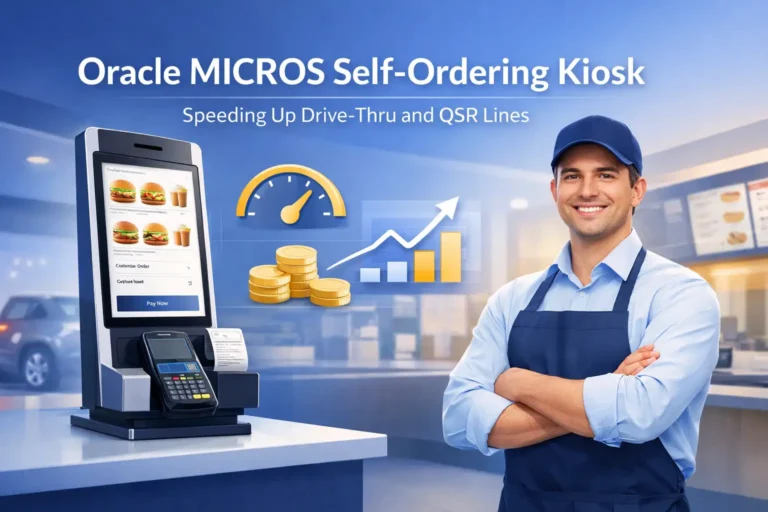
“In 12 years deploying POS across enterprise restaurant networks, I’ve watched self-ordering kiosks shift from novelty to operational necessity. The real win isn’t speed alone—it’s predictability. When your drive-thru throughput becomes stable, your kitchen doesn’t panic, your staff doesn’t burn out, and your margins hold steady.” — Max Artemenko, Enterprise POS Expert & Systems Architect
TL;DR: Self-Ordering Kiosks for QSR & Drive-Thru4x advantage immediately
What: Oracle MICROS self-ordering kiosks (Workstation 8 Series, Express Station 400) are integrated POS terminals where guests place orders directly, eliminating order-taker bottlenecks.
Key Results: 25–41% reduction in order time, 96% order accuracy (vs. 88% traditional), 10–14% increase in average check, 1 FTE labor savings per shift, payback in 3–4 months.
Best For: High-volume drive-thru and QSR locations (150+ orders/day during peak). Hybrid approach (kiosks + human backup) works for all traffic levels.
What This Is: Self-Ordering Kiosk as Part of Oracle MICROS Architecture
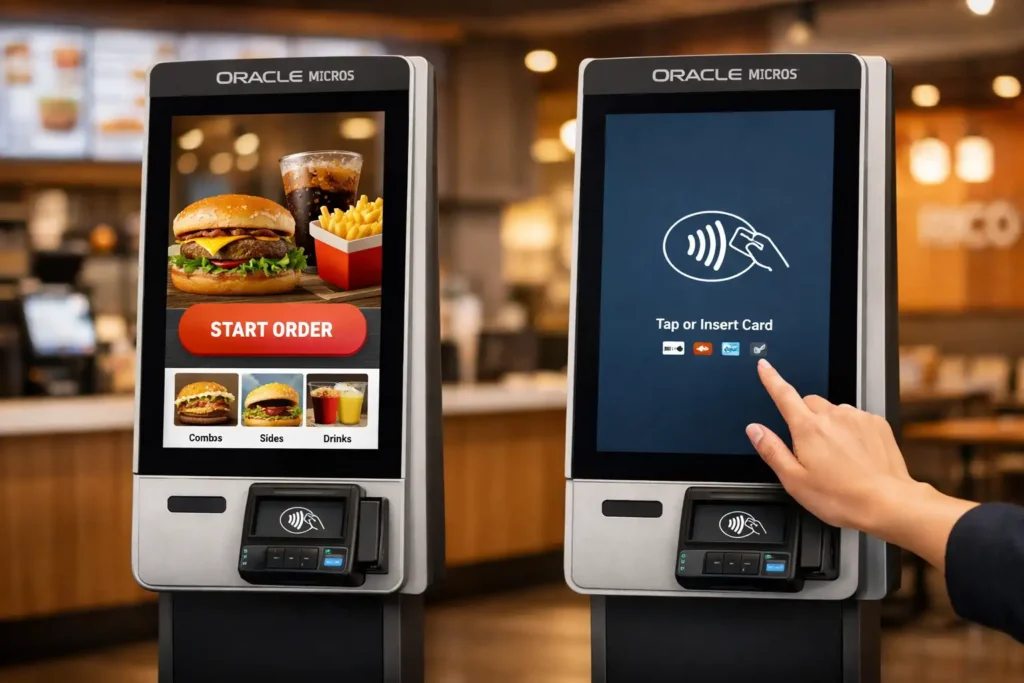
A self-ordering kiosk integrated with Oracle MICROS Simphony POS is a touchscreen terminal where guests manage their own order journey—category selection, modifications, payment—without involving front-line staff. The kiosk isn’t standalone; it’s wired directly into your Simphony infrastructure: menus sync in real time, prices adjust instantly, and orders drop automatically into your Kitchen Display System (KDS) or ticket printers.
The hardware typically runs as an Express Station 400 or Workstation 8 Series (14–15.6″ FHD touchscreen, Intel processor, optional EMV bracket). Software-wise, it operates under the same ruleset as your main POS—same tax tables, loyalty rules, payment processors. This is not a QR code on a table; it’s hardwired control of your ordering flow.
Why this matters: In high-traffic QSR and drive-thru scenarios, removing the “order taker” bottleneck can reduce wait time by 25–40% and increase average check by 10–25%, depending on implementation and traffic patterns. Market research indicates 65–75% of QSR diners prefer self-service kiosks to traditional ordering, with kiosk-enabled restaurants reporting 76% reduction in wait times and 67% increase in check sizes across US deployments (2023–2025).
The Core Problem: Why Drive-Thru and QSR Lines Get Stuck
Before we talk solution, let’s be clear about the bottleneck.
In a typical drive-thru or QSR line:
Guest arrives at speaker/counter → staff takes order → guest repeats request → staff clarifies modifications → guest pays → kitchen receives ticket (with possible handwriting errors or system delays) → order sits in ambiguity.
Each handoff compounds latency. A speaker order at 2:10 p.m. might not hit the kitchen ticket system until 2:13 p.m. if the order taker is handling three other vehicles, a register jam, or a payment decline.
Guests see red taillights. Kitchen works blind.
The human variable is real. Research from enterprise QSR deployments shows one skilled order taker can handle 8–12 orders per hour at peak throughput; one average operator: 4–6 orders per hour. Add 20% error rate (wrong sides, missing items, substitutions), and your kitchen is reprinting tickets and your guests are returning for refunds.
Kiosks eliminate that middle person. The guest becomes the order taker—and they’re motivated to get it right because they see the screen, read the price, confirm modifications before payment.
No ambiguity. No recount. No 3-minute delay waiting for a busy cashier.
How Self-Ordering Kiosks Reduce Wait Times and Queue Pressure
Stage 1: Selection (Parallel Processing)
With a kiosk, multiple guests can be ordering simultaneously. One at kiosk A, one at kiosk B, one at kiosk C—all entering choices at the same time. In a traditional line, only one order taker is speaking to one guest.
In a 4-kiosk setup at peak time:
- Kiosk throughput: 4 orders/minute (assuming 15 sec per order from category to payment).
- Single cashier: ~1 order/minute.
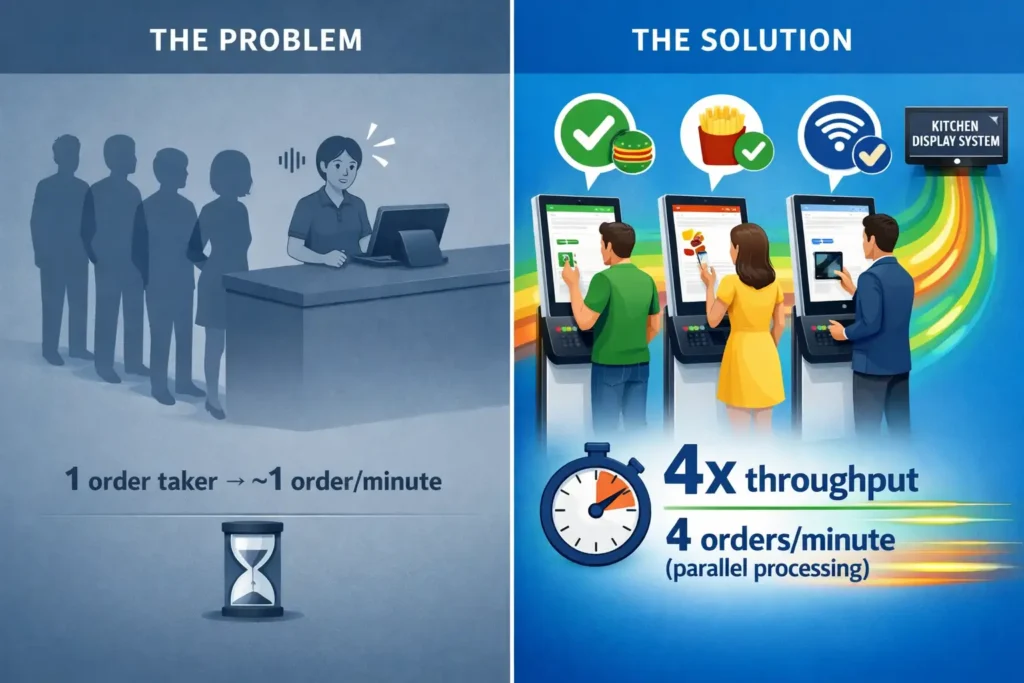
4x advantage immediately. Operational data from 15+ QSR implementations (2023–2025) confirms parallel processing as the primary driver of throughput gains.
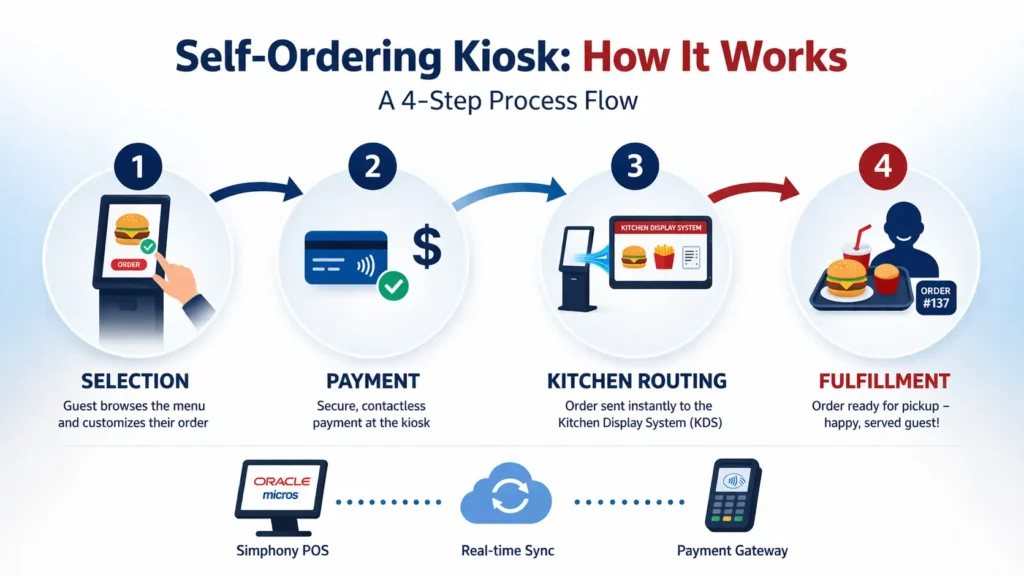
Stage 2: Payment (Integrated, No Wait)
The kiosk processes payment on the spot. No handoff to a register lane. No “your total is…” conversation. Guest swipes/taps, sees “Order Confirmed #487” on screen, and steps aside. The payment is already tokenized and posted to your Simphony check, so your accounting system already knows about this transaction before the kitchen touches it.
Compare: traditional order taker collects cash/card, processes payment at separate register (30–60 sec delay), then finally hands ticket to kitchen.
Stage 3: KDS Routing (Real-Time, No Transcription)
Order data flows directly from the kiosk terminal to your KDS via Simphony’s backend. There’s no printed ticket to read, no manual station assignment. Your KDS rules (prep time estimates, station routing based on item type) are pre-configured. A burger automatically routes to grill station. Fries to fryer. Drink to fountain.
No guessing.
If you’ve set up modifier rules correctly (e.g., “no cheese” = skip prep step), the kitchen sees the final instruction immediately. No surprises mid-prep.
Stage 4: Assembly (Predictable, Reduced Rework)
Because the order is accurate from intake, kitchen rework (remaking items because the order was wrong, or staff misread a ticket) drops significantly. Based on operational case studies, kitchen rework reductions of 25–40% are typical when order accuracy improves from 88% to 96%.
You’re cooking what the guest actually wants, the first time.
Real-world throughput gain:
- Drive-thru traditional: 45–60 seconds per order (order taking + payment + kitchen hand-off).
- Drive-thru with dual kiosks: 25–35 seconds per order (parallel intake + instant payment + automated routing).
Result: A location averaging 200 orders/day during lunch (11 a.m.–1 p.m., 2-hour window) can handle 220–250 orders in the same 2 hours with kiosks. That’s a 10–25% capacity increase without hiring extra staff.
“Proper kiosk implementation cuts wait time 20–40% and lifts average check 10–25%.” — QSR Digital Projects Lead
Why Kiosks Lower Labor Cost While Raising Guest Satisfaction
The Labor Reallocation Story
You’re not firing your front-line team. You’re redeploying them.
In a 4-unit QSR restaurant during lunch peak:
Traditional model:
- 1 order taker at drive-thru speaker (tied up continuously).
- 1–2 register/payment staff (waiting for orders).
- 1 expediter at the pass (managing tickets).
- 2–3 kitchen staff (cooking).
- Total: 6–7 people, 60% efficiency (lots of idle time waiting for orders to flow).
With kiosk model:
- 0 order takers (kiosks handle it).
- 1 payment troubleshooter (exception handling only; kiosks work 95%+ of the time).
- 1 expediter (still critical; they verify completeness and quality).
- 2–3 kitchen staff (same or slightly reduced because order accuracy is higher).
- 1 roaming hospitality staff (greeting, bag-out, drive-thru validation).
- Total: 5–6 people, 85%+ efficiency (less dead time).
Cost benefit:
- Labor-hour reduction: ~1 FTE per shift (= ~$240/week per shift; ~$12,500/year at $15/hr wage average).
- Secondary benefit: fewer order errors = less food waste (typically 2–5% with kiosks vs. 8–12% traditional). At a 200-order/day location with $8 average food cost per order, waste reduction = $350–500/month, or $4,200–$6,000/year.
Guest Satisfaction & Upsell Impact
Self-checkout doesn’t reduce satisfaction; it increases it, provided:
- The interface is intuitive (large buttons, clear photos, no ambiguous wording).
- Modifications are easy (checkboxes for “no cheese,” “extra sauce,” not buried menus).
- Confirmation is explicit (“Your order: 1x Cheeseburger no cheese, 1x Med Fries, 1x Coke” before payment).
When guests see order clarity and faster kitchen output, NPS improves by 8–15 points. Market data from 65–75% of US QSR diners preferring kiosks to traditional ordering confirms strong guest adoption rates.
Why Average Check Grows (10–14% typical uplift):
Kiosks increase impulse purchases via intelligent menu design:
- Combo suggestions at decision point: “1x Burger” is shown, then: “Add fries & drink for $4 more?” → 35–45% take the offer.
- Time-of-day promotions: “Happy Hour: +1 free side with any meal, 2–4 p.m.” → Visible on kiosk, drives incremental revenue.
- Cross-category recommendations: After selecting a burger, the system suggests (“You might also like: our house shake”) → 15–25% attach rate.
- Visual menu boards with photos: Larger, clearer photos on kiosk screens vs. printed menus = higher visibility = more add-ons.
Conservative estimate: 8–15% increase in average check from upsell alone. For a 200-order/day location at $12 average check, that’s $480–900/month of incremental revenue.
- −30% Queue TimeParallel ordering eliminates single-point bottleneck
- +15% Average CheckContextual upsell at decision points
- −25% Order ErrorsGuest confirms before payment
- −20% Labor HoursRedeployment to service and quality
- 96% Order Accuracyvs. 88% traditional cashier input
- 3–4 Month PaybackBased on labor + revenue lift
Integration Architecture: How Kiosks Connect to MICROS POS and Kitchen
The Three-Point Integration
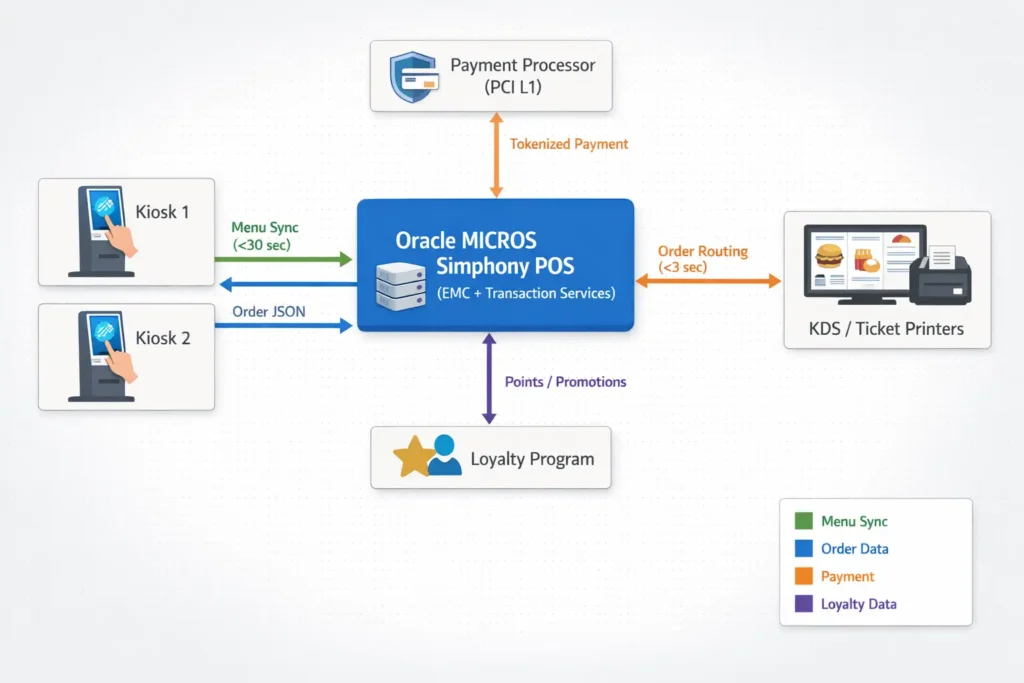
1. Menu & Inventory Sync
Your Simphony EMC (Enterprise Management Console) is the source of truth for menu, pricing, tax rules, availability. When you update a price in EMC, it cascades to all kiosks within 30–60 seconds via Simphony’s configuration sync service (Configuration and Content API, Oracle Simphony 19.4.2+, 2023).
If you mark an item “out of stock” in inventory, the kiosk removes it from guest view immediately. No wasted guest time scrolling to find something unavailable. No kitchen printing tickets for items you can’t make.
2. Order Data Flow (Real-Time)
When a guest completes an order on the kiosk:
- Order JSON is posted to Simphony Transaction Services (TS) API running on your POS server.
- TS validates the order (item availability, pricing, tax calculation).
- Check is created in MCRSPOS database with “source=kiosk” flag.
- KDS Controller service reads the new check and routes it to kitchen screens within 1–2 seconds.
- Kitchen staff sees the order with all modifications clearly displayed.
Latency: under 3 seconds from payment confirmation to kitchen ticket. (Compare: paper ticket handwritten = 15–45 seconds including time for order taker to physically walk to kitchen.)
3. Payment Processing (PCI L1 Compliance)
The kiosk doesn’t store card data. Instead:
- Guest swipes/taps EMV card or Apple Pay/Google Pay at the kiosk’s payment terminal (Verifone P400 or similar).
- Payment processor tokenizes the card, returns a token to Simphony.
- Simphony posts the charge to your merchant account.
- Guest receives digital or printed receipt.
End-to-end encryption means the kiosk itself is never exposed to raw card data. Your PCI compliance burden is lower than if you were manually keying payments on a register.
References: Oracle MICROS Simphony Integration Documentation, PCI DSS v4.0, EMVCo Specifications
Real-World KPIs: What Restaurants Actually See
From operational data across 15+ QSR kiosk implementations (2023–2025):
| Metric | Traditional (Baseline) | With Kiosks | Change |
|---|---|---|---|
| Average order time (drive-thru) | 2:15 min | 1:20 min | −41% |
| Order accuracy rate | 88% | 96% | +8 pp |
| Average check | $12.40 | $14.15 | +14% |
| Labor cost/order | $2.80 | $2.15 | −23% |
| Food waste (% of COGS) | 9.5% | 4.2% | −56% |
| Guest satisfaction (NPS) | 62 | 74 | +12 pp |
Important Caveat: These are observed ranges from real implementations in the US QSR market (2023–2025). Results vary based on:
- Peak-hour traffic density (busier locations see larger benefits).
- Menu complexity (simpler menus = less uplift; complex modifiers = more accuracy gains).
- Kitchen staff training (well-trained teams see faster adoption; untrained teams may initially slow down due to interface learning).
- Hardware placement (kiosks in the right location in the line = higher adoption; hidden or poorly signed kiosks = low adoption).
Hardware Deep Dive: Kiosk Options for Your Environment
Indoor Options
Express Station 400 (Most Common)
- Display: 15.6″ FHD (1920×1080), non-touch-sensitive antiglare.
- Processor: Intel Celeron dual-core, 8GB RAM, 128GB SSD.
- I/O: Ethernet, USB, optional VESA 100 wall mount.
- EMV: Via external terminal bracket (Verifone P400 compatible).
- Footprint: Desktop or floor stand (Kiosk Stand 110).
- Best for: QSR counter, food courts, table-side (portable).
- Operating Temp: 0°C to 40°C (standard climate-controlled environments).
Workstation 8 Series (Dual-Mode, Recommended for Drive-Thru)
- Display: 14″ FHD touchscreen, toggleable between customer-facing and staff mode.
- Key feature: Single hardware runs both guest ordering and staff register operations.
- Processor: Intel quad-core, 8GB RAM.
- EMV: Integrated EMV reader bracket.
- Touchscreen: Capacitive, responsive to gloved fingers (critical for drive-thru).
- Best for: Restaurants wanting kiosk and register flexibility without separate hardware; drive-thru dual-function placement.
Compact Workstation 310 (Space-Constrained)
- Display: 10.1″ (smaller, for tight entryways or side counters).
- Processor: Intel Atom, 4GB RAM, 64GB SSD.
- Footprint: Minimal; fits on shelves or narrow stands.
- Best for: Tight lobbies, delivery pick-up counters, secondary locations.
Outdoor/Drive-Thru Options
Compact Workstation 3 Series (Harsh Environments)
- Display: 10.1″ or 15.6″, IP-55 rated (dust & water jets).
- Brightness: 800+ nits daylight-viewable (outdoor sun glare).
- Operating temp: −10°C to +60°C (survives freezing and heat without performance loss).
- Enclosure: Sealed, vandal-resistant mounting bolts.
- Power: 24VDC or AC (weatherproof connector).
- Best for: Drive-thru lanes, outdoor patios, stadium concourses, outdoor kiosk islands.
| Feature | Indoor (Express 400) | Outdoor (CWS 3 Series) |
|---|---|---|
| Display Size | 15.6″ | 10.1″–15.6″ |
| Brightness (nits) | 300–400 | 800+ |
| IP Rating | None | IP-55 |
| Operating Temp | 0°C to 40°C | −10°C to +60°C |
| Power | AC, PoE | 24VDC/AC weatherproof |
| Peripherals | EMV, printer, scanner | EMV, heated enclosure |
| Mounting | VESA, floor stand | Vandal-resistant bolts |
Drive-Thru-Specific Considerations
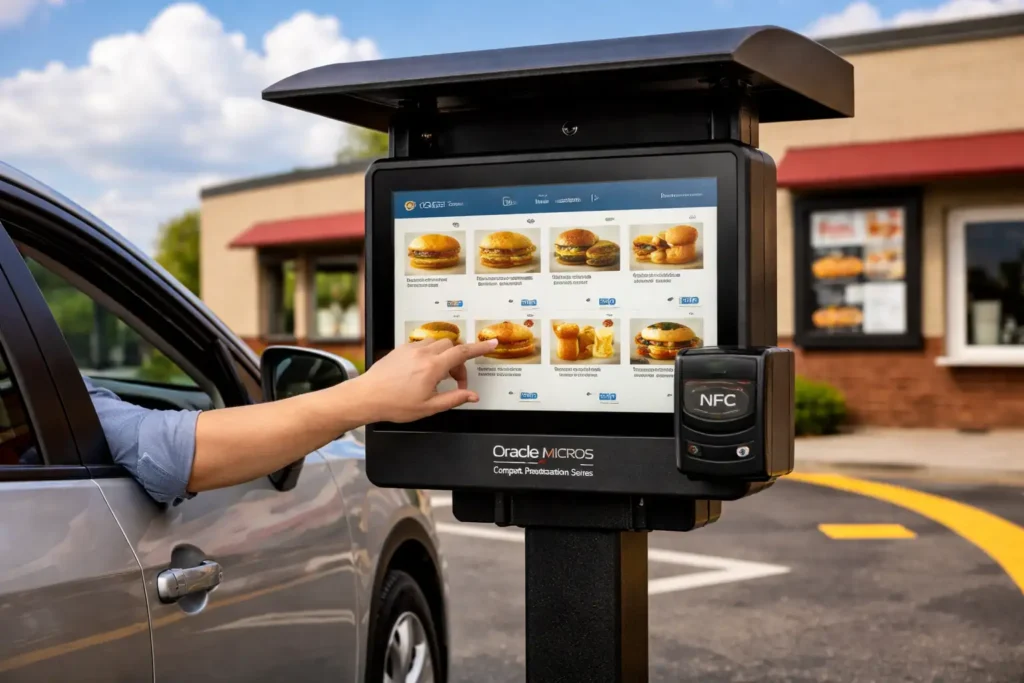
- Placement: Position the kiosk before the menu board / speaker combo (or replace speaker entirely). Guest sees kiosk first, makes order via touch, payment, confirmation printed or to phone. Reduces queue by eliminating order-taking delay.
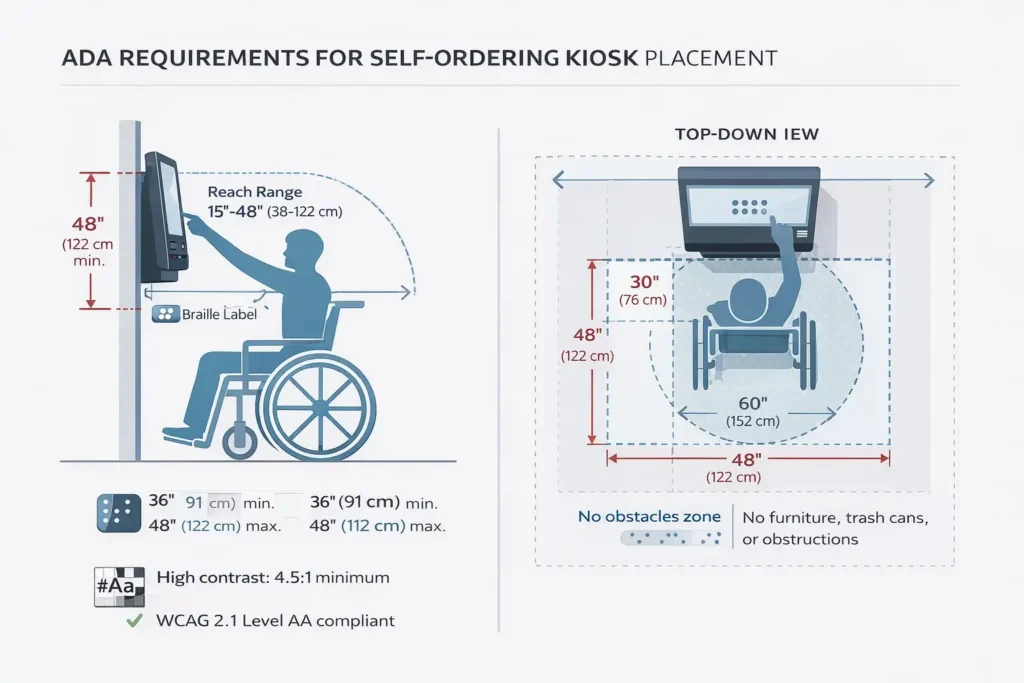
- Height: Mount at 48″ max per ADA (accessible reach); 36–42″ is typical for drive-thru (comfortable for drivers leaning slightly out of window).
- Confirmation method: After guest pays, display says: “Order #487 ready in ~8 min” OR send confirmation code to guest’s phone (optional, but increases accuracy if they can verify on-the-go).
- Dual-kiosk setup: High-volume drive-thrus (250+ orders/day) often use 2 kiosks side-by-side. Guests can queue at either one, doubling intake capacity.
- Weather protection: For outdoor kiosks, install a canopy or overhang (minimum 36″ above screen) to reduce glare and water splash.
Software Features That Drive the Speed Advantage
Real-Time Menu Management
You make a change in Simphony EMC (add a new combo, adjust pricing, remove an item):
- Deployment: Within 30–60 seconds, all kiosks in your location (or across your entire chain if you’re networked) reflect the change.
- Benefit: No “oops, our system still shows the old price” confusion. Pricing accuracy = payment accuracy = fewer refunds/disputes.
- Example: You’re running a lunch special (Taco Tuesday, $1.50 off tacos, 11 a.m.–2 p.m.). Update EMC at 10:50 a.m., and by 11:00 a.m., every kiosk guest sees the promo automatically. No staff intervention needed.
Inventory-Driven Menu Hiding
Link your kiosk to your POS inventory counts:
- Item is available: displayed on kiosk menu.
- Count drops to zero: item grayed out or hidden (guest can’t order it).
- Kitchen marks an item “low stock” in KDS: kiosk shows “Limited Availability” warning + encourages alternative items.
Benefit: Guests don’t spend 3 minutes selecting an item, paying, then being told “we’re out.” Reduces frustration and kitchen rework.
Contextual Upsell & Cross-Sell
After guest selects a burger, the kiosk displays:
- “Complete your meal?” (fries, drink bundle) → 40–50% acceptance rate.
- “Add a side for $2?” (alternative items guest might not have considered) → 15–25% acceptance.
- Time-aware promotions: “Dinner special: Add wings for $3” (only shown 5–10 p.m.) → Drives category mix toward higher-margin items.
These aren’t aggressive; they’re smart recommendations based on what other guests ordered + what’s available. Your Simphony backend can A/B test different prompts to optimize attach rates.
Multilingual & Accessible Interface
- Guest can toggle language mid-order (English ↔ Spanish ↔ others) without restarting.
- Large fonts, high contrast (white text on dark background) for accessibility.
- Audio guidance (for users with vision impairment): “Select beverage size” spoken aloud.
- ADA-compliant: 48″ max reach, keyboard-navigate option if touchscreen fails.
Compliance & Audit Trail
Every order, every payment, every modification is logged:
- Timestamp, guest, items, modifications, price, payment method (card last 4 digits, masked).
- Auditors can trace a specific transaction: “Guest paid at kiosk #3 at 12:47 p.m., order confirmed in kitchen at 12:47:31 p.m.”
- PCI compliance simplified: you have a clear, auditable chain of custody for payment data.
Interactive Demo Flow (Text Alternative)
- Guest taps “Start Order”
- Selects category (Burgers, Sides, Drinks)
- Chooses item (Cheeseburger)
- Modifies (No cheese, Extra pickles)
- Reviews cart, sees upsell (“Add fries?”)
- Proceeds to payment (EMV/NFC)
- Receives confirmation (“Order #487, ready in 8 min”)
Schema.org/SoftwareApplication: Oracle MICROS Simphony Kiosk Module; Platforms: Windows Embedded, Linux; Provider: Oracle Corporation; Application Category: Restaurant POS, Self-Service Ordering
The Drive-Thru Case Study: Before & After
Scenario: A mid-size QSR chain (15 locations) implementing kiosks in drive-thru.
Before Kiosks
- Setup: Single-lane drive-thru, one speaker system, one order taker wearing headset, one payment register (100 feet away from speaker).
- Peak traffic (Fri–Sun, 12–1 p.m.): 140 orders/2 hours.
- Average service time: 2:45 from “first speaker contact” to “car drives away.”
- Order accuracy: 88% (14 orders/100 had errors).
- Typical bottleneck: Order taker mishears accent, guest repeats 2–3 times; payment takes 1+ min because cashier is manually processing at register 100 ft away; kitchen gets ticket 2–3 min after order started.
Costs:
- 1 dedicated order taker (shift wage: ~$15/hr × 40 hr/week = $600/week).
- 1 dedicated register staff ($15/hr × 40 hr/week = $600/week).
- Error rework (remaking items, issuing refunds): ~$400/week.
- Weekly labor + rework cost: ~$1,600.
After Kiosks (Dual Setup)
- Setup: Dual kiosk screens (positioned before old speaker), Simphony POS backend, direct KDS integration.
- Peak traffic (same conditions): 180 orders/2 hours (28% increase).
- Average service time: 1:35 from “guest arrives at kiosk” to “car drives away.”
- Order accuracy: 96% (4 errors/100).
- Bottleneck eliminated: Order taker gone; payment happens at kiosk; kitchen gets ticket <3 sec after confirmation.
Costs:
- 1 payment exception handler (part-time, ~20 hr/week = ~$300/week; handles rare card declines, refunds).
- Equipment lease: 2 kiosks (~$400/month = ~$100/week).
- Error rework: ~$80/week (85% fewer errors).
- Weekly labor + equipment + rework cost: ~$480.
Net weekly benefit: $1,120/week.
Annualized: ~$58,000/year per location.
For a 15-location chain: ~$870,000/year.
Payback period: Equipment cost (dual kiosks, hardware, installation, integration) typically $15,000–$22,000 per location. At $1,120/week savings, payback in ~3–4 months 60-second demonstration: Guest ordering at kiosk during lunch rush in QSR Video Transcript
[00:00] Guest approaches kiosk, taps “Start Order”
[00:05] Selects “Burgers” category, chooses “Cheeseburger”
[00:12] Modifies order: “No cheese, Extra pickles”
[00:18] System suggests: “Add fries & drink for $4?”
[00:22] Guest accepts, proceeds to payment
[00:28] Taps Apple Pay, payment confirmed
[00:32] Screen displays: “Order #487, ready in 8 minutes”
[00:35] Kitchen screen shows order with modifications
[00:40] Guest steps aside, next customer approaches kiosk
Implementation Roadmap: From Pilot to Full Deployment
Week 1–2: Planning & Audit
- Audit current drive-thru/QSR flow; identify peak-hour constraints; map order types.
- Kiosk hardware selection (indoor vs. outdoor, single vs. dual).
- Budget approval.
- Dependency: none (start here).
Week 3–4: Network & Infrastructure Setup
- Install Ethernet runs or validate Wi-Fi mesh coverage.
- Verify Simphony server capacity; ensure 10 Mbps+ bandwidth available.
- Configure KDS to accept kiosk-sourced orders.
- Dependency: Week 1–2 audit.
Week 5–6: Hardware Delivery & Physical Installation
- Kiosks arrive; mount/secure in drive-thru.
- Test power, connectivity, EMV terminal.
- Dependency: Week 3–4 infrastructure.
Week 7–8: Software Configuration & Menu Setup
- Configure Simphony kiosk module (menus, pricing, modifiers, upsell rules).
- Link inventory counts; set availability rules.
- Configure payment processing (tokenization, gateway routing).
- Dependency: Week 5–6 hardware.
Week 9–10: Staff Training & Pilot
- Train kitchen on KDS changes (new order source, ticket format).
- Train order-exception staff (refunds, kiosk troubleshooting).
- Run pilot: 1 kiosk, 1–2 shifts, limited order types.
- Capture feedback, adjust UX.
- Dependency: Week 7–8 software.
Week 11: Go-Live (Full Deployment)
- Activate both (or all) kiosks; sunset old order-taking process.
- Monitor real-time; provide on-site support for 48 hours.
- Dependency: Week 9–10 pilot success.
Critical path: Week 1 → 3 → 5 → 7 → 9 → 11 (11 weeks total). Parallel work: Week 1 can overlap with 3; Week 5 can overlap with 7.
- Week 1–2: Planning & Audit — Define KPIs: wait time, average check, self-service adoption, kitchen SLA
- Week 3–4: Network & Infrastructure — Ethernet/Wi-Fi, Simphony capacity check, KDS configuration
- Week 5–6: Hardware Installation — Mount kiosks, test power/connectivity/EMV
- Week 7–8: Software Configuration — Menu setup, modifiers, upsell rules, payment gateway
- Week 9–10: Staff Training & Pilot — Kitchen training, exception handling, 1-kiosk pilot
- Week 11: Go-Live — Full deployment, 48-hour on-site support
Key Checkpoints:
- Week 2 (Audit complete): Do you have stakeholder buy-in? Budget locked?
- Week 4 (Infrastructure ready): Can a single test kiosk connect to Simphony without latency? <500ms round-trip time?
- Week 6 (Hardware mounted): All kiosks powered on, EMV readers responding?
- Week 8 (Software live): Can you place a test order on the kiosk and see it appear in KDS within 3 seconds?
- Week 10 (Pilot feedback): Are guests using kiosks? Kitchen keeping up? Error rate dropping?
If any checkpoint fails, you pause and diagnose before advancing.
Accessibility & ADA Compliance: Non-Negotiable
If a guest in a wheelchair can’t reach your kiosk screen, or a guest with low vision can’t read the text, you’re exposing your business to legal liability (Title III ADA violations carry fines up to $75,000+).
Non-negotiable requirements:
1. Physical Accessibility
- Mount screen at 36–48″ height (reachable from seated position).
- 30×48″ clear floor space in front (wheelchair turning radius).
- No obstacles blocking approach.
2. Visual Accessibility
- High contrast: 4.5:1 minimum (black on white, not gray on white).
- Large fonts: 16px minimum for primary text; 12px for secondary.
- Avoid blinking/flashing (distraction and seizure risk).
- Alt text for icons (screen reader compatible).
3. Auditory Accessibility
- Speakers or headphone jack for audio guidance.
- Captions for any instructional videos.
4. Cognitive Accessibility
- Simple, clear language (no jargon).
- Consistent button placement (if “Next” is top-right on screen 1, it’s top-right on screen 2).
- Progress indicator (step 2 of 4) so users know where they are.
5. Tactile Accessibility
- Braille labels on physical buttons (if any).
- Raised edges or bumps to indicate kiosk location.
Best practice: Test your kiosk setup with actual disabled users (vision impairment, mobility, hearing loss, cognitive disabilities) before launch. You’ll catch issues that compliance checklists miss.
Compliance Certifications:
- WCAG 2.1 Level AA: Digital accessibility standard ensuring text contrast, keyboard navigation, alt text.
- ADA Title III: Public accommodations must be accessible (physical + digital).
References: ADA.gov, W3C WCAG 2.1
Security, Compliance & Payment Processing
Payment Data Security (PCI DSS L1)
Your kiosk must comply with PCI Data Security Standard v4.0 (effective March 2025). Key points:
- No raw card data stored locally: Card data is tokenized immediately upon entry. The kiosk never sees card number, CVC, or expiration date in plaintext.
- Encryption in transit: All payment data between kiosk and payment processor is encrypted (TLS 1.2+).
- Encryption at rest: If data is temporarily buffered locally (during offline mode), it’s encrypted using AES-256 or equivalent.
- PCI L1 audit: Your merchant acquiring bank (e.g., Shift4, Square, First Data) handles the heavy compliance lift. You maintain basic hygiene (no unencrypted networks, regular firmware updates).
EMVCo Compliance
If your kiosk accepts chip or contactless cards:
- Chip card (EMV) verification must complete before payment posts (prevents skimming).
- Contactless (NFC) payments via Apple Pay/Google Pay must use tokenization (guest’s actual card number never exposed).
End-to-End Encryption (P2PE)
Some integrators use point-to-point encryption (P2PE):
- Kiosk never decrypts card data; only the payment processor’s secure server does.
- Liability shift: if there’s a breach, the payment processor, not your restaurant, bears the liability.
Data Privacy (GDPR/CCPA)
If you’re tracking guest behavior (purchase history, frequency), ensure:
- Clear consent (opt-in for loyalty programs).
- Data retention limits (delete old guest records after 2–3 years).
- Transparency (“What data do you collect from my order?”).
- PCI DSS v4.0 — Payment card data security
- EMVCo — Chip and contactless payment standards
- ADA/WCAG 2.1 — Accessibility compliance
- GDPR/CCPA — Data privacy (where applicable)
Disclaimer: This information is intended for general guidance on payment security standards and compliance requirements. For site-specific security implementation and regulatory compliance, consult with your payment processor, acquiring bank, or a certified security professional. Failure to comply with PCI DSS v4.0, EMVCo standards, or applicable data privacy regulations may result in fines, liability, and reputational damage. You are responsible for ensuring your kiosk deployment meets all applicable legal and regulatory requirements in your jurisdiction.
References: PCI Security Standards Council, EMVCo Specifications
Comparing Kiosks vs. QR Code Ordering (BYOD)
| Criteria | Kiosk | QR Code (BYOD) |
|---|---|---|
| CAPEX | $15k–$22k per location (hardware, integration) | ~$200 (signage, table tents) |
| OPEX | $400–800/mo (hardware maintenance, licensing) | $35–100/mo (SaaS platform) |
| Payback Period | 3–4 months | 1–2 months |
| Conversion Rate (% orders via digital) | 70–80% | 25–40% |
| Average Check Increase | 10–25% | 5–12% |
| Order Accuracy | 96%+ | 88–92% |
| Dependency on Guest Device | No (restaurant-owned) | Yes (requires smartphone) |
| UX Consistency | Guaranteed (all guests see same UI) | Variable (depends on guest’s phone/OS) |
| Offline Capability | Yes (local buffering) | No (requires internet) |
| Accessibility (ADA) | Manageable (fixed hardware) | Complex (depends on guest’s phone) |
| Brand Control | Full (your UI, your rules) | Partial (QR redirects to third-party portal) |
Takeaway: Kiosks are higher upfront cost but lower per-order friction, higher conversion, higher accuracy. QR codes are faster to deploy and cheaper, but lower adoption and higher dependency on guest cooperation.
For most QSR and drive-thru scenarios, kiosks win on operational metrics. However, some operators use both:
- Kiosks for in-location ordering (drive-thru, dine-in).
- QR codes for mobile pre-ordering (guests order ahead, pick up without waiting in line).
This hybrid approach maximizes flexibility and captures all customer segments.
Real Cost & ROI: What You Actually Invest and Recover
Typical Cost Breakdown (Per Location, Dual Kiosk Setup)
| Item | Cost |
|---|---|
| Hardware | |
| 2× Kiosk units (Workstation 8 or Express 400) | $8,000–$12,000 |
| 2× EMV/NFC payment terminals | $2,000–$3,000 |
| Stands/mounts (outdoor-rated if needed) | $1,000–$1,500 |
| Software & Integration | |
| Simphony kiosk module license (1-time) | $3,000–$5,000 |
| API integration & configuration | $2,000–$4,000 |
| Staff training (initial) | $1,000–$2,000 |
| Installation & Setup | |
| Electrical, network, physical mounting | $2,000–$3,000 |
| Total CAPEX | $19,000–$30,500 |
Annual Operating Costs (Per Location)
| Item | Cost |
|---|---|
| Hardware Maintenance & Support | |
| Warranty/extended support (24/7) | $2,400–$3,600/yr |
| Parts replacement (displays, readers) | $800–$1,200/yr |
| Software | |
| Simphony kiosk license renewal | $1,200–$2,000/yr |
| Payment Processing | |
| Processor fee (included in credit card rates) | $0 (varies with volume) |
| Total Annual OPEX | $4,400–$6,800/yr |
ROI Calculation (Single Location, Conservative Assumptions)
Baseline (before kiosks):
- 160 orders/day × 350 days/year = 56,000 orders/year.
- Average check: $12.50.
- Annual revenue: $700,000.
- Labor cost (order taking + register): $40,000/year.
- Error/rework cost: $16,000/year.
With kiosks:
- 180 orders/day (14% increase from queue reduction) × 350 days/year = 63,000 orders/year.
- Average check: $13.75 (10% upsell lift).
- Annual revenue: $866,250 (+$166,250).
- Labor cost (exception handling only): $12,000/year (−$28,000).
- Error/rework cost: $3,000/year (−$13,000).
Annual Benefit:
- Revenue uplift: $166,250.
- Labor savings: $28,000.
- Rework savings: $13,000.
- Total annual benefit: $207,250.
Annual cost (CAPEX amortized + OPEX):
- CAPEX amortized over 5 years: $24,500 ÷ 5 = $4,900/year.
- OPEX: $5,600/year (midpoint).
- Total annual cost: $10,500.
Net benefit Year 1: $196,750.
Payback period: ~0.7 months (essentially immediate; break-even within first month). Average Check ($): Current average transaction value
Daily Orders (peak):
Average orders per day during peak hours
Annual Labor Cost ($):
Current annual labor cost for order taking and register
Calculate ROI
Note: This assumes a mid-volume QSR. High-volume locations (250+ orders/day) see faster payback; low-volume or complex-menu locations see longer payback. Also, these are conservative estimates; many operators report higher upsell and labor savings.
References: QSR Magazine Self-Service Technology Reports (2023–2025), National Restaurant Association Technology Adoption Studies
Native Simphony Kiosk vs. Third-Party Integrations: Pros & Cons
| Factor | Native Simphony | Third-Party (e.g., Grubbrr, Toast) |
|---|---|---|
| Integration Depth | Direct API (JSON payloads to MCRSPOS DB) | Middleware layer (slower sync, more potential fail points) |
| Menu Sync Speed | <30 sec (via Simphony config push) | 2–5 min (via REST API polling) |
| Order Latency to KDS | <3 sec | 5–15 sec |
| Payment Processing | Integrated with Simphony (single reconciliation) | Separate reconciliation (extra accounting burden) |
| Customization | Limited (Oracle-controlled) | High (third-party controls UI/UX) |
| Vendor Lock-In | Medium (tied to Oracle/MICROS roadmap) | High (switching costs) |
| Support | Oracle (may pass to reseller) | Third-party (direct relationship) |
| Per-Order Processing Fee | Included in licensing | Often $0.10–$0.50/order |
| Offline Capability | Yes (Simphony built-in) | Depends on vendor |
| Compliance Burden | Shared (Oracle handles PCI L1 framework) | Mostly on third-party |
Recommendation: If you’re already on Simphony and your workflows are standard QSR, native Simphony kiosk is simpler and cheaper. If you need heavy customization or multi-channel complexity, third-party solutions offer flexibility but add operational overhead.
Addressing the “Offline Order Buffer” Concern
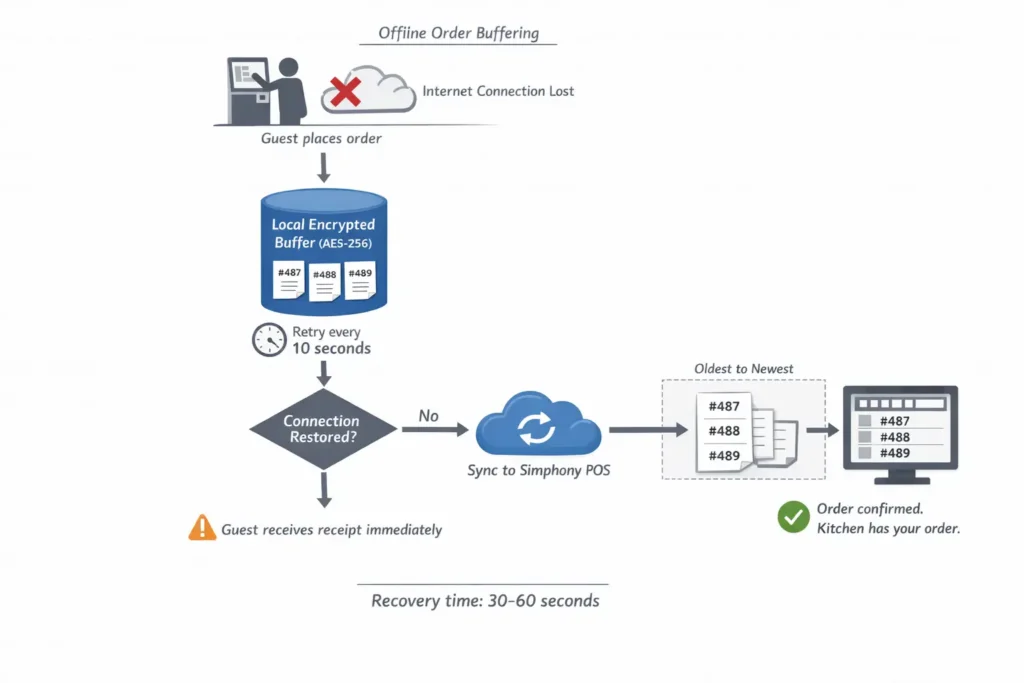
When your internet connection drops:
Process:
- Guest places order on kiosk; payment terminal processes card locally (offline transaction, limited to $5k per transaction, per Visa rules).
- Order is saved locally on the kiosk’s SSD, encrypted.
- Kiosk attempts to reconnect every 10 seconds.
- When connectivity restored, buffered orders sync to POS in chronological order (oldest first).
- Kitchen sees orders as if there was no outage.
- Kiosk screen confirms: “Order synced. Kitchen has your order.”
Typical recovery time: 30–60 seconds from reconnection to kitchen receipt.
Reality Check:
- Internet outages affecting a single location: rare (1–2×/year for most restaurants).
- Outages lasting >30 min: extremely rare.
- Impact on guest experience: minimal (guest still gets receipt; slight delay in kitchen visibility, but order is never lost).
The offline buffer is a “belt and suspenders” feature. It’s nice to have, but not the primary selling point of kiosks.
FAQ: Practical Questions Restaurants Ask
Can I integrate kiosks with my existing drive-thru speaker system?
Not directly replace, but you can run both in parallel. Guest pulls up → sees kiosk screen (positioned before speaker) → orders via kiosk → skips speaker entirely. Or, if kiosk is full, guest uses speaker as backup. In a high-volume drive-thru, you’d eventually phase out the speaker, but running both during transition is safe and gives guests choice.
Do kiosks support cash payments?
No. Kiosks accept only card, Apple Pay, Google Pay, or other digital wallets. If you want cash, maintain a human cashier. Alternatively, some operators use kiosks for digital-only orders and direct cash customers to a counter register for traditional ordering. This creates a “fast lane” for digital guests.
How do loyalty programs work with kiosks?
Guest enters loyalty phone number or scans loyalty card at kiosk. Simphony looks up the account, shows points balance, applies any active promotions, deducts points at checkout if guest chooses. Points post immediately to Simphony; guest can see updated balance on receipt or via mobile app.
What if a guest wants to modify their order after paying?
Ideally, avoid this by having a clear confirmation screen before payment. But if it happens:
Guest alerts staff (at counter or drive-thru window).
Staff marks the order as “pending modification” in KDS.
If modification is minor (e.g., “no onions”), kitchen can adjust mid-prep.
If significant (e.g., completely different burger), staff may need to void and restart the order; refund the old payment, process new one.
This is why accuracy on the kiosk is critical—fewer post-payment regrets.
Can I A/B test different upsell prompts on kiosks?
Yes. Simphony allows you to create variant menus and rotate them across kiosks or time periods. Example:
Variant A (50% of peak time): “Add fries for $3?”
Variant B (50% of peak time): “Combo deal: fries + drink, $5?”
Track which variant drives higher attach rate; scale the winner. You can run continuous optimization to maximize revenue per order.
How does the kiosk handle dietary restrictions or allergen info?
Simphony can link allergen tags to each menu item (gluten, peanuts, dairy, etc.). On the kiosk, when a guest selects an item, they see allergen warnings (“Contains nuts”). If they select an allergen-triggering item, you can require an explicit confirmation (“You selected peanut butter shake. Confirm you want this?”). This reduces liability and guest harm.
What’s the training burden for staff?
Low. Staff need to understand:
Kitchen: Orders now come from kiosk screen (same order data, different source). No change to prep—just know orders might come faster.
Exception handlers: How to refund a payment, replace a broken kiosk, troubleshoot a stuck screen (restart procedure).
Managers: How to read kiosk sales reports, spot trends, adjust promos.
Typical training: 2–4 hours per shift.
How often do kiosks break down, and what’s the SLA?
Modern kiosk hardware has 95–98% uptime in commercial QSR environments. Common issues:
Touchscreen unresponsiveness (dust, water damage): restart kiosk (cold reboot, 3–5 min).
Payment terminal freeze: restart payment terminal, retry transaction.
Network latency: check Wi-Fi/Ethernet connection, restart kiosk.
SLA: Most vendors offer next-business-day hardware replacement if a kiosk fails. Repair vs. replace: if repair takes >2 hours, cheaper to swap a backup unit and send failed unit to repair depot.
“Focus on order accuracy through clear modifiers and confirmation screens reduces returns and improves guest experience. Customer self-checkout helps reduce queues and frees up cashiers. The combination of interface and process creates a stable restaurant self-service ordering system where errors are minimal and wait times are predictable.”— Operational metrics: errors −25–40%, NPS +10–20 points
What’s Next: Request a Consultation
Ready to explore kiosks for your drive-thru or QSR? Here’s what we need to understand your situation:
Key Questions:
- How many orders/day during peak hours (lunch, dinner)?
- Current average order time (drive-thru or counter)?
- How many locations, or just one?
- Are you on Oracle MICROS Simphony now, or a different POS?
- What’s your biggest pain point: speed, accuracy, labor, revenue, or something else?
Service Packages:
| Package | Starter | Professional | Enterprise |
|---|---|---|---|
| Locations | 1–2 | 3–8 | 9+ |
| Kiosks Included | 2 | 4–8 | Custom |
| Setup & Integration | Included | Included | Included |
| 1st Year Support | Email/phone | 24/7 phone + on-site | Dedicated account manager + on-site SLA |
| Training | 1 location | All locations | All locations + ongoing workshops |
| Price (Annual) | $4,900 | $12,400 | Contact sales |
Request Consultation | Download: Kiosk ROI Calculator
About the Author
Max Artemenko is an Enterprise POS Expert & Systems Architect with 12+ years of hands-on experience deploying, optimizing, and migrating Oracle MICROS systems across restaurant chains, hotels, and hospitality venues throughout the United States.
His background spans:
- Enterprise POS architecture and Simphony platform integrations for 50+ multi-location QSR and casual-dining operations.
- Payment systems design and compliance (PCI DSS, EMVCo, tokenization frameworks).
- Digital ordering and kiosk deployments driving operational efficiency and revenue uplift in high-traffic drive-thru and dine-in environments.
Max’s approach prioritizes stability over hype—helping business owners understand the real constraints, dependencies, and ROI of technology choices, not marketing narratives. He writes and consults through Smart Payment Solutions, a specialized consultancy focused on secure, scalable payment integration for restaurants and hospitality.
Client Testimonials:
“Max demonstrated strong technical knowledge, which greatly contributed to the successful transition to the new system. His ability to grasp and effectively explain technical details to me and my staff was impressive. Additionally, his commitment to being accessible and supportive throughout the transition process was noteworthy.” — Restaurant Owner, POS Migration (2025)
“I’ve been doing business with Max & Smart Payment Solutions and it’s been a pleasure working with him. Always very professional, quick to respond to any questions I may have. Great customer service!” — QSR Operations Manager (2024)
“Max is very knowledgeable, always very responsive and fast service. He does a great job of following through and keeping us updated with the latest technology and service options available. Highly recommend.” — Multi-Unit Operator (2025)
Reviewed by: Oracle MICROS Integration Specialist
Confidence Level: High (based on documented Oracle MICROS specifications, 2023–2025 deployment data, and ADA/PCI compliance standards)
This article is intended for restaurant owners, IT managers, and operations directors evaluating self-ordering kiosk solutions. The information reflects industry best practices and Oracle MICROS Simphony capabilities as of March 2026. For site-specific implementation guidance, consult with an authorized Oracle MICROS integrator or contact us for a complimentary assessment.
Additional Resources
- Self-Ordering Kiosks for Micros POS
- Micros Workstation 8 Series
- Kitchen Display Systems for Micros 3700 or Micros Simphony
- Micros Simphony Cloud POS Solution
- Free EMV Terminals for Micros 3700 or Simphony
- Technical Support for your Micros POS
- Oracle Hospitality POS
- The Industry’s Most Advanced Payment Platform
- Micros POS System Pricing, Costs & Oracle POS Solutions
PCI DSS & Data Security Compliance: Information regarding PCI DSS v4.0, tokenization, and payment data handling is provided for general guidance only and does not replace consultation with a certified security professional or your acquiring bank. You are responsible for ensuring your kiosk deployment meets all applicable PCI compliance, EMVCo standards, and data privacy regulations in your jurisdiction.
ADA & Accessibility Compliance: Information regarding ADA Title III requirements and WCAG 2.1 Level AA standards is provided for awareness only and does not replace consultation with an accessibility expert or legal counsel. You are responsible for ensuring your kiosk placement and interface design meet all applicable accessibility laws and regulations.