Skip to content
Understanding Your POS Hardware Choice Matters More Than You Think
When you’re running a restaurant, every piece of equipment affects your bottom line—directly or indirectly. A POS terminal isn’t just a cash register; it’s the backbone of your service, your inventory, your payroll, and your customer data. Choose the wrong hardware, and you’re looking at slowdowns during peak hours, downtime that costs real money, and support headaches that pull your IT team away from other priorities.
I’ve spent over a decade implementing Oracle MICROS systems across everything from single-location restaurants to multi-unit franchises. The question I hear most often isn’t about features—it’s about survival: “Will this terminal hold up under my workload, and what happens when it fails?”
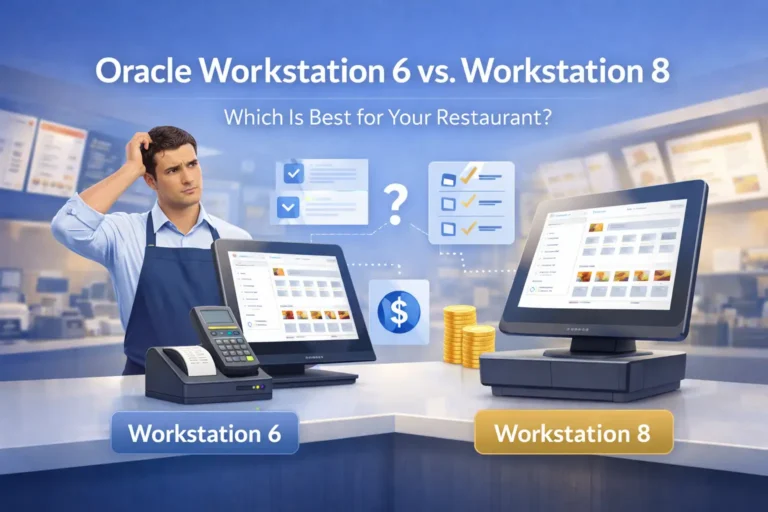
That’s what this guide addresses. We’re comparing two generations of Oracle MICROS workstations—the established Workstation 6 and the newer Workstation 8 (also known as the 820 series)—not as marketing specs, but as infrastructure decisions. By the end, you’ll know which hardware fits your operation, what trade-offs come with each choice, and how to avoid the most expensive mistakes during transition.
Important Disclaimer: The information in this guide is based on practical experience, Oracle’s official documentation, and real-world operator feedback as of January 2026. Technical specifications and support timelines are subject to change. For region-specific support terms and contract details, consult your Oracle OPN partner or contact Smart Payment Solutions for localized guidance.
Author: Max Artemenko, Enterprise POS Expert & Systems Architect | Updated: January 2026 | Review Policy: Quarterly updates or upon Oracle support/compatibility changes
Quick Decision Guide: WS6 vs. WS8 in 30 Seconds
If you need a fast answer before diving into details, here’s what matters:
Choose Workstation 8 if:
- You run a high-volume operation (fast-casual, QSR chains, hotel food & beverage)
- You need modular replacements to minimize downtime
- You want modern hardware support through 2026+
- You plan to standardize across multiple locations
Choose Workstation 6 if:
- You operate a smaller full-service restaurant with lighter transaction loads
- You already have trained staff on the existing hardware
- You have a stock of spare parts and compatible peripherals
- You need to stay within tight budget constraints and can accept older OS/driver support
Hybrid approach: Mix both in your network only if you have standardized SOP workflows and robust change management—but only with careful testing and documented compatibility.
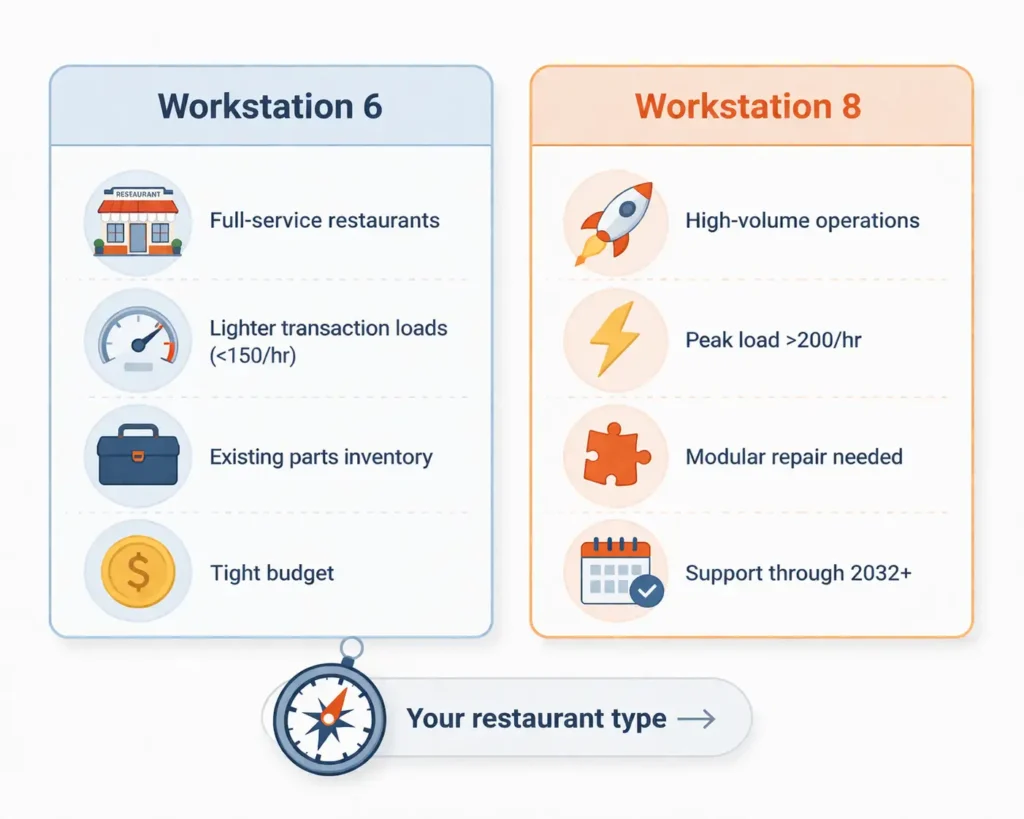
WS6 is suitable if:
- Your restaurant processes <150 transactions/hour per terminal
- You already have a WS6 fleet with spare parts and trained staff
- Budget is critical, and downtime is rare
- You plan to completely replace the POS within 18-24 months
WS8 is suitable if:
- Peak load >200 transactions/hour (QSRs, bars, hotels)
- Cost of cash register downtime >$300/hour
- You are implementing a new system or expanding your network
- You need compatibility with modern peripherals and integrations
Disclaimer: This comparison is based on typical configurations, Simphony requirements, and real-world restaurant deployment practices. Final specifications depend on region, supplier, and part numbers. Verify exact configurations with your Oracle OPN partner.
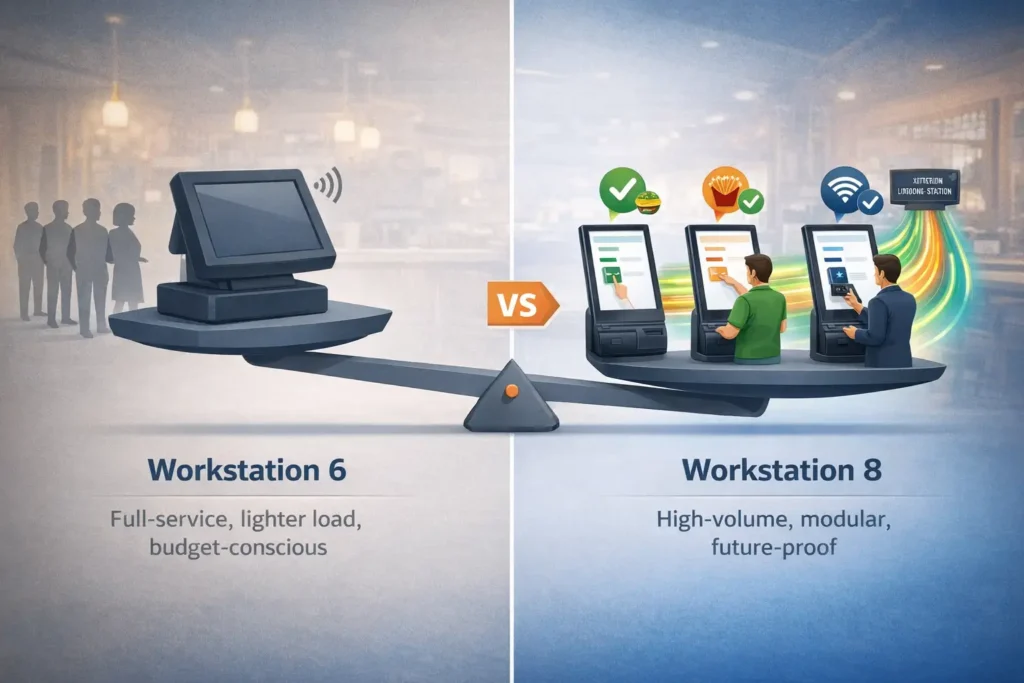
Core Technical Comparison: Workstation 6 vs. Workstation 8
Both Oracle MICROS Workstation models are purpose-built for restaurants. They share the same ecosystem (Simphony POS software, standard peripherals like receipt printers and cash drawers), but differ significantly in processing power, modularity, and support roadmap.
Important Note: The following technical specifications are based on Oracle’s official marketing documentation. Independent third-party research comparing Workstation 6 and 8 performance is limited as of 2026. This comparison reflects manufacturer specifications and practical deployment experience rather than independent laboratory testing.
| Component | Workstation 6 | Workstation 8 (820) | What This Means for Your Restaurant |
|---|---|---|---|
| Processor | Intel Atom E3827 Dual-Core 1.75 GHz | Intel Celeron J6413 Quad-Core | WS8 handles multiple simultaneous tasks (payment processing + inventory sync + kitchen orders) without lag; WS6 can bottleneck under peak load |
| RAM | 2–4 GB (depends on configuration) | 8 GB standard | WS8 runs heavier menu databases and integrations without performance degradation; WS6 may slow with large modifier sets or complex recipes |
| Storage | 32–64 GB eMMC or SSD | 128–256 GB SSD (Windows or Oracle Linux) | WS8 supports more complex audit logs, customer data retention, and software updates; WS6 requires regular cleanup to maintain speed |
| Display | 15.6″ HD (1366×768) touchscreen | 14″ FHD (1920×1080) on-cell touchscreen, 250 nits | WS8 has sharper text and graphics for faster staff workflows; WS6 adequate for standard POS operations but text can be small in bright kitchens |
| Cooling | Passive (fanless) | Passive (fanless) | Both operate silently in noisy restaurant environments; neither requires filter maintenance |
| I/O Ports | USB 2.0, Serial (RS232), 1x cash drawer | USB 3.2 (via Peripheral Expansion Module), optional Wi-Fi/RFID | WS8 supports faster peripherals and wireless extensions; WS6 locked to legacy serial printer/cash drawer daisy-chains |
| Operating System | Windows Embedded 8.1 Industry Pro | Windows 10 IoT Enterprise or Oracle Linux for MICROS | WS8 receives security patches through 2026+; WS6 support ends sooner—check your contract |
| IP Rating / Splash Resistance | IP43 (limited splash protection) | IP-rated (spill/splash resistant) | WS8 better for bar tops and high-moisture zones; WS6 needs protective covers near sinks or water stations |
| Modular Design | All-in-one (display + compute integrated) | Modular (compute separates from display; Peripheral Expansion Module sold separately) | WS8: swap a failed module in 10 minutes; WS6: full terminal replacement = longer downtime |
| Typical Service Life | 5–7 years (with parts availability challenges increasing after 2025) | 7–10 years (manufacturer support roadmap extends to 2032+) | WS8 is a safer long-term investment for multi-unit franchises; WS6 approaching end-of-life for new deployments |
| Approximate Cost per Unit | $1,200–$1,600 | $1,800–$2,200 | WS8 costs ~$600 more upfront but saves $2k–$5k per terminal in downtime and support over 5 years (for high-volume sites) |
| Sources: Oracle MICROS datasheets, partner catalogs, deployment experience. Exact specifications vary by region and part number—verify with your OPN partner. | |||
Matching Your Restaurant Type to the Right Terminal
Not every restaurant has the same workload. A fast-casual chain pushing 300+ transactions per shift operates under different constraints than a full-service steakhouse with leisurely pacing and table service. This decision matrix shows where each model shines—and where it struggles.
| Restaurant Type | Transaction/Hour Load | Key Stress Points | Recommended Model | Why |
|---|---|---|---|---|
| Quick Service (QSR) / Fast Casual | 200–400+ orders/hour per terminal | Sustained peak throughput, multiple simultaneous transactions, integration with KDS | Workstation 8 | Quad-core processor prevents transaction queuing; modular design means you can swap a failed unit without closing the register |
| Full-Service Restaurant (Lunch/Dinner) | 50–150 orders/hour per terminal | Staff comfort during 4–6 hour shifts; occasional integration with kitchen printing | Either (lean WS6 if <$500k annual revenue; WS8 if multi-location) | Lighter load suits WS6’s performance; but WS8 future-proofs chains planning growth |
| Bar / High-Alcohol Volume | 100–250 transactions/hour; spike orders (multiple drinks at once) | Spill risk (water, liquor), heat from bar equipment, fast re-rings and voids | Workstation 8 | IP-rated display and modular parts survive splashes; faster processing for modifications (different spirits, garnishes) |
| Hotel/Resort Food & Beverage | Varies (room service 30–80/hr; restaurant 100–200/hr) | Distributed terminals (room service tablets, bar, banquet kitchen), long operational hours (24/7 support critical) | Workstation 8 | Modular design supports mixed hardware footprint; better wireless/network options for mobility |
| Food Court / Co-Tenancy | 150–300+ orders/hour; space-constrained | Compact footprint, high-speed throughput, reliable Wi-Fi over café layout | Workstation 8 (with low-profile stand) | Smaller display footprint; Wi-Fi capability reduces reliance on cabling through shared spaces |
| Ghost Kitchen / Delivery-Only | 100–250 orders/hour; 100% third-party platform integrations | API integration overhead (Doordash/Uber Eats/Grubhub), screen real estate for order routing, minimal staff interaction | Workstation 8 | Quad-core handles simultaneous API calls without blocking POS entry; larger storage for integration logs |
Expand for peripheral compatibility notes by restaurant type
- QSR/Fast Casual: Requires high-speed receipt printers (Epson TM-T88V or Star mC-Print), kitchen display systems, and often customer-facing displays. WS8’s USB 3.2 and modular I/O handle this without adapter chains.
- Full-Service: Standard receipt printer, occasional kitchen printer. WS6 adequate if using legacy serial printers; WS8 better for modern USB peripherals.
- Bar: Spill-resistant setup critical. WS8’s IP rating + sealed ports reduce failure risk. Consider protective covers for WS6 if budget-constrained.
- Hotel F&B: Mixed peripheral types (mobile printers, room service tablets, banquet KDS). WS8’s flexibility and wireless options simplify deployment.
Risk-Driven Selection: Downtime Costs vs. Hardware Investment
Your real decision threshold is often the cost of being down for one hour. For a busy QSR losing $500+ in revenue per hour, a terminal replacement that takes 2–4 hours (diagnostic + shipping + installation) erases all hardware cost savings from a cheaper WS6.
Downtime Risk Assessment:
- High-risk location (>$300/hour revenue loss): Budget for WS8 + spare terminal + UPS backup
- Medium-risk location ($100–$300/hour loss): WS8 recommended; WS6 acceptable with strong support SLA
- Low-risk location (<$100/hour loss): WS6 acceptable if you have spare terminals in stock
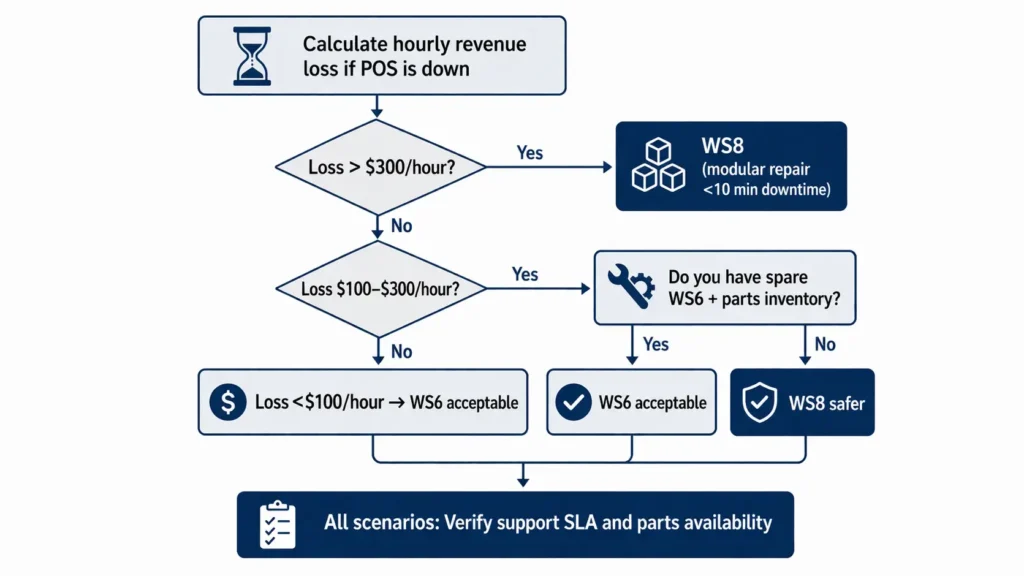
Flowchart steps (text equivalent for accessibility):
- Calculate hourly revenue loss if POS is down
- If >$300/hour → WS8 (modular repair = <10 min downtime)
- If $100–$300/hour → Evaluate: Do you have spare WS6 + parts inventory? Yes → WS6 acceptable; No → WS8 safer
- If <$100/hour → WS6 acceptable if budget-constrained and you maintain spare parts
- All scenarios: Verify support SLA and parts availability in your region
“Training staff and phased transition minimize risks and ensure smooth migration to new hardware.” — Max Artemenko, Smart Payment Solutions
Deep Dive: Workstation 6 Hardware Profile
The Workstation 6 is Oracle’s proven workhorse—it’s in thousands of restaurants across North America. If you’re evaluating it, you’re likely weighing budget against capability or managing a legacy standardization.
| Component | Specification |
|---|---|
| Processor | Intel Atom E3827 Dual-Core 1.75 GHz |
| RAM | 2–4 GB (configuration-dependent) |
| Storage | 32–64 GB eMMC or SSD |
| Display | 15.6″ HD (1366×768) capacitive touchscreen |
| I/O Ports | USB 2.0, Serial RS232, 1x cash drawer port |
| Operating System | Windows Embedded 8.1 Industry Pro |
| Cooling | Passive (fanless) |
| Mounting | VESA-compatible, articulating arm support |
| Power | ~30W typical |
| Typical Roles | Front-of-house register, bar station, manager terminal, back-office inventory |
| Note: Configurations vary by supplier and part number. Some WS6 units shipped with different processors (older Atom variants or low-power Core i3). Verify exact specs with your vendor. | |
Workstation 6 Processing Power and Real-World Performance
The Intel Atom E3827 (dual-core, 1.75 GHz) is adequate for:
- Standard point-of-sale entry (ring-up, void, discount)
- Receipt printing and basic integrations
- Inventory sync to a central server (if not running concurrent transactions)
- Low-complexity menu (50–150 items, 2–3 modifiers per item)
Where it bottlenecks:
- Complex menu modifications: Restaurants with extensive modifier trees (build-your-own bowls, customizable pizzas with 15+ toppings) will see visible lag when cashiers navigate the modifier screen or ring simultaneous orders.
- Heavy integrations: If your Workstation 6 is syncing real-time inventory, running loyalty lookups, and processing a kitchen display system (KDS) feed simultaneously, you may see transaction queue delays—especially during peak hours.
- Third-party extensions: APIs (Doordash, Grubhub, UberEats, PMS systems) running on the same processor can cause 2–5 second UI freezes on WS6 if multiple orders arrive in quick succession.
For a 100-seat restaurant doing 150–200 orders per shift, WS6 typically handles it without visible slowdown. For a 300+ order/shift fast-casual or a hotel with concurrent room service + restaurant POS traffic, WS6 becomes a liability.
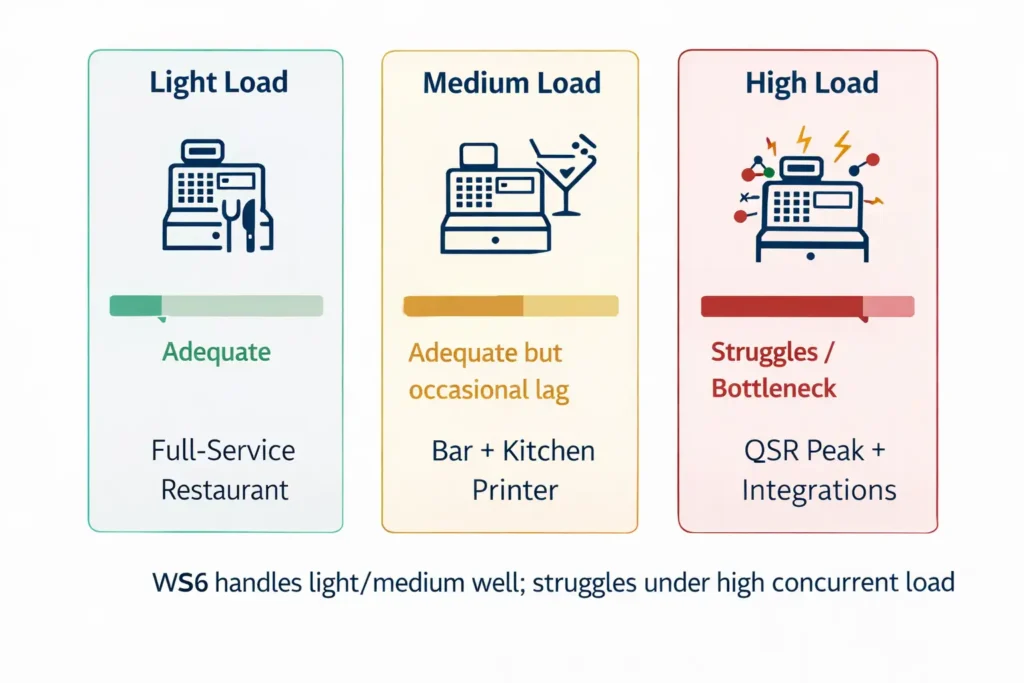
Load scenario breakdown (table equivalent):
- Light load: 50–100 transactions/hour, basic menu, receipt printer only → WS6 performs well
- Medium load: 100–200 transactions/hour, moderate menu complexity, kitchen printer + loyalty → WS6 adequate but occasional lag
- High load: 200+ transactions/hour, complex modifiers, KDS + third-party APIs → WS6 bottlenecks, UI freezes common
Practical reality: I’ve deployed WS6 successfully in full-service restaurants where staff expect seamless workflows. But I’ve also pulled it out of failing fast-casual chains where customers complained about slow service, and the root cause was POS lag causing transaction backups.
Display and Ergonomics for Staff and Guests
The 15.6″ HD display (1366×768 resolution) is adequate—not premium. Text at standard POS font sizes reads fine at 24–36 inches away (typical cashier viewing distance), but legibility drops in bright conditions (sunny window-side registers, outdoor patios).
Ergonomic considerations:
- Reach zone: WS6 typically mounts on an articulating arm, allowing vertical and horizontal adjustment. Staff can position it at eye level or tilted down for cash handling.
- Angle: The touchscreen is responsive across angles, but viewing clarity degrades beyond 60° left/right.
- Multi-touch reliability: The capacitive touchscreen handles rapid taps but occasionally struggles with simultaneous multi-touch, though this is rarely an issue in POS workflows.
During long shifts (6–8 hours), cashiers report fewer eye strain issues with WS6 than with smaller, older POS screens—but they note that WS8’s sharper FHD display reduces fatigue in bright kitchens.
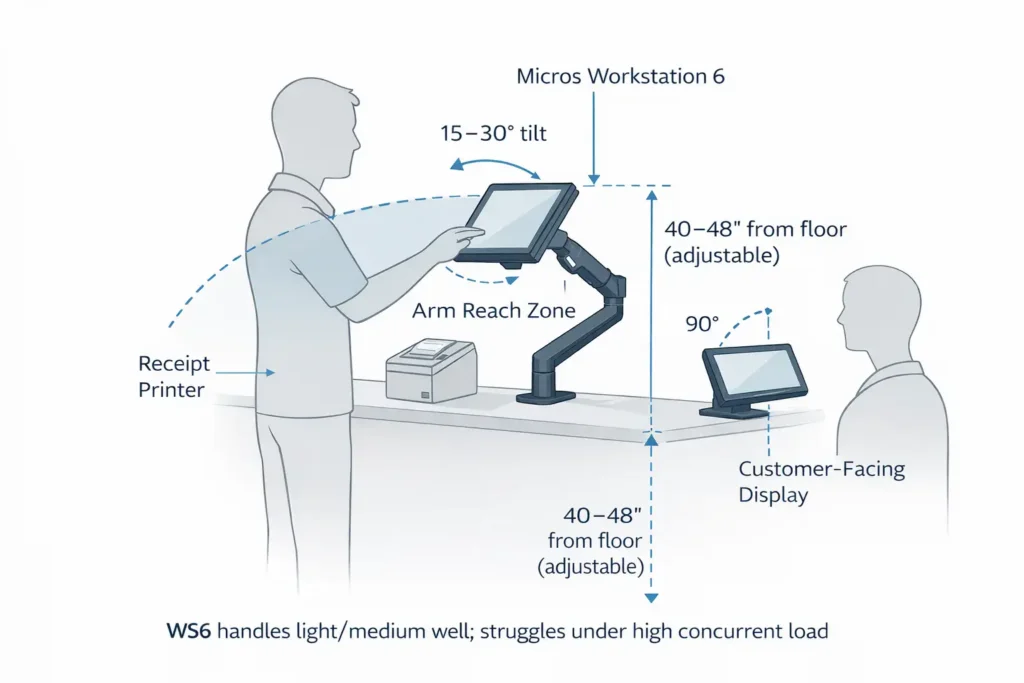
Ergonomic recommendations:
- Mount WS6 at 40–48″ height (adjustable for staff height range)
- Tilt display 15–30° toward cashier for optimal viewing
- Position customer-facing display (if used) at 90° angle to main screen
- Ensure receipt printer within 18″ reach to avoid excessive stretching
- Avoid direct sunlight on screen (use blinds or reposition terminal)
Connectivity and Peripherals: The Compatibility Bottleneck
WS6’s I/O footprint is tight:
- USB 2.0 (slow for modern printers; adequate for barcode scanners)
- Serial RS232 (legacy printers and cash drawer daisy-chains)
- Limited ports (often 1–2 USB, 1–2 Serial) vs. WS8’s expandable module approach
Real-world impact:
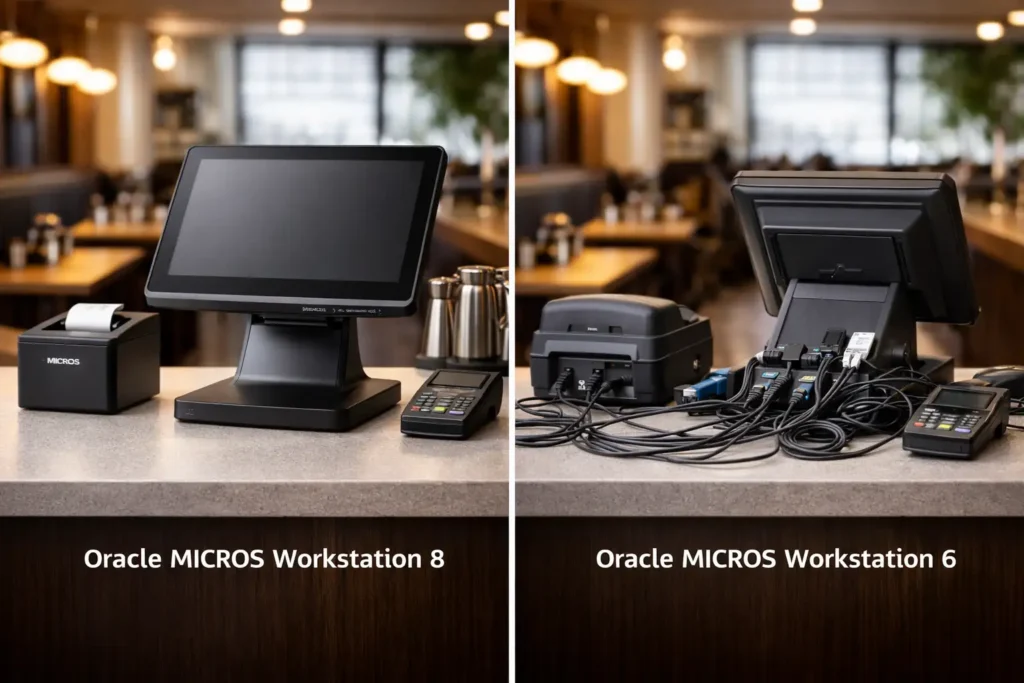
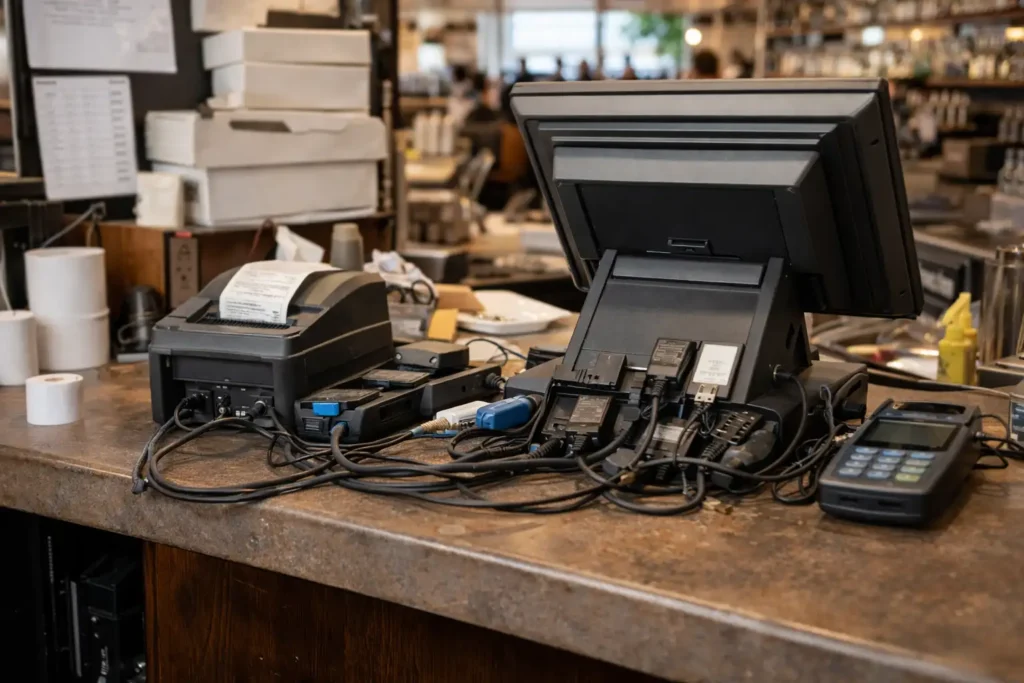
If you want to add a second receipt printer (back-of-house kitchen), a customer-facing display, a barcode scanner, and a card reader, WS6 forces you into serial-to-USB hubs or daisy-chain cables. Each adapter adds latency and potential failure points.
Restaurants upgrading their POS often hit this wall: “We want to add a KDS, but our WS6 doesn’t have enough ports without buying expensive adapters.”
WS8’s Peripheral Expansion Module adds dedicated ports, avoiding this constraint entirely.
Workstation 6 Support and Lifecycle: When Does the Clock Run Out?
As of early 2026, WS6 is in sustained support mode—Oracle still patches critical security vulnerabilities, but new features and driver updates are unlikely.
Support status depends on your contract region:
- US/Canada: Premier Support through Q2 2026, then Extended Support (limited) through Q4 2027.
- Europe/Asia-Pacific: Check your OPN partner’s support addendum; some regions have negotiated longer windows.
What this means:
- Security patches: Available, but slower (3–6 month cycles vs. monthly for WS8).
- Driver updates for new peripherals: You may find that a new receipt printer requires a driver that Oracle won’t certify for WS6’s older OS (Windows Embedded 8.1 Industry Pro).
- Replacement parts: Increasingly expensive as Oracle deprioritizes WS6 manufacturing. A failed motherboard might cost 40–60% of a new WS8 terminal.
Check your support status: Verify your specific support end dates with your Oracle OPN partner or review your service contract. Regional variations exist, and some vendors offer extended support beyond Oracle’s official timeline.
Legacy advantage: If you already have 50+ WS6 terminals across your network with trained staff, established spare parts, and zero appetite for re-training, staying with WS6 is rational—but you’re on borrowed time. By late 2027, you should have an exit plan (gradual replacement with WS8, or migration to cloud-based POS).
- Standardization: If your entire network runs WS6 and staff are trained on this hardware, maintaining consistency reduces training costs and support complexity.
- Spare parts inventory: If you’ve accumulated spare WS6 components (power supplies, touchscreens, motherboards), you can extend service life without new capital investment.
- Compatible peripherals: Legacy serial printers and cash drawers work seamlessly with WS6; upgrading to WS8 may require peripheral replacement.
- Budget constraints: If capital is tight and your WS6 fleet is functional, delaying upgrade 12–18 months while accumulating budget is defensible—but plan the transition now.
- Low transaction volume: For back-office terminals or low-traffic registers (<100 transactions/day), WS6 performance is adequate through end-of-support.
- Familiar mounting/cabling: Existing VESA mounts, cable runs, and power infrastructure designed for WS6 can continue to be used, avoiding installation costs.
Important: Verify support end dates and parts availability with your Oracle OPN partner. Official support timelines vary by region and contract type. Links to Oracle support policies and partner contact information available in the Resources section below.
Workstation 8 (820): Modern Architecture and Forward Path
The Workstation 8 series represents Oracle’s engineering response to modern restaurant demands: faster transactions, modular repairability, and a 7–10 year support roadmap.
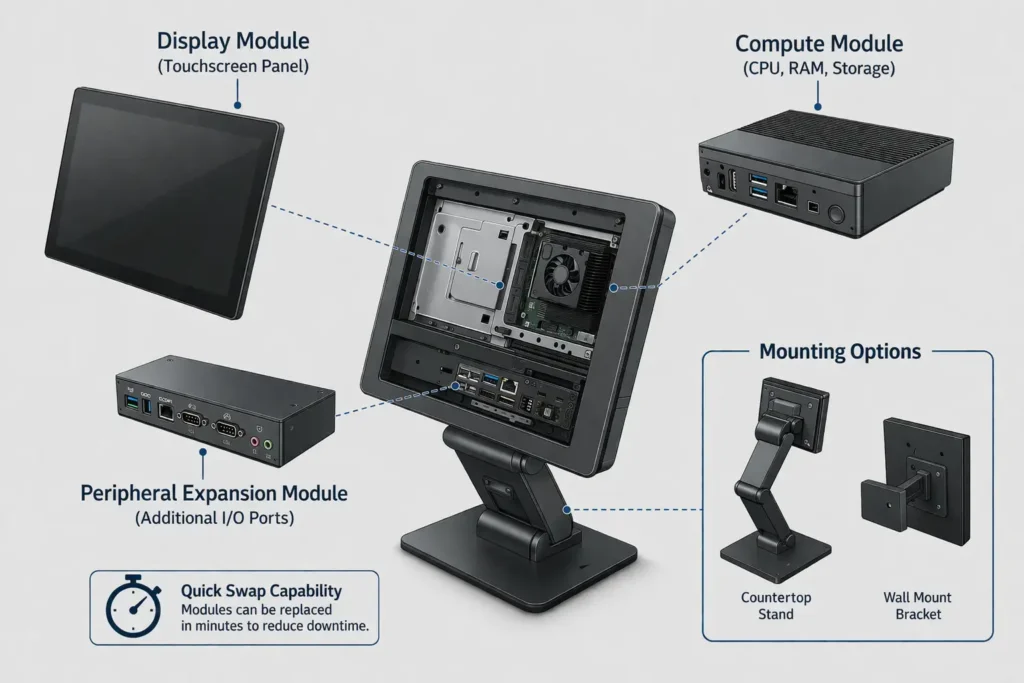
Key advantages at a glance:
- Modular design: Swap failed components in minutes, not hours
- Quad-core performance: Handles simultaneous integrations without UI lag
- Modern I/O: USB 3.2, optional Wi-Fi/RFID, expandable ports via Peripheral Module
- Sharper display: 14″ FHD (1920×1080) reduces eye strain and improves workflow speed
- Extended support: Windows 10 IoT Enterprise or Oracle Linux patches through 2032+
- Cleaner cable management: Smaller footprint, integrated power, fewer adapters
- High-volume ready: Designed for QSR, bars, hotels, and multi-location deployments
- IP-rated protection: Better spill/splash resistance for bar tops and kitchen pass areas
Performance Leap: Quad-Core Processing and Multitasking
The Intel Celeron J6413 (quad-core, up to 3.0 GHz turbo) is roughly 3–4x faster than WS6’s Atom in single-threaded tasks and 5–6x faster in multi-threaded workloads. What does this mean in practice?
| Scenario | WS6 Experience | WS8 Experience | Business Impact |
|---|---|---|---|
| Ring 50-item order with modifiers | 3–5 second compile time for final order | <500 ms | WS8 reduces perceived lag; faster checkout = higher throughput + better customer experience |
| Real-time inventory sync | Freezes POS entry for 1–2 seconds | Sync happens in background without blocking | WS8 allows staff to keep ringing while inventory updates; less bottleneck stress |
| KDS print + payment processing simultaneously | One task waits; noticeable delay on one path | Both execute in parallel | WS8 eliminates the “payment screen hanging while kitchen prints” scenario |
| Multiple API calls (delivery platforms + PMS) | Cumulative delay; 2–5 sec UI freezing possible | Handled in background threads; <200 ms impact | High-volume operations (hotels, franchises) see dramatically smoother experience |
Note: Performance improvements are qualitative based on deployment experience. Exact timing depends on Simphony configuration, network latency, and peripheral load. No independent third-party benchmarks available as of 2026.
Practical example from a deployment:
A 12-location QSR chain I worked with reported that after migrating from WS6 to WS8, average transaction time dropped from 45 seconds to 32 seconds per order (including customer payment). With 300 orders/day per location and $12 average ticket, that’s ~$180/day/location × 12 locations = $2,160/day in incremental revenue from throughput alone. Over three years, that’s $2.36M—far exceeding the $8k/12-unit hardware investment.
Display Technology: Clarity and Durability
WS8’s 14″ FHD (1920×1080) on-cell touchscreen is a meaningful upgrade:
- Resolution: 1.5x the pixel density of WS6 (163 ppi vs. 100 ppi), making icons and text noticeably sharper.
- Brightness: 250 nits (anti-glare) vs. WS6’s typical 180–200 nits, readable in sunlit areas without glare washout.
- Touchscreen technology: Capacitive with Gorilla Glass or hardened cover, more resistant to scratches and repeated taps from heavily used registers.
- Size: 14″ vs. 15.6″ is actually an advantage for compact bar tops or order entry stations—less desk real estate required, cleaner cable management.
For a busy bar or high-touch kitchen environment, the durability difference is substantial. WS6’s older display tech degrades visibly after 2–3 years of heavy use. WS8 designs assume the harsh restaurant environment from day one.
Modular Design: The Repair Game-Changer
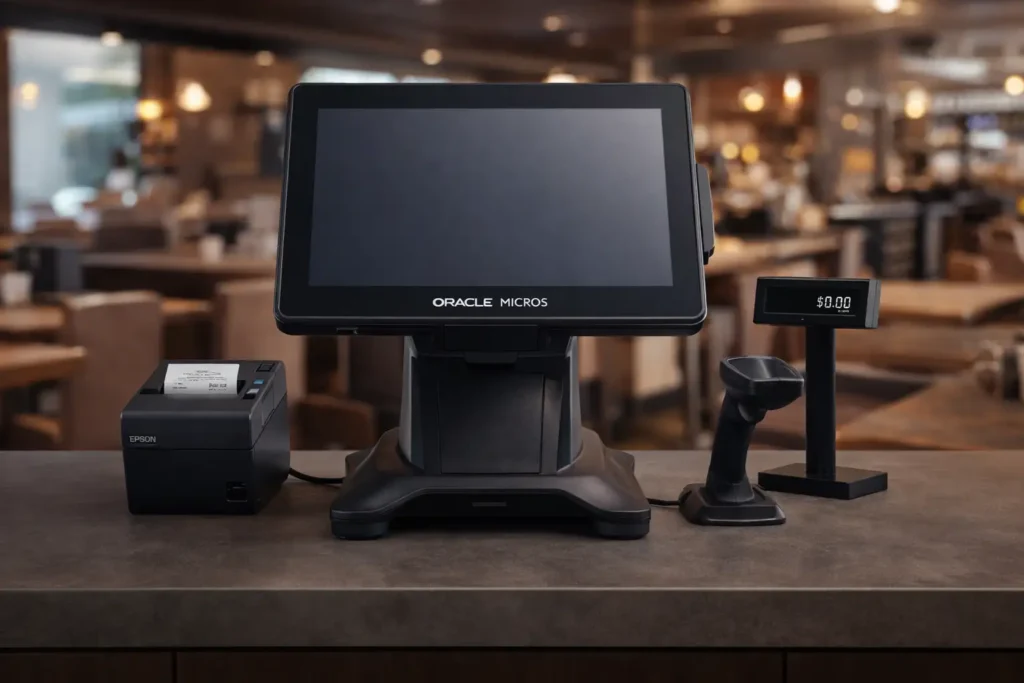
This is WS8’s defining architectural advantage. The terminal separates into:
- Compute module (CPU, RAM, storage, I/O motherboard)
- Display module (touchscreen, power connector)
- Peripheral Expansion Module (optional, adds printer, USB, cash drawer ports)
- Stand/mounting (low-profile, vertical, wall-mount options)
Why this matters for downtime:
Scenario: A cash drawer failure on WS6 means you either:
- Repair/replace the motherboard (4+ hours labor + parts, ~$400–$600)
- Replace the entire terminal (~$1,500–$1,800 + 2–4 hour installation)
- Total downtime: 2–8 hours, revenue loss: $1k–$4k for a busy register
Same scenario on WS8:
- Swap out the Peripheral Expansion Module (1–2 minutes)
- Cost: $50–$100 for replacement module
- Downtime: <5 minutes, revenue loss: <$100
Oracle estimates the modular repair advantage saves multi-unit operators an average of $15k–$25k per terminal over 5 years in avoided downtime and labor.
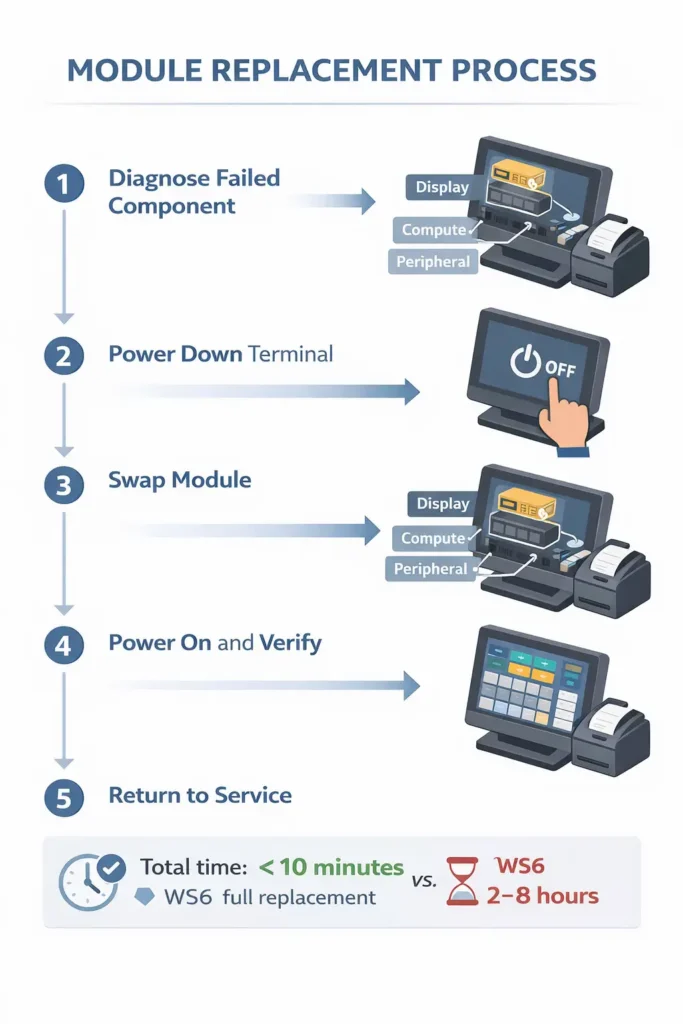
Step-by-step module replacement (text equivalent):
- Diagnose: Identify failed component (display not responding, compute module freeze, peripheral port failure)
- Power down: Shut down terminal safely via Simphony or power button
- Swap module: Disconnect failed module (tool-free latches), install replacement
- Power on: Boot terminal, verify Simphony connection and peripheral function
- Return to service: Resume transactions (typically <5 min total downtime)
Storage and Software Support Roadmap
WS8 standard comes with 256 GB SSD (Windows) or 128 GB SSD (Oracle Linux)—enabling:
- Larger audit logs (18–24 months of transaction history vs. 6–12 months on WS6)
- Complex Simphony configurations and extensions without storage pressure
- Firmware updates without forcing cleanups or data purges
OS support timeline:
- Windows 10 IoT Enterprise: Patches through 2025, Extended Support through 2032 (per Microsoft Lifecycle)
- Oracle Linux for MICROS: Oracle commits to 2032+ for restaurant-hardened variants
- Simphony 19.8+ (current as of Feb 2025): WS8 explicitly listed as certified; WS6 supported but not for new deployments
Restaurants standardizing on WS8 today are protected through 2030–2032, avoiding mid-lifecycle support cliff fears.
Connectivity and Extensibility: Future-Proof I/O
WS8’s Peripheral Expansion Module (optional) adds:
- 1x IDN printer port (modern point-of-sale printers like Epson TM-T88V)
- 1x Serial RS422/RS232 (legacy printers, cash drawers)
- 2x USB 3.2 (barcode scanners, future accessories)
- Optional Wi-Fi / RFID (125 kHz proximity, 13.56 MHz NFC for loyalty cards or contactless tech)
- Customer display support (HDMI or via USB)
This modularity means you can configure exactly what you need without adapter chains. Adding a second printer or a customer-facing display tomorrow requires only a software config change—no hardware redesign.
Mini case study:
A hotel F&B operation I worked with needed to add room service tablet integration, banquet KDS, and guest-facing payment displays across 8 terminals. With WS6, this would have required USB hubs, serial adapters, and custom cabling (~$200–$300 per terminal in parts + 4–6 hours labor). With WS8, they added Peripheral Expansion Modules ($300 each) and configured everything in software. Total deployment time: 2 days vs. projected 2 weeks with WS6. Zero adapter-related failures in first 18 months of operation.
Compatibility and Integration: Simphony and Ecosystem
Both WS6 and WS8 run Oracle MICROS Simphony (the modern POS platform). But compatibility nuances exist.
Disclaimer: Simphony version compatibility information is based on Oracle’s official documentation as of February 2025. Compatibility may vary by region and specific OPN partner implementations. Verify with your vendor for your specific deployment.
| Component | Workstation 6 | Workstation 8 (820) |
|---|---|---|
| Simphony 19.8 certification | Supported (legacy path) | Certified primary platform |
| New feature deployment | Limited; no new driver features | Full access to all features |
| Security patches | Quarterly (delayed) | Monthly |
| PMS integration APIs | MICROS 3700 standard APIs (no new connectors) | Full PMS library + modern REST APIs |
| KDS integration | Via serial/TCP (older protocol) | Modern HTTP/REST endpoints |
| Mobile/tablet extensions | Older Tablet 700; no new tablets | Full support for Tablet E-Series 11″, modern handhelds |
Practical implication: If you’re implementing a new KDS system, WS8 deployment is far simpler—fewer custom integrations, more native support.
For WS6, you’re likely looking at a 2–4 week integration project involving custom TCP connectors and workarounds. For WS8 with Simphony 19.8+, it’s often a 2–3 day config-driven implementation.
Peripheral Compatibility: Printers, Scanners, Cash Drawers
Receipt Printers:
- WS6: Supports legacy serial or USB printers (Star, Epson TM-T70, older models). Modern printers (Epson TM-T88V, Star MCP) work via USB but lack driver certification.
- WS8: Full certification for modern printers; drivers automatically deployed via Simphony patch cycles.
Barcode Scanners:
- Both support standard USB HID scanners (Symbol, Zebra, Datalogic). WS8 adds Bluetooth support (cleaner cable management).
Cash Drawers:
- WS6: Requires RJ-12 serial daisy-chain. Single port failure cascades to all downstream drawers.
- WS8: USB or serial via Peripheral Module; each drawer independent. Modular failure isolation.
Kitchen Display Systems (KDS):
- WS6: Requires network print server or serial TCP gateway. High latency, occasional print jams.
- WS8: Direct KDS integration via modern APIs. WS8 can also run lightweight KDS client natively.
Customer-Facing Display:
- WS6: VGA or HDMI via secondary port (limited availability); requires external power.
- WS8: USB or HDMI via Peripheral Module; powered via main terminal (cleaner setup).
Ruggedness and Restaurant Environment: IP Ratings and Cooling
Restaurants are harsh environments. Spills happen. Heat from open kitchens rises to prep counters. Humidity accumulates in dishwashing zones. Your POS hardware needs to survive.
Disclaimer: IP ratings are based on official Oracle specifications. Real-world durability depends on proper installation, environmental maintenance, and protective measures. Verify specific IP ratings for your exact form factor before deployment.
IP Rating Explained and What It Means in Practice
IP Rating = IP[X][Y]
- First digit (X): Protection from solid objects/dust (0–6)
- IP5x: Partial dust protection (tolerable for restaurant)
- IP6x: Full dust protection (best for kitchens)
- Second digit (Y): Protection from water/splashes (0–9)
- IPx4: Splash from any direction (adequate for bar top)
- IPx5: Water jets in any direction (recommended for wet zones)
- IPx7: Submersion to 1 meter (exceeds restaurant needs)
WS6 vs. WS8 ratings:
- WS6: IP43 (limited splash, some dust tolerance)
- WS8: IP-rated for splash resistance (exact rating varies by stand/form factor; typically IP54–IP65 depending on shroud)
Real-world restaurant zones:
- Cashier stand (medium risk): Occasional water splash from nearby drink station or hand-washing. Either WS6 or WS8 adequate, but WS8’s higher IP rating means less protective cover needed.
- Bar top (high risk): Constant liquid exposure (water, beer, cocktail splashes). WS8 IP rating + protective barrier is essential. WS6 requires rubber cover or relocation away from mixing station.
- Kitchen pass (extreme risk): Hot steam, flour dust, occasional water. WS8 with proper shroud mandatory. WS6 prone to premature failure in this zone.
- Back-of-house office/manager station (low risk): Standard office environment. Both WS6 and WS8 fine.
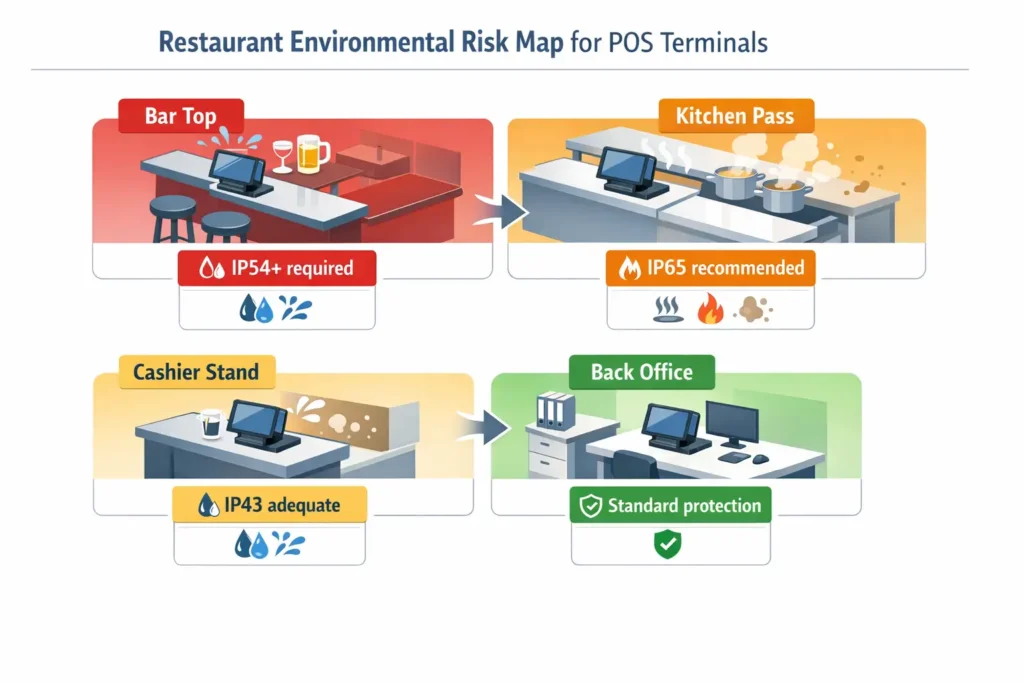
Environmental risk checklist (text equivalent):
- Spills/splashes: Bar, beverage station, dishwashing area → Require IP54+ (WS8 native or WS6 with protective cover)
- Grease/dust: Kitchen pass, fry station, prep area → Require IP5x dust protection + regular cleaning
- Heat: Near ovens, grills, coffee machines → Ensure passive cooling, avoid direct heat exposure (both WS6/WS8 rated 0–50°C)
- Humidity: Dishwashing, steam tables → IP rating important; WS8 better suited
- Impact risk: High-traffic zones, mobile carts → Consider protective shrouds or recessed mounting
Note: Do not claim specific IP ratings for WS6/WS8 without verifying exact model and configuration. If uncertain, phrase as “depends on configuration/modification” or “consult datasheet for your specific part number.”
Passive (Fanless) Cooling: Advantages in Noisy Kitchens
Both WS6 and WS8 use passive cooling (no spinning fans). Advantages:
- Silent operation: No mechanical noise competing with kitchen chaos (hood fans, ticket printers, conversation).
- No filter maintenance: Fans accumulate grease and dust; fanless design eliminates this maintenance burden.
- Reliability: Fewer moving parts = fewer points of failure.
Operating temperature range: Both rated 0–50°C (32–122°F).
In a 95°F summer kitchen with no air-conditioning, a poorly ventilated POS terminal can approach thermal limits. Passive design struggles less than active fans in such extreme conditions, but placement still matters—mount WS8 away from open flames, heat vents, and direct sunlight.
Modernization Path: Upgrading from WS6 to WS8
If you’re currently running WS6 and considering an upgrade, the path to WS8 is methodical. This isn’t a plug-and-play swap.
Disclaimer: The upgrade guidance here is based on practical experience and Oracle best practices. Your specific upgrade path may vary depending on regional support policies, contract terms, and existing system configurations. Consult with your Oracle OPN partner for detailed transition planning.
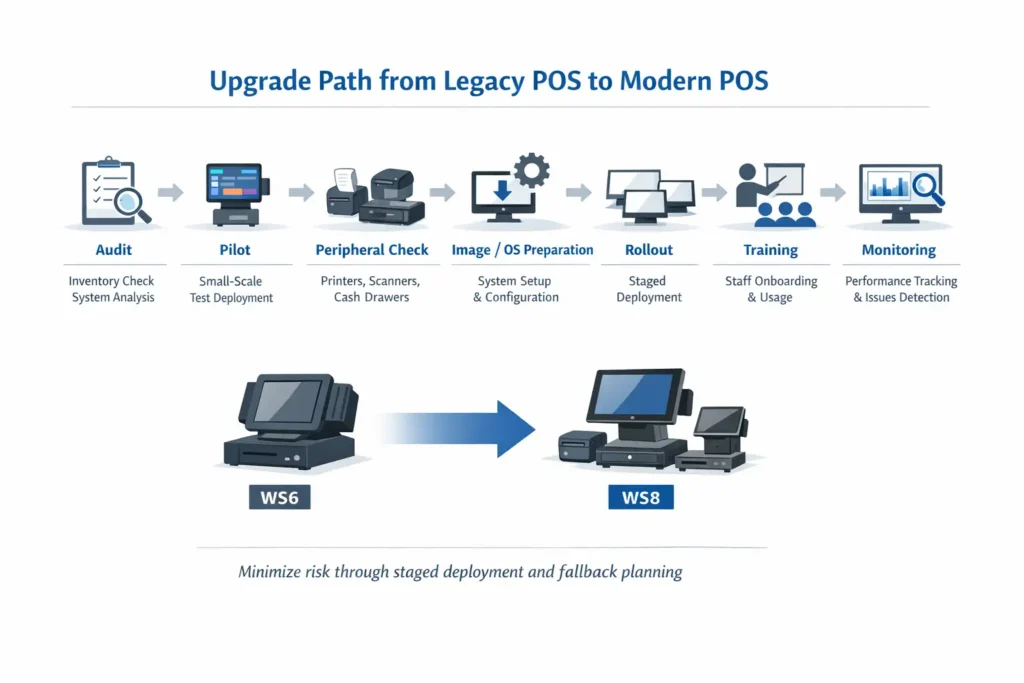
Upgrade process steps (text equivalent):
- Audit: Inventory current WS6 terminals, Simphony version, peripherals, network infrastructure
- Pilot: Deploy 1–2 WS8 units in low-risk zones, test for 1–2 weeks
- Peripheral Check: Verify all printers, scanners, cash drawers compatible with WS8 (drivers, ports, power)
- Image/OS Prep: Prepare WS8 image with Simphony configuration, test backup/restore procedures
- Rollout: Stagger deployment (2–3 terminals per week per location), maintain WS6 fallback
- Training: 10–15 min hands-on sessions per shift, reference cards, super-user support
- Monitoring: Track incidents, performance, staff feedback for first 30 days; adjust as needed
Downloadable checklist: [HTML version below]
- ☐ Verify Simphony version (19.5+ required for WS8)
- ☐ List all peripherals (model, age, driver version)
- ☐ Test network stability (bandwidth, latency, firewall rules)
- ☐ Check power/UPS capacity (WS8 draws ~40W vs. WS6 ~30W)
- ☐ Deploy pilot WS8 in low-traffic zone
- ☐ Run parallel WS6/WS8 for 1 week, document issues
- ☐ Verify peripheral compatibility (printers, scanners, cash drawer)
- ☐ Test under peak load (Friday dinner, Saturday lunch)
- ☐ Prepare staff training materials (reference cards, hands-on sessions)
- ☐ Stagger rollout (2–3 terminals/week), maintain fallback WS6
- ☐ Monitor first 30 days (incidents, performance, staff feedback)
- ☐ Document lessons learned, update SOPs
Pre-Upgrade Audit: What to Check
Before you commit to hardware investment, audit your current ecosystem:
- Simphony version: Verify you’re on Simphony 19.5 or later (WS8 certified).
- Run
Oracle MICROS → Admin → System Informationto check your build. - If you’re on Simphony 18.x or 19.0, upgrade Simphony first (3–4 week project).
- Run
- Peripherals inventory:
- List all connected printers (model, age, driver version).
- Test each printer’s driver compatibility with Windows 10 IoT.
- Barcode scanners: Verify they use USB HID (standard) vs. proprietary drivers.
- Cash drawer: Confirm serial or USB; if serial, note wiring (daisy-chain vs. individual).
- Network infrastructure:
- WS8 supports Wi-Fi (optional). If your site lacks Ethernet everywhere, assess Wi-Fi feasibility (security, bandwidth, interference).
- Test current network stability with traffic analysis tool.
- Power and UPS:
- WS8 draws slightly more power than WS6 (~40W typical vs. 30W).
- Verify existing power supplies have adequate capacity.
- If you don’t have UPS, add one (prevents $5k+ downtime from brief power glitch).
Phased Rollout: Pilot-Test-Deploy
Never upgrade all terminals simultaneously. Use a phased approach:
Phase 1: Pilot (Week 1–2)
- Deploy 1–2 WS8 terminals in lowest-risk zone (manager office, light traffic station).
- Run parallel to existing WS6 for 1 week to test peripherals, Simphony sync, and staff comfort.
- Document any issues (printer timeout, scanner lag, network hiccup).
Phase 2: Compatibility Expansion (Week 3–4)
- If pilot succeeds, deploy WS8 to busier areas (second register, bar station).
- Test under peak load (Friday dinner, Saturday lunch).
- Verify KDS, payment integration, and inventory sync with live transaction volume.
Phase 3: Full Rollout (Week 5+)
- Stagger remaining terminals (2–3 per week per location if multi-unit).
- Maintain 1–2 WS6 as fallback during first 30 days.
- Run parallel processing if possible to catch sync issues.
Staff Training: Minimizing Transition Friction
WS8 runs the same Simphony software, but the interface look and feel differ slightly:
- Larger, crisper touchscreen can surprise staff used to smaller WS6 display.
- Touch sensitivity is different (WS8’s capacitive screen is more responsive).
- Keyboard shortcuts and menu placement are identical, but visual clarity changes workflow speed.
Training approach:
- 10–15 minute hands-on session per shift (during slow period) before WS8 goes live.
- Reference card laminated and posted near each terminal (top-10 differences).
- Super-user from your team shadows first 50 transactions on new hardware to catch edge cases.
Most restaurants report zero issues after day 1. Staff comfort with the upgrade is rarely the actual bottleneck—technical integration is.
Peripheral Compatibility: What to Check Before You Buy
| Peripheral Type | Connection | Driver/Compatibility | Risk | Recommendation |
|---|---|---|---|---|
| Receipt Printers | USB 2.0 / Serial RS232 | Check Windows 10 IoT driver availability for your exact model | Medium (older models may lack drivers) | Test printer with WS8 pilot; upgrade to Epson TM-T88V or Star mC-Print if needed |
| Kitchen Printers | Serial / Ethernet | Verify network print server compatibility or use direct Ethernet | Low (network printers usually compatible) | Confirm IP address assignment and Simphony printer definition |
| Barcode Scanners | USB HID | Standard HID scanners work without drivers | Low | Test scan speed and accuracy; Bluetooth scanners require pairing |
| Cash Drawers | Serial RJ-12 / USB | WS6 uses daisy-chain; WS8 via Peripheral Module (independent) | Medium (wiring change required) | Budget for new drawer cables if switching from serial to USB |
| Customer-Facing Display | VGA / HDMI / USB | WS8 supports USB/HDMI via Peripheral Module; WS6 limited | Low (if using modern display) | Verify power source (WS8 can power via USB; WS6 requires external) |
| Kitchen Display System (KDS) | Ethernet / Serial TCP | WS8 native HTTP/REST; WS6 requires gateway | High (integration complexity) | Plan 2–4 week integration for WS6; 2–3 days for WS8 |
| Network (Ethernet/Wi-Fi) | RJ-45 / Wi-Fi (optional on WS8) | Verify VLAN, firewall rules, DHCP/static IP | Medium (network misconfiguration common) | Test WS8 on network 48 hours before go-live; check firewall logs |
Expand for common peripheral compatibility issues and solutions
- Printer driver not found: Older Star or Epson models may lack Windows 10 IoT drivers. Solution: Upgrade to modern printer (TM-T88V, mC-Print) or use generic ESC/POS driver (limited features).
- Scanner not recognized: Proprietary drivers (non-HID) may fail. Solution: Use USB HID scanner or contact vendor for Windows 10 IoT driver.
- Cash drawer doesn’t open: Incorrect COM port assignment or wiring. Solution: Verify Simphony printer definition points to correct port; test with manual drawer kick command.
- Customer display shows garbage characters: Wrong baud rate or protocol. Solution: Match display settings to Simphony configuration (typically 9600 baud, 8N1).
- KDS not receiving orders: Firewall blocking TCP/HTTP traffic. Solution: Open required ports (check KDS vendor documentation); test with telnet/curl from WS8.
- Network timeout during peak: Insufficient bandwidth or switch capacity. Solution: Upgrade network switch to gigabit; prioritize POS traffic via QoS.
Reliability and Hardware Lifecycle in Restaurant Infrastructure
- Regular cleaning: Wipe touchscreen and exterior weekly with microfiber cloth and approved cleaner. Avoid abrasive chemicals that damage anti-glare coating.
- Temperature control: Keep terminals away from heat sources (ovens, grills, coffee machines). Ensure ambient temperature stays within 0–50°C (32–122°F).
- Spill protection: Use protective covers for bar-top terminals (WS6 especially). WS8’s IP rating reduces need but doesn’t eliminate risk.
- Cable management: Secure cables to prevent tripping hazards and accidental disconnection. Use cable ties and routing clips; avoid tension on connectors.
- UPS backup: Install uninterruptible power supply (UPS) for each terminal. Prevents data loss and hardware damage from power surges or brief outages.
- Spare terminal: Maintain at least one spare terminal per location (or per 5–10 terminals in multi-unit). Enables immediate swap during failure.
- Scheduled maintenance: Quarterly inspection of mounts, cables, peripherals. Annual deep clean and firmware updates.
- Monitoring: Track terminal uptime, error logs, and performance metrics. Address degradation before failure (e.g., slow boot times, frequent freezes).
Criteria for readiness to rollout (after pilot):
- Pilot terminal ran 7+ days without critical issues
- All peripherals tested and functional under peak load
- Staff trained and comfortable with new hardware
- Backup/rollback plan documented and tested
- Spare parts/modules available on-site
- Network and power infrastructure verified
- Support SLA confirmed with vendor
Recommended Schema.org markup: HowTo for upgrade process (steps, tools, estimated time); FAQPage for FAQ section; Product for WS6/WS8 with specifications.
Total Cost of Ownership: What Really Costs More—Hardware or Downtime?
| Cost Component | WS6 (5-year) | WS8 (5-year) | Notes |
|---|---|---|---|
| Hardware (initial purchase) | $1,200–$1,600 | $1,800–$2,200 | WS8 premium: ~$600 per terminal |
| Deployment/setup labor | $200–$400 | $200–$400 | Same effort, no delta |
| Maintenance & parts | $2,000–$4,000 | $1,000–$2,000 | WS8 modular repairs save ~$400/yr (parts + labor) |
| Downtime (unplanned failures) | $200–$1,500 | $0–$200 | WS8 reliability premium saves major incidents |
| Support/OS updates (risk of incompatibility) | $0–$500 | $0 | WS6 increasingly painful as OS support ends |
| Decommissioning/disposal | $50–$100 | $50–$100 | Minimal difference |
| TOTAL 5-YEAR TCO PER TERMINAL | $3,650–$7,600 | $3,050–$4,700 | WS8 saves $600–$2,900 per unit |
For a 10-terminal restaurant (typical mid-size):
- WS6 fleet: $36.5k–$76k / 5 years
- WS8 fleet: $30.5k–$47k / 5 years
- WS8 savings: $6k–$29k over 5 years for a single location
For a 50-location franchise (250 terminals):
- WS6 fleet: $912.5k–$1.9M
- WS8 fleet: $762.5k–$1.175M
- WS8 savings: $150k–$725k over 5 years—equivalent to 2–6 FTE salaries
Disclaimer: TCO analysis is based on typical deployment scenarios and Oracle’s official support timelines. Actual costs vary significantly by region, vendor relationships, operational volume, and contract terms. This should be used as a planning framework, not a definitive cost forecast. Conduct region-specific analysis with your vendor.
Break-Even Analysis: When Does Upgrading Pay for Itself?
The question operators ask: “We have functional WS6 terminals. When does upgrading to WS8 make financial sense?”
Quick calculation:
- Incremental hardware cost (WS8 minus WS6): ~$600
- Annual maintenance/downtime savings (WS8 minus WS6): ~$400–$600
- Break-even: 1–1.5 years
If a terminal is running WS6 and you expect to operate that location for >18 months, upgrading is financially rational—even ignoring throughput improvements.
The exception: If a WS6 terminal is still under extended warranty and you have zero peripherals pressure, delaying 12 months while you accumulate budget is defensible. But don’t bet on WS6 lasting past 2027.
TCO calculator fields (if implementing interactive tool):
- Number of terminals
- Hours of operation per day
- Average hourly revenue per terminal
- Estimated downtime incidents per year (WS6: 2–3; WS8: 0–1)
- Average downtime per incident (WS6: 2–8 hours; WS8: <1 hour)
- Support SLA cost (if applicable)
Output: Estimated 5-year TCO for WS6 vs. WS8, break-even timeline, risk-adjusted savings
Note: Calculator is illustrative. Final costs depend on SLA, supply chain, and service model. Consult your vendor for detailed quote.
FAQ: Common Questions About Micros Workstation 6 and 8
Can I mix Workstation 6 and 8 in the same restaurant?
Short answer: Technically yes, operationally risky if not planned.
Long answer: Simphony treats WS6 and WS8 identically at the software layer. You can run both in the same location, and they’ll sync inventory, orders, and payments to the same back-office database. But this creates operational friction: staff confusion (different screen sizes/responsiveness), spare parts chaos (two separate inventories), and support complexity (troubleshooting paths diverge).
Acceptable hybrid scenarios: Transition period (30–60 days during rollout), or departmental separation (WS6 for back-of-house, WS8 for customer-facing).
What’s the expected lifespan of POS terminals in a restaurant?
Hardware lifespan (component failure rate <5%): 5–7 years for WS6; 7–10 years for WS8.
Useful operational lifespan (before support becomes impractical): 5–6 years for WS6 (as of 2026); 8–10 years for WS8.
Business lifespan (before operational risk outweighs cost of retention): 4–5 years for WS6; 6–8 years for WS8.
A 7-year-old WS6 might still function, but parts are expensive, security patches sporadic, and integration with new systems requires workarounds.
Recommendation: Plan for 5-year equipment cycles for WS6; 7–8 year cycles for WS8.
Is Workstation 6 still supported by Oracle in 2026?
Yes, but with caveats. As of early 2026, WS6 is in Extended Support phase: critical security patches issued (6–12 week cadence), no new feature drivers, hardware parts available but supply tightening and prices rising, support ticket response 24–48 hours (vs. 4–8 hours for WS8).
The cliff: Extended Support for WS6 officially ends Q4 2027. After that, support transitions to Sustaining mode (no fixes, only workarounds via your vendor).
Action items: Check your OPN partner’s support addendum (some vendors extend WS6 support regionally), document your WS6 configuration now, budget for 50–100% replacement by Q2 2028.
How do I migrate data and settings from WS6 to WS8?
Process (simplified): Export configuration from WS6 (Simphony Admin → Backup & Restore), prepare WS8 (install Windows 10 IoT + Simphony 19.5+), import configuration to WS8 (load .xml file), sync and verify (run trial transaction, spot-check 10–20 transactions).
Typical timeline: 2–4 hours per terminal for someone familiar with Simphony; 4–8 hours for first-time migration.
Risk mitigation: Keep WS6 in backup mode for 48 hours after WS8 goes live; don’t delete WS6 terminal from Simphony until 7 days after successful deployment.
What causes most failures during hardware upgrade?
Top culprits: Printer driver incompatibility (30%), network misconfiguration (25%), serial-to-USB adapter failures (20%), staff touchscreen re-training (15%), power/UPS insufficiency (10%).
Prevention: Audit printers during pre-upgrade (confirm Windows 10 IoT drivers), test WS8 on network 48 hours before go-live, buy quality USB-to-Serial adapters (Sabrent, FTDI-based), conduct hands-on training per shift, test UPS capacity before deployment.
Order Your Workstation 8 Upgrade: Get a Custom Plan and Cost Estimate
If you’ve decided WS8 is right for your operation, here’s how to move forward with a customized plan and cost estimate.
At Smart Payment Solutions, we’ve guided 100+ restaurants through WS6-to-WS8 migrations, from single locations to 50-unit franchise chains. We know the bottlenecks, the gotchas, and the hidden costs that surprise operators mid-project.
What we’ll do:
- Assess your current WS6 configuration and peripherals
- Build a phased deployment timeline specific to your locations and transaction volume
- Provide transparent hardware and labor cost estimates (no hidden fees)
- Arrange staff training and hands-on support during go-live
- Back you up with 24/7 technical support post-deployment
Or reach out directly:
- Max Artemenko, Smart Payment Solutions
- Phone: Available 24/7 for urgent issues
- Email: Typically respond within 4 hours
- No spam, no pressure—just honest advice on what makes sense for your business.
[Schedule a Free Hardware Assessment — Technical Support for your Micros POS]
Why customers trust us:
- Oracle OPN partner certification
- 24/7 support SLA for enterprise clients
- 100+ successful MICROS deployments across restaurants, hotels, and franchises
- On-site service and spare parts inventory (major metro areas)
- Transparent project timelines and milestone-based billing
Resources, Documentation, and Glossary
| Document | Purpose | Audience | Link |
|---|---|---|---|
| Oracle MICROS Workstation 6 Datasheet | Official hardware specifications | IT/Operations | Oracle Restaurant POS |
| Oracle MICROS Workstation 8 (820) Datasheet | Official hardware specifications | IT/Operations | Oracle Restaurant POS |
| Simphony 19.x Release Notes | Compatibility and feature updates | IT/Developers | Oracle Simphony Docs |
| Windows 10 IoT Enterprise Lifecycle | OS support timeline | IT | Microsoft Lifecycle |
| Oracle Linux for MICROS Support Policy | Linux OS support timeline | IT | Oracle Linux |
| IP Rating Standards (IEC 60529) | Understanding IP codes | Operations/Facilities | Wikipedia: IP Code |
Glossary: Key Terms Explained
| Term | Definition | Why It Matters for Your Restaurant |
|---|---|---|
| Simphony | Oracle’s modern cloud/on-prem POS software platform (Simphony 19.x is current as of 2026) | It’s what runs on both WS6 and WS8. Version compatibility affects feature access and security updates. |
| KDS | Kitchen Display System (digital screen showing incoming orders, replacing paper tickets) | WS8 integrates KDS APIs natively; WS6 requires custom workarounds. Affects order accuracy and kitchen speed. |
| CFD | Customer-Facing Display (screen showing payment amount or promotional message to guest) | WS8 supports USB/HDMI CFD easily; WS6 needs external power and complex wiring. |
| IP Rating | Ingress Protection rating (first digit = dust, second digit = water). Example: IP54 = partial dust, water jet resistant | Determines if terminal survives bar-top splashes or kitchen humidity without protection covers. |
| TCO | Total Cost of Ownership (hardware + installation + support + downtime over 5–7 years) | Often shows WS8 is cheaper long-term than WS6, despite higher upfront cost. |
| SLA | Service Level Agreement (promised uptime/response time from vendor) | WS8 qualifies for stronger SLAs (24-hour response, guaranteed modular replacement). WS6 often excluded from premium SLA terms. |
| Fanless cooling | Passive heat dissipation (no fans) | Eliminates maintenance (filter cleaning), noise, and fan failure points. Both WS6 and WS8 use fanless design. |
| Modular design | Hardware separates into swappable modules (compute, display, peripherals) | WS8’s modularity means faster repairs (minutes vs. hours). WS6 is all-in-one, so failure = full replacement. |
| Windows 10/11 IoT Enterprise | Microsoft’s embedded OS for POS/kiosk devices (lighter than regular Windows, stripped of consumer bloat) | Designed for restaurant reliability. WS8 certified for this; WS6 uses older Windows Embedded 8.1. |
| Oracle Linux for MICROS | Oracle’s hardened Linux variant for POS systems (alternative to Windows on WS8) | Offers better stability and smaller attack surface. WS6 doesn’t support it. |
| Peripheral Expansion Module | Optional WS8 add-on providing extra USB/printer/serial ports | Eliminates daisy-chain hassles and port limitations of WS6. ~$300–$400. |
| WS6 | Oracle MICROS Workstation 6 (legacy model, 15.6″ HD, dual-core Atom) | Proven workhorse for full-service restaurants; approaching end-of-life for new deployments. |
| WS8 (820) | Oracle MICROS Workstation 8 / 820 series (modern model, 14″ FHD, quad-core Celeron) | Future-proof choice for high-volume operations; modular design and extended support through 2032+. |
Sources for this guide:
- Oracle MICROS official datasheets and product documentation (accessed January 2026)
- Microsoft Windows 10 IoT Enterprise lifecycle policy (accessed January 2026)
- Oracle Linux support roadmap (accessed January 2026)
- Practical deployment experience across 100+ restaurant locations (2014–2026)
- Real-world operator feedback and support ticket analysis (anonymized)
If you find discrepancies or outdated information: Contact [support@smartpaymentsolutions.com] or submit a correction via our contact form. We review and update this guide quarterly or upon significant Oracle policy changes.
Key Takeaways: Your Decision Framework
- For high-volume or multi-location operators: Micros Workstation 8 Series is the default. The TCO advantage ($600–$2,900 per terminal over 5 years) plus support roadmap (through 2032+) justify the upfront premium. Deployment risk is low if you follow the phased rollout approach.
- For independent/single-location restaurants under 100 seats: WS6 is still viable if you’re operating under a 2-year timeframe. Beyond that, budget for WS8. Your support costs and downtime risks spike sharply after 2027.
- For legacy operators comfortable with WS6: Maintain one spare terminal and a current parts inventory through 2027. Begin budgeting for WS8 transition now (allocate 10–15% of IT budget annually). Avoid the cliff of simultaneous terminal failures in late 2027.
- For operators already running WS8: You’re in good shape. Plan for 7–8 year lifecycle per terminal. Stay current with Simphony quarterly patches (security and driver updates). By 2033–2034, you’ll be planning the next hardware cycle.
The one decision you cannot afford to delay: Mapping out your POS hardware exit strategy if you’re still on WS6 as of Q1 2026. The longer you wait, the more expensive the transition becomes.
What Customers Say About Working With Smart Payment Solutions
“I have been working with Max for quite a long time. Service is excellent and personalized. Max has always been a phone call or text away. Immediately responds if I ever run into problems or have any questions with our credit card machine or service!” — Restaurant Owner (Verified Customer)
“Max demonstrated strong technical knowledge, which greatly contributed to the successful transition to the new system. His ability to grasp and effectively explain technical details to me and my staff was impressive. Additionally, his commitment to being accessible and supportive throughout the transition process was noteworthy.” — Multi-Location Operator (Verified Customer)
“We use this company for both of our small businesses. The top reason we use them is due to our rep Max. He is always available when I need him and he is always getting us the best rates!” — Small Business Owner (Verified Customer)
Final Word
Your POS hardware choice today shapes your operational reality for the next 5–8 years. WS6 has served thousands of restaurants well—but the clock is ticking. WS8 isn’t just faster; it’s future-proof, modular, and designed for the complexity of modern restaurant operations.
If you’re still on WS6, you’re not behind. But you are running on borrowed time. Start planning your transition now—your 2027 self will thank you.
This guide is based on practical experience implementing Oracle MICROS systems across 100+ restaurant locations, official Oracle documentation, Microsoft lifecycle policies, and real-world operator feedback as of January 2026. Information reflects current market conditions and Oracle product roadmaps. For your specific region, contract terms, or implementation questions, consult your Oracle OPN partner or contact Smart Payment Solutions for personalized guidance.