
TL;DR — Key Takeaways
- OPI vs SPI: SPI is Oracle’s current built-in payment path for Simphony (from release 19.10), removing the need for a separate OPI server. OPI remains valid for legacy environments and specific Pay@Table scenarios.
- Version matters above everything: Your Oracle release, payment interface version, PSP validation, and terminal model must all align before you buy anything.
- Cloud Simphony vs. RES 3700: These are different architectures with different payment paths, constraints, and support models.
- “Compatible” is not enough: A terminal may take cards without being truly integrated with your Oracle workflow.
- Cost is real: Oracle Transaction Services licensing, PSP interchange rates, and gateway fees all vary by deployment type. Understand the full cost stack before committing.
Quick Glossary
Before diving in, here are the key abbreviations used throughout this guide:
TermWhat it means
OPIOracle Payment Interface — the classic server-side payment interface layer SPISimphony Payment Interface — the newer client-side payment interface built into Simphony PSPPayment Service Provider — the company processing your card transactions (e.g., Shift4, Adyen, Worldpay) PEDPIN Entry Device — the card reader/terminal where the guest taps, inserts, or swipes EMVEuropay, Mastercard, Visa — the global chip card standard PCI DSSPayment Card Industry Data Security Standard — the security compliance framework for card payment environments P2PEPoint-to-Point Encryption — encryption of card data from the terminal to the processor NFCNear Field Communication — the wireless technology enabling contactless tap payments CDECardholder Data Environment — the systems and infrastructure in scope for PCI compliance
What Oracle MICROS payment integration includes
If a vendor says a terminal is “compatible with Oracle MICROS,” that phrase alone is not enough. In Oracle MICROS projects, compatibility only matters when the full path works together: POS version, payment interface, payment service provider, terminal model, and the payment flow you need at the property.
“The mistake I see most often is buying hardware first and asking integration questions later. With MICROS, the real issue is not whether a terminal can take a card. It is whether your exact RES 3700 or Simphony setup can pass payment data, return status correctly, and support the workflow your staff uses every day.” — Max Artemenko, POS Systems Expert & Product Architect
This guide breaks that down for 2026. It focuses on Oracle MICROS payment integration for Oracle Micros Simphony POS System and RES 3700, explains the difference between Oracle Payment Interface (OPI) and Simphony Payment Interface (SPI), and shows how to evaluate integrated EMV terminals without mixing up “works as a card reader” and “works as a true MICROS-integrated payment terminal.”
A quick note on evidence. Public research on this topic is thin. The strongest available sources are Oracle product documentation and Oracle Marketplace partner validation materials, not independent studies. Where Oracle documentation is clear, I cite it. Where public evidence is missing, I say so directly.
Oracle MICROS payment integration includes four connected layers: the POS, the payment interface, the PSP, and the terminal or PIN pad. If one layer does not match the others, you may still accept cards — but not in a clean integrated workflow.
For most projects, the working model is this: the Oracle MICROS POS sends a payment request, OPI or SPI handles the interface logic, the payment service provider (PSP) authorizes the transaction, and the terminal captures cardholder input through EMV chip, NFC contactless, or PIN entry.
«The SPI is a resilient version of the OPI… it removes the need for the OPI server and reduces LAN traffic on POS clients.» — Oracle Simphony Payment Interface (SPI) Documentation, 2024–2025. https://docs.oracle.com/
That architectural shift changes the practical deployment model materially for Simphony environments. Where OPI required a separate on-premise server sitting between the POS workstations and the PSP, SPI brings that messaging and response handling directly into the Simphony client.
That is the core of oracle micros payment integration. Not just a reader on the counter. A synchronized payment path.
In practice, this is why micros pos integration discussions get messy. One seller may mean “the terminal can process cards.” Another may mean “the terminal is validated in an Oracle payment path with status sync, approval response handling, and mapped workflow support.” Those are different things.
A common field scenario: a restaurant replaces a processor and keeps the old MICROS estate. The processor offers a terminal that runs EMV and Apple Pay. Procurement assumes that means the device is ready. Then IT finds out the POS version, driver path, or PSP route does not support the required tender flow. The hardware was fine. The integration path was not.
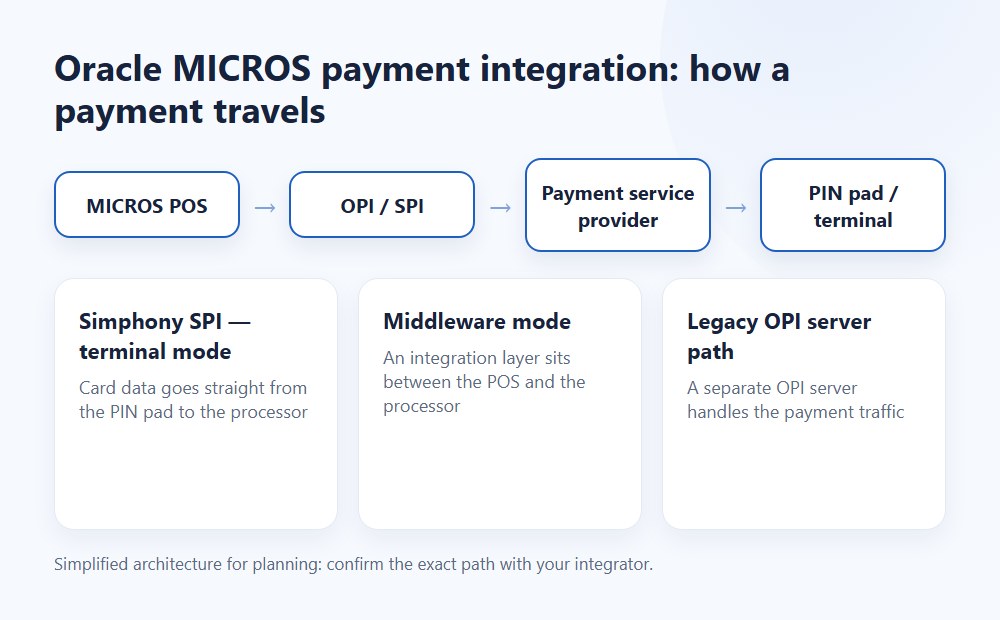
Alt text: “oracle micros payment integration architecture showing POS, OPI/SPI layer, PSP, and terminal”
Simphony vs RES 3700: which payment path you are integrating
Simphony and RES 3700 do not use the same payment path in the same way. That is the first check before discussing terminals, EMV, or processor changes.
For Simphony, current Oracle guidance centers on SPI as the newer model. Oracle states that SPI is built into the Simphony client and removes the need for the OPI server in many scenarios, while OPI can still coexist at the same property for supported use cases (Oracle — The Simphony Payment Interface (SPI); Oracle — Credit Cards / SPI deployment modes and OPI coexistence). One specific transition point is critical for planning: OPI is supported in Simphony through release 19.9, and from 19.10 the Simphony Payment Interface (SPI) is the default active built-in path. If your property needs OPI functionality in 19.10+, the formulation in Oracle’s own materials is more precisely that SPI is the default and recommended built-in path — confirm with Oracle documentation whether a forced OPI configuration is still permissible in your specific release.
For RES 3700, the picture is more legacy and more site-specific. Public Oracle materials show RES 3700 compatibility as version-bound and tied to older OPI-oriented paths and transaction-service dependencies (Oracle Compatibility Matrix). In other words, simphony payment integration planning is usually about choosing or confirming SPI vs OPI behavior in a current Simphony estate, while RES 3700 planning is often about confirming that a legacy environment can support the payment route at all.
«Oracle documents that Simphony 19.1 supports only OPI and SPI as credit-card drivers, and that other legacy drivers are no longer available.» — Oracle MICROS Simphony Release Notes. https://docs.oracle.com/
Here is the practical difference:
Platform Primary payment path to check Architecture focus Main risk area
Simphony 19.x SPI (default from 19.10), OPI coexistence in earlier releases Client-side payment interface, cloud/service dependencies, driver setup Assuming all terminals validated for one Simphony release work across all 19.x estates
RES 3700 OPI-style legacy integration path On-premise interfaces, site-specific network and version constraints Assuming a modern terminal offer automatically fits an older estate
Oracle’s own wording supports this split. The compatibility matrix ties supported POS/payment-interface combinations to specific versions, including 19.5 through 19.8 as the currently listed OPI/SPI targets, with cloud multi-tenant deployments required to use OPI/SPI (Oracle — Compatibility Matrix; Oracle — MICROS Simphony Release Notes).
Integrated payments vs standalone terminals
Integrated payments and standalone terminals solve different problems. An integrated terminal exchanges payment state with the POS. A standalone terminal processes the card payment outside that synchronized loop.
That difference affects workflow, reconciliation, and error handling. With an integrated vs standalone terminal decision, the real question is not whether the guest can tap a card. The question is whether the POS knows what happened, when it happened, and how that payment maps back to the correct check.
Oracle public materials do not publish comparative KPI studies on speed, staff error rates, or reconciliation time for integrated vs standalone terminal use in MICROS environments. That is a NO DATA area in public research. Oracle documentation explains setup and workflows, but not benchmark results (Oracle Payment Cloud documentation and release materials summarized in research brief).
From operational experience, the difference usually comes down to this:
- Integrated: the POS sends the amount, the terminal returns approval status, and the check reflects the payment state automatically.
- Standalone: staff enters or confirms amounts on the terminal separately, then closes or adjusts the check in the POS manually or semi-manually. In Oracle’s iCare model, a standalone terminal is explicitly described as a scenario where “there is no POS to send iCare transactions” — meaning check-level item data does not flow through.
That second model can work. It is just less forgiving in busy operations.
In one migration project involving a multi-station restaurant floor, the property had standalone payment behavior layered onto an older POS routine. Staff were closing checks after terminal approval but without consistent reference matching. The fix was not “buy faster terminals.” The fix was aligning the payment path so the approval state came back into the POS reliably. Result: fewer end-of-day mismatch calls and much cleaner manager review. That is not a published Oracle metric. It is field reality.
The business impact also extends to tip entry. When payment is handled on an integrated device at the table, the tip prompt appears directly in front of the guest during the approval sequence. Field data from pay-at-table deployments consistently shows that on-device tipping during approval — compared to paper tip adjustments after the fact — reduces tip-entry errors to near zero and tends to lift average tip percentages, since the prompt is presented at the highest-attention moment of the transaction. One middleware vendor, SoftPoint, cites a 21% average tip boost from integrated tableside checkout; while that figure comes from a commercial source and covers their specific middleware implementation rather than native Oracle SPI, the directional logic applies to any well-implemented on-device tip workflow.
Cloud vs. On-Premise Payment Architecture
Choosing between cloud and on-premise deployment is one of the most consequential decisions for payment integration architecture, and it is often underweighted relative to terminal and PSP selection.
Cloud Simphony (Simphony Cloud)
In Simphony Cloud, SPI updates, PSP configurations, and driver versioning are managed centrally by Oracle. Your IT team does not maintain on-premise servers or manually push payment driver updates to individual workstations. New payment configurations roll out as part of Oracle’s release train.
This matters practically: when Oracle releases an updated SPI configuration or a PSP certifies a new driver for Simphony 19.x, cloud properties receive those updates on a predictable schedule. The payment path stays current without local intervention.
For multi-location operators, cloud architecture also means a new property can be onboarded into the same payment configuration as existing sites without re-engineering the local infrastructure. That alone saves weeks on a typical chain rollout.
On-Premise and Hybrid Simphony
On-premise Simphony and hybrid configurations require local server maintenance for OPI routing, local network security, and manual management of payment driver updates. The OPI server — where it remains in use — must be maintained at the property.
Oracle has been moving firmly toward cloud-first for Simphony, and the cloud model is the current generation of the platform. Operators on self-hosted or single-tenant configurations retain OPI/SPI compatibility, but Oracle’s documentation marks “Single tenant/self-hosted only” for some older OPI support scenarios, and multi-tenant cloud is required to use OPI/SPI going forward (Oracle — Compatibility Matrix).
RES 3700: Always On-Premise
RES 3700 remains a fully on-premise system. Payment integration for Micros RES 3700 POS System runs through local OPI-style paths with local server dependencies. There is no cloud provisioning layer equivalent to Simphony’s STS Gen2 model. This creates the constraints described in the RES 3700 section below — local server crypto requirements, WAN dependencies, and version-specific interface support.
Summary: Which Architecture Affects Your Payment Path
Factor Simphony Cloud Simphony On-Premise/Hybrid RES 3700
Payment interface SPI (default, managed by Oracle) OPI or SPI, locally configured OPI-style, locally configured
Driver updates Automatic via release train Manual, site-managed Manual, site-managed
PSP configuration Cloud-provisioned Local configuration Local configuration
Pay@Table support SPI or OPI coexistence OPI server required for Pay@Table in many configurations OPI server
Main payment risk Version mismatch after Oracle update Local server/crypto/maintenance gaps Legacy interface constraints, WAN dependency
Which Oracle MICROS environments support payment integrations
Oracle MICROS payment compatibility is version-specific and environment-specific. Before choosing a PSP or EMV terminal, you need to verify the exact Oracle platform, release family, and deployment model.
Oracle’s public compatibility and product documentation make one point very clear: payment support is not generic across all MICROS estates. Supported combinations depend on Simphony version, payment interface path, and in legacy environments the local deployment constraints as well (Oracle — Compatibility Matrix; Oracle — SPI documentation).
That is why any claim like “this is a pos system that integrates with oracle” is incomplete unless it also answers: which Oracle product, which version, which payment interface, and which workflow?
Simphony 19.x and Oracle Simphony deployments
For Simphony 19.x, payment planning should start with SPI assumptions unless your property has a documented reason to remain on or coexist with OPI. Oracle describes SPI as the client-side payment component and the current resilient model for Simphony payment processing (Oracle — The Simphony Payment Interface (SPI)).
The strategic point matters. In older Simphony logic, OPI introduced a separate server layer. In SPI, that messaging and response handling is brought into the Simphony client. Oracle also notes that SPI and OPI use the same OPIPayment.dll, and that they can run together at the same property where needed (Oracle — Credit Cards / SPI deployment modes and OPI coexistence).
OPI support in Simphony runs through 19.9, and from 19.10 the operative default built-in path is SPI. For older transition cases, Oracle release materials also show 18.2 as an important baseline — properties without SPI had to upgrade to 18.2, configure OPI or SPI, then upgrade to 19.1 (Oracle — Simphony release notes).
This affects procurement. A terminal that worked in one Simphony 19.2 validation report may not be the right answer for a 19.10 rollout if the expected path changed from OPI-led to SPI-led behavior.
Legacy RES 3700 and site-specific constraints
For RES 3700, compatibility checks should be stricter. The platform can support integrated payments, but legacy estates carry more local constraints around network, encryption, transaction services, and validated interface paths.
Oracle materials show that RES 3700 projects may require licensed Oracle Transaction Services, outbound HTTPS on port 443 for some cloud-connected paths, and in some legacy processor scenarios a server capable of 128-bit cipher strength (Oracle RES 3700 interface and driver documentation). For devices connecting to external services, outbound port 9080 to the PAX terminal management server may also be required.
That is why RES 3700 projects often fail on details, not on the headline.
A property may say, “We only need a new chip reader.” But the real dependency may be older server crypto, WAN stability, or a version-specific OPI route. If those pieces are not aligned, the terminal quote is just a quote.
Payment terminals compatible with Oracle MICROS
Payment terminals compatible with Oracle MICROS are not one universal list. Compatibility depends on the Oracle environment, the payment interface path, the PSP validation path, and the specific workflow required at the property.
An important boundary: Oracle Retail EFTLink terminal lists apply to Xstore, not to Simphony. These are separate product contexts and the terminal lists should not be assumed interchangeable.
For this article, two categories stay separate:
- Public Oracle/Oracle Marketplace evidence that certain devices or families were validated in specific configurations.
- MIP-supported terminal options that can actually be provided for your deployment.
«Partner integrations validated on Simphony 19.4.1 include Contactless, Swipe, EMV Chip & Pin, and Keyed entry for both Pay@Counter and Pay@Table paths.» — Oracle Marketplace Validation Report. https://marketplace.oracle.com/
Terminal compatibility overview for Oracle MICROS environments
Terminal / family Typical use case Interface path to verify Environment notes
Ingenico Lane 3000 Fixed countertop / guest-facing PIN pad OPI path must be confirmed for exact estate Common question in ingenico lane 3000 micros 3700 scenarios; do not assume across all releases. Requires individual verification against your OPI version and RES/Simphony release.
Ingenico Lane 3600 Countertop with larger form factor Verify by MIP-supported route and exact Oracle environment Best treated as deployment-specific
Ingenico Lane 7000 Countertop, larger screen, NFC/EMV use cases Verify exact OPI/SPI-supported flow Good fit where guest-facing interaction matters
PAX A800 / mobile-integrated class Mobile or semi-mobile workflows Verify Oracle payment path plus PSP support Relevant in pax oracle micros pos integration evaluations; requires individual verification — no direct Oracle documentation confirming A800 in a published validation at time of writing
Verifone P400/V400m Countertop or mobile depending on model Seen in Oracle validation materials for SPI Pay@Counter scenarios Relevant to verifone oracle micros pos integration but still version-specific
Public Oracle-linked evidence supports some of these families in specific validation or documentation contexts. Oracle Marketplace materials referenced in the research brief show Verifone P400 in SPI Pay@Counter validation contexts, while older Oracle quick reference and validated-partner materials mention devices such as Ingenico ICT220 and PAX Q80 under OPI-related validation paths (Oracle Marketplace validation reports; Oracle compatibility and partner materials summarized in brief).
Ingenico, PAX, and Verifone integration paths
Ingenico, PAX, and Verifone each appear in Oracle-related payment discussions, but not as a universal promise across all MICROS estates. Their integration paths must be checked against the exact Oracle version and payment-interface route.
For ingenico lane 3000 micros 3700 questions, the safe answer is this: Lane 3000 may fit legacy Oracle MICROS payment projects where the validated OPI path and site constraints line up, but it should never be assumed just because the device is an EMV/NFC reader. Oracle’s validated-partner guidance lists Ingenico Lane 3000 under OPI support contexts, which is useful but still not the same as universal compatibility.
For pax oracle micros pos integration, mobile and Android-based device discussions often sound simpler than they are. A PAX device may support card acceptance perfectly and still fail your intended Oracle workflow if the payment driver, PSP route, or mapping method is different from your deployment. The PAX A800, for instance, is a capable Android-based mobile terminal — but “capable” and “validated for your exact Oracle path” are two different statements.
For verifone oracle micros pos integration, Oracle public materials are stronger in recent Simphony validation examples, especially around Verifone P400/V400m-type flows in SPI-related documentation and payment cloud service materials (Oracle Marketplace validation reports; Oracle Payment Cloud and hardware documentation summarized in brief).
The buying rule is simple.
Confirm the version. Confirm the payment path. Confirm the tested workflow. Then buy hardware.
Countertop, tableside, and chip reader use cases
The right micros emv chip reader depends less on the card brands it can accept and more on where the payment happens in the operation. Countertop, tableside, and fixed guest-facing PIN pad setups are different projects.
For pay at counter, the terminal is usually mapped to a workstation or station context. That makes fixed EMV chip and NFC readers a good fit when station-level routing is stable.
For Tableside Ordering & Payments, the real issue is mobility and workflow support. Oracle documentation distinguishes Pay@Table from standard counter flows, and validation artifacts also separate Pay@Counter and Pay@Table as different tested scenarios (Oracle Marketplace validation report). Oracle’s historical pay-at-table hardware documentation has referenced Zebra MC40 Android devices with integrated or external card readers as the target mobile hardware for this scenario.
A portable device that supports Apple Pay is not automatically a valid pay-at-table Oracle MICROS solution. The workflow, mapping, and payment path still need to be validated for that use case.
How Simphony payment integration works in practice
Simphony payment integration works as a live request-response process between the POS, SPI, the terminal or middleware, and the PSP. In current Oracle architecture, SPI is the central logic layer for this in Simphony.
Oracle’s own documentation is unusually clear here. It explains that SPI is part of the Simphony client, formats messages for the PSP, and processes responses directly. Oracle also says this removes the need for an OPI server in many scenarios and can reduce LAN traffic when a PED is attached (Oracle — The Simphony Payment Interface (SPI)).
That is the core of simphony payment integration in 2026.
Authorization, token handling, and payment status sync
In practice, Simphony authorization starts in the POS, passes through SPI, reaches the PED or middleware, and then goes to the PSP host for approval. The response comes back with transaction references and token-related data that the POS can use to store payment state without storing card data.
Oracle describes this payment path in detail. In SPI workflows, the POS initiates payment, SPI opens the secure connection to the PED or middleware, the PED collects cardholder interaction, and the PSP host returns approval and token data. Oracle further notes that card-data handling (steps 4–6 of the flow) sits entirely outside Simphony itself — it is the PSP’s zone of responsibility (Oracle Simphony Configuration Guide).
This is where people confuse “integrated” with “magic.”
Integration helps with status sync. It does not remove the need to confirm how settlement, tip adjust, or exception responses are handled in your PSP path.
The tip adjust point matters a lot in restaurants. Pre-auth and later tip workflows may be separate from the base approval path. Terminal-side tipping and later closed-check tip adjustment are not always identical workflows in the Oracle SPI model. Oracle’s payment documentation notes that tip adjustment is a configurable feature — it requires TipAdjust to be enabled and a specific tender selected, and does not function when Signature verification is required. If your service model depends on tips being added after the guest leaves the terminal, this must be tested before rollout, not assumed.
Field data shows that moving from paper tip adjustments to integrated on-device tipping (Pay@Table) can reduce tip-entry errors to near zero and often boosts average tip percentages, as prompts are presented directly to the guest during the approval sequence rather than relying on staff to apply an accurate adjustment later.
In one restaurant conversion, the staff expected tip entry to mirror the old processor behavior. The new flow supported authorization cleanly, but tip handling was different on closed checks. We changed training and tender rules before launch instead of patching it after the first Friday dinner rush. Result: no flood of manager voids on day one.
Pay at counter and pay at the table workflows
Pay at counter and pay at the table are different operational flows even when they use the same processor family. The difference is staff movement, terminal location, and when the guest interacts with the payment device.
In pay-at-counter mode, the POS operator starts the payment from the workstation or station UI. The terminal prompts for insert, tap, or swipe, then approval returns into the POS. This tends to be simpler to support because the lane mapping is more stable.
In pay-at-the-table mode, the workflow depends on mobile hardware and the validated Oracle route for that property. A standard validated Pay@Table workflow in Oracle MICROS environments with an OPI/SPI-connected portable device typically follows these steps:
- Server enters their employee number on the payment terminal.
- The terminal fetches open checks assigned to that employee from the POS.
- Server selects the correct check from the list on the terminal display.
- Server prints the bill or skips printing if the guest does not need it.
- Guest reviews the bill, selects a tip amount if applicable, and splits the payment if needed.
- Guest taps, inserts, or swipes to complete payment approval.
- Approval syncs back to close the POS check automatically.
This workflow is supported through both OPI and SPI paths depending on your Simphony version; Oracle documentation notes that Pay@Table continues to use the OPI server path in configurations where SPI’s LAN-free path is not available for the tableside device.
The takeaway is simple. If your business runs high-volume dine-in service, do not ask only whether a PSP supports Simphony. Ask whether it supports your exact pay-at-table flow in your exact version path.
EMV, contactless, and mobile wallet requirements
A modern Oracle MICROS payment project should support EMV chip, NFC contactless, and wallet acceptance where the terminal and processor path are enabled for it. Hardware capability alone is not enough.
The standards side is broader than Oracle alone. EMVCo remains the baseline for contactless behavior, and Apple’s integration guidance governs Apple Pay tokenized wallet acceptance on the network side. Oracle materials and partner validation reports confirm that Oracle MICROS-related setups can support EMV, contactless, and Apple Pay in validated configurations (EMVCo contactless requirements; Apple Pay Platform Integration Guide; Oracle payment documentation summarized in brief).
EMV chip and PIN pad behavior in Oracle MICROS setups
In a standard card-present flow, the EMV chip interaction happens at the PIN pad or reader, not inside the POS application itself. The POS initiates the sale. The terminal handles the card-present capture sequence.
That distinction matters for simphony emv and micros emv chip reader planning. The reader must support the card-present path, and the payment configuration must support the tender and response path for that device.
Fallback also matters. Technical fallback can occur when the chip cannot be read and the configuration permits an alternative path such as magstripe. Cardholder verification method (CVM) fallback can also vary: if the selected CVM is PIN but PIN cannot be used, the system may fall back to Signature at POS or No CVM, depending on issuer personalization rules and device configuration. That is not just a terminal question. It is a transaction-policy question that must be tested before rollout.
So when evaluating a PIN pad or EMV device, test these scenarios:
- Insert chip approval
- Contactless tap approval
- Fallback behavior when chip read fails
- Signature or no-CVM behavior if applicable
- Void or cancel during prompt state
That is the boring test plan nobody wants to run. It is also the one that prevents ugly surprises.
NFC contactless and Apple Pay acceptance
NFC contactless and Apple Pay require two things at the same time: terminal-side hardware support and software-side enablement in the payment path. One without the other is not enough.
This is one of the most common misunderstandings in MICROS payment projects. A device may physically support tap. But if the PSP configuration, driver setup, or payment application path does not enable that method, the business will still not have working contactless acceptance.
Apple Pay relies on terminal-side NFC communication — specifically, the NFC controller routing between the POS terminal and the Secure Element — plus the enabled software path in the payment driver. Oracle SPI is the payment messaging layer in Simphony. It does not replace the need for NFC-capable hardware, and NFC-capable hardware does not replace the need for SPI or driver-side enablement.
So if a proposal says “supports contactless,” ask the follow-up question: supported by the hardware, or enabled and validated in this Oracle MICROS payment integration path?
Security and PCI scope in Oracle MICROS payment projects
Security architecture in Oracle MICROS projects depends on where cardholder data travels, where it does not travel, and what systems are connected to the payment environment. OPI or SPI can help reduce exposure, but they do not erase PCI scope by themselves.
Oracle documentation says SPI is intended to keep the transaction system free of PCI data, and Oracle Simphony and OPI do not store card data in the payment flow as designed. But PCI scope still depends on the total architecture, especially network segmentation and system connectivity (Oracle security and SPI documentation summarized in brief; PCI DSS scoping guidance).
“Terminal support does not equal processor support. And tokenization does not equal P2PE. Those two mix-ups cause a lot of expensive mistakes in payment projects.” — Max Artemenko, POS Systems Expert & Product Architect
Tokenization and P2PE are not the same
Tokenization and P2PE solve different parts of the security problem. Tokenization replaces stored card data with a surrogate value after authorization. P2PE protects card data in transit between defined points, from the moment the card is read at the terminal to the moment it reaches the processor’s decryption environment.
«The P2PE Standard defines point-to-point encryption as protected transmission between specific points with decryption handled by the P2PE solution provider.» — PCI SSC P2PE Standard v3.1, PCI Security Standards Council, 2026. https://www.pcisecuritystandards.org/
That matters because many merchants hear “tokenized” and assume the whole environment is now encrypted end to end. Not true — and I have seen this assumption cause real compliance gaps. Oracle/MICROS historical implementation examples show the combined model well: encryption can begin at the reader while a token is returned for storage after authorization. That is good architecture. It is still not the same control as a validated P2PE solution, which requires separate certification of the full solution path — not just the terminal.
PCI SSC guidance also makes clear that only QSA(P2PE)s specifically trained for TSP assessments can evaluate the token data environment — meaning these two controls are governed by entirely different validation paths (PCI SSC P2PE materials).
How architecture changes PCI scope
Architecture changes PCI scope because connected systems can remain in scope even when the POS does not store card data. PCI DSS scoping depends on connectivity and influence over the cardholder data environment, not just on whether the POS database stores PAN.
This is where integrated vs standalone terminal decisions matter beyond operations. With an integrated Oracle MICROS payment path, the POS-to-terminal interface layer, connected middleware, and related systems may stay relevant to scoping decisions. With a truly standalone terminal isolated from merchant systems, scope may narrow substantially if the device and network are genuinely separated.
Oracle MICROS positions Simphony as an integrated payment solution — meaning the integration itself brings additional systems into the area of review, not just the payment terminal. In SPI terminal mode, the POS sends the payment request to the PED over localhost:port or IP:port, creating a direct connection between the POS environment and the payment device.
So the safe rule is this: never assume PCI scope from marketing language. Scope comes from the architecture diagram.
Disclaimer: Information about PCI DSS in this article is general in nature and does not replace an annual assessment by a qualified security assessor (QSA). For formal scoping, compliance decisions, and certification, engage a QSA and review current PCI DSS documentation at pcisecuritystandards.org.
For further reading on this topic, see our guide to Restaurant PCI Compliance.
Understanding integration costs and fees
This section covers one of the most underexplored areas for restaurant and hotel operators evaluating Oracle MICROS payment integration: what does it actually cost?
Technical compatibility matters. But if the financial model does not work for your operation, the best-integrated system in the world is still the wrong choice. Fees eat margin. That is the short version.
Oracle Transaction Services licensing
For RES 3700 deployments, Oracle Transaction Services must be separately licensed and installed on the RES/3700 server as a prerequisite for payment integration. This is not included automatically in a base RES 3700 software license. If you are planning a payment integration upgrade on a legacy RES 3700 estate, confirm Transaction Services licensing status before any other step.
For Simphony Cloud, Oracle acts as both the platform provider and, in some configurations, the gateway and processor through Oracle MICROS Payment Cloud Service. This changes the cost structure: instead of a separate gateway fee layered on top of a PSP fee, Oracle’s payment cloud model consolidates gateway and processing functions. However, the trade-off is reduced PSP flexibility — you are working within Oracle’s validated partner network rather than choosing any processor independently.
PSP fees and interchange in integrated vs. standalone configurations
The payment architecture you choose — integrated Simphony SPI, OPI middleware, or standalone terminal — does not directly change your interchange rates. Interchange is set by the card networks (Visa, Mastercard) and your card-acceptance category. What does change is:
- Gateway fees: Integrated SPI configurations may route through Oracle’s payment cloud service, a validated PSP’s own gateway, or a middleware layer. Each adds a per-transaction or monthly fee.
- Reconciliation labor: Integrated systems return payment status directly into the POS, meaning end-of-day reconciliation can be automated or semi-automated. Standalone terminal configurations require manual matching, which adds labor cost that does not appear on a payment statement but is real.
- Chargeback handling: With an integrated path, transaction references link POS check data to payment authorization data, making chargeback responses faster and more defensible.
A practical example: a 200-cover restaurant running 400 transactions per day on a standalone terminal setup might spend 45–60 minutes on end-of-day reconciliation that an integrated path reduces to under 10 minutes. That is not a published Oracle figure — it is a pattern I have seen across multiple properties. The labor cost is real even if it never shows up on a processor statement.
Questions to ask about cost before you sign
Before committing to any PSP or integration architecture, get written answers to:
- Does Oracle charge a per-transaction fee for payments routed through SPI or Oracle Payment Cloud?
- What is the total monthly gateway cost for my transaction volume?
- Are there additional licensing fees for Pay@Table or tip-adjust functionality?
- How does the PSP’s rate structure compare for card-present EMV vs. contactless vs. keyed entry?
- What are the chargeback fees, and how does the integration affect dispute resolution access?
Understanding the full cost stack — software licensing, gateway fees, interchange, and operational labor — is as important as understanding the technical architecture. An integration that saves $3,000 per year in reconciliation labor but costs $4,000 per year more in gateway fees is not a net win.
How to choose the right PSP and terminal stack
The right PSP and terminal stack is the one that matches your Oracle version, your payment workflow, and your rollout reality. Not the one with the nicest hardware demo.
For oracle micros payment integration, a smart selection process starts with the Oracle side first, then the payment side. Confirm the environment, confirm the interface path, and only then choose the terminal stack.
A clean selection model usually looks like this:
Decision layer What to confirm first Why it matters
Oracle platform Simphony or RES 3700, exact release Determines OPI/SPI path and supported driver logic
Payment interface OPI, SPI, coexistence, or legacy route Changes architecture and supported workflows
Deployment model Cloud vs. on-premise vs. hybrid Affects update cadence, server requirements, and PSP provisioning path
PSP Validated support for your Oracle path “Processor compatible” claims are often too broad
Terminal model Countertop vs mobile vs tableside Workflow fit matters as much as device capability
Payment methods EMV, NFC contactless, Apple Pay, tip adjust Feature support can vary by driver, workflow, and certification
Cost structure Gateway fees, licensing, reconciliation labor Total cost of ownership, not just hardware price
Public Oracle evidence backs the need for this order. Compatibility matrices and partner validation reports are version-specific and workflow-specific, including separate validation for Pay@Counter and Pay@Table in some cases (Oracle Compatibility Matrix; Oracle Marketplace validation reports).
Questions to ask before you commit to a provider
Before signing with any provider, get written answers to the following. Organized by category for easier evaluation:
Technical questions:
- Which exact Oracle MICROS product and version have you validated: RES 3700 or Simphony, and which release?
- Is the payment path OPI, SPI, or a coexistence model?
- If this is Simphony, does the path align with the property’s current release and the 19.9/19.10 transition point?
- Which exact terminal models are supported in this configuration?
- Does the solution support EMV chip, NFC contactless, and Apple Pay in this Oracle path?
- How does tip adjust work for your workflow: on device, after close, or both? Is TipAdjust enabled and what are the tender constraints?
- Is pay at the table supported, or only pay at counter?
- What happens during fallback, cancel, timeout, and lost-connection scenarios?
Business questions:
- Does hardware support also mean processor certification in this exact setup?
- What are the total gateway fees, per-transaction costs, and any Oracle licensing surcharges?
- What is the rollback plan if a pilot store exposes a workflow mismatch?
- What are the typical timelines for a deployment of my scale — and who is responsible at each stage: Oracle support, the PSP, and the integration partner?
That list sounds strict. Good. It should be.
Need help evaluating your current payment setup or planning a migration? We offer professional Oracle Micros installation and setup and can audit your current acquiring costs at no charge. Contact an expert
Oracle MICROS payment integration rollout checklist
A smooth rollout starts with version validation and ends with workflow testing in a live-like environment. Most payment integration failures happen because one assumption was left untested.
Oracle’s own materials support a staged process: prepare the account and roles, configure POS and payment settings, board or activate terminals, install and map the payment driver or module, test in non-production, then move to go-live (Oracle payment cloud and configuration materials summarized in brief).
Phase 1: Before Purchase
- Confirm Oracle product: Simphony or RES 3700
- Confirm exact version and supported payment path (OPI, SPI, or coexistence)
- Confirm deployment model: Cloud, on-premise, or hybrid
- Confirm PSP validation for that exact environment
- Confirm terminal model support for the target workflow (counter, tableside, or both)
- Verify EMV chip, contactless, and Apple Pay enablement in the PSP’s Oracle validation
- Verify tip workflows: on-device, closed-check adjust, or both
- Confirm Transaction Services licensing status (RES 3700)
- Confirm gateway fees, licensing costs, and total cost structure
Phase 2: Pilot and Testing
- Test pay at counter and pay at table separately if both apply
- Test void, cancel, timeout, and connection-loss scenarios
- Test EMV chip insert, NFC contactless, and Apple Pay
- Test tip entry and closed-check adjustment
- Test split-check behavior
- Test fallback scenarios (chip read failure, CVM fallback)
- Pilot in one location before chain-wide rollout
- Document station-to-terminal mapping and staff workflow changes
Phase 3: Scale and Go-Live
- Freeze firmware/driver assumptions before full deployment
- Confirm all devices have been boarded through Oracle Support (for Payment Cloud Service deployments)
- Verify that post-update behavior is consistent across all terminals
- Document exception-handling procedures and who is responsible at each failure point
- Confirm staff training on new tip and pay-at-table flows before first live service
Pre-launch validation points
Pre-launch validation should cover both normal flow and exception flow. A payment project is not ready because one test card approved once.
Validation point What to test
Version fit POS release, payment interface version, driver path
Terminal fit Exact model, firmware branch if relevant, mapping behavior
PSP path Authorization response, status return, settlement references
Payment methods EMV chip, swipe if allowed, NFC, Apple Pay
Restaurant flow Split checks, tip adjust, pay at counter, pay at table
Exception handling Cancel, timeout, device disconnect, failed auth, retry logic
Cost verification Gateway fees active, Transaction Services licensed, interchange category correct
For structured incident and exception planning, ISO/IEC 27035-1:2023 provides a framework for preparation, detection, reporting, and response. NIST SP 800-61 Rev. 2 offers a complementary incident-handling checklist. These are not MICROS-specific payment manuals, but they are useful for building an exception plan before go-live.
In one case, a chain rollout looked clean on paper, but the pilot exposed a simple issue: terminal prompts were correct, while split-check behavior on staff flow was not. We fixed the tender behavior, adjusted training, and avoided rolling a small mismatch into twenty locations. That pilot phase — one store, two weeks, full scenario testing — saved an estimated three to four hours of manager intervention per weekend across the chain.
FAQ
FAQ about Oracle MICROS payment integration
Can existing terminals be reused with a new Oracle MICROS payment setup?
Sometimes, yes. But only if the exact Oracle version, payment interface path, PSP route, and device model line up in a supported configuration. Generic “EMV compatible” is not enough. Check Oracle’s compatibility matrix and the PSP’s validation report for your specific version.
What is the difference between integrated and standalone terminals in daily operations?
Integrated terminals return payment status into the POS automatically. Standalone terminals process payment outside that synchronized loop — in Oracle’s iCare model, standalone locations don’t pass check-level item data at all. The guest may not notice the difference. The staff, accounting team, and anyone handling chargebacks will.
Does a terminal compatible with Oracle MICROS automatically support any processor?
No. Terminal support does not automatically mean processor support. Certification and validation apply to the full solution path — the specific PSP, the specific Oracle version, the specific payment interface, and the specific workflow. Each element must be validated as a combination, not independently.
Can I use any payment processor with Simphony?
No. While some middleware vendors claim to be “processor-agnostic,” true Oracle integration requires the PSP to be validated for your specific OPI/SPI version and Oracle release. A middleware layer may abstract some of that complexity, but it introduces its own version dependencies and does not remove the need for validation.
Do PAX or Verifone options matter only at the hardware level?
No. In pax oracle micros pos integration and verifone oracle micros pos integration projects, vendor choice affects workflow, driver path, validation history, and deployment notes. The device brand is not just a hardware preference — it determines which Oracle-documented integration path applies to your estate.
How long does a typical Oracle MICROS payment integration deployment take?
This varies significantly by property complexity, but a single-location pilot from configuration to go-live typically runs two to four weeks when the Oracle environment, PSP, and terminal model are pre-confirmed. Multi-location rollouts generally add two to four weeks per phase after the pilot is validated. The most common cause of timeline extension is discovering version mismatches or workflow gaps during testing that were assumed to be resolved at the hardware-selection stage.
Can any pos system that integrates with oracle reuse the same payment architecture?
Not automatically. Even if a pos system that integrates with oracle exists in one environment, the payment path must still be confirmed for the exact Oracle product, release, and use case. What works for one Simphony 19.4 property does not automatically transfer to a 19.10 cloud deployment or a legacy RES 3700 estate.
Important note: This article is operational and technical guidance, not PCI, legal, or processor-contract advice. For certification, compliance scope, and final deployment decisions, use current Oracle documentation, your PSP’s written validation, and qualified compliance or security advisors where required.