
Disclaimer: This article is informational and operational in nature. It does not constitute legal, tax, PCI compliance, or Oracle contract advice. Technical requirements vary depending on your specific software version, network configuration, and support entitlements. Always validate migration scope with a qualified specialist.
If you are still running MICROS RES 3700 in 2026, the right question is not “does it still boot.” The real question is whether the system is still supportable, compatible, and worth carrying forward for the next few years.
“When a restaurant says ‘our 3700 still works,’ I usually ask one more question: does it still fit your support model, payment stack, and growth plan? That is where the real migration decision starts.” — Max Artemenko, POS Systems Expert & Product Architect
This guide is for operators on RES 3700 — and for hotel and enterprise teams on MICROS 9700 — who have been told it is time to move to Oracle MICROS Simphony Cloud. No scare tactics. No empty promises. Just what actually changes, what it costs, and how to do it without blowing up a service period.
Oracle’s public materials support the direction toward Simphony, especially the Lifetime Support Policy and current Oracle MICROS Simphony Cloud documentation. Oracle states that Sustaining Support can continue “for as long as you use your Oracle software,” but that does not mean RES 3700 remains strategically equal to a current cloud-hosted POS platform. Source: Oracle Lifetime Support Policy and Oracle Lifetime Support Policy Coverage for Applications.
TL;DR — The Short Version
- RES 3700 is not dead, but it is legacy. It runs under Oracle’s Sustaining Support — indefinite but limited. Premier Support for RES 3700 4.0 ended in August 2011. You are not receiving active platform development.
- Simphony is Oracle’s current cloud platform. It gets continuous updates, has live documentation, and supports modern payment, kitchen, and delivery integrations natively.
- The migration is a project, not a switch. It touches configuration, menus, payments (OPI → SPI), integrations, workstations, OS compatibility, and staff training.
- Cost is real on both sides. Staying on 3700 has hidden costs: aging hardware, parts scarcity, patching burden, and downtime risk. Simphony shifts from CapEx to OpEx — industry estimates put hardware replacement for a single site at $13,000–$38,000 upfront vs. roughly $500–$1,500/month per location on Simphony.
- The decision threshold is not a calendar date. It is when support status, hardware age, payment friction, or OS incompatibility starts blocking your business.
Why businesses are migrating from MICROS RES 3700 to Simphony
Businesses are migrating because RES 3700 is a legacy platform under Oracle’s lifetime support framework, while Simphony is Oracle’s actively maintained cloud platform for food and beverage operations. The trigger is rarely one dramatic failure. It is the accumulation of support, compatibility, security, and expansion friction.
According to Oracle’s Lifetime Support Policy Coverage for Applications, Premier Support for RES 3700 4.0 ended in August 2011, placing the system in Sustaining Support — indefinite but limited in scope. Source: Oracle Lifetime Support Policy Coverage for Applications, 2026.
Oracle’s current public posture is clear: RES 3700 sits in older-release documentation, while Simphony has live release notes and an active documentation hub updated through 2025–2026. Oracle’s Simphony release notes confirm an actively maintained platform: Oracle Simphony Cloud Service Release Notes and Oracle Simphony documentation hub.
A second trigger is architecture. RES 3700 is tied to an on-premise POS server model and manual patching patterns. Simphony is a cloud-hosted POS service with centralized update behavior — it automatically updates and secures itself in the Oracle Cloud, removing the manual patch cycle entirely. Oracle documents cloud update sequencing in Simphony materials, including compatibility staging between enterprise updates and client-side extensibility: Oracle Simphony 19.8 documentation.
In one multi-site migration planning engagement, the biggest issue was not POS screens. It was fragmented support responsibility: old servers, mixed Windows versions, and payment dependencies nobody had documented cleanly. After the audit, the client delayed a rushed rollout, rebuilt the inventory, and avoided a bad cutover window. That kind of restraint saves money.
What “end of life” and “end of support” mean for RES 3700
For RES 3700, “end of life” language is often used loosely by the market. Oracle’s official framework uses support phases — Premier Support, Extended Support, and Sustaining Support — instead. That distinction matters.
Oracle’s public support page states: “Sustaining Support … provides maintenance for as long as you use your Oracle software.” That is the cleanest official answer to the common question is micros 3700 still supported. Supported, yes, in the lifetime-support sense. Supported the same way as an actively developed cloud platform — no. Source: Oracle Lifetime Support Policy.
So what does res 3700 end of support mean in practice?
- End of Premier Support (August 2011 for v4.0) means you are past the normal active support window.
- Sustaining Support does not mean the product stops running.
- It does mean you should not confuse ongoing maintenance access with active platform evolution, broad OS validation, or a future-proof architecture.
That is why many operators search res 3700 end of life when what they really need to know is: can the current environment be kept stable without creating bigger business risk next year than it solves today?
Legacy on-premise risks vs modern cloud POS expectations
Legacy on-premise systems create risk through dependency chains. The POS depends on the server. The server depends on the OS. The OS depends on compatibility, patching discipline, and hardware someone still has to maintain.
That risk is not theoretical. Oracle’s RES 3700 security guide stresses prompt patching. Oracle has also published security advisories affecting RES 3700 5.7 branches, including vulnerabilities with released patches. See Oracle’s RES 3700 Security Guide, Oracle’s April 2021 Security Alert CVRF, and NIST NVD entries for CVE-2019-3025 and CVE-2020-14783.
PCI pressure adds another layer. PCI SSC’s materials emphasize scoping, vulnerability control, and in-scope system management under PCI DSS v4.0.1. Legacy restaurant POS environments remain exposed to memory, transit, and configuration weaknesses if not tightly maintained. See PCI SSC document library. Detailed guidance on PCI Compliance requirements for restaurants is worth reviewing before any migration planning conversation.
Cloud does not remove all risk — it changes where the burden sits. With Simphony, Oracle’s model centers on cloud service administration and centrally managed updates rather than local server patch mechanics. That is why the simphony cloud vs res 3700 conversation is really an operating-model conversation, not just a feature checklist.
“Sustaining Support … provides maintenance for as long as you use your Oracle software.” — Oracle Lifetime Support Policy
Simphony vs RES 3700: the core differences that affect the upgrade decision
The core difference is simple: RES 3700 is an older on-premise platform; Simphony is Oracle’s current cloud service for restaurant operations. The upgrade decision should be based on architecture, supportability, update model, compatibility, integration path, and cost structure.
Here is the practical simphony vs res 3700 comparison.
RES 3700 vs Oracle MICROS Simphony Cloud: Key Differences
Factor MICROS RES 3700 Oracle MICROS Simphony Cloud
Deployment model On-premise POS server and local back-office architecture Cloud-hosted POS service
Product status Legacy/older-release documentation path Actively maintained current platform
Support framing Oracle lifetime support phases, including Sustaining Support Current cloud service release cycle and active documentation
Update delivery Manual patch download and local installation Centrally managed cloud update model
OS dependency Windows 10/Server 2016/2012 R2 documented; Windows 11/Server 2022 not confirmed Cloud service model reduces dependence on local server OS stack
Workstation path Legacy workstation compatibility (WS4, WS5, WS5A) may constrain modernization Compatibility handled through current device and deployment guidance
Payment model Legacy OPI-style dependencies SPI and current Simphony payment architecture
Configuration model Local/enterprise management logic EMC-centered cloud configuration and remote administration
Kitchen Display (KDS) Isolated to local network; no cross-location visibility Cloud-first KDS: real-time sync across all locations, analytics on prep times and bottlenecks
Integrations Closed ecosystem; custom consulting required for each connection API-first: DoorDash, Uber Eats, Xero, QuickBooks, and dozens of others with minimal friction
Scalability Multi-site possible, but with more on-prem complexity Centralized multi-location control; adding a site adds a subscription, not a server
Cost pattern CapEx: hardware, licenses, installation; ongoing server maintenance OpEx: subscription model averaging $500–$1,500/month per location
The official evidence behind this comparison spans multiple Oracle sources. For RES 3700 architecture and patching flow, see Oracle’s legacy documentation library: Oracle RES 3700 Online Documentation Library and Oracle RES 3700 Patch for 5-7. For Simphony’s current position, see Oracle Simphony documentation hub.
Switching to Simphony is also an opportunity to modernize your payment infrastructure. We offer free EMV terminals for Oracle MICROS Simphony, providing seamless integration and a current level of transaction security. Learn more about our payment processing solutions.
Architecture: on-premise server vs cloud-hosted deployment
The architecture difference is the reason many upgrades become unavoidable. RES 3700 relies on a local deployment model with Windows-based server requirements, back-office components, and enterprise management dependencies. Simphony is a cloud service with deployment guides designed around that service model.
Oracle’s RES 3700 5.7 materials list Windows-based requirements and supporting components: IIS compatibility, .NET Framework, and Sybase Adaptive Server. Oracle’s Simphony documentation is organized around Simphony Cloud Service — not a locally installed Windows server stack. Simphony also allows updating the Enterprise Cloud to version 19.2+ without immediately updating client extensions, simplifying phased migration and version management. Source: Oracle Simphony 19.8 Documentation, 2025.
See Oracle RES 3700 compatibility pages: support and compatibility and system requirements.
For operators, the takeaway is blunt: a cloud-hosted POS still needs good local networking, but it removes the need to babysit a local POS server as the center of the environment.
Kitchen Display Systems (KDS): isolated local network vs cloud-first operations
This is where the architectural difference becomes visible in daily service. RES 3700’s KDS works — it displays orders, tracks prep time, manages kitchen workflow. It is functional. But its display is isolated to your local network. There is no cross-location visibility and no analytics on which stations bottleneck during your 9 PM rush.
Simphony’s KDS is built for a cloud-first world. Because data lives in the cloud, your KDS sees orders in real time across all locations. Prep times sync automatically. Managers can monitor kitchen performance from anywhere — the office, another restaurant, or their phone. Analytics immediately show which menu items take longest to prepare and where training would help.
During a catering event, when you are prepping in multiple kitchens, cloud-based KDS keeps everything synchronized. When a ticket voids after close, the system knows it across all locations instantly. Simphony’s KDS is not just a display — it is an operational nerve center.
Integrations: closed ecosystem vs API-first platform
RES 3700 integrates with other systems, but the process is manual and expensive. Connecting to a delivery platform requires Oracle’s consulting team. A loyalty program requires custom development. The system was designed as a standalone solution, not an ecosystem.
Simphony’s API-first architecture changes this. You can connect to DoorDash, Uber Eats, Xero for accounting, QuickBooks, and dozens of other platforms with minimal friction. Your loyalty program talks directly to your POS. Delivery orders flow seamlessly into your kitchen. For restaurants managing dine-in, delivery, catering, and online ordering simultaneously, Simphony consolidates everything into one system. RES 3700 forces separate workflows and manual data reconciliation.
Supportability, updates, and long-term scalability
Simphony is easier to justify long term because Oracle is still actively publishing release notes, cloud documentation, and compatibility guidance for it. RES 3700 can remain operable, but its support model is a maintenance model, not a growth model.
Oracle documents RES 3700 patching as a download-and-install local process. Simphony is described as automatically updating and securing itself in Oracle Cloud. Source: Oracle Simphony 19.8 documentation.
Single-site operators sometimes stretch 3700 longer if hardware, payment interfaces, and OS support still hold. Multi-location groups run into administrative drag sooner — centralization becomes more valuable every quarter.
Is MICROS 3700 still supported, and when is upgrading no longer optional?
Yes, MICROS 3700 can still fall under Oracle’s support framework through Sustaining Support. No, that does not mean every environment should stay on it.
The right threshold is not a calendar slogan like res 3700 end of life. The threshold is when support status, OS compatibility, workstation age, payment interface risk, or downtime exposure starts to interfere with operations.
Oracle’s support page and applications policy are the official base: Oracle Lifetime Support Policy and Oracle Applications Coverage PDF.
Software and OS compatibility limits
A lot of RES 3700 decisions are really Windows compatibility decisions. Oracle documentation confirms support for Windows 10 64-bit and older Windows Server releases — Server 2016, 2012 R2, and 2008 R2 SP1. It does not confirm Windows 11 or Windows Server 2022 in the official compatibility matrices. See Oracle support and compatibility and Oracle system requirements.
That matters because unsupported OS combinations create operational dead zones: driver issues, patch failures, installation exceptions, and support escalation problems.
In one audit, the POS software was stable, but the server refresh plan had already moved the client’s standard IT baseline beyond the Oracle-listed OS matrix. The migration decision became less about features and more about not getting trapped on an unsupported island. That is common.
Hardware and workstation lifecycle warning signs
Upgrading is no longer optional when the hardware path is becoming harder to support than the software itself. Legacy MICROS workstation families — WS4, WS5, and WS5A — have documented limits tied to older OS images and severe memory constraints on some models.
Oracle materials note that Workstation 5A has very limited RAM available for integrator use (approximately 30MB) and that functions such as CAPS and KDS Controller do not run on it. Older WS4 lines were tied to Windows CE 4.2. Those are not good signs for modern rollout planning.
The practical warning signs are: devices fail intermittently under load, replacement units come from secondary markets, peripherals need workarounds, memory limits block add-ons, and no one wants to touch the image.
That is maintenance debt. For a comprehensive look at replacing and upgrading MICROS 3700 equipment, we have a dedicated guide.
Should you consider leaving Oracle entirely?
This is a question the article would be incomplete without addressing. For some operators — particularly smaller independent sites, those on aggressive cost-reduction plans, or businesses where Oracle’s feature set is overkill — evaluating alternatives like Toast, Lightspeed, or Aloha makes sense.
The case for staying within Oracle’s ecosystem is strongest when you are in a hotel or hospitality complex that relies on MICROS Opera PMS integration, when you operate at scale (50+ locations), or when you have made significant investments in Oracle-ecosystem training and configuration. Simphony’s centralized management, API openness, and active development roadmap represent a genuine upgrade from RES 3700 — not just a vendor lock-in play. But if you are a single-site operator with no Oracle-dependent integrations, it is worth running a competitive evaluation before committing.
What changes during a RES 3700 to Simphony migration
A migration changes more than the POS screen. It usually affects configuration, menu structures, payments, integrations, workstations, administration workflow, and staff behavior.
The biggest mistake is assuming this is a one-click database conversion. It is not. The migration is a platform transition with several distinct workstreams. Understanding them upfront makes the process considerably less stressful.
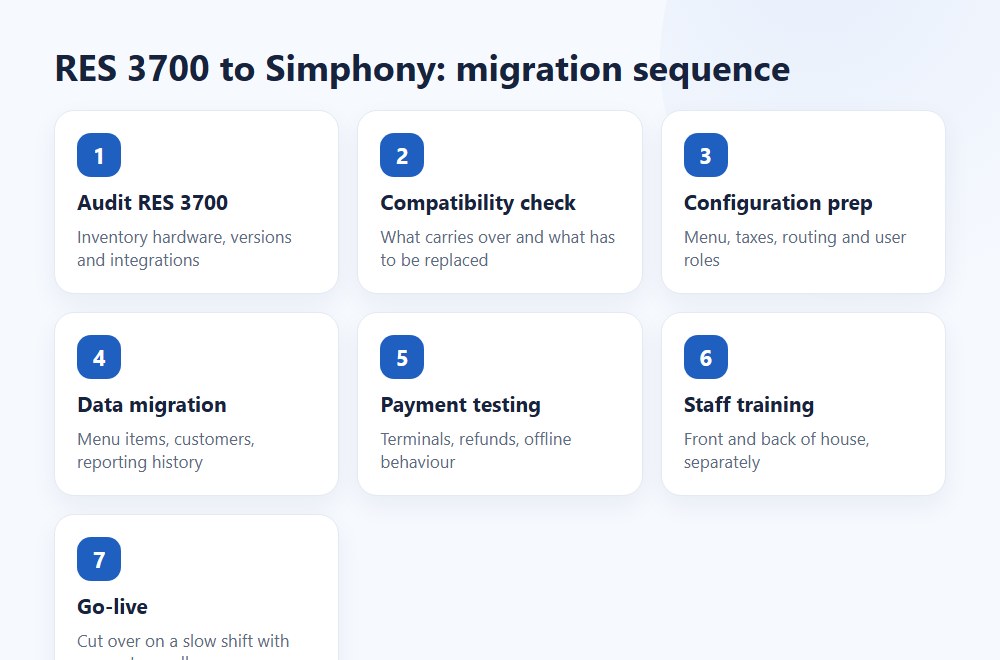
The entire process typically takes 4–8 weeks depending on complexity. A rough project timeline looks like this: weeks 1–2 for infrastructure audit and readiness assessment; weeks 2–4 for hardware procurement, network preparation, and environment setup; weeks 3–5 for configuration rebuild and data mapping; weeks 4–6 for integration testing and payment certification; week 7 for staff training; week 8 for go-live and hypercare. Complex multi-site rollouts or environments with heavy custom integrations should plan for 3–6 months.
Configuration and menu data migration
Menu and configuration migration is a structured rebuild plus controlled transfer — not a magical clone. Oracle materials support Simphony import/export and configuration handling, but the official sources do not confirm a complete automated menu item database migration or EMC configuration transfer guide from RES 3700 into Simphony.
That means operators should expect field review, object mapping, cleanup, and validation. Revenue centers, tender types, and tax codes must be remapped manually due to structural differences between the two systems. A menu that “works fine” in 3700 can still be messy when mapped into a new structure — old naming habits, duplicate tenders, legacy tax logic, and revenue-center exceptions all surface during this phase.
Source basis: Oracle’s RES 3700 documentation library, Simphony manager/configuration guidance, and service change materials.
Payment and integration model changes
Payment changes are often the most sensitive part of the project. Older MICROS environments may rely on OPI (Oracle Payment Interface), while Simphony’s newer model introduces SPI (Simphony Payment Interface).
The technical difference is not cosmetic. OPI is an external application and database layer for payment service provider communication — each POS client addresses OPI during a payment transaction. SPI is a resilient, more embedded variant that operates as part of the Simphony client application itself, formatting messages for the PSP and handling responses directly. The explicit design goal of SPI is to avoid passing PCI-scoped data through the transaction system and network.
This is why OPI to SPI payment migration should be treated as a workstream, not a checkbox. It also raises a practical question many operators care about: Can you keep your current payment processor? Simphony supports multiple payment gateways through SPI, so you are not automatically forced into Oracle Payment Cloud. However, your specific processor, pin-pads, and EMV certification will need to be validated against Simphony’s compatibility list before go-live. If you have a favorable rate with your current acquirer, confirm compatibility early — before you budget.
For the broader integration picture: PMS posting, loyalty, stored value, KDS, online ordering, and delivery connectors all need validation. The highest-risk categories are PMS, loyalty/stored value, and KDS. For hotel environments, see our dedicated guide on Opera PMS integration.
Operational impact on teams and training
Staff retraining is inevitable, but the duration depends more on site complexity and role design than any universal average. Oracle provides official training materials, but does not publish a standard retraining duration for the RES 3700 → Simphony transition.
In practice: frontline cashiers adapt quickly, typically in 2–4 hours of hands-on time for core workflows. Managers are where the real risk lives — exception handling, overrides, reporting, permissions, and payment exception workflows can catch supervisors off guard if they are left out of the preparation phase. Plan for role-specific training sessions completed before go-live, not during service. A phased train-the-trainer approach, starting 10–14 days before launch, gives teams time to internalize the new workflows.
How to plan the upgrade with minimal downtime
A safe upgrade is possible, but it requires audit discipline, a controlled cutover window, and a rollback-ready plan. The goal is not “zero drama.” The goal is predictable risk.
The strongest planning patterns point to a low-traffic cutover window, a 48–72 hour change freeze, rehearsal, manual fallback readiness, and a rollback runbook. These practices align with AWS Prescriptive Guidance and Microsoft Dynamics 365 cutover guidance — both emphasize defined checkpoints, data handling procedures, and explicit decision authority for the fix-forward vs. rollback call.
“Do not approve the project off a product demo. Approve it off an inventory, a dependency map, and a tested cutover plan.” — Max Artemenko, POS Systems Expert
Pre-migration audit checklist
Before you upgrade res 3700 to simphony, audit the current stack in writing. Not from memory.
- RES version and patch level
- Enterprise Management version alignment (major version must match: EM 5.7 requires RES 5.7)
- Windows OS compatibility against Oracle matrices (Server 2016 max confirmed; Windows 11/Server 2022 not supported)
- Workstation compatibility and peripheral inventory (WS4, WS5, WS5A carry documented memory and OS constraints)
- Payment flow and processor dependencies — confirm OPI/SPI path and acquirer compatibility
- PMS, KDS, loyalty, online ordering, reporting, and export integrations
- Backup status of system database (Oracle requires backup before any patching)
- Network topology and internet reliability (minimum Cat 6 cabling recommended for Simphony Cloud)
- Revenue centers, tenders, tax logic, menu exceptions — all require remapping
- Reporting and historical-data retention needs (individual transaction history typically does not import directly)
Oracle’s RES 3700 compatibility and patch docs support several of these checks directly. See Oracle support and compatibility, Oracle system requirements, and Oracle RES 3700 Patch for 5-7.
Cutover strategy and rollback readiness
Cutover should be planned as a business event, not just a technical task. Timing, role ownership, communications, test criteria, and rollback checkpoints all need to be explicit.
The most reliable pattern:
- Freeze nonessential changes 48–72 hours before cutover.
- Take final backups and confirm data sync boundaries.
- Run final UAT on payments, printing, and core service flows.
- Launch in a low-traffic window (late night or between service periods).
- Keep manual fallback for payments and order flow ready.
- Define who can call rollback — and make sure that person is present.
- Maintain hypercare coverage after go-live for at least 24–72 hours.
AWS prescriptive guidance is especially clear that rollback needs defined checkpoints, data handling procedures, and a single decision authority. Microsoft Dynamics 365 guidance emphasizes governance, timing, and roles. Both apply here.
In one restaurant rollout, the team had a solid launch plan and a weak rollback plan. Payment terminal certification stalled during final testing. Because the fallback path had been documented, the site delayed production cutover by one service period instead of forcing the issue live. Frustrating, yes. Expensive disaster, no.
Project timeline reference
RES 3700 to Simphony Migration: Typical Project Timeline
Phase Typical timing Key deliverable
Infrastructure audit Weeks 1–2 Signed-off inventory document
Hardware procurement + network prep Weeks 2–4 Equipment on-site, network validated
Configuration rebuild and data mapping Weeks 3–5 Menu, tenders, tax, revenue centers in Simphony
Integration testing Weeks 4–6 PMS, payments, KDS, delivery confirmed
Staff training Week 7 Role-based sessions completed pre-go-live
Go-live + hypercare Week 8 Cutover executed in low-traffic window
Complex environments (heavy custom integrations, 10+ locations, hotel PMS) should add 4–8 weeks to this baseline.
Cost of migrating: Simphony vs RES 3700 total cost of ownership
The cost comparison should be built as TCO, not sticker price. The micros 3700 vs simphony cost question should be evaluated across licenses, infrastructure, support, implementation, integration work, training, and downtime risk.
Orientation on real numbers: While Oracle does not publish official public pricing, industry experience shows RES 3700 hardware replacement (CapEx) typically runs $13,000–$38,000 per site — broken down as roughly $3,000–$8,000 for server hardware, $2,000–$5,000 per register for terminals and displays, $5,000–$15,000 for software licenses, and $3,000–$10,000 for installation and configuration. Simphony shifts to an OpEx model averaging $500–$1,500 per location monthly. These are industry estimates based on typical operator experiences, not Oracle list prices — your actual quote will vary.
TCO Comparison: RES 3700 Keep-and-Maintain vs Simphony Migration
Cost category RES 3700 keep-and-maintain Simphony migration / run-state
Application licensing / entitlements Legacy ownership/support structure Cloud service / subscription ($500–$1,500/mo per location, est.)
Server and storage Local server and related upkeep ($3,000–$8,000 per site, est.) Reduced local server dependency
OS / DB / security software Ongoing maintenance burden Different burden shifted to service model
IT administration Local patching, support, troubleshooting More centralized cloud administration
Implementation / configuration Lower immediate change if staying put Project cost for migration and setup
Integration remediation Legacy connector maintenance Validation, reconfiguration, possible redevelopment
Training Lower short-term change Retraining during migration
Downtime risk Higher aging-platform risk over time Project cutover risk, then different steady-state profile
Over five years, a single location running RES 3700 might cost $25,000–$50,000 total in hardware, maintenance, and support. Simphony might cost $30,000–$90,000 depending on features and scale — but Simphony includes updates, security patches, and support. The real TCO advantage for Simphony appears when you scale: adding a second location to RES 3700 duplicates your infrastructure costs; adding a second location to Simphony adds a monthly subscription. That is the difference between linear cost growth and marginal cost growth.
Oracle sources support the cloud-service licensing posture for Simphony and the legacy installed-product posture for RES-linked environments. See Oracle Simphony licensing documentation.
The hidden cost of staying on RES 3700
The hidden cost is not only support fees. It is time, fragility, and the cost of failure during service.
Analytical materials from Squirrel Systems, Verifone, and CSL Group all point in the same direction: outdated POS environments create losses through maintenance load, hardware crashes, connectivity failures, and revenue-at-risk during downtime. These are directional, not site-specific — but the pattern is consistent.
The secondary market for decommissioned MICROS parts is not inexhaustible. What is a simple power supply repair today may become a two-week search next year. Oracle ended manufacturing and active support for legacy MICROS hardware some time ago. As decommissioned systems are absorbed into the secondary market, the pool of available genuine replacement components shrinks. For some component types, availability has already become constrained. The right approach is to ask your support partner now whether the parts you are likely to need in year three or five will actually be available. Do not assume that what is repairable today will remain so indefinitely.
From operations, the common hidden costs are: buying time with used or aging hardware, preserving outdated Windows/server baselines, support time spent on one-off issues, payment certification friction, and service disruption when something breaks at the wrong hour.
For more on hardware lifecycle decisions, see our guide on replacing and upgrading MICROS 3700 hardware.
Where Simphony changes the cost model
Simphony changes the cost model by shifting part of the spend from owned local infrastructure toward a cloud service — the classic CapEx to OpEx move. The benefit is not that cloud is always cheaper. The benefit is that cost becomes easier to standardize across locations, and local infrastructure burden usually shrinks.
For single independent sites, this may or may not produce immediate savings. For growing groups, predictability often matters as much as raw price. When you add your second location to Simphony, you add a subscription line item. When you add your second location to RES 3700, you add a server, a license, an installation project, and a new support obligation. That math compounds fast.
Integration and compatibility review before go-live
A migration should not go live until critical integrations, workstations, payments, and OS assumptions are tested in the target state. Most failed launches are not caused by the POS core. They are caused by the dependencies around it.
Third-party integrations that need validation
Validate every third-party path that touches service flow, money flow, or guest records.
Priority classes:
- PMS and room-charge interfaces — consider Opera PMS integration testing early
- Loyalty and stored value
- KDS
- Online ordering and kiosk flows
- Reporting exports
- Delivery aggregators (DoorDash, Uber Eats) — these connect through Simphony’s open API ecosystem and typically require configuration rather than a full rewrite, but must be validated per your current connector setup
- Accounting and ERP handoffs (Xero, QuickBooks)
PMS, loyalty/stored value, and KDS are the highest-risk categories. Do not assume delivery integrations need a full API rewrite — inspect the current connector model first, then scope accordingly.
Payment, workstation, and OS testing priorities
Minimum UAT priorities before go-live: logins and permissions, open check/modify/send/void/close, split checks and multiple tenders, tips and settlements, printer routing, peripheral behavior, offline/error handling, PMS posting if applicable, and end-of-day reporting.
For Windows OS compatibility, confirm every workstation and server dependency against documented support lists. For workstation compatibility, verify not only whether the terminal powers on, but whether it has the memory, peripherals, drivers, and supported path for the target deployment. WS5A with ~30MB integrator RAM cannot run CAPS or KDS Controller — that is a hardware gate, not a configuration issue.
If a payment device works in a lab and fails in live routing, none of the menu cleanup will save the launch. Test payments last and test them thoroughly.
Simphony Cloud vs RES 3700 for multi-location restaurant operations
For multi-location operators, Simphony usually has the stronger long-term operating model. The reason is centralized management, remote administration, and standardization across sites.
Oracle’s current materials support this directly. Simphony Cloud is positioned as a centrally managed environment, and EMC serves as the primary configuration console. Brands like New York Burger and MINA Group cite centralized data and real-time marketing analytics as the primary ROI drivers post-migration.
“Oracle has definitely helped us to streamline our operations. It is simple and fast to use, and utilizing the product helped us become a smarter business.” — Pablo Colmenares, founder, New York Burger
“As operators, we’ve had the opportunity to work with several different POS systems where we weren’t able to be as omnipresent as we’d like to be … The choice was clear to go with Oracle Simphony Cloud because of their reliability, data, and ability to see how the entire operation is doing and how our marketing efforts are working.” — Patric Yumul, president, MINA Group
Centralized management and remote administration
Simphony’s Enterprise Management Console is built for centralized control of enterprise, properties, revenue centers, and configuration objects from any connected administrative environment. EMC can be remotely distributed, installed, and updated through SimphonyApp — when a new version is available, it downloads and applies automatically on login.
That gives multi-site teams practical leverage: one place to govern configuration, centralized menu/pricing/promotions updates pushed to all locations simultaneously, cleaner rollout control across new openings, and less dependence on local site-by-site server care.
Oracle’s case material around Coco Bambu confirms this operational difference. The Brazilian restaurant group migrated from RES 3700 to Simphony in 2023 due to API limitations and scale constraints. After the transition, they gained real-time price exports and menu reconciliation across all sales channels — functionality that RES 3700’s architecture could not deliver natively. Source: Oracle Brasil, Coco Bambu case study, 2024.
When on-premise architecture slows expansion
On-premise architecture slows expansion when every new site inherits a hardware, imaging, support, and local-configuration burden. Cloud does not eliminate rollout work — it cuts down the layers.
Industry deployment timelines confirm this: hardware ordering, on-site installation, and environment preparation can add 2–6 weeks to a single-site launch and 4–12 weeks to a multi-location rollout. A cloud migration with a prepared configuration environment can reduce that to days for each subsequent site. That is the operational value of moving from per-server infrastructure to per-location subscription.
Special case: MICROS 9700 upgrade to Simphony
A micros 9700 upgrade to simphony follows the same broad migration logic as RES 3700, but the scope is often less predictable. That is because 9700 environments are commonly more specialized and can involve more custom data mapping.
Official Oracle end-of-support dates for 9700 are not confirmed in publicly available primary materials. What is clear is that 9700 is a distinct legacy line originally designed for hotel properties, and migration mapping is less fully documented in available official sources.
What is similar to a RES 3700 migration
The similar stages are straightforward: inventory current data and dependencies, convert or remap data into Simphony structures, reconfigure POS objects and integrations, test payments and workflows, train the team, cut over with rollback readiness.
Both platforms share four common migration stages: data inventory and preparation; database conversion into Simphony (which performs the initial database conversion and encrypts sensitive data); reconfiguration of POS objects and external integrations (including TLS v1.2 compliance for both RES 3700 5.0+ and 9700 v4.0+); and post-migration cleanup — including secure erasure of legacy database files.
What usually differs in scope and data mapping
9700 scope often differs because the underlying data structures and hotel-property use cases can be more complex. The 9700 uses a relational database schema with tighter dependencies between configuration objects and table structures, which means remapping is more manual and less standardized than a typical RES 3700 project.
RES 3700, by contrast, uses documented exchange formats including ODBC, ASCII flat file, and POSWebService for sales/revenue data — formal channels that reduce the volume of hand-crafted data mapping. That structural difference means 9700 projects typically require earlier discovery, more custom validation, and longer testing phases. If you are on 9700, budget for that extra scope from day one.
Questions to answer before you commit to the upgrade
Before committing, answer five things clearly: support reality, compatibility reality, payment readiness, integration readiness, and business timing. If one of those is fuzzy, the budget number is probably fuzzy too.
Important: The migration decision should account for your current RES version, Oracle support status, Windows OS compatibility, payment interface dependencies, and critical integrations. A go/no-go based on a product demo alone is how projects go sideways. Validate each of these areas in writing before approving scope or timeline.
“Do not approve the project off a product demo. Approve it off an inventory, a dependency map, and a tested cutover plan.” — Max Artemenko, POS Systems Expert
Can your current environment safely stay on RES 3700?
It can, but only if the environment still sits inside a manageable risk envelope. That means: your version is understood, your Windows and workstation stack are supportable, your payment interfaces are stable, your hardware path is sustainable (including secondary market parts availability), and the business is not blocked by the platform.
Use a simple business-risk frame: look at both likelihood and impact. A minor compatibility issue with low service impact is one thing. A payment, security, or infrastructure issue during peak service is another. NIST SP 800-30 Rev.1 formalizes this as a three-step process: prepare, conduct, communicate results — with risk level determined as a combination of likelihood and impact. Apply the same logic to your legacy POS decision.
Are your integrations, payments, and staff ready for change?
If integrations are undocumented, payment certification is unresolved, or managers have not been trained, you are not ready. The migration may still be the right move. The timeline is wrong.
Use this readiness filter:
- Are all critical integrations listed and owned?
- Has the OPI/SPI payment path been reviewed with your acquirer?
- Are old workstations and peripherals validated against Simphony compatibility?
- Do managers know exception flows, not just cashiers?
- Is rollback authority assigned?
That is the difference between a migration project and a stressful surprise.
Can I migrate in December during the holiday rush?
FAQ
FAQ about MICROS RES 3700 to Simphony migration
Is Simphony the right move if RES 3700 still works today?
Often yes, but not automatically. A working legacy POS can still be the wrong strategic platform. If RES 3700 is stable, fully documented, on supported infrastructure, and not limiting payments, integrations, or expansion, there may be a case to extend its life short term. Oracle’s support framework allows that discussion because Sustaining Support is not the same as immediate shutdown. Source: Oracle Lifetime Support Policy. But if the system “works” only because everyone is avoiding changes, nursing old hardware, and hoping the next OS or payment issue waits until after the weekend — then the system is already costing more than it looks. That is not stability. That is deferred risk.
Can I keep my current payment processor after migrating to Simphony?
This is one of the most important questions for operators with favorable processing rates. Simphony uses the SPI (Simphony Payment Interface) model, which supports multiple payment service providers — you are not automatically locked into Oracle Payment Cloud. However, your specific processor, pin-pads, and EMV certification need to be validated against Simphony’s compatibility list before committing to a migration timeline. Check this with your acquirer and your implementation partner early in the process, not at go-live.
Will my existing receipt printers and peripherals work with Simphony?
Some will carry forward; others will not. Peripherals that support ESC/POS, OPOS/JavaPOS, or Ethernet-based print routing generally have a viable path. Serial-only devices may require a serial-to-Ethernet converter or a certified print server. Legacy workstations (WS4, WS5, WS5A) have specific documented constraints — WS5A in particular cannot run CAPS or KDS Controller due to RAM limits. Run a hardware inventory against Simphony’s compatibility matrix before assuming anything carries forward.
How long does a RES 3700 to Simphony migration take?
For a straightforward single-site operation with clean integrations, 4–8 weeks from audit to go-live is realistic. Multi-site rollouts or environments with complex PMS, loyalty, or custom integrations should plan for 3–6 months. The longest phases are typically configuration rebuild, integration testing, and payment certification — not the go-live cutover itself.
Can I migrate in December during the holiday rush?
The short answer is: avoid it if at all possible. A controlled low-traffic window is one of the most important factors in a successful cutover. Holiday season is the opposite of that. If your timeline is being pushed by a business driver, prioritize having a fully tested rollback plan and manual payment fallback ready. But if you have flexibility, schedule your cutover for a low-volume period — a Tuesday night in January is better than any Saturday in December.